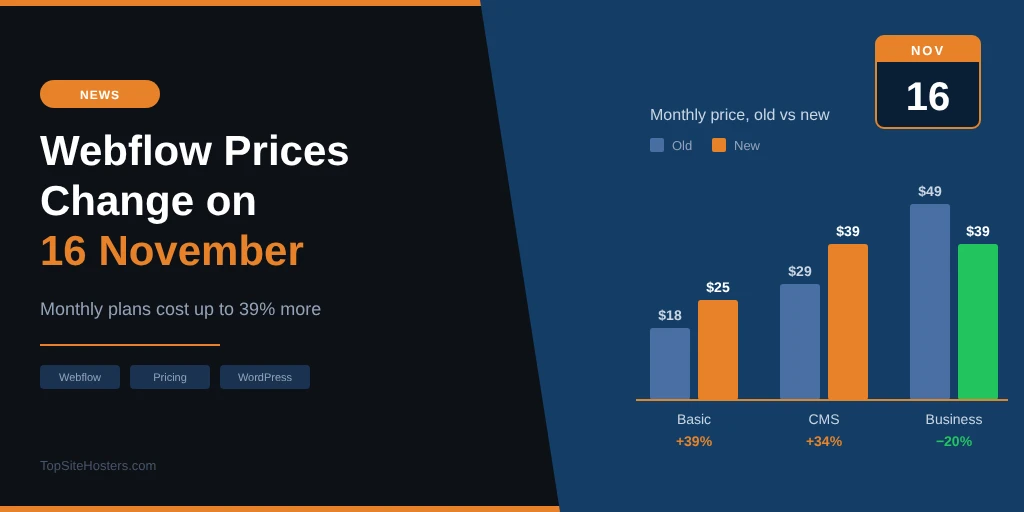
If your Webflow site is on monthly billing, your next renewal could cost you 39% more. If that site sits in a Freelancer or Agency Workspace, the new prices reach you on 16 November, and you only have a few days left to keep the old rate for another year.
- What Changes on 16 November
- Old vs New Webflow Prices
- What You Get on Each Plan Now
- Who Pays More and Who Pays Less
- How to Keep Your Current Price for Another Year
- Monthly Billing Now Costs a Lot More
- What Is Webflow?
- Is Webflow Still Worth It Compared With WordPress?
- Frequently Asked Questions
- What to Do Now
Webflow announced the change in May. Most existing sites started moving to the new prices from 29 June, but client sites run by freelancers and agencies, plus anyone still on legacy pricing, were given extra time. That time is nearly up. Below you’ll find what changes, who ends up paying more, how to delay the increase, and how the new prices stack up against running the same site on WordPress.
What Changes on 16 November
The 16 November date is the final stage of a rollout that started in spring. Webflow split it into three steps, and which one applies to you depends on how your site is billed and who manages it.
| Date | Who it affects | What happens |
|---|---|---|
| 13 May 2026 | New purchases | New Site plans and the Team plan go live |
| 29 June 2026 | Most existing sites | Move to new pricing at the next renewal or billable change |
| 16 November 2026 | Freelancer and Agency Workspace sites, legacy pricing | Move to new pricing at the next renewal or billable change |
The date isn’t a switch that flips overnight. Your site moves to the new plan at its first renewal or billable change on or after 16 November. Webflow counts upgrading, downgrading, or switching between monthly and yearly billing as a billable change. So a client site on yearly billing that renews next March keeps its current price until March, unless someone changes its plan before then.
The Workspace plans themselves stay the same. Freelancer still costs $16 a month on yearly billing or $24 monthly, and Agency still costs $35 or $42. What changes is the Site plan attached to each client site, which is where most of the money goes for agencies managing dozens of sites.
Old vs New Webflow Prices
The biggest structural change is that the CMS and Business plans no longer exist. Both merge into a single plan called Premium. Basic stays, but at a higher price, and Ecommerce plans are unchanged for now. The table shows each old plan, what it becomes, and how much the price moves.
| Old plan | Becomes | Billed monthly | Billed yearly |
|---|---|---|---|
| Basic | Basic | $18 → $25/mo (+39%) | $14 → $15/mo (+7%) |
| CMS | Premium | $29 → $39/mo (+34%) | $23 → $25/mo (+9%) |
| Business | Premium | $49 → $39/mo (−20%) | $39 → $25/mo (−36%) |
| Ecommerce | Ecommerce | Unchanged | Unchanged |
Webflow’s reasoning, set out in its pricing announcement, is that AI tools make content sites easier to build and grow, so fewer plans with higher limits make more sense than a ladder of CMS tiers. That logic works well if you were on Business. It’s a harder sell if you run a small CMS site on monthly billing and never came close to the old limits.
What You Get on Each Plan Now
The new lineup is shorter, and each paid plan gets more room than before. Basic now allows 300 static pages instead of 150, and Premium raises the CMS ceiling from 2,000 items to 20,000. Here is what each plan includes on the current pricing page.
| Plan | Price (yearly) | Pages | Bandwidth | CMS |
|---|---|---|---|---|
| Starter | Free | 2 | 1 GB | Limited |
| Basic | $15/mo | 300 | 10 GB | No |
| Premium | $25/mo | 300 | 50 GB, up to 2.5 TB with add-ons | 20,000 items, 40 Collections |
| Team | $2,500/mo | As Premium | As Premium | Plus Localize and publishing workflows |
Starter works for testing a design, but with two pages, 50 form submissions and a webflow.io address, it isn’t a plan you can run a business site on. Basic suits a brochure site with no blog. Premium is the plan most real sites will need, because any blog, portfolio or case study section depends on the CMS.
Two smaller changes matter for growing sites. The paid CMS item add-ons are gone, since Premium now includes 20,000 items. Extra bandwidth is sold in steps instead, starting at $20 a month for another 50 GB on yearly billing ($30 on monthly). The Team plan sits at the other end of the scale: an annual contract for larger organisations that need ten seats and governance tools but don’t want a full Enterprise deal.
Who Pays More and Who Pays Less
The same change can mean a price rise for one site and a discount for the next. It comes down to which plan you were on, how you pay, and how much traffic the site serves.
Small sites on monthly billing lose the most. Basic goes from $18 to $25 a month and CMS from $29 to $39. A single CMS site now costs $468 a year instead of $348. For an agency billing ten client CMS sites monthly, that’s an extra $1,200 a year with no change in what the sites can do day to day.
Former Business sites with modest traffic come out ahead. Premium costs less than Business did and doubles the CMS item limit. The catch is bandwidth, which drops from 100 GB to 50 GB. Webflow says sites that used more than 50 GB over the previous two billing months will get bandwidth add-ons, so busy sites lose some or all of the saving. Webflow’s own examples show the range:
| Business site | Old price | New price | Result |
|---|---|---|---|
| 50 GB, monthly billing | $49/mo | $39/mo | Cheaper |
| 150 GB, yearly billing | $59/mo | $65/mo | Dearer |
| 500 GB, yearly billing | $199/mo | $199/mo | Same |
CMS sites on yearly billing see only a small rise. The price goes from $23 to $25 a month, which adds $24 a year, and the CMS item limit grows from 2,000 to 20,000. If your sites already bill yearly, the new pricing makes little difference to what you pay.
How to Keep Your Current Price for Another Year
Webflow left one door open. If you switch a site from monthly to yearly billing before the new pricing applies to it, the site keeps its current plan for one more year. For Freelancer and Agency Workspace sites, that means making the switch before 16 November.
- List every client site and note its plan and billing cycle.
- Flag every site on monthly billing. These are the ones facing the 34% to 39% increase.
- Switch each flagged site to yearly billing in its plan settings before 16 November.
- Leave former Business sites under 50 GB alone if Premium works out cheaper for them.
- Run anything you’re unsure about through the Webflow pricing calculator first.
Switching makes sense even beyond the one year delay. Yearly billing on the old CMS plan works out at $276 a year, compared with $468 on the new Premium monthly price. When that year ends and the site moves to Premium yearly, it only goes up by $2 a month. Avoid upgrading or downgrading a plan in the meantime, because that counts as a billable change and moves the site to new pricing straight away.
Monthly Billing Now Costs a Lot More
The gap between monthly and yearly billing used to be modest. Now it’s wide enough that staying on monthly billing needs a reason, such as a site you expect to close within a few months. Webflow says yearly billing saves up to 40%, and the yearly totals show why.
| Plan | Yearly billing | Monthly billing | Extra per year |
|---|---|---|---|
| Basic | $180 | $300 | $120 |
| Premium | $300 | $468 | $168 |
For freelancers, this changes how client sites should be set up from the start. If you pass hosting costs on to clients monthly, you can still pay Webflow yearly and spread the charge yourself. That keeps $120 to $168 per site per year in your pocket or your client’s.
What Is Webflow?
Webflow is a website builder and hosting platform in one. You design pages visually, much like working in a design tool, and Webflow turns that design into HTML, CSS and JavaScript behind the scenes. Hosting, SSL and a CMS for blog posts and other content come with the paid Site plans, so there’s no separate host to pick and no plugins to keep updated.
That setup is what draws designers, agencies and marketing teams. A marketing team can publish new pages without waiting for a developer, and an agency can hand over a client site that doesn’t need weekly maintenance. The catch is control. You build inside Webflow’s tools and pay Webflow’s prices, which is why a price change here hits harder than a price rise at an ordinary web host, where you could simply move your site.
Is Webflow Still Worth It Compared With WordPress?
Moving from WordPress to Webflow has been a popular choice for agencies and marketing teams over the past year. The price rise doesn’t undo the reasons for that move, but it does change the maths, so the numbers need checking again.
A Premium site on yearly billing costs $300 a year. That covers hosting, a CDN, SSL, backups and the visual editor, with no plugins to update. On WordPress, the same $300 buys you a year of managed WordPress hosting at the premium end of the market. Budget shared hosting costs far less: a typical entry plan renews at around $9 a month, roughly $108 a year. Add a premium theme, a page builder, and a security or backup plugin, and WordPress often ends up between those two numbers.
The bigger difference isn’t price. WordPress lets you move your whole site to another host whenever you want, and hosting prices across the industry keep creeping up as well, so that freedom has real value. Webflow lets you export your site’s code and your CMS content as CSV files, but the CMS, forms and hosting stay behind, so moving away still means a rebuild. When Webflow raises prices, your real choice is to pay or start over. If you’re weighing a move, the guide on whether you should leave WordPress goes deeper into the pros and cons, and the Squarespace pricing breakdown shows how another hosted builder compares.
If you decide WordPress still fits, the host matters more than the platform. A slow or overpriced host is the most common reason people give up on WordPress in the first place. The list of the best web hosting providers is a good place to compare renewal prices before you commit.
Frequently Asked Questions
Is Webflow really free?
Webflow has a free Starter plan, but it’s meant for testing. You get two static pages, 1 GB of bandwidth, 50 form submissions and a webflow.io address. To use your own domain, you need at least the Basic plan at $15 a month on yearly billing.
What is Webflow used for?
Webflow is mostly used for company websites, marketing sites, portfolios and blogs, often built by designers and agencies for their clients. It also offers Ecommerce plans for online shops, although larger stores tend to choose a platform built mainly for selling.
Is Webflow better than WordPress?
It depends on who maintains the site. Webflow suits designers and marketing teams who want visual control without managing updates or plugins. WordPress suits people who want lower costs, a huge plugin library, and the freedom to move hosts. After this price change, WordPress has the edge on cost for small sites.
When does the new Webflow pricing apply to my site?
Most sites moved at their first renewal or billable change after 29 June 2026. Sites in Freelancer or Agency Workspaces, and sites on legacy pricing, move at their first renewal or billable change after 16 November 2026.
What happened to the Webflow CMS and Business plans?
Both were merged into the new Premium plan. Premium costs $25 a month on yearly billing or $39 monthly, with 20,000 CMS items, 40 Collections and 50 GB of bandwidth.
Are Webflow Ecommerce plans changing?
No. Webflow says there are no changes to Ecommerce plans at this time.
Which country owns Webflow?
Webflow is an American company with its headquarters in San Francisco, California.
What to Do Now
How much the change affects you depends on your setup. Use the checklist that fits your situation and act before 16 November if your sites are in a Freelancer or Agency Workspace.
- Site owners on monthly billing: check whether your site has already moved to new pricing. If not, switch to yearly billing before your next renewal.
- Freelancers and agencies: audit every client site this week, switch monthly sites to yearly before 16 November, and update your client pricing for next year.
- Former Business sites: check your bandwidth over the last two months. Under 50 GB, Premium saves you money. Over it, run the numbers in the calculator.
- Anyone thinking of moving from WordPress: compare the full yearly cost at renewal prices, not launch prices, and factor in that leaving Webflow later means a rebuild.
The one year lock on yearly billing is the only breathing room Webflow offers. Use that year to work out what your sites will cost on the new plans, and whether your current platform still justifies the price.