If you got an email from Squarespace this month with a higher renewal figure than you were expecting, you’re not alone. The platform raised subscription prices across its most popular plans in early July 2026, with no public announcement and no press release. Customers found out when the billing update landed in their inboxes.
The Core plan, which is the standard choice for most small businesses and freelancers, is going from $23 to $29 per month on annual billing. That’s a 26% increase. On the Plus plan, the jump is the same percentage. Some users on legacy promotional pricing are seeing effective increases of 50% or more when their renewal hits, because they’re absorbing both this hike and the plan restructuring Squarespace quietly rolled out in 2025.
If you’re trying to figure out what changed, whether it affects you, and what to do about it before your next renewal, here’s the full picture.
What Changed and When
The new pricing took effect on July 6, 2026. For existing subscribers, the increase applies at your next renewal date, not immediately. Monthly subscribers got as little as one billing cycle’s notice. Annual subscribers have until their current term ends.
Here’s the full breakdown for annual billing:
| Plan | Old price (per month) | New price (per month) | Change |
|---|---|---|---|
| Basic | $16 | $19 | +19% |
| Core | $23 | $29 | +26% |
| Plus | $39 | $49 | +26% |
| Advanced | $99 | $99 | No change |
For monthly billing, the Basic and Advanced plans are unchanged. Core goes from $36 to $39 per month (+8%), and Plus rises from $56 to $65 (+16%).
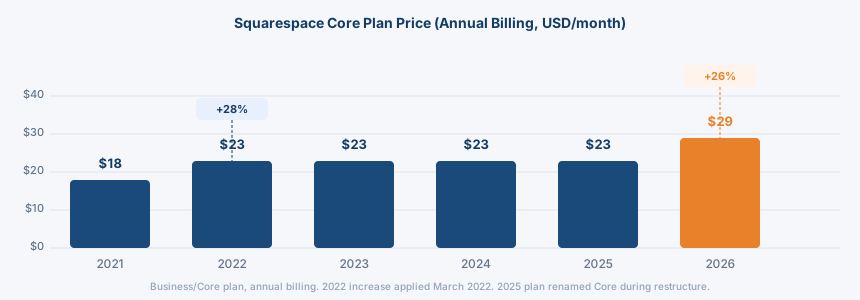
One thing that’s tripping people up: Squarespace restructured its entire plan lineup in 2025, retiring the old Personal, Business, Commerce Basic, and Commerce Advanced tiers in favour of the current four-tier structure. Many users on those legacy plans are hitting their first renewal under the new setup now, in 2026, which means they’re seeing both changes stack on top of each other at once. One Reddit user reported their price had climbed 61% since they first signed up in 2021.
To find your renewal date: log into Squarespace, go to Settings, then Billing, and look for the “Next billing date” field. That’s the date that matters.
Why Squarespace Is Raising Prices
The official line from Squarespace is investment in “Design Intelligence”: Blueprint AI, built-in text generation tools, and a new suite of automated design features. The price increase, the company says, reflects the cost of building those capabilities.
Most users aren’t buying it. The more credible explanation sits in the ownership timeline.
Squarespace went private in October 2024 after being acquired by Permira, a global private equity firm, in a deal that ended at $7.2 billion after shareholders pushed back on an initial offer of $6.9 billion. Private equity acquisitions of established software platforms follow a predictable pattern: lock in the user base, reduce competitive pressure by going private, then expand margins. Price hikes are a straightforward way to do that.
The thing is, this isn’t unique to Squarespace. TSH has written about the same dynamic in web hosting, where renewal prices routinely run two to three times higher than introductory rates. The business model in subscription software is to get you in cheaply, build dependency, then raise the cost once you’ve invested time and content in the platform. Squarespace’s captive user base, particularly photographers and freelancers who’ve spent years building their portfolios there, is exactly the kind of audience this playbook targets.
The AI justification is worth acknowledging honestly: Squarespace is building real features. But for users with static portfolio sites who log in twice a year to update a gallery or post a blog entry, paying more to fund AI tools they didn’t ask for is a hard sell.
How Loud Is the Reaction?
Loud. Squarespace was trending on Threads within days of the billing emails going out, with photographers, filmmakers, and freelancers publicly declaring they were leaving and asking what to switch to. Forum threads on the Squarespace community site are running into dozens of replies, with users who have been on the platform for a decade calling the increase a dealbreaker.
The frustration is amplified by how Squarespace handled the communication. A direct email to customers is not the same as a transparent public announcement. Users who weren’t paying close attention to their inbox found out at renewal time, when the invoice was already due.
Should You Stay or Move?
The honest answer is: it depends on your situation, and the maths is different for everyone.
If you’re on the Basic plan and $3 more per month doesn’t change your calculations, staying is fine. Basic at $19 per month annually is still a reasonable price for what it includes, and moving platforms carries its own costs in time and disruption.
The case for moving gets stronger the further up the plan tiers you are. Core at $29 per month means $348 per year for annual billing. If you’re not actively using the analytics, Google Workspace email integration, or e-commerce tools that justify Core over Basic, you’re overpaying for features that are sitting idle. Before your renewal, it’s worth logging in and honestly assessing which plan features you’re actually using.
The case for moving to something else is strongest for users who want control of their own content long term. Squarespace is a closed platform. Your site lives on their servers, under their terms. If they raise prices again in 12 months, your options are pay or start over. That’s the real cost of platform dependency, and it’s one that self-hosted WordPress solves structurally rather than just temporarily.
Our website builders guide covers how every major platform compares on this if you’re still weighing your options. It breaks down Wix, Squarespace, Shopify, and Webflow side by side, including what each one actually costs over five years and what happens when you want to leave.
If You’re Thinking About WordPress
WordPress itself is free. What you pay for is hosting. A simple portfolio or small business site on a quality shared hosting plan starts well under $10 per month, and often under $5 on introductory pricing.
The trade-off is real and worth naming: WordPress takes more effort to set up and maintain than Squarespace. You handle updates, you choose a theme, and you’re responsible for your own configuration. For someone who wants to build a website once and leave it alone for years, that’s a genuine downside.
That said, the flexibility is hard to match. WordPress powers around 43% of websites on the internet for a reason. You own your content, you can move hosts without rebuilding your site, and the plugin ecosystem covers almost anything you’d ever need.
Providers like Hostinger and IONOS offer managed WordPress plans that handle much of the maintenance side, bringing the experience closer to Squarespace’s simplicity while keeping hosting costs well below what Squarespace now charges at Core and above.
What to Do Before Your Renewal Date
If your renewal is coming up, take 10 minutes to go through this before it hits:
- Find your renewal date. Settings, then Billing in your Squarespace account. Mark it in your calendar.
- Check your plan. Are you on Core or Plus because you need those features, or because it was the default you signed up on?
- Audit your actual usage. If you’re not using e-commerce, advanced analytics, or the Google Workspace email, downgrade to Basic before renewal. That saves $120 per year at current prices.
- If you’re moving, export first. Squarespace provides an XML export tool: find it under Settings in your account dashboard. Download everything before you cancel. Once you cancel, access to your content and domain management becomes complicated.
- Transfer your domain separately. If you registered your domain through Squarespace, initiate a transfer to an independent registrar before cancelling your subscription. Losing the domain is the most disruptive thing that can happen in a platform migration.
Frequently Asked Questions
When does the Squarespace price increase take effect?
The new pricing took effect on July 6, 2026. For existing subscribers, it applies at your next renewal date. Check your billing settings to find out exactly when that is.
Which plans are affected?
The annual Basic, Core, and Plus plans all increased. The Advanced plan is unchanged on both annual and monthly billing. Monthly Core and Plus also increased, while monthly Basic and Advanced stayed the same.
Why did Squarespace raise its prices?
The official reason is investment in AI design tools under the “Design Intelligence” banner. The broader context is that Squarespace was taken private by the private equity firm Permira in October 2024 for $7.2 billion, and price increases are a standard way for businesses under private equity ownership to improve margins after an acquisition.
Is WordPress cheaper than Squarespace?
For most small sites, yes. WordPress is free to use, and shared hosting starts well under what Squarespace now charges at Core level. The difference is that WordPress requires more setup work. If you want a managed experience closer to Squarespace, managed WordPress hosting plans from providers like Hostinger and DreamHost bring the gap down considerably.
How do I export my Squarespace content before cancelling?
Find the export tool under Settings in your account dashboard and download your XML content file. Do this before you cancel, not after. Images need to be downloaded separately from the asset manager. If you have an online store, export your product and customer data from the Commerce panel before leaving.