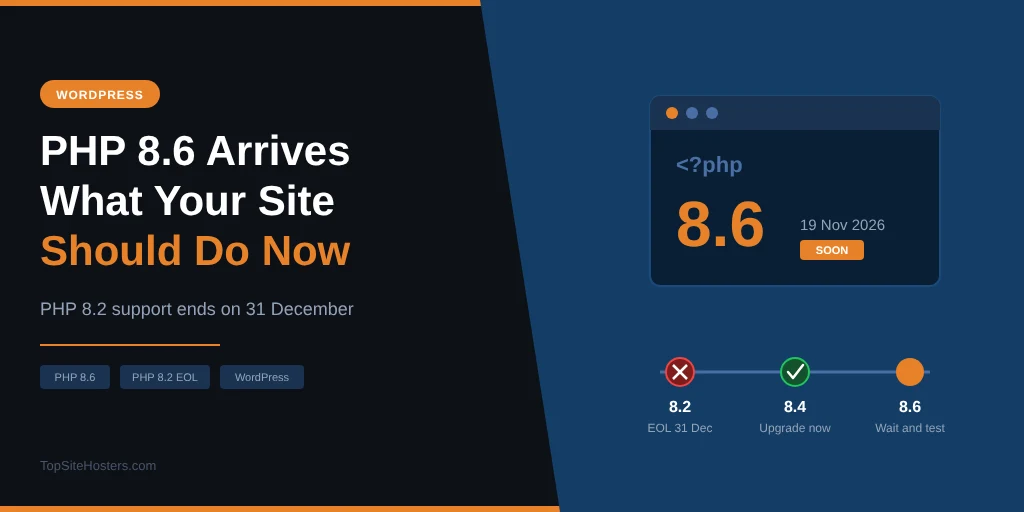
PHP 8.6 arrives on 19 November, and for most WordPress site owners it changes almost nothing on day one. Your site won’t speed up overnight, your plugins won’t suddenly break, and your host won’t switch you over without warning. The release that should get your attention is a different one: PHP 8.2 stops receiving security fixes on 31 December 2026, six weeks from now.
- What PHP 8.6 Changes, in Plain English
- The Changes That Can Affect Your Site
- Is WordPress Ready for PHP 8.6?
- PHP 8.2 Reaches End of Life on 31 December
- Which PHP Version Should Your Site Run Right Now?
- When Will Your Host Offer PHP 8.6?
- How to Upgrade Safely
- Common Questions About PHP 8.6
- What to Do Before the New Year
That matters because a large share of WordPress sites still run PHP 8.2 or older. If yours is one of them, the end of the year is a real deadline, and PHP 8.6 is a good reminder to check where you stand. This guide covers what’s new in 8.6, the few changes that can affect a WordPress site, which version you should run today, and how to upgrade without taking your site offline.
What PHP 8.6 Changes, in Plain English
PHP is the programming language WordPress is written in, and almost every page your visitors load runs through it on your host’s server, unless it’s served from a cache. A new PHP version arrives every November. Each one brings new tools for developers, removes or discourages old ones, and usually makes the language a little faster and safer.
PHP 8.6 is mostly a release for developers. The headline additions include:
- Partial function application: a shorter way to reuse a function with some values already filled in
- clamp(): a built in function that keeps a value between a minimum and a maximum
- A Duration class: a standard way to work with time spans like “90 minutes”
- Readonly defaults: class properties that can’t be changed can now have a default value
- A new polling API: a lower level tool for software that handles many connections at once
None of these change what your visitors see. They’ll matter once plugin and theme developers start using them, which usually takes a year or more, because developers have to keep supporting older PHP versions in the meantime.
The Changes That Can Affect Your Site
Two parts of PHP 8.6 can have a visible effect on a WordPress site, and both depend on the plugins you use rather than on WordPress itself. Most sites will be fine, but it helps to know what to look for if something behaves oddly after an upgrade.
New session defaults
PHP 8.6 changes three default settings for PHP sessions, the system some plugins use to remember a visitor between pages. Strict mode is switched on, session cookies are hidden from JavaScript, and those cookies are no longer sent when another site posts a form back to yours. All three make sites safer against session hijacking and cross site attacks.
WordPress itself doesn’t use PHP sessions for logins, so your dashboard won’t notice. Some plugins do, though, especially older membership, form, booking and payment plugins. If one of them relies on a payment provider posting the visitor back to your site, the new cookie setting can make the plugin lose track of that visitor’s session, which can log them out or empty their basket. Your host may also keep the old values in its own configuration, so whether you see any change depends on how your server is set up.
More deprecation warnings
PHP 8.6 marks a long list of older functions and habits as deprecated. That means they still work, but PHP logs a warning each time they’re used, and they’ll be removed in a later version. Examples include returning a value from a class constructor and using return inside a finally block, along with a list of older functions that have newer replacements.
On a well maintained site, you won’t notice these at all. On a site with older or abandoned plugins, the error log can fill up quickly, and if your site is set to display errors, warnings can appear on the page itself. That’s not a security risk, but it looks broken to visitors and it’s a sign that a plugin needs replacing before the next major PHP version removes those functions for good.
Is WordPress Ready for PHP 8.6?
WordPress core tends to be ready for a new PHP version early. Last year, core developers announced PHP 8.5 support one day after PHP 8.5 came out, and WordPress 6.9 shipped with it two weeks later. For 8.6, they’ve already fixed deprecation notices in core, such as a constructor returning a value in two older files, so a similar timeline is likely.
Your plugins and theme are a different story. WordPress can only guarantee its own code, and most sites run a long list of plugins written by different developers. Popular, actively maintained plugins tend to be ready quickly. Plugins that haven’t been updated in a year or two are the ones that cause trouble, and they’re the main reason to wait before switching to a brand new PHP version.
The WordPress project currently recommends PHP 8.3 as a minimum. That’s a sensible baseline: it’s well tested, supported by almost every plugin, and it receives security fixes until the end of 2027.
PHP 8.2 Reaches End of Life on 31 December
The more urgent date for most site owners is 31 December 2026, when PHP 8.2 receives its last security fix. After that, any new vulnerability found in PHP 8.2 stays unfixed by the PHP project. Your site won’t stop working on 1 January, but it will be running on software that no longer gets patched, and that risk grows every month.
A lot of sites are affected. In September 2026, about a quarter of WordPress sites that report their PHP version were running PHP 8.2, and around 62% were running 8.2 or older. More than a third were already on versions that have reached end of life, including PHP 7.4, which still powered around one in six WordPress sites.
This year has shown why that matters. Several serious PHP vulnerabilities came to light in 2026, including the critical PHP flaws covered earlier this year. The PHP project only releases fixes for supported versions, so sites on end of life versions depend entirely on their host patching PHP itself, which some hosts do and many don’t.
Which PHP Version Should Your Site Run Right Now?
The safest choice today is the newest version that all your plugins support, as long as it still receives security fixes. For most WordPress sites in late 2026, that’s PHP 8.3 or 8.4. This table shows where each version stands, based on the official PHP support schedule:
| Version | Status | Security fixes until | Advice |
|---|---|---|---|
| 7.4, 8.0, 8.1 | End of life | Ended | Upgrade now |
| 8.2 | Security fixes only | 31 Dec 2026 | Upgrade before the end of the year |
| 8.3 | Security fixes only | 31 Dec 2027 | Safe choice, WordPress recommended minimum |
| 8.4 | Active support | 31 Dec 2028 | Best choice for most sites |
| 8.5 | Active support | 31 Dec 2029 | Fine if your plugins support it |
| 8.6 | New | Expected end of 2030 | Wait a few months |
If you’re on 8.2 or older, moving to 8.4 gives you two extra years of security fixes and is well supported by plugins. If you’re already on 8.3 or 8.4, there’s no rush. Moving to PHP 8.6 makes sense once your main plugins confirm support, which for most sites will be some time in 2027.
When Will Your Host Offer PHP 8.6?
Hosts rarely offer a new PHP version on release day, and for a live site that’s no bad thing. They need time to build it, test it with their control panel and caching, and check that common extensions work. The timing usually depends on the type of hosting you have.
- Managed WordPress hosts usually add a new version within days or a few weeks, because they control the whole platform and test only one application
- Shared hosts on cPanel or Plesk typically follow within weeks to a couple of months, once the control panel vendors have released updated packages
- VPS and server customers can usually install it themselves as soon as their operating system’s repositories carry it
Last year’s PHP 8.5 shows the range. Some managed hosts offered it within weeks, while at least one shared host added it in January 2026, about seven weeks after release, with a warning that many applications weren’t ready yet. Hosts don’t normally switch existing sites to a brand new version.
The more useful question for your host is what happens to PHP 8.2 sites in January. Some hosts move customers to a newer version automatically, some keep 8.2 running and patch it themselves, and some simply leave it unpatched. If you’re on managed WordPress hosting, the answer is usually already in your dashboard or emails. On shared hosting, it’s worth asking support directly.
How to Upgrade Safely
Changing your PHP version takes a few clicks, but doing it carelessly is how sites end up with a white screen. Follow these steps in order, and you can switch back within a minute if anything goes wrong.
- Check your current version. In WordPress, go to Tools, Site Health, then the Info tab, and open the Server section.
- Update everything first. Update WordPress, your theme and all plugins. Remove plugins you no longer use.
- Make a fresh backup. Use your host’s backup tool or a backup plugin, and check that the backup finished.
- Test on a staging site if you have one. Switch the staging copy first, then click through your important pages, forms and checkout.
- Switch the live site. Change the PHP version in your hosting control panel.
- Check the site and the error log. Load your main pages, log in, submit a form, and look at the PHP error log for new warnings.
- Switch back if needed. If something breaks, set the previous version again and contact the plugin’s developer.
The guide to securing a WordPress site covers backups and updates in more detail. Where you change the PHP version depends on your host’s control panel.
In cPanel
Look for “MultiPHP Manager” or “Select PHP Version” in the Software section. MultiPHP Manager lets you set the version per domain, while Select PHP Version, found on hosts running CloudLinux, also lets you switch PHP extensions on and off.
In Plesk
Open Websites and Domains, select your domain, and click “PHP” or “PHP Settings”. Choose the version from the dropdown and save. Plesk usually offers both FPM and FastCGI handlers, and FPM is the better choice for WordPress on most servers.
On managed WordPress hosting
Managed hosts use their own dashboards, but the setting is usually under Tools, Settings or Site details, labelled “PHP version” or “PHP engine”. Some hosts also let you test a new version on a staging copy with one click, which is the easiest way to do step four above.
Common Questions About PHP 8.6
When is PHP 8.6 released?
PHP 8.6 is scheduled for general release on 19 November 2026, following several release candidates in September, October and November. Your host will add it to its control panel some time after that, from a few days to a couple of months later.
Is WordPress compatible with PHP 8.6?
WordPress core developers are already fixing the deprecation notices PHP 8.6 introduces, and last year they confirmed PHP 8.5 support the day after its release. Your plugins matter more, so check that your most important ones list PHP 8.6 support before switching.
Should I upgrade to PHP 8.6 straight away?
For a live site, no. Wait a few months until your plugins and WordPress confirm support. If you’re on PHP 8.2 or older, upgrading to 8.3 or 8.4 now is far more important than moving to 8.6 early.
What happens to my site when PHP 8.2 reaches end of life?
Your site keeps working, but PHP 8.2 stops receiving security fixes after 31 December 2026. Any vulnerability found after that date stays open unless your host patches PHP itself, so upgrading before then is the safer option.
How do I check which PHP version my WordPress site uses?
In your WordPress dashboard, go to Tools, Site Health, open the Info tab and expand the Server section. The PHP version is listed there, along with your server’s memory limit and other settings.
What to Do Before the New Year
PHP 8.6 is a good release, but it’s not one you need to rush into. Give it a few months, let your plugins catch up, and upgrade once WordPress confirms full support. The deadline that matters this year is PHP 8.2’s end of life on 31 December. If Site Health shows 8.2 or anything older, make a backup, update your plugins and move to PHP 8.4 before the new year. For most sites it’s a short job, and it buys you two more years of security fixes.