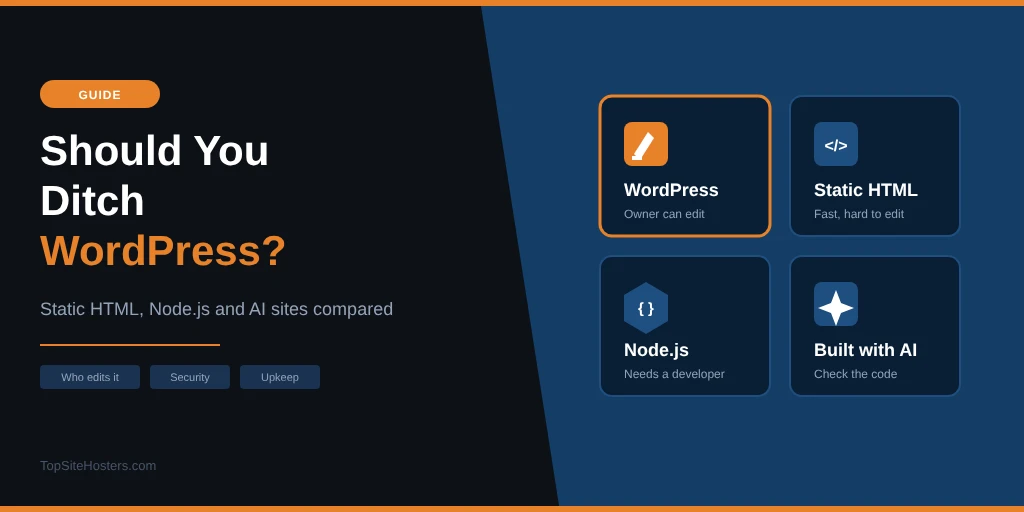
Many businesses are rebuilding their websites right now. Leads are flat, the website gets the blame, and the advice usually points in one of three directions: rebuild it with an AI tool, switch to a static site, or move to Next.js because that’s what developers use.
- Is WordPress Really Dying?
- What People Blame WordPress For
- Static HTML Sites
- Node.js and Next.js Sites
- Sites Built With AI
- WordPress vs Static vs Node.js vs AI: Comparison Table
- How to Decide
- Our View: Mostly Fear, Not Facts
- Before You Rebuild, Find What’s Actually Wrong
- Using AI Without Rebuilding
- Common Questions About Leaving WordPress
- Our Verdict
A lot of this advice comes from LinkedIn, where hardly a day goes by without a post calling WordPress slow, outdated or not secure. Many are written by people who sell AI builds, Next.js development or migration projects, so a business moving off WordPress is a business that might hire them. Their posts rarely mention what a rebuild costs, what happens to your search rankings or who will update the new site once it’s live. Some of their points are fair, but the overall picture they paint is one sided.
A rebuild can feel like progress, but it’s often based on a guess about what’s wrong. You can spend months on a migration, risk your search rankings along the way, and end up with a new design that has the same problems as the old one, because the platform was never what held the site back.
WordPress isn’t always the answer either. Static sites, Node.js frameworks and AI builders each do some things better, and WordPress has weak points of its own. This guide compares all four, using current figures and real security incidents, so you can choose based on how your site is actually run.
Is WordPress Really Dying?
The figures show a clear decline. According to W3Techs, WordPress ran 39.5% of all websites on 29 October 2026, down from around 42.6% earlier in the year. Among sites that use a known content management system, its share was 58.3%.
WordPress is losing ground, and the drop has been faster in 2026 than in previous years. It still runs far more websites than any other platform. Its nearest rivals among content management systems, Shopify and Wix, each hold a share in single figures.
Asking whether WordPress is dead doesn’t help you much. What matters is whether it suits your site, and whether the problems you’re seeing are really caused by WordPress or by something around it.
What People Blame WordPress For
The usual complaints about WordPress are slow pages, security scares, a clunky editor and a site that doesn’t bring in enquiries. Each of these is a real problem that many site owners run into. In most cases, though, the cause lies in the hosting, the plugins or the way the site was built, and those things would follow you to a new platform.
Slow pages
A slow WordPress site usually comes down to cheap hosting, no caching, too many plugins or a heavy page builder. The server’s first response, measured as TTFB, depends mostly on your hosting. A static site on the same slow server would load faster, but the same WordPress site on a better plan with proper caching would also close most of the gap.
Security problems
WordPress does have a security problem, and most of it sits in plugins. Patchstack recorded 11,334 new WordPress vulnerabilities in 2025, 42% more than in 2024. Of those, 91% were in plugins and 9% in themes, while WordPress core accounted for just 6. For 46% of the flaws, the developer had no fix ready when the details were made public.
2026 has been a harder year for core itself. The WP2Shell flaws in July let attackers run code on a default install and were added to CISA’s list of exploited vulnerabilities, and several more core fixes followed in August and September. WordPress installs security releases for core automatically by default, so most sites were patched within days. Plugins are a different story, as an abandoned plugin may never get a fix at all. Our guide to securing a WordPress site covers the steps that make the biggest difference.
It feels clunky
A site with 30 plugins and a theme bought in 2019 will feel slow and awkward to edit. That’s the result of years of adding features, and WordPress doesn’t force it on you. A modern block theme and a short plugin list fix most of it, at a fraction of the cost of a rebuild.
Leads are flat
This complaint triggers more rebuilds than any other, and the platform is rarely the cause. Fewer enquiries usually come from broken tracking, a confusing contact form, slow pages on mobile or an offer that doesn’t convince. Move the same weak points to a new platform and you’ll get the same results.
Static HTML Sites
A static site is a set of ready made HTML files. There’s no database and no code running when someone visits, so the server simply sends the finished page. Static sites can be written by hand or built with a static site generator such as Hugo, Eleventy or Astro, which turns templates and text files into HTML.
Where static sites win
For the right kind of site, static is better than WordPress. Pages load fast, hosting is cheap or even free, and with no database or login page there’s very little for an attacker to break. Maintenance is close to zero, since there are no plugins or core updates to install. A portfolio, a landing page or a small business site that changes twice a year is a good fit.
The catch: who updates it?
Static sites run into trouble when the owner wants to change something. Most people won’t edit HTML files, write in Markdown or push changes to a Git repository. Every new photo, price or opening time then goes through a developer, and a change that should take two minutes turns into an email, a wait and an invoice.
You can add a headless CMS to give the owner an editor. That brings back a login and often a monthly fee, and many headless editors are less complete than the one in WordPress. Some also keep your content in their own system, which makes it harder to move away later.
Coding agents are starting to change this. A developer can now ask an AI tool to turn a Word document into a new page in seconds. That helps anyone comfortable with code, but it doesn’t yet help a shop owner who wants to change a price on a Saturday morning.
A static site is a strong choice when the content rarely changes or a developer looks after it anyway. It’s a weak choice when the owner needs to update the site every week without help.
Node.js and Next.js Sites
Next.js is a framework built on React that runs on Node.js, and it powers a large share of modern web apps. Developers like it because it’s fast, flexible and comfortable to work with, and it handles both the pages visitors see and the code that runs on the server. For an online tool, a dashboard or a site with user accounts, that flexibility is a real advantage over WordPress.
The security record
Moving to Node.js doesn’t remove security work, but it moves the risk somewhere else. A typical Next.js project relies on hundreds of npm packages written by other people, plus the framework and Node.js itself. These four incidents from the past two years show what that can mean:
| Incident | When | What happened |
|---|---|---|
| Next.js middleware bypass (CVE-2025-29927) | March 2025 | A single request header let attackers skip the checks in Next.js middleware, which many sites use for logins. Version 11 never received a fix |
| React2Shell (CVE-2025-55182) | December 2025 | Rated 10 out of 10. Attackers could run code on servers using React Server Components, including Next.js apps. Exploited within hours and added to CISA’s list of exploited vulnerabilities. Censys counted about 2.15 million instances that might be affected |
| ChainDrop npm worm | August 2026 | More than 1,300 npm package versions, with around 2 billion downloads a month between them, were infected with malware that stole passwords and access keys, then spread to other packages |
| Node.js security releases | 21 October 2026 | Ten vulnerabilities in Node.js itself, four rated high, across all supported versions (22, 24 and 26). The most serious, CVE-2026-111497, could let malformed compressed data lead to remote code execution. Two others let attackers get past TLS certificate checks |
Attacks like ChainDrop are known as supply chain attacks, because they target the code your site is built from rather than the site itself. WordPress has had them too, through hijacked plugins. The difference lies in who can respond. A WordPress site owner can update a plugin from the dashboard, while checking a Node.js project’s dependencies and rebuilding it needs a developer.
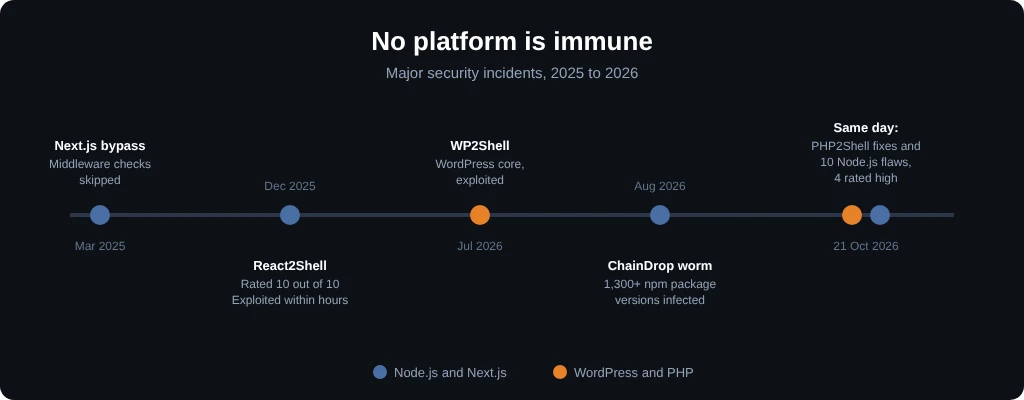
The runtime underneath needs patching too, whichever platform you choose. The Node.js security releases on 21 October 2026 came out on the same day as the fixes for PHP2Shell, a critical set of PHP flaws that put WordPress sites at risk. On shared or managed hosting, your host patches PHP for you, and most did so within a day or two. If you run a Node.js site on your own VPS, updating Node.js is your job.
The maintenance problem
Node.js sites also ask more of your hosting. Many shared hosting plans can’t run them at all, or only with limits, so you usually need a VPS you manage yourself or a platform built for Node.js. Those platforms are easy to start with, but costs can climb as traffic grows. Framework versions also change quickly, and a site left untouched for two years can take days of work to bring up to date.
Node.js is the right choice for web apps and for businesses with developers on hand. For a marketing site that a small team needs to keep running, it usually adds cost and complexity without much benefit.
Sites Built With AI
AI builders such as Lovable, Bolt and v0 can produce a polished website or app from a short description in a minute or two. They’re useful for testing an idea, showing a client a first draft or building a simple internal tool. The problems start when that first draft goes live as a business website without anyone reviewing it.
The security problem
Apps built with AI and launched without a code review have a poor security record so far. A 2026 study, by researchers including authors from Microsoft and the National University of Singapore, audited 200 live apps built with Claude Code or Lovable. The results were clear:
- 91% of the apps had at least one vulnerability
- 66% of the flaws found were rated critical or high
- Broken access control, where users can see or change data that isn’t theirs, was the most common problem
- In about a fifth of the test runs where a known flaw came back, the AI recognised the risk and still shipped the insecure code
The platforms themselves can add risk. In 2026, a flaw in Lovable let anyone with a free account open other users’ projects, including source code and database credentials. It stayed open for 48 days after it was first reported and affected thousands of projects.
Sites the owner can’t update
Most AI builders produce a React app or plain HTML with no editor behind it. The site looks finished, but the owner can’t change a phone number without going back to the AI tool or finding a developer. Sites like this look good on launch day, then sit unchanged because the people who own them can’t update them.
AI builders work well for prototypes and quick tests. As a business website, a site built this way needs a developer to review the code and a plan for how it will be updated before it goes live.
WordPress vs Static vs Node.js vs AI: Comparison Table
The table below sums up how the four options compare on the points that matter most for a business website: who can edit it, how fast and secure it is, who looks after it and what hosting it needs. No option wins every row, which is why the right choice depends on how your site is run.
| WordPress | Static HTML | Node.js / Next.js | Built with AI | |
|---|---|---|---|---|
| Owner can edit it | Yes, built in editor | No, unless you add a CMS | No, unless you add a CMS | Rarely |
| Speed | Good with decent hosting and caching | Very fast | Fast | Varies |
| Main security risk | Plugins and themes | Very low | npm packages and framework flaws | Unchecked code |
| Who maintains it | Owner or host, from the dashboard | Developer, but rarely needed | Developer, regularly | Developer, if anyone |
| Hosting needed | Any PHP hosting | Any hosting, often free | VPS or a Node.js platform | Depends on the tool |
| Best for | Sites the owner updates often | Sites that rarely change | Web apps and developer teams | Prototypes and tests |
How to Decide
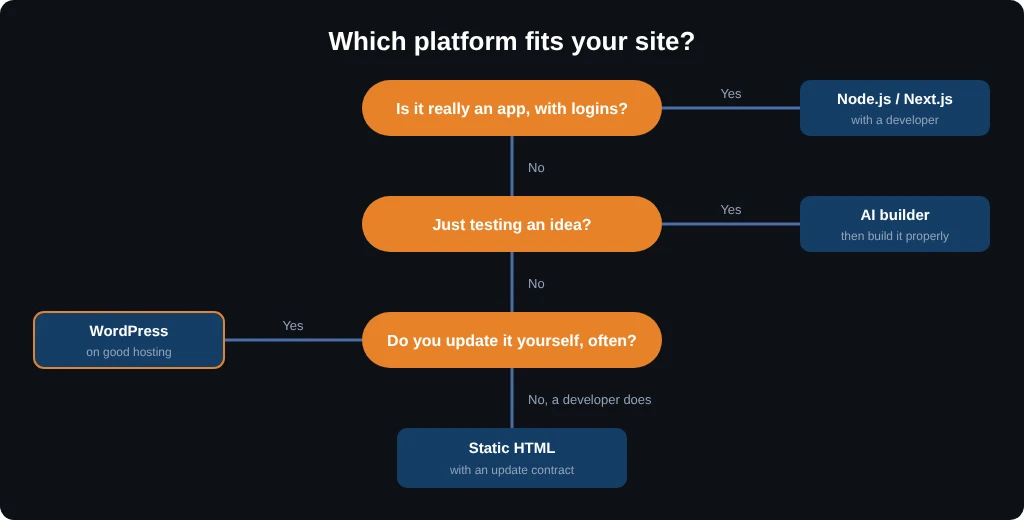
The platform that’s getting the most attention this year isn’t necessarily the one that fits your business. A better starting point is how your site is run day to day. These three questions narrow the choice quickly:
- Who updates the site? If you or your team make changes without a developer, you need a proper editor, which usually means WordPress or another CMS
- How often does it change? Weekly news, prices or products call for a CMS, while a site that changes a few times a year can be static
- Who keeps it secure? If nobody will check dependencies and apply updates, pick the option whose risks you can manage yourself
Put together, the answers usually point one way. If you update the site often without a developer, WordPress remains the practical choice. If a developer makes a few changes a year, a static site will be faster and cheaper to run. If the site is really an app, with logins and user data, a framework like Next.js makes sense, as long as a developer looks after it. If you only want to test an idea, an AI builder is a quick way to start, followed by a proper build if the idea works.
Our View: Mostly Fear, Not Facts
Much of the “leave WordPress” talk is fear mongering. WordPress has real problems, and this guide doesn’t hide them, but they’re rarely the reason a business website struggles. Swapping platforms because of a scary LinkedIn post replaces a set of known problems with unknown ones, and the people pushing the switch are often the ones who’ll be paid to do it.
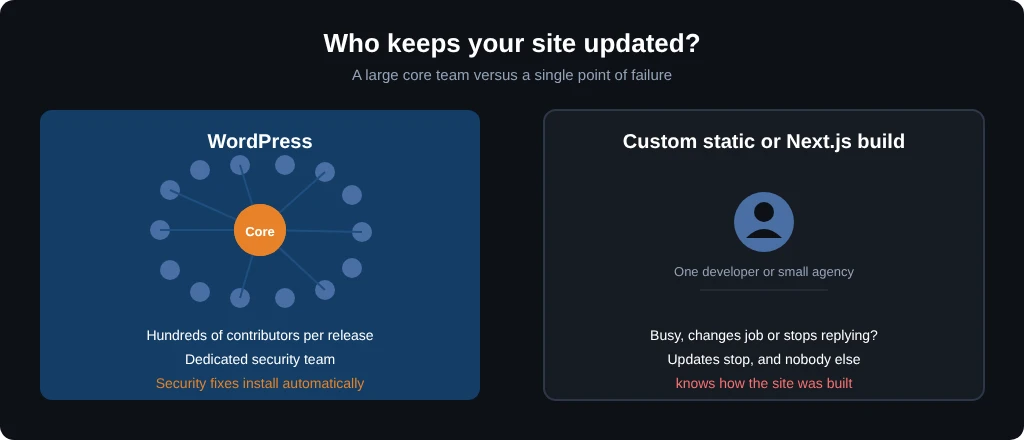
There’s also a question of who keeps your site going. WordPress core is maintained by hundreds of contributors, with regular releases and a dedicated security team, and fixes reach most sites automatically. A custom static site or Next.js build often depends on a single developer or a small agency. If that person gets busy, changes jobs or stops replying, your site stops getting updates, and nobody else knows how it was put together. For most businesses, that’s a bigger risk than anything in the WordPress codebase.
If you do choose a static or custom build, get a written contract that covers updates, security fixes and content changes, with clear prices and response times. Make sure you own the code and the hosting account, and that the project is documented well enough for another developer to take over. Without those, a cheap rebuild can become very expensive the first time something breaks.
Before You Rebuild, Find What’s Actually Wrong
A rebuild can be the right call, but it shouldn’t be the first step. Replacing a platform costs time and money, and it won’t help if the real problem is somewhere else. Work through these checks first, as each one can be done in an afternoon:
- Test your speed. Check TTFB and Core Web Vitals on mobile. A high TTFB points to your hosting rather than WordPress
- Audit your plugins. Remove anything you don’t use, and replace plugins that haven’t been updated in a year
- Check your hosting plan. A cheap shared plan with no caching will slow down any CMS, and better hosting fixes more slow WordPress sites than a rebuild does
- Fix your tracking. Make sure form submissions, calls and sales are actually recorded before you decide the site isn’t working
- Test your contact path as a customer would. On your phone, open your site and try to get in touch: find the contact form or phone number, fill in the form and send it. Count the taps, note anything slow or confusing, and check that the message actually arrives. Every extra step or broken form loses people who were ready to buy.
If your hosting turns out to be the weak spot, our list of the best web hosting compares providers on speed and support. If you’d rather hand updates, caching and backups to someone else, managed WordPress hosting takes most of the maintenance off your plate.
Using AI Without Rebuilding
AI doesn’t have to mean starting over. It’s just as useful on a site you already have, for writing and editing content, fixing CSS, building a new page template or tracking down why a plugin breaks. WordPress is adding AI features to core as well, so working this way will get easier over the coming releases.
Whatever you build with, a person should check every change before it goes live. Test on a staging site first, keep a recent backup, and don’t let any tool push code straight to your live site. Used this way, AI speeds up work on a website that already earns money, instead of putting it at risk.
Common Questions About Leaving WordPress
Is WordPress dead in 2026?
No. WordPress is losing share, falling to 39.5% of all websites in October 2026, but it still runs more sites than any other platform by a wide margin.
Is a static site faster than WordPress?
Usually, yes. A static site sends ready made files, so there’s no database or code to run on each visit. A WordPress site on good hosting with proper caching can come close, and the gap is often smaller than the difference between cheap and good hosting.
Is Next.js more secure than WordPress?
Next.js isn’t automatically more secure. It has had serious flaws of its own, including React2Shell in December 2025, which was rated 10 out of 10 and exploited within hours, and its npm packages are a target for supply chain attacks. Updates also need a developer, where a WordPress owner can update from the dashboard.
Can a client edit a static website?
Only with difficulty. Without a CMS, changes mean editing files directly, which most clients won’t do. A headless CMS solves part of the problem, but it brings back a login, often a monthly fee and an editor that’s usually less complete than WordPress.
Are websites built with AI safe for a business?
They can be, but only after a review. A 2026 study found that 91% of 200 live apps built with AI tools had at least one vulnerability, and two thirds of the flaws were critical or high. AI builders are fine for prototypes, but a business site needs a developer to check the code and plan how it will be updated.
Our Verdict
WordPress, static sites, Node.js and AI builders all have a place. The mistake is choosing one because it’s popular, or rebuilding because leads dropped without finding out why. Choose the platform that matches who updates your site, how often it changes and who keeps it secure. Before any of that, fix the problems you can find today. In many cases they sit in the hosting, the plugins or the enquiry path, and none of those needs a new website.