You can transfer a domain to another registrar in about a week. You pay for one year, that year is added on top of the time you already have, and nothing you’ve paid for is lost.
- Is Transferring Your Domain Worth It?
- Before You Start: Five Checks
- How to Transfer a Domain to Another Registrar
- Transferring Away From GoDaddy
- Will Your Website or Email Go Down?
- The 60 Day Lock, and the Change That’s Coming
- Moving Several Domains at Once
- What About .uk, .no and Other Country Domains?
- Common Questions About Domain Transfers
- Should You Switch?
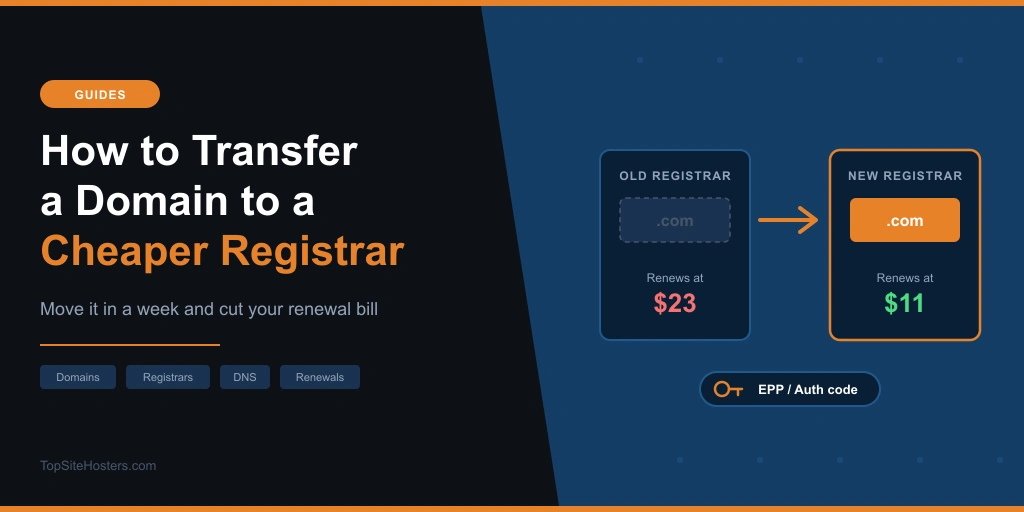
The real question is whether it’s worth doing. If you’re paying $23.19 a year for a .com that Porkbun renews for $11.08, you’re paying twice as much for exactly the same name. Ten domains like that and you’re throwing away over $100 a year.
There’s a deadline, too. The wholesale price of every .com goes up 7% on November 1, 2026, and most registrars pass that on almost immediately.
Is Transferring Your Domain Worth It?
For .com, .net and .org domains, the transfer fee isn’t an extra cost. The new registrar charges you for one year and tacks it onto your expiry date. You’re really just paying next year’s renewal early, at the new registrar’s price.
That makes the renewal price the number to watch at any domain registrar. A cheap transfer deal can still cost you more. GoDaddy, for example, advertises a .com transfer for one cent. Read the fine print and it only applies when you buy three years, with the other two at $22.99 each plus the ICANN fee. That’s about $46 for three years. The same three years at Porkbun cost $33.24.
These are the .com prices listed on each registrar’s site in October 2026, in USD for one year, including the $0.20 ICANN fee.
| Registrar | Transfer | Renewal | Worth knowing |
|---|---|---|---|
| Spaceship | $9.68 | $10.18 | Lowest renewal here, ICANN fee shown separately at checkout |
| Cloudflare | $10.46 | $10.46 | Sold at cost, but you must use Cloudflare’s DNS |
| Porkbun | $11.08 | $11.08 | Same price every year, free WHOIS privacy |
| Namecheap | $11.68 (sale) | $18.68 | Free WHOIS privacy, but renewal costs $7 more than the transfer |
| GoDaddy | $0.01 (3 year purchase) | $23.19 | The one cent only covers year one |
Prices checked October 2026, including the $0.20 ICANN fee. Registrars change them often, so check the checkout before you pay.
Over three years, the order changes. Namecheap’s transfer price is fair, but its renewal makes it the most expensive of the five, just ahead of GoDaddy.
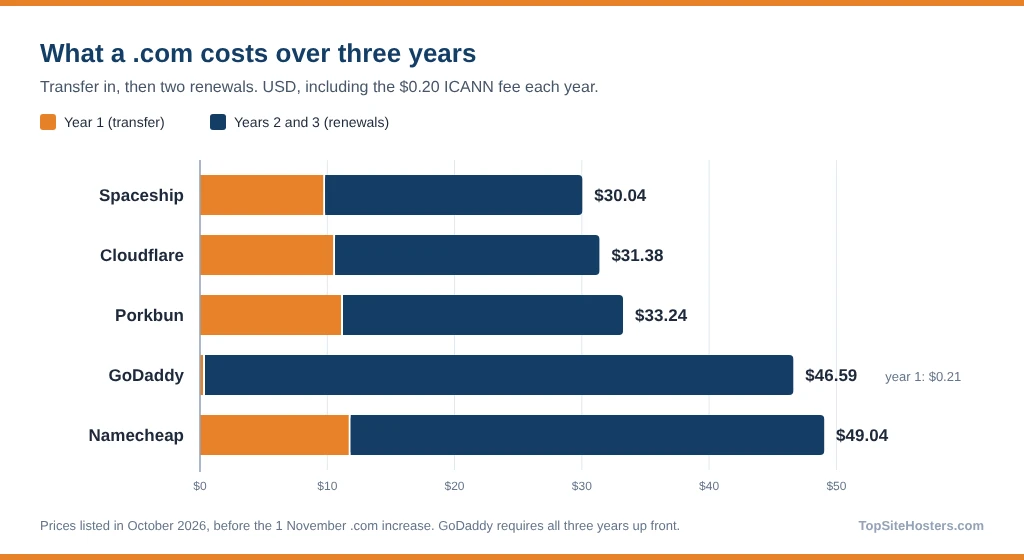
Expect most of these to rise by around 70 cents after November 1, when the .com wholesale price goes from $10.26 to $10.97. Cloudflare’s at cost price, for instance, becomes $11.17.
Moving one .com from $23.19 a year to $11.08 saves you about $12 a year for fifteen minutes of work, done once. Move ten and you keep around $120 every year after that.
And .com isn’t done going up. Verisign’s contract lets it raise the wholesale price by up to 7% in each of the remaining years of its current contract period, which could take it to $13.42. The full story is in our post on .com and .org price increases.
Staying where you are makes more sense if:
- Your domain expires in less than two weeks
- The saving is a dollar or two and your registrar has never given you trouble
- You use email or a site builder from your registrar that’s tied to the domain
- The domain came free with your hosting and renews at a fair price
Before You Start: Five Checks
When a transfer fails, it’s nearly always for one of these reasons. Five minutes of checking now can save you a week of delays.
- 1. Is the domain at least 60 days old?
- Registrars can refuse a transfer within 60 days of the original registration or a previous transfer. Many also add a 60 day lock if you change the owner’s name, organization or email.
- 2. When does it expire, and when was it last renewed?
- Give yourself at least two weeks before expiry. If it’s already expired, renew it where it is first. Then wait: if you transfer within 45 days of a renewal, including an automatic one, the extra year often isn’t added. Cloudflare warns that you’re still charged for the transfer in that case.
- 3. Can you actually get the emails?
- The approval request goes to the owner’s email address on the domain. If that’s an old work address you can’t reach anymore, sort it out well before you start. Changing it can trigger the 60 day lock you’re trying to avoid.
- 4. Where does your DNS live?
- Look up which nameservers your domain uses with our DNS Lookup tool. If they belong to the registrar you’re leaving, your DNS records live there too, and they can vanish when the domain goes. More on that below, because it’s the one that catches people out.
- 5. Is DNSSEC turned on?
- DNSSEC adds a security signature to your DNS. Check it with our DNSSEC Checker. If it’s on and you’re also switching nameservers, turn it off first. Otherwise your domain can stop resolving altogether until the signatures line up again.
How to Transfer a Domain to Another Registrar
Every registrar labels its buttons differently. The process underneath is identical.
- Copy your DNS records. Export or screenshot every one, and don’t skip the email records.
- Unlock the domain. At your current registrar, switch off the “transfer lock” or “registrar lock”.
- Get the authorization code. It goes by a few names: auth code, EPP code or transfer authorization code (TAC). Some registrars make it expire after a few days, so use it quickly.
- Start the transfer at the new registrar. Enter the domain and the code, then pay for the year.
- Approve it. Keep an eye on the owner’s inbox. Some registrars let you approve the release from your dashboard, which can cut days off the wait.
- Wait. Most transfers finish within 5 to 7 days. Leave the contact details alone until it’s done.
- Tidy up. Once the domain shows at the new registrar, turn on auto renewal, WHOIS privacy and the transfer lock.
A transfer doesn’t move your website or your hosting. It only changes who you pay for the name.
Transferring Away From GoDaddy
Plenty of people searching for this are leaving GoDaddy, usually because of the renewal price or the constant upsells at checkout. The steps are the same as above. In your account, open your Domain Portfolio, pick the domain, and choose Transfer to Another Registrar under Transfer. GoDaddy then walks you through unlocking it and getting the code.
Before you click anything, make a list of what else you bought there. Email, a website builder site or an SSL certificate tied to the domain all stay behind with GoDaddy. Line up the replacements first. Our GoDaddy review covers what its hosting and extras really cost if you’re deciding whether any of them are worth keeping.
Will Your Website or Email Go Down?
Usually not. The transfer itself doesn’t touch your nameservers, so if your DNS is with your web host or a service like Cloudflare, your site keeps loading the whole time.
The trouble starts when your nameservers belong to the registrar you’re leaving. Once the domain moves, that registrar has no reason to keep answering for it. Your website can go offline, and your email can quietly stop arriving, and you might not notice for a day or two.
Do things in this order. Copy every DNS record, recreate them at your new registrar or your host, switch the nameservers, and give it a day to settle. Only then start the transfer. Check the MX, SPF and DKIM records twice. Miss one and your email bounces or ends up in spam.
Cloudflare works the other way round. It insists your domain is already running on Cloudflare’s DNS before the transfer, and you can’t use any other DNS provider while the domain is registered there.
The 60 Day Lock, and the Change That’s Coming
For now, the 60 day rules still apply. A registrar can refuse to let a domain go if it was registered or transferred in the last 60 days, and many lock it for 60 days after an owner change. Some let you opt out of that last one when you make the change, so look for the checkbox.
In June 2026, ICANN’s Board adopted a package of transfer policy reforms, including a shorter 30 day lock for newly registered and newly transferred domains. The rules around owner changes are being reworked separately. ICANN hasn’t set a start date yet, so plan around 60 days until your registrar says otherwise.
Moving Several Domains at Once
Most registrars take bulk transfers. Paste in your domains with their codes, pay once, and each one gets its own extra year.
Keep a simple list: each domain, its expiry date, where its DNS lives, and whether you’ve used the code yet. Then start with the domains you care least about. If something goes wrong, it happens to a parked name and not the one running your business.
What About .uk, .no and Other Country Domains?
Country domains follow their own registry’s rules, not ICANN’s. A .uk domain moves with an IPS tag rather than an authorization code, and at some registrars, Cloudflare among them, a .uk transfer is free and doesn’t add a year.
Norway’s .no, Germany’s .de and the rest each have their own process. Check your new registrar’s help page for your exact extension before you begin.
Common Questions About Domain Transfers
Can you transfer domains between registrars?
Yes. Almost any domain can move once it’s more than 60 days old, unlocked and not expired. A domain caught up in a legal dispute or a recent owner change may be blocked for a while.
How much does it cost to transfer a domain?
Usually one year’s renewal at the new registrar, and that year gets added to your registration. For a .com, that’s about $10 to $12 at the cheaper registrars. Some country domains, like .uk at certain registrars, move for free.
Do I have to wait 60 days to transfer a domain?
Yes, for now. Registrars can refuse a transfer within 60 days of registration or a previous transfer. ICANN has approved a shorter 30 day lock, but there’s no start date yet.
How long does it take to transfer a domain from one registrar to another?
Most take 5 to 7 days. If your current registrar lets you approve the release early, it can be done in a day.
Can I transfer an expired domain?
Don’t count on it. Renew it at your current registrar first, then wait 45 days before you start the transfer, so the extra year you pay for is actually added.
Should You Switch?
If your .com costs more than about $15 a year to renew, yes. It takes an afternoon and saves you money every year after. Sort out your DNS first, leave two weeks before expiry, and do it before November 1 so the extra year is billed at today’s price.
If you’re already paying close to cost and your registrar has never let you down, leave it where it is. Saving a dollar a year isn’t worth the hassle.