
Website Builders: Guide to the Main Platforms in 2026
Wix, Squarespace, Shopify and Webflow compared honestly, including what it costs over five years and what happens when you want to leave
A website builder bundles the tools to create and edit a website with the hosting infrastructure to serve it, all under one monthly subscription. You log in, choose a template, drag and drop your content into place, and publish. No server to configure, no software to install, no hosting account to set up separately.
- What Is a Website Builder?
- Builder vs Self-Hosted WordPress
- The Main Website Builders Compared
- What You Give Up With a Builder: The Lock-In Problem
- The Real Cost Over Five Years
- Website Builders and SEO: What You Get
- AI Website Builders: What’s New in 2026
- GDPR and Data Residency for European Users
- Which Builder Should You Choose?
- Frequently Asked Questions
That convenience is the product. What you trade for it is control and portability. This guide covers what each major builder actually offers, what it costs over time, and the question every builder guide avoids: what happens when you want to leave.
What Is a Website Builder?
Website builders come in two distinct forms that are worth separating from the start.
Hosted builders like Wix, Squarespace, Shopify, and Webflow bundle everything into one subscription. Your site lives on their infrastructure, uses their design system, and runs under their terms. You pay monthly. They handle the rest.
Self-hosted builders like WordPress with Elementor or Divi separate the building tool from the hosting. You install the software on a hosting account you choose, own the files outright, and can move or modify anything. This guide focuses on hosted builders but covers where self-hosted WordPress is the better choice throughout.
Builder vs Self-Hosted WordPress
Most guides in this category are written by people who earn affiliate commissions from builder signups. That creates a structural incentive to recommend builders regardless of whether they’re the right choice. This section tries to correct that.
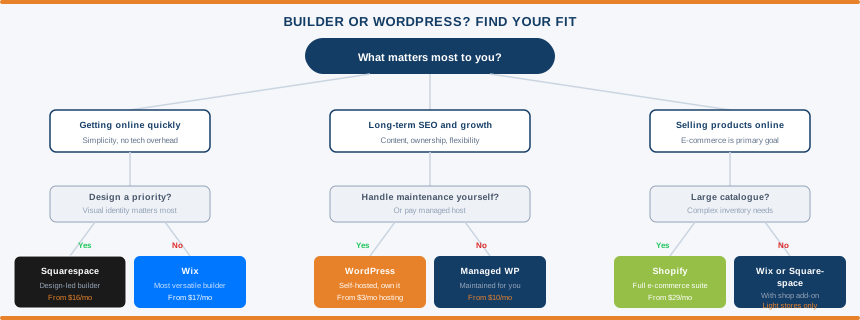
What a hosted builder actually gives you: Everything is handled for you. Hosting, SSL, security patches, software updates, backups, and infrastructure maintenance are all included in the subscription. You focus on your site. The platform handles the rest. For someone who wants to build a website without thinking about servers, this is a genuine benefit worth paying for.
What a hosted builder actually costs you: You own your content in the sense that you wrote or uploaded it. You do not own the infrastructure, the design system, or the code that renders your site. The platform owns those. When you want to leave, you take your content and rebuild elsewhere from scratch. Your design does not transfer. Your URL structure may not be reproducible on a different platform. The longer you stay, the more expensive leaving becomes.
Self-hosted WordPress separates the building tool from the hosting. You download the WordPress software, install it on a hosting account you control, and own everything. Every file, every database entry, every design element is yours. You can move your entire site to a different host in an afternoon. The trade-off is responsibility — updates, security, and maintenance are your job unless you pay a managed WordPress host to handle them. See our managed WordPress hosting guide for how that works.
The honest comparison:
| Factor | Hosted Builder | Self-Hosted WordPress |
|---|---|---|
| Setup speed | Minutes to hours | Hours to a day |
| Technical overhead | Minimal — platform handles it | Moderate, or pay managed host |
| Content ownership | You own the content you created | You own everything |
| Platform portability | Difficult — design doesn’t transfer | Move host anytime, no rebuild |
| SEO control | Good on most platforms | Complete technical control |
| Long-term cost | Escalates with features and tiers | More stable, often cheaper |
| Plugin and feature depth | Platform ecosystem only | 60,000+ plugins, unlimited |
| Monetisation flexibility | Platform restrictions apply | No restrictions |
The honest recommendation: for a simple site you need running quickly with no technical overhead, a hosted builder is a reasonable choice. For any site where long-term SEO, content depth, data ownership, or platform flexibility matters, self-hosted WordPress is the better foundation. The convenience premium of a builder is real and sometimes worth paying. Go in knowing what you’re trading.
The Main Website Builders Compared
| Builder | Starting Price | Free Plan | Best For | SEO Control | E-commerce | Portability |
|---|---|---|---|---|---|---|
| Wix | $17/mo | Yes (ads + Wix domain) | General business, beginners | Good | Add-on from Core plan | Low — no export format |
| Squarespace | $19/mo | 14-day trial only | Design-led brands, creatives | Good | Fee on Business plan | Low — limited XML export |
| Shopify | $5/mo (Starter) | 3-day trial only | Product-based e-commerce | Good for products | Built for it | Product data exports, design doesn’t |
| Webflow | $14/mo | Free (Webflow subdomain) | Agencies, SaaS, designers | Strong | Available, more expensive | Exports HTML/CSS, CMS limited |
| Hostinger Builder | $1.99/mo | No | Budget beginners | Limited | Basic | Very low — proprietary lock-in |
| WordPress (self-hosted) | From $3/mo (hosting) | Software free, hosting costs | Content, SEO, full control | Complete | WooCommerce | Move host anytime |
Wix
Wix is the most versatile general-purpose hosted builder. Over 2,000 templates, a flexible drag-and-drop editor, a growing app marketplace, and AI tools for site generation and content assistance. It suits local businesses, personal sites, service businesses, and anyone who wants maximum features in an accessible package.
Plans run from $17/mo (Light) to $159/mo (Business Elite) on annual billing. A free plan exists but shows Wix branding, serves ads, and gives you a Wix subdomain rather than your own domain. The step from free to paid is necessary for any serious use.
The main limitation that catches people out: once you choose a template and launch your site on Wix, you cannot change to a different template without rebuilding the site from scratch. Choose carefully before launching. Load times are also slower than Webflow and some competitors, which affects Core Web Vitals performance on complex pages.
Squarespace
Squarespace’s strength is design quality. Fewer templates than Wix (190+) but every one is polished to a higher standard. Pages built on Squarespace consistently look more intentional and brand-consistent than equivalent Wix builds. This makes it the right choice when visual identity is the primary priority: photographers, designers, restaurants, event businesses, creative professionals, and brand-forward companies.
Plans run from $19/mo (Basic) to $52/mo (Advanced) on annual billing. No free plan, a 14-day trial covers evaluation. E-commerce is available on all plans, but the Basic plan applies a 2% transaction fee on every sale. That fee disappears from the Core plan upwards, starting at $39/month. If you’re selling anything meaningful, factor in the transaction fee before choosing Business plan pricing. And with Squarespace raising prices by up to 26% this month, those figures are worth double-checking before you commit.
Shopify
Shopify exists for one purpose: selling products online. Inventory management, payment processing, shipping integrations, abandoned cart recovery, POS hardware, multi-channel selling the e-commerce infrastructure is the most comprehensive in the builder category by a significant margin. If selling products is the primary function of your site, Shopify is the standard choice.
The Starter plan at $5/mo lets you add buy buttons and checkout to an existing site. The Basic plan at $29/mo is the starting point for a full Shopify store. The Grow plan at $79/mo reduces transaction fees and adds reporting.
The limitations worth knowing before committing: Shopify’s URL structure is fixed. Product pages live at /products/[slug] and collection pages at /collections/[slug]. These prefixes cannot be removed or changed. For most e-commerce sites this is irrelevant. For SEO-focused businesses where URL structure matters, it’s a genuine constraint. Transaction fees also apply on all plans if you’re not using Shopify Payments, which is only available in certain countries.
App costs escalate quickly. A basic Shopify store with a handful of apps covering reviews, upsells, subscriptions, and email marketing can add $100 to $200 per month in app fees on top of the plan cost.
Webflow
Webflow occupies different territory from the other builders. Rather than simplifying the design process for beginners, it gives designers and developers precise visual control over HTML and CSS without requiring them to write code. The output is clean, production-quality markup rather than the bloated generated code some visual builders produce.
Suited to SaaS companies, design agencies, B2B businesses, and marketing teams who need to ship pages quickly without going through a development team. Strong SEO control, flexible CMS, clean Core Web Vitals performance.
Plans from $14/mo (Basic) to $39/mo (Business). The learning curve is real. Webflow is not beginner-friendly and should not be the first choice for anyone without design or front-end web experience. For those it does suit, it’s the best hosted builder for design quality and technical output.
Hostinger Website Builder
The budget entry point. Plans from $1.99/mo introductory make it the cheapest option in the category by a meaningful margin. AI-assisted site creation, simple drag-and-drop editor, one-click publishing. Gets a site live quickly at minimum cost.
The significant limitation: Hostinger’s builder is a proprietary platform. You cannot export your site to another platform or hosting provider. If you outgrow it or want to move, you start from scratch. SEO control is more limited than Wix, Squarespace, or self-hosted WordPress. Suited to simple projects where future scalability and platform ownership are not priorities.
What You Give Up With a Builder: The Lock-In Problem
This is the section every builder review guide avoids. It needs to be understood before you commit to building a site on any hosted platform.
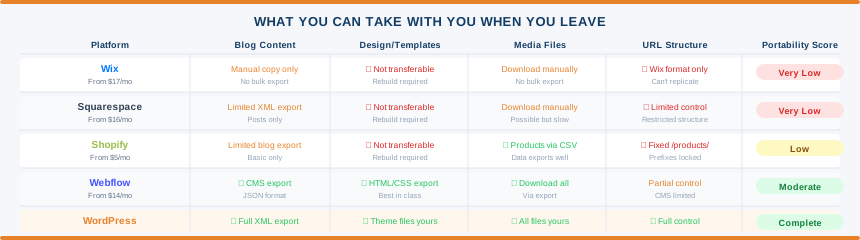
Every hosted builder is a closed ecosystem. Your design lives in their system. Your URL structure is built on their infrastructure. Your media files are stored on their servers. Your content database runs on their platform. When you want to leave:
Wix: No portable export format exists. Your content can be copied manually, page by page. Your design cannot be transferred in any automated way. Moving away from Wix means rebuilding your site from scratch on whatever platform you move to.
Squarespace: Exports a limited XML file that contains your blog posts and some page content. Your design doesn’t transfer. Media files need downloading individually. Rebuilding is required.
Shopify: Product data and customer records export cleanly as CSV files. Blog content is more limited. Your design, theme, and store configuration don’t transfer. Moving away from Shopify means rebuilding the store on the new platform.
Webflow: Exports clean HTML and CSS, which is more portable than most builders. The CMS content doesn’t export to other platforms cleanly. The export is most useful for handing off to a developer rather than migrating to another hosted platform.
None of this is hidden. It’s in the terms and the export documentation. The issue is that most people don’t think about it at the start when choosing a platform, and discover it when they need to move.
The practical risk is real. Platforms raise prices at renewal. Terms change. Platforms get acquired. A builder that costs $23/mo today may cost $35/mo in two years when you’re deeply embedded in it and leaving would require rebuilding your entire site. With self-hosted WordPress, any of those events means migrating your install to a different host in an afternoon.
Lock-in is not a reason to avoid builders entirely for every use case. It is a reason to understand what you are committing to before you spend two years building your business on a platform you don’t control.
The Real Cost Over Five Years
The introductory prices on builder plans look competitive. The five-year picture is different.
All prices below are on annual billing. Renewal prices often increase after the first term, the same pattern that applies to hosting. Check the renewal rate before committing.
Typical small business site over five years:
Squarespace Core: $23/mo × 60 months = $1,380 Wix Business: $36/mo × 60 months = $2,160 Shopify Basic (no apps): $29/mo × 60 months = $1,740 Shopify with typical apps ($100/mo extra): $129/mo × 60 months = $7,740
Self-hosted WordPress equivalent over five years:
Good shared hosting: $5/mo × 60 months = $300 Premium theme: $60 one-time purchase Essential plugins (SEO, backup, security, forms): $100/year × 5 years = $500 Total: approximately $860 over five years
The self-hosted WordPress total is meaningfully lower even accounting for the additional costs. The builder total buys convenience and managed infrastructure. Whether that trade is worth it depends on the value of your time and technical confidence.
If managing WordPress yourself isn’t appealing, managed WordPress hosting adds $15 to $30 per month. Even at $30/mo for managed hosting plus the plugin costs, that’s $2,300 over five years, competitive with Squarespace Core and significantly cheaper than Wix Business or Shopify with apps.
Our breakdown of why hosting renewal prices are higher than advertised covers the same pattern from the hosting side. The same scepticism applies to builder pricing.
Website Builders and SEO: What You Get
All major builders now cover the SEO basics adequately: meta titles, meta descriptions, image alt text, SSL certificates, sitemaps, and mobile-responsive templates. For a local business or simple informational site, any of the main builders provides enough SEO control to rank for local and branded terms.
The differences emerge at the technical level and become meaningful for content-driven sites with serious SEO ambitions.
WordPress with Yoast or RankMath: Complete control over schema markup, URL structure, canonical tags, robots.txt configuration, .htaccess rules, Core Web Vitals optimisation, and any technical SEO requirement. The standard for content operations with long-term SEO ambitions.
Wix: Significant improvement in recent years. URL structure is customisable. Robots.txt is accessible. Most on-page SEO tools are available. Still lags WordPress for advanced technical SEO, particularly schema markup flexibility and page speed optimisation.
Squarespace: Solid for content and on-page SEO. URL structure is somewhat restricted but manageable. Clean code output helps performance. Technical configuration is more limited than Wix or WordPress.
Shopify: Strong for product and e-commerce SEO. Structured data for products and reviews is well-handled. The fixed /products/ and /collections/ URL prefixes are a genuine constraint for businesses where URL structure matters to rankings. Blog functionality is basic compared to WordPress.
Webflow: The strongest technical SEO control in the hosted builder category. Clean code output, good Core Web Vitals performance, full control over meta data, canonical tags, and structured data. The right choice for SEO-focused businesses that still want a hosted platform.
AI Website Builders: What’s New in 2026
Every major platform now offers AI-assisted site creation in some form. Wix ADI, Squarespace Blueprint AI, and Hostinger’s AI builder all generate a starting point from a description of your business. Newer platforms including Framer are built with AI-first workflows at the core.
The honest assessment: AI-generated sites reduce initial setup time significantly. A starting template that might take an hour to configure manually is ready in minutes. The AI handles layout decisions, colour choices, and section structure based on your description.
What AI doesn’t change: the underlying platform’s limitations. A Wix site generated by AI is still a Wix site with Wix’s portability constraints and pricing model. An AI-generated Shopify store still has fixed URL structures. The output still needs editing, real content, and refinement before it’s genuinely useful.
AI site generation is worth factoring into your setup convenience calculation. It’s not a reason to choose a platform that doesn’t otherwise fit your requirements.
GDPR and Data Residency for European Users
For EU businesses and Norwegian businesses under the EEA framework, where your builder stores data matters. Personal data collected through your site like contact form submissions, e-commerce customer records, analytics, is subject to GDPR obligations regardless of which platform you use.
Wix: Infrastructure on AWS. EU data centres available. Data Processing Agreement published and accessible. GDPR compliance documentation is comprehensive. Adequate for most EU business use cases.
Squarespace: US-headquartered company. EU data transfers rely on Standard Contractual Clauses. DPA available on request but less prominently documented than Wix or Shopify. Adequate for most use cases but requires more verification for strict compliance requirements.
Shopify: Canadian company with EU data centres available. DPA provided as standard. GDPR compliance documentation is thorough. Appropriate for EU-facing e-commerce.
Webflow: US-based, AWS infrastructure. EU data centre available. DPA available. Adequate for most EU businesses with standard compliance needs.
For businesses with strict data residency requirements, those in healthcare, finance, or legal sectors where data sovereignty is a compliance requirement rather than a preference, self-hosted WordPress on EU-based infrastructure gives the most control. Providers like Hostinger and IONOS offer EU data centres with full GDPR compliance documentation and DPAs as standard.
Which Builder Should You Choose?
- Selling physical products online
- Shopify. The e-commerce infrastructure is the strongest in the category by a meaningful margin. Nothing else competes for product-based businesses where selling is the primary purpose of the site.
- Design matters most, smaller product catalogue or service business
- Squarespace. The design-to-price ratio is the best in the hosted builder category. Photographers, designers, restaurants, and brand-forward businesses consistently produce better-looking sites on Squarespace than anywhere else.
- General business site with maximum features, beginner-friendly
- Wix. The most versatile all-in-one option. Suits the widest range of use cases and has the most developed app marketplace.
- SaaS company, agency, or marketing team needing design control
- Webflow. Production-quality code output, strong CMS, the best technical SEO in the hosted builder category. Not for beginners.
- Budget is the primary constraint:
- Hostinger Website Builder. The lowest entry cost in the category. Accept the portability trade-off going in.
- Long-term content strategy, SEO ambitions, or platform ownership matters:
- Self-hosted WordPress. Nothing in the hosted builder category competes for content operations, SEO control, and the ability to own and move your digital presence. Pair it with a good shared hosting plan to start or managed WordPress hosting if you want the maintenance handled.
Frequently Asked Questions
Is a website builder good enough for a business? Yes, for many types of businesses. A local service business, restaurant, photographer, or small retailer can build and maintain an effective site on Wix or Squarespace without needing anything more complex. Where builders start to show limitations is for businesses with serious content and SEO ambitions, complex functionality requirements, or a need for full data ownership.
Can I move my website from a builder to WordPress later? Yes, but it requires rebuilding the site rather than migrating it. Builder content can be manually transferred. Your design won’t transfer and will need to be rebuilt on WordPress with a theme. The migration is doable but more work than moving a WordPress site between hosts. Factor in the rebuild cost when choosing a platform if you think you might want to move in future.
Do website builders include hosting? Yes. All hosted builders include hosting as part of the subscription. Your site runs on the platform’s infrastructure. This is both the convenience and the constraint — you don’t choose or control the hosting environment.
Are website builders good for SEO? Good enough for most local and small business use cases. Wix, Squarespace, and Webflow all handle standard SEO requirements adequately. For content-heavy sites, affiliate sites, or businesses that depend on organic search traffic as a primary channel, self-hosted WordPress with dedicated SEO plugins provides meaningfully more control.
What is the cheapest website builder? Hostinger Website Builder starts from $1.99/mo introductory, making it the cheapest hosted option. Wix and Squarespace both have free or trial options but require paid plans for a custom domain and removal of platform branding. Self-hosted WordPress with entry-level shared hosting starts from $3 to $5/mo and is cheaper over time than most hosted builders despite the slightly higher setup complexity.
Do I need a website builder or WordPress? Depends on what you’re building and what matters to you. A website builder is the right choice if you want to get online quickly with no technical involvement, and you’re building a site that doesn’t depend on SEO for growth. WordPress is the right choice if you want to own your platform, build a content-driven site, or need flexibility that hosted builders don’t provide.
Can I use a free website builder for a business site? Technically yes, but practically no. Free plans on Wix and similar platforms show platform branding, serve ads you don’t control, and give you a subdomain rather than your own domain. A business communicating from a Wix-branded URL or with third-party ads on its homepage looks unprofessional. Paid plans start from $16 to $17/mo on annual billing — the same as a coffee per day. For a business site, that’s the minimum sensible investment.
Which website builder is best for e-commerce? Shopify for any business where selling products is the primary purpose. The inventory management, payment processing, shipping integrations, and POS tools are the strongest in the category. Wix and Squarespace handle light e-commerce adequately. For larger catalogues or higher transaction volumes, Shopify is the standard.