
Most people skip it. That’s usually fine, until the day it isn’t.
You signed up for hosting, got the welcome email, and moved on. The Acceptable Use Policy was a link in the footer you scrolled past. That’s what almost everyone does. Then, months later, your site goes down without warning. The suspension notice in your inbox references a clause you’ve never read, about a resource limit you didn’t know existed, or a type of content the host quietly prohibits.
A hosting provider’s Acceptable Use Policy (AUP) is a legal document that defines what you’re allowed to do on their servers. It sits alongside the Terms of Service, usually linked in the footer under Legal or Policies, and almost nobody reads it before signing up. The problem isn’t that people are careless. It’s that AUPs are long, written in legal language, and seem irrelevant right up until they aren’t.
The AUP isn’t there to catch you out. It exists because shared hosting puts thousands of sites on the same physical server, and one badly behaved account can drag everyone else down with it. Providers need rules to act on, and the AUP is where those rules live.
What most people don’t realise is that AUPs vary considerably between providers. One host might suspend you automatically for a traffic spike that pushes past a CPU threshold for 60 seconds. Another gives you a grace period and contacts you first. One host deletes suspended accounts after 30 days with no obligation to preserve your data. Another keeps everything intact. These differences matter, and you only find them by reading.
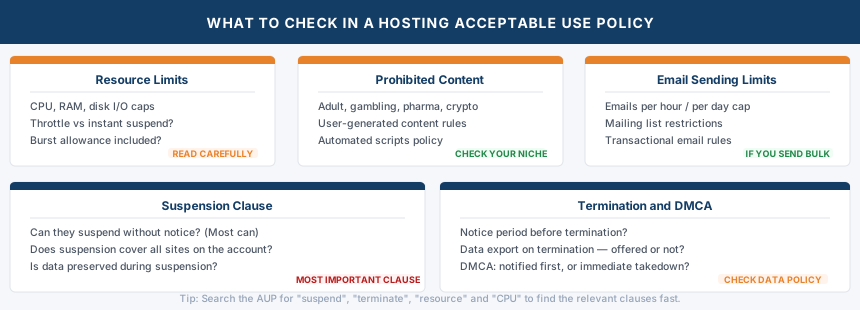
This guide walks through the sections that actually matter, what to look for in each one, and the clauses that catch people by surprise. It’s the same approach TSH takes with renewal pricing: the information that affects you most is often the part nobody points out.
What Is an Acceptable Use Policy?
An AUP is a set of rules governing how you may use a hosting service. It covers the types of content you can host, how much of the server’s resources you’re permitted to use, what happens if you exceed those limits, and the circumstances under which your account can be suspended or terminated.
Most providers call it an Acceptable Use Policy, but you’ll also see it labelled as a Fair Use Policy, Terms of Use, or folded directly into the main Terms of Service. The name doesn’t matter. What matters is finding the section that covers resource limits, prohibited content, and suspension procedures.
Resource Limits: The Section That Trips People Up Most
On shared hosting, you share a physical server with dozens or hundreds of other accounts. Every provider imposes limits on how much CPU, RAM, bandwidth, and disk I/O any single account can consume at once. The specific limits vary considerably, but the principle is the same everywhere: if your site uses more than its fair share, the host will act.
The tricky part is that these limits are rarely published as hard numbers. Providers typically use language like “accounts may not use more than 5% of server resources for a period longer than 60 seconds” or “resource usage must not negatively impact other users.” What that translates to in practice depends on the host and the specific server load at any given moment.
What to look for in this section:
CPU and RAM limits. Some hosts publish specific percentages; most don’t. Look for any mention of what triggers an automated response, and whether the response is throttling (slowing your site down) or suspension (taking it offline completely). There’s a meaningful difference.
Disk usage rules. Several AUPs explicitly prohibit using hosting storage for anything other than live website files. Storing media archives, personal backups, or large file collections on a shared hosting account often violates the AUP even if you’re within your stated disk allowance. KnownHost’s AUP, for example, states that storage is limited to active website files and explicitly prohibits using hosting space for general file storage or media archives.
Email sending limits. Most shared hosts cap the number of emails you can send per hour or per day. This matters if you run a mailing list, send transactional emails from your site, or use your hosting email for marketing. Exceeding the limit can trigger automatic throttling or, in some cases, result in your domain being blacklisted.
Traffic spikes. A sudden burst of traffic, whether from a viral post, a product launch, or bot activity, can push your resource usage well above normal levels. Some hosts have a burst allowance that permits temporary overages; others suspend automatically. Check which approach your host takes before a traffic spike reveals it for you.
Prohibited Content: What You Can’t Host
Every AUP includes a list of prohibited content. Most of it is obvious: illegal material, malware, phishing pages, content that infringes copyright. But a few categories catch people off guard.
Adult content. Many budget shared hosting providers prohibit adult content entirely. Others permit it but require you to be on a specific plan or have age verification in place. If you’re building anything in this category, confirm the host’s position before signing up.
Certain business types. Some hosts restrict or prohibit content related to gambling, pharmaceuticals, firearms, cryptocurrency, and similar sectors. The list varies by provider and by the jurisdiction they operate in. This is rarely the first thing a new site owner checks, but it’s worth scanning if your site operates in any grey area.
Copyrighted material. DMCA notices are a practical reality for any site that allows user-generated content. The AUP will typically explain the host’s DMCA handling process: whether they notify you before taking action, how quickly they expect you to respond, and at what point repeated notices lead to account termination. Some hosts operate a three-strikes policy; others act immediately on a credible notice.
Scripts and automated processes. Background scripts, cron jobs running too frequently, and certain automated tools can consume disproportionate server resources. Many AUPs specifically address this, setting limits on how often background tasks can run or prohibiting specific types of scripts entirely.
The Suspension Clause: Read This Carefully
This is the section most worth your time. Look for three things.
Whether suspension can happen without notice. The majority of hosting AUPs include language along the lines of “we reserve the right to suspend accounts without prior notice.” That’s standard, and it’s there to allow hosts to act immediately if an account is actively causing harm to other users. What varies is whether the host makes any practical commitment to contact you promptly after the fact, and whether there’s any appeals process.
What gets suspended. On a shared hosting account, a suspension typically takes down everything associated with that account: every site, every email address, every database. The Website Down Checker can confirm from the outside whether your site is returning a suspension notice or another error. If you’re hosting multiple sites for clients on a single account, one AUP violation affecting one site can bring all of them down. This is one reason agency-level plans or separate accounts per client are worth considering. A VPS eliminates the shared account risk entirely since each environment is isolated. A VPS eliminates this risk entirely since each account is fully isolated.
Data retention during suspension. Some hosts keep your files intact and accessible once you resolve the issue. Others don’t guarantee anything. A few explicitly state they will delete suspended accounts after a set period (30, 60, or 90 days is common) with no obligation to preserve your data. This is not the time to discover you haven’t kept an off-site backup.
The Termination Clause
Termination is the permanent version of suspension. Most AUPs reserve the right to terminate accounts for repeated AUP violations, serious security incidents, or at the provider’s sole discretion with or without cause.
The phrase “at our sole discretion” appears in most hosting AUPs. It means the provider can terminate your account for reasons not specifically listed, as long as they’re not acting illegally or in breach of their own contract with you. In practice, hosts rarely terminate accounts without cause, but knowing the clause exists means understanding that your hosting is ultimately a service you’re renting, not infrastructure you own.
Check whether the AUP specifies any notice period before termination, whether terminated accounts receive a data export, and whether there’s a refund for unused paid periods.
What to Do Before You Sign Up
Reading the full AUP of every host you consider isn’t realistic. A quicker approach:
Search for “suspend” and “terminate.” Read every sentence that includes those words. This gives you the suspension and termination clauses quickly without reading everything else.
Search for “resource” or “CPU.” This surfaces the resource limit section, which is where the most practically significant restrictions on day-to-day usage live.
Check for your content category. If your site operates in any niche that might attract scrutiny (affiliate marketing, adult content, gambling, cryptocurrency, supplements, firearms), search the AUP for relevant terms.
Look at the DMCA section. If you run a site that accepts user-generated content of any kind, understanding how your host handles DMCA notices is important. Some hosts notify you and give you time to respond. Others act immediately on receipt of a notice.
The full AUP is worth reading once when you’re choosing a host. After that, the things that actually matter in day-to-day hosting are usually obvious: don’t use the server for things it’s not designed for, keep your resource usage reasonable, and make sure your content complies with local law.
Frequently Asked Questions
Where do I find a hosting provider’s AUP?
Look in the footer of the provider’s website under Legal, Terms, or Policies. It’s sometimes linked from the Terms of Service rather than listed separately. If you can’t find it, searching “[provider name] acceptable use policy” usually surfaces it directly.
Can my host suspend me for a traffic spike?
Yes, if the spike pushes your account past the resource limits defined in the AUP. Some hosts include a burst allowance that tolerates temporary overages; others use automatic throttling or suspension. Check your host’s position on this before a traffic spike finds you unprepared.
What happens to my data if my account is suspended?
It depends on the host and the reason for suspension. In most cases, data is preserved during a suspension and accessible once the issue is resolved. For terminations, some providers export your data on request; others make no such commitment. Read the data retention clause in your AUP and keep off-site backups regardless.
Does the AUP apply to email too?
Yes. Most shared hosting AUPs cover email usage explicitly, including limits on sending volume, prohibitions on spam, and rules around mailing lists. Sending bulk email from a shared hosting account without checking these limits is one of the more common ways accounts get flagged.
Can a host terminate my account without refunding me?
Generally yes, if the termination is due to an AUP violation. Refund terms are typically covered in the Terms of Service rather than the AUP. Most hosts won’t refund for terminations related to AUP violations, w