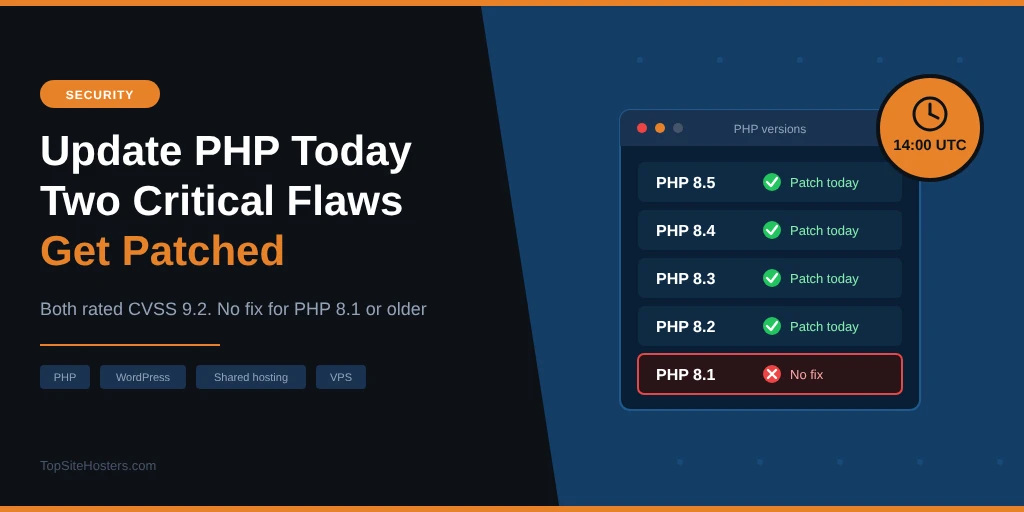
Warning: update PHP today. Two critical PHP flaws get patched on 21 October 2026 at 14:00 UTC (16:00 CEST, 10:00 EDT). Make sure your site gets the update as soon as it’s out. We have updated the article with the fixed version numbers.
- What We Know So Far
- Which PHP Versions Will Get a Fix?
- How to Check Your PHP Version
- What to Do on Shared Hosting
- If Your Site Is Behind Cloudflare
- What to Do on a VPS or Dedicated Server
- Patch Status for Control Panels and Linux
- Still on PHP 8.1 or Older?
- Signs Your Site May Have Been Hit
- Common Questions About the PHP Security Release
PHP runs almost every website on shared hosting, including WordPress, Joomla and WooCommerce. Both flaws are rated 9.2 out of 10, and news of them leaked before the fix was ready.
On most hosting plans, your host installs the update, not you. Your job today is to check your PHP version, make sure your host is patching, and move off PHP 8.1 or older if you’re still on it.
| PHP security release | Details |
|---|---|
| Release time | 21 October 2026, 14:00 UTC (16:00 CEST, 10:00 EDT) |
| Severity | Two flaws, each CVSS 9.2 (critical) |
| Type | Reported as remote code execution |
| Reported CVEs | CVE-2026-109618 and CVE-2026-109619 (named by CERT-EU, not yet by PHP) |
| Fixes expected for | Supported versions: PHP 8.2, 8.3, 8.4 and 8.5 |
| PHP 8.1 and older | End of life, no fix expected |
| Attacks seen so far | None reported |
What We Know So Far
The PHP security team posted a short notice on 20 October: two vulnerabilities, both rated critical at 9.2 under CVSS version 4.0, with a fix due at 14:00 UTC on 21 October. It asked administrators to “prepare now so you can update as soon as it is available”. It also said it may release earlier if details become public or attacks start.
What PHP hasn’t said yet is which versions are affected, how the flaws work, or which version numbers will contain the fix. That will come with the release.
Some details have come out anyway. The EU’s cyber security team, CERT-EU, lists the flaws as CVE-2026-109618 and CVE-2026-109619 and says they could allow remote code execution without logging in, meaning an attacker could run their own code on the server. It also warns they “could affect all PHP versions from PHP 5 onwards”. Researchers have nicknamed the pair “php2shell”.
The security firm watchTowr says the flaws “are indeed real” and that it has reproduced one of them, though it didn’t discover them and is holding back details until the fix is out.
The flaws first surfaced in a Hacker News post on 20 October, since deleted, which gave a disclosure date of 22 October. PHP then set its release for 21 October. So far, neither watchTowr nor the security firm Huntress has seen attacks using these flaws, and PHP has published no workaround. Attacks can start quickly once technical details are public, so the first day after the release matters most.
Which PHP Versions Will Get a Fix?
PHP normally releases security fixes only for versions it still supports. Right now, that’s four branches:
| PHP version | Status | Security fixes until |
|---|---|---|
| PHP 8.5 | Active support | 31 December 2029 |
| PHP 8.4 | Active support | 31 December 2028 |
| PHP 8.3 | Security fixes only | 31 December 2027 |
| PHP 8.2 | Security fixes only | 31 December 2026 |
| PHP 8.1 and older | End of life | No longer patched |
If your site runs PHP 8.2 or newer, expect a patched version from today. If it runs 8.1, 8.0 or anything from the PHP 7 era, you shouldn’t expect a fix from the PHP project. That’s not a small group: one site monitoring service found that 18% of the WordPress sites it tracks still run PHP 8.1 or older.
How to Check Your PHP Version
It takes under a minute:
- WordPress: go to Tools, then Site Health, open the Info tab and expand Server. The PHP version is listed there
- cPanel: look for MultiPHP Manager or Select PHP Version on the main screen
- Plesk: open your domain and click PHP
- Other panels: search the dashboard for “PHP version” or ask your host’s support
Write down the full number if you can see it, for example 8.3.35. Once the release is out, that’s how you’ll tell whether your host has installed the fix.
What to Do on Shared Hosting
On shared hosting, PHP is installed and updated by your host. Your control panel lets you switch between versions, but only versions the host has installed, and you can’t patch them yourself. So today, your job is to make sure your host is on it.
Send your host a short support message and ask:
- When will you install today’s PHP security release on my server?
- Will every PHP version in my control panel get the fix, or only some?
- My site runs PHP [your version]. Will that version be patched?
A good host will already have a plan. Many patch critical updates automatically and post a notice on their status page. If yours can’t say when it will patch, or offers nothing newer than PHP 8.1, keep that in mind when your plan comes up for renewal.
Once the release is out, check your PHP version again over the next day or two. If the number hasn’t changed after 48 hours, ask again.
If Your Site Is Behind Cloudflare
If your site runs through Cloudflare, you already have some protection. Cloudflare put firewall rules against both flaws live on 21 October at 03:02 UTC, about 11 hours before PHP released the fix. The rules are switched on automatically for every plan, including the free one.
On a paid plan (Pro, Business or Enterprise), check one setting: the Cloudflare Managed Ruleset should be deployed and set to block.
Cloudflare says it’s already seeing attack traffic, including attempts to get around the new rules. It describes the rules as an extra layer while you patch, not a replacement. Your server still needs the PHP update.
What to Do on a VPS or Dedicated Server
On a VPS or dedicated server you manage yourself, updating PHP is your responsibility. Get ready now:
- List every PHP installation: the server itself, control panels such as cPanel or Plesk, Docker images and any app that bundles its own PHP
- Check where your PHP comes from: your Linux distribution, a separate repository or your control panel. Each one ships the fix on its own schedule
- Plan a short maintenance window just after 14:00 UTC, with a backup taken beforehand
- Restart PHP after updating: for PHP FPM, a reload loads the new version. If you use Apache with mod_php, you need a full Apache restart. That matters here, because PHP says mod_php carries the highest risk.
Running PHP 8.1 or older on a server you can’t upgrade today? CERT-EU’s advice is to take internet facing applications off the public network, or put them behind a VPN, until they’re fixed.
On a managed VPS, the host usually handles PHP updates. Check your plan or ask, because “managed” covers different things at different hosts.
Patch Status for Control Panels and Linux
If you run your own server, where you get the update depends on where your PHP comes from. This is the status at 16:00 CEST on 21 October 2026:
| Platform | Status | Notes |
|---|---|---|
| Plesk | Rebuilding, no date yet | All PHP versions it ships are affected. Plesk is also rebuilding 7.4, 8.0 and 8.1 |
| cPanel | No public status yet | Check your server’s update log and cPanel’s announcements |
| CloudLinux | No public status yet | Relevant if your host uses CloudLinux PHP selector versions |
| Debian | Fix through security and LTS teams | Trixie and bookworm covered. Bullseye only through paid extended support |
| Ubuntu | Depends on release | 26.04 and 24.04 get free updates. 22.04 only if a fix is backported. 20.04 and 18.04 need Ubuntu Pro |
| RHEL and AlmaLinux | Fix coming from Red Hat | Red Hat’s PHP packages often lag behind PHP’s own releases |
| Remi repository | No update on 21 October | Use your distribution’s packages or build from source |
| Docker php images | Pull and rebuild | Pull the latest image, rebuild your own images and recreate containers |
Status changes quickly, so check your vendor’s security page before you rely on this table. Whatever the source, confirm the result: the version shown should be 8.5.12, 8.4.27, 8.3.36, 8.2.35 or newer.
Still on PHP 8.1 or Older?
Upgrade now. Old PHP versions already miss years of security fixes. If CERT-EU is right that these flaws reach back to PHP 5, sites on old versions stay exposed unless their host or Linux distribution adds its own fix.
Moving to PHP 8.3 or 8.4 is usually a few clicks in your control panel. Test first if you can: take a backup, switch the version, and check your site, especially forms, checkout and any older plugins. Our article on PHP 8.0 and 8.1 being removed from shared hosting explains what can break and how to check.
If your host only offers old PHP versions, it’s time to look at other hosts.
Signs Your Site May Have Been Hit
Attacks started before many servers were patched, so it’s worth checking your site once the update is in. Look for:
- New PHP files in your site’s main folder or the uploads folder that you didn’t add
- Cron jobs or scheduled tasks you don’t recognise
- Admin or editor accounts you didn’t create
- On a VPS, PHP processes starting shells or download tools such as curl or wget
If you find any of these, updating PHP alone isn’t enough. Restore a clean backup made before 21 October if you have one, change your passwords, and ask your host to check the account. Our guide to backing up a WordPress site [link: /blog/how-to-back-up-a-wordpress-site-a-practical-guide/] explains how to set up backups so you’re ready next time.
Common Questions About the PHP Security Release
Is my WordPress site affected?
Most likely, yes. WordPress runs on PHP, and CERT-EU says the flaws could affect every version from PHP 5 onwards. Until PHP publishes the details, treat every PHP site as affected and make sure the server gets the update.
Do I need to update WordPress or my plugins?
No. This is a flaw in PHP itself, not in WordPress. The fix happens on the server. Keeping WordPress and plugins updated is still a good idea, but it won’t fix this.
When will my host install the fix?
That depends on the host. Many patch critical PHP releases within a day or two. If there’s no notice on their status page, ask support directly.
Is anyone exploiting these flaws yet?
Not as far as anyone has reported. Security firms watching for attacks had seen none by 21 October, but that often changes once technical details are published.
My site is on PHP 8.1. Will it get a fix?
Not from the PHP project, which no longer supports 8.1. Some hosts and Linux distributions add their own fixes to old versions, so ask your host. The safer option is to move to PHP 8.3 or newer.
Sources: PHP release notice (21 October 2026), PHP supported versions, CERT-EU advisory 2026-018, Cloudflare, Plesk advisory, BleepingComputer and Help Net Security reporting.