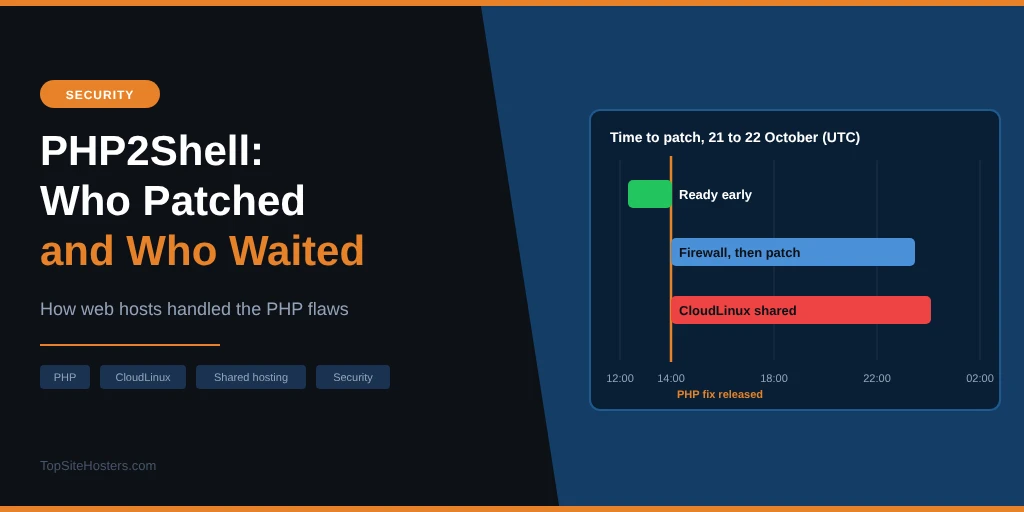
PHP released its fix for the PHP2Shell flaws at 14:00 UTC on 21 October. Within 45 minutes, Cloudflare was counting tens of thousands of attack attempts. Two hours later it was hundreds of thousands, and soon after, millions.
If your site is on shared hosting, you couldn’t do anything about that yourself. The moment your site was safe depended on your host, and often on the company that supplies your host’s PHP. Some hosts were protected before the fix came out. Others took their customers’ sites offline. Many shared hosts waited half a day for patched packages from CloudLinux.
Below: how the hosts we review responded, why so many shared hosting customers had to wait, and what to ask your host today.
PHP2Shell Is Now Being Exploited
PHP2Shell is the nickname for two critical flaws in PHP, CVE-2026-109618 and CVE-2026-109619, that let an attacker run code on a server without logging in. PHP fixed them in versions 8.5.12, 8.4.27, 8.3.36 and 8.2.35. If you missed the details, our article on the PHP security release explains how to check your version.
Since then, things have moved fast:
- Attacks started before the fix: Amazon’s threat intelligence team saw its first attempt on 17 October, four days before the release, and now says PHP2Shell is “broadly exploited in the wild”
- Exploit code is public: several versions have circulated since early on 21 October, and researchers have confirmed it works on Apache with mod_php
- Governments are warning: the UK’s National Cyber Security Centre told organisations to update immediately or take affected systems offline
- Old PHP is widespread: VirusTotal counted 5.1 million servers running PHP. Of those that show their version, about three quarters run a PHP version that no longer gets security fixes
Which Hosts Patched, and When
We checked the status pages and announcements of the hosts we review. Where a host published its own update, we say so. Where the information comes from other reporting, we mark it as reported. Times are in UTC and were last checked on 22 October 2026, 08:00 UTC.
| Host | Status | When (UTC) | Source |
|---|---|---|---|
| SiteGround | Protected before the release, no action needed from customers | 21 Oct, before 14:00 | Own blog |
| WordPress.com and Pressable | Protected before the release, worked with the PHP team in advance | 21 Oct, before 14:00 | Own blog |
| Hostinger | Firewall rules, then PHP patched on managed plans. VPS customers patch themselves | 21 Oct | Own blog |
| Hetzner (web hosting) | PHP 7.4 and 8.0 to 8.5 patched, PHP 5.6 and 7.3 the next morning | 21 Oct 17:50, 22 Oct 04:32 | Own status page |
| 20i | Patched, including older PHP versions | 21 Oct 20:01 | Own status page (reported) |
| IONOS | Updates rolled out on all hosting systems. VPS and dedicated customers patch themselves | 21 Oct, until about 21:00 | Own status page (reported) |
| Kinsta | Cloudflare rules, then patches rolling out for each PHP version | 21 Oct 23:25 | Own status page (reported) |
| WP Engine | CDN protection, then patches fully deployed | 22 Oct 01:19 | Own status page (reported) |
| Bluehost | Most servers patched, upload limits possible in the meantime | 21 Oct | Own status page (reported) |
| Rocket.net | Patching in waves | Into 22 Oct | Own status page (reported) |
| DreamHost | Patched, testing ongoing. PHP 8.1 and older rely on mitigations for now | 21 and 22 Oct | Reported |
| Namecheap | Mitigations on all platforms. Patch rollout reported overnight | From 21 Oct 13:31 | Own status page |
| InMotion | Dedicated servers patched. Shared hosting protected by a setting change, waiting for CloudLinux | 21 Oct 18:04 | Own announcement |
| GoDaddy | Managed WordPress patched. Web Hosting and Windows Hosting on mitigations, waiting for vendor |
A missing statement doesn’t mean a host didn’t patch. Many hosts fix things quietly and never post about it. But if your host is on that last row, a short support ticket will tell you where you stand.
Why Many Shared Hosts Had to Wait: CloudLinux
Most shared hosting runs on cPanel, and a large share of cPanel servers run on CloudLinux. CloudLinux is the operating system that keeps hundreds of customers on one server from slowing each other down. It also supplies its own PHP builds, called alt-php, which power the “Select PHP Version” option many shared hosting customers see in their control panel.
That has a consequence. When PHP releases a fix, hosts using alt-php can’t simply install it. They wait for CloudLinux to build, test and publish new packages for every PHP version and every operating system it supports. This is how that went, according to CloudLinux’s own status page:
| Time (UTC) | What happened |
|---|---|
| 21 Oct 09:26 | Imunify360 firewall rules released, described as “an interim mitigation, not a fix” |
| 21 Oct 14:00 | PHP releases the fix |
| 14:39 | First package: alt-php 7.4 only. Target for the rest set at 19:00 |
| 15:36 to 18:22 | More packages arrive, mostly PHP 7.4 and 8.0 |
| 20:18 | Large batch released, but PHP 8.2, 8.3 and 8.5 still missing on CloudLinux 8 and 9. New target about 21:15, PHP 8.5 about 22:30 |
| 22 Oct, around midnight | Packages reported in the stable repository |
So for many shared hosting customers on PHP 8.2 or 8.3, two widely used versions, the patch only reached their host 7 to 10 hours after the release. That’s the same window in which attack attempts went from thousands to millions.
There was a second catch. At 20:18 UTC, CloudLinux said it hadn’t yet published the security information that update tools use to recognise a package as a security fix. Hosts that automatically install only security updates wouldn’t have picked up the new packages without someone doing it by hand.
To be fair to CloudLinux, it had a much bigger job than PHP itself. PHP patched four versions. CloudLinux builds PHP from version 5.2 to 8.5 for many operating systems, and it backported the fix to old versions PHP no longer supports. Its firewall rules were also live hours before the release. But a firewall rule only blocks the attacks it knows about, and attackers were already changing their payloads to get around such rules.
Other control panels moved on their own schedules. cPanel’s EasyApache 4 shipped fixed PHP 8.2 to 8.5 and added fixes for 7.4, 8.0 and 8.1. DirectAdmin did the same, but has no fix for PHP 5.6 to 7.3. Plesk had patched PHP packages on release day, but the fix for its own control panel came later. One German host, netcup, kept its control panel offline until early on 22 October while it waited.
Three Ways Hosts Handled the Gap
Looking at the table, hosts fell into three groups.
Ready before the release. SiteGround and Automattic, which runs WordPress.com and Pressable, had protection in place before 14:00. Automattic worked with the PHP security team in advance. Their customers had nothing to do.
Firewall first, then patch. Hostinger, Kinsta, WP Engine and many others blocked known attacks at the firewall, then rolled out patched PHP over the following hours. That’s the most common approach, and it works as long as the firewall rules keep up with new attack variants.
Offline until fixed. Contabo took its shared hosting offline until it was patched. netcup and Mittwald, two German hosts, did the same as a precaution. It’s the safest option, and for a few hours it’s also the most painful one for site owners.
Running Your Own Server With Plesk, cPanel or DirectAdmin?
If you run your own VPS or dedicated server with a control panel, you’re the host, so the update is your job. The panel makers moved quickly. Here’s what each one shipped:
| Control panel | PHP 8.2 to 8.5 | PHP 7.4, 8.0 and 8.1 | Worth knowing |
|---|---|---|---|
| Plesk | Fixed on release day | Fixed, builds dated 21 October | The panel itself needs Obsidian 18.0.81 Update 4. The fix for 18.0.80 came later |
| cPanel (EasyApache 4) | Fixed in EasyApache 4 release 25.91 | Fix backported | Runs on CloudLinux? Update the alt-php packages as well |
| DirectAdmin | Fixed | Fix backported | No fix for PHP 5.6 to 7.3 |
| CloudLinux (alt-php) | Late on 21 October | Fixed, plus older versions | Security information followed later, so check that updates actually installed |
Three common mistakes:
- Updating only the default PHP version: a site pinned to another version in your panel stays exposed if that version wasn’t updated. Update every installed version and remove the ones you don’t use
- Trusting the version number: for PHP 7.4, 8.0 and 8.1, the patched package often shows the same version as before. Check the build date in your panel or package manager. It should be 21 October 2026 or later
- Forgetting the restart: PHP FPM needs a restart or reload before it uses the new version. Apache with mod_php needs a full restart
On Plesk, also check that the panel itself is on 18.0.81 Update 4 or later, under Tools & Settings, then Updates. On cPanel, check that automatic updates are turned on in WHM under Update Preferences, or run the EasyApache 4 update yourself.
What This Means When You Choose a Host
Price and speed get most of the attention when people compare hosts. A week like this shows two other things that matter.
How a host communicates. The hosts in the top half of our table published clear updates with times and PHP versions. You could check exactly where your site stood. If your host published nothing, you had no way of knowing.
Who controls the PHP. Hosts that build and manage their own PHP, or work closely with the PHP project, seem to have patched fastest. Hosts that depend on an outside supplier like CloudLinux could only move as fast as that supplier. Neither is wrong, but it’s worth knowing which kind of host you’re with.
Old PHP versions also became a real risk this week. PHP itself only fixed 8.2 and newer. Whether a site on 8.1 or older got a fix depended on what the host’s supplier backported. If your site still runs an old version, move it to PHP 8.3 or newer.
What to Do Now
First, check your PHP version. In WordPress, go to Tools, then Site Health, then the Info tab, and expand Server. You’re patched if it shows 8.5.12, 8.4.27, 8.3.36, 8.2.35 or newer. For PHP 8.1 and older, the version number doesn’t change when a backport is applied, so you’ll need to ask your host.
Then send your host a short message:
- Have you installed the PHP2Shell fix (CVE-2026-109618 and CVE-2026-109619) on my server?
- Does my account use CloudLinux alt-php, and if so, have the updated packages been installed?
- My site runs PHP [your version]. Is that version patched, or only protected by firewall rules?
Finally, check your site for signs it was hit while it was exposed: PHP files you didn’t add, especially in the uploads folder, unknown admin accounts and cron jobs you don’t recognise. If you find any, restore a backup from before the attacks began, ideally before 17 October, change your passwords and tell your host. A web application firewall such as Cloudflare’s free plan adds a layer of protection, but it doesn’t replace the PHP update.
Common Questions About PHP2Shell and Web Hosts
Has my web host patched PHP2Shell?
Check your host’s status page or blog first. Many published updates on 21 and 22 October. If you can’t find anything, ask support directly and check your PHP version in your control panel.
What is CloudLinux and why did it delay the fix?
CloudLinux is an operating system used on many shared hosting servers. It supplies its own PHP builds, so hosts using them had to wait for CloudLinux to package the fix. For PHP 8.2, 8.3 and 8.5, that took until late on 21 October or the early hours of 22 October.
Is my site safe if my host only used firewall rules?
Safer, but not fully safe. Firewall rules block known attack patterns, and attackers change their patterns. PHP’s own developers have said only the update fully fixes the flaws.
My host has said nothing. What should I do?
Open a support ticket and ask the three questions above. A host that can’t tell you whether it patched a critical flaw two days later is worth reconsidering.
Does PHP 8.1 get a fix on shared hosting?
Not from PHP itself. cPanel, DirectAdmin and CloudLinux have backported fixes to 8.1, 8.0 and 7.4, so many hosts can patch those versions. Older versions are often left without a fix. Moving to PHP 8.3 or newer is the safer choice.