Your site is running fine. Then it isn’t. Pages slow to a crawl during busy periods. You get a “Resource Limit Reached” error you’ve never seen before. A traffic spike from a campaign you ran brings the whole thing down for twenty minutes.
- What Shared Hosting Actually Is (And How It Works)
- The Noisy Neighbour Problem
- What a VPS Actually Gives You
- 7 Signs Your Site Has Outgrown Shared Hosting
- The Traffic Numbers: A Practical Guide
- When Upgrading Doesn’t Make Sense
- The Cost Reality
- Which VPS to Consider
- Common Questions About Shared Hosting vs VPS
- The Honest Summary
These aren’t random technical failures. They’re symptoms. And they usually point to the same cause: your site has outgrown shared hosting.
The question of when to upgrade is one of the most common in web hosting, and most answers you’ll find online are written by companies that want to sell you a VPS. So here’s the honest version: a lot of sites stay on shared hosting longer than they should, but plenty of others upgrade before they need to and end up paying for resources they don’t actually need.
This guide helps you figure out which situation you’re in.
What Shared Hosting Actually Is (And How It Works)
Shared hosting puts your website on a server alongside anywhere from dozens to hundreds of other sites. You all share the same physical hardware: the same CPU, the same RAM, the same storage drives.
Most people understand this in principle. What they don’t understand is how the limits actually work.
Many shared hosting providers, particularly those running cPanel on Linux, use software called CloudLinux with a system called LVE (Lightweight Virtual Environment) to enforce per-account resource limits. These limits are invisible during normal operation, but they’re always there. A typical shared hosting account might be allocated something like 100% of one CPU core, 1 to 2GB RAM, 20 to 30 entry processes, and a set I/O limit.
Those numbers mean different things in practice:
Entry processes are the number of simultaneous PHP processes your account can run. If you hit the limit of 20, any new request queues up and waits. During a traffic spike, this is usually the first thing that breaks. Visitors see slow pages or timeout errors while your server is technically working fine.
CPU limits are enforced in real time. If your account exceeds its CPU allocation, CloudLinux throttles it immediately. Your site doesn’t crash, it just gets slower. Mysteriously slower, with no obvious error message.
RAM limits cause 500 errors when exceeded. CloudLinux frees cached memory first, then kills processes if that’s not enough. From a visitor’s perspective, they just see a broken page.
The important thing to understand is that these limits exist regardless of what “unlimited” plans advertise. Unlimited bandwidth and unlimited storage are real in the sense that you’re not being charged by the gigabyte. But CPU, RAM, and concurrent processes are always capped. They have to be, or one account could consume the entire server.
The Noisy Neighbour Problem
There’s a separate issue that’s harder to diagnose and harder to fix: what happens when someone else on your shared server causes problems.
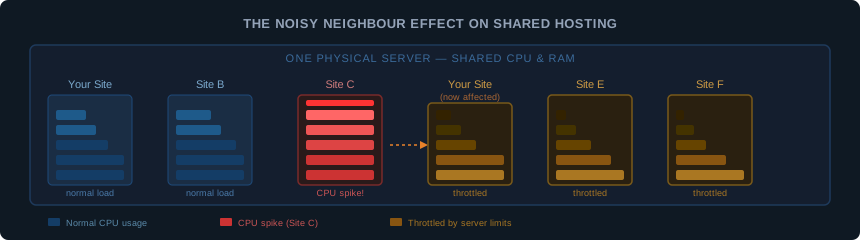
On a shared server, your resource allocation protects you from exceeding your own limits. What it doesn’t fully protect you from is the general performance of the server itself. If a neighbouring account gets hit by a bot attack, runs a memory-heavy backup job at midnight, or simply has a poorly coded site generating excessive database queries, the physical server gets slower for everyone on it.
This is called the noisy neighbour effect. It’s why your site can run beautifully one day and feel sluggish the next, with no changes on your end. The server is under pressure from something you can’t see and can’t control.
Good shared hosting providers manage this actively. They use CloudLinux to enforce hard limits per account, monitor for abuse, and suspend accounts that consistently consume disproportionate resources. Cheap, oversold shared hosting does none of this, and the noisy neighbour problem is constant.
This matters for the upgrade decision because if your performance problems are caused by a noisy neighbour rather than your own resource usage, upgrading your plan tier on the same host may not help. Moving to a VPS, or moving to a better managed shared host, would.
What a VPS Actually Gives You
A VPS (Virtual Private Server) uses virtualisation to divide a physical server into isolated virtual machines. Each VPS gets a guaranteed slice of the hardware: a fixed number of CPU cores, a set amount of RAM, and dedicated storage. Those resources are yours regardless of what other VPS instances on the same physical machine are doing.
The practical difference:
- On shared hosting, your RAM allocation is a soft ceiling that varies with server load
- On a VPS, your RAM is reserved and guaranteed
- On shared hosting, a CPU spike from a neighbour affects you
- On a VPS, your CPU cores are isolated from other instances
This isolation is what makes VPS hosting more reliable under load. It’s not that a VPS is faster in absolute terms. A well-configured shared hosting plan with LiteSpeed and NVMe storage can be faster for simple WordPress sites than a poorly tuned entry-level VPS. The difference is consistency. VPS performance doesn’t degrade because of what other people are doing.
VPS hosting comes in two forms worth understanding:
Unmanaged VPS gives you root access to a bare server. You install the operating system, configure the web server, manage security updates, set up backups, and handle everything yourself. It’s significantly cheaper but requires server administration skills. If you’ve never configured Nginx or hardened a Linux server, this is not where to start.
Managed VPS includes the infrastructure management. The host handles OS updates, security monitoring, server configuration, and support for server-level issues. You focus on your site. InMotion’s VPS plans include Tier 3 support meaning senior system administrators handle issues directly. ScalaHosting’s managed VPS uses their proprietary SPanel control panel as a cPanel alternative with built in security monitoring. These cost more than unmanaged, but the gap has narrowed considerably.
7 Signs Your Site Has Outgrown Shared Hosting
These are the signals that actually matter, in roughly the order they tend to appear.
1. Consistent slow load times despite optimisation
If you’ve already optimised images, enabled caching, minimised plugins, and tested your TTFB with our server response tester and it’s still slow, the bottleneck is likely the server. A well-optimised WordPress site on a good shared plan should load in under 2 seconds. Consistently above 3 seconds after optimisation is a signal.
2. Resource limit errors
Errors like “508 Resource Limit Reached”, “503 Service Unavailable”, or unexplained 500 errors that appear under load are the clearest signal. These mean CloudLinux is throttling your account because you’re hitting your CPU, RAM, or entry process limits. Your host’s dashboard may also show resource usage alerts.
3. Traffic spikes bring the site down
If a mention on social media, a newsletter send, or a campaign causes your site to slow severely or go offline, your shared plan can’t absorb the burst. A VPS handles spikes without affecting other sites because your resources don’t shrink when demand increases. You can test baseline uptime with our uptime calculator to get a sense of what downtime costs you over time.
4. Your host contacts you about resource usage
When a shared hosting provider emails you about excessive CPU or memory usage, they’re telling you directly that you’ve outgrown the plan. This is the clearest possible signal. Most hosts try to work with you before suspending an account, but repeated resource warnings mean the upgrade conversation is overdue.
5. You need server configurations shared hosting won’t allow
Custom PHP extensions, specific PHP versions your host doesn’t support, Redis or Memcached for caching, Node.js applications, custom server rules. Shared hosting restricts what you can install and configure because changes affect other accounts on the same server. If your development requirements have hit these walls, a VPS is the right move regardless of traffic levels.
6. You’re running multiple high-traffic sites
Shared hosting plans that allow multiple sites still pool all those sites into your single resource allocation. Two sites that are each fine individually can together exceed your CPU and entry process limits regularly. This often surfaces as both sites slowing down at the same times.
7. E-commerce with real transaction volume
An online shop processing payment transactions needs reliable, consistent performance. A checkout page that times out loses the sale and often the customer permanently. If your e-commerce site is generating meaningful revenue, the cost of inconsistent shared hosting performance is higher than the cost of a VPS upgrade.
The Traffic Numbers: A Practical Guide
One of the most common questions is “how many visitors can shared hosting handle?” The honest answer is: it depends entirely on what those visitors are doing.
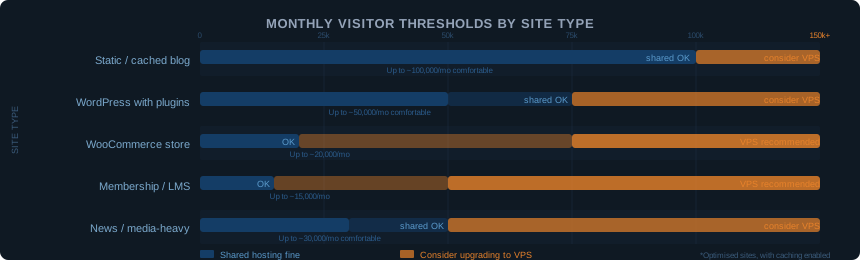
A simple blog with well-cached pages can handle 100,000 monthly visitors on a decent shared plan with no issues. A WooCommerce store running complex database queries on every page load might struggle at 10,000 monthly visitors on the same plan.
Some practical reference points:
| Site Type | Shared hosting comfortable range | Consider VPS above |
|---|---|---|
| Static or cached blog | Up to 100,000/mo | 150,000+/mo |
| WordPress with plugins | Up to 50,000/mo | 75,000+/mo |
| WooCommerce store | Up to 20,000/mo | 30,000+/mo |
| Membership or LMS site | Up to 15,000/mo | 20,000+/mo |
| News or media-heavy site | Up to 30,000/mo | 50,000+/mo |
These are rough guides, not hard limits. The real variable is how resource-intensive each page request is. A cached WordPress page might use 10ms of CPU. An uncached WooCommerce page calculating shipping, checking inventory, and querying the database might use 500ms. The same traffic level produces very different server load depending on which pages visitors are hitting.
The most reliable signal isn’t a visitor number. It’s whether your site is hitting its resource limits, which you can check in your hosting control panel.
When Upgrading Doesn’t Make Sense
The upgrade conversation goes wrong when people treat VPS as a prestige step rather than a practical one. A VPS is not inherently better than shared hosting. It’s a different trade-off.
Don’t upgrade to VPS if:
You haven’t optimised your site first. A slow WordPress site is often slow because of unoptimised images, too many plugins, no caching, or a heavy theme, not because of the hosting. Fix those things first. They’re free. An optimised site on good shared hosting consistently outperforms an unoptimised site on a VPS.
You’re below the traffic thresholds. If you’re getting 10,000 monthly visitors and not seeing resource limit errors, shared hosting is working fine. Upgrading costs money, time and technical overhead you don’t need to spend.
You’re not prepared to manage a server. An unmanaged VPS with no one maintaining it is worse than good shared hosting. Security patches don’t apply themselves. If you don’t have the technical skills or the budget for managed VPS, stay on shared hosting with a reputable provider until you do.
Your problems might be fixable by switching shared hosts. Sometimes the issue isn’t that you need a VPS. It’s that your current shared host oversells their servers and manages them poorly. Moving to a better shared host, one that runs LiteSpeed, uses NVMe storage, and enforces proper CloudLinux limits, can solve performance problems that look like outgrown hosting but are actually just a bad host.
The Cost Reality
The price gap between shared hosting and VPS has narrowed significantly. Premium shared hosting plans from providers like Hostinger, SiteGround, and InMotion run $10 to $25 per month at renewal. Entry-level managed VPS from Hetzner starts at around $4 per month for 2 vCPU and 4GB RAM with full root access. InMotion’s managed VPS starts at $14.99 per month introductory with 4 vCPU, 8GB RAM, and Tier 3 support included.
The cost comparison used to be simple: shared hosting is cheap, VPS is expensive. That’s no longer true at the entry level. The real cost difference comes from management overhead. An unmanaged VPS at $5 per month might cost you several hours of admin time per month. A managed VPS at $25 per month includes that time in the price.
Factor the total cost of ownership, not just the monthly invoice.
Which VPS to Consider
If you’ve decided the upgrade makes sense, here are the providers worth looking at based on what you need:
For developers and technical users who want maximum value: Hetzner offers some of the best raw specs per euro in the European market. Unmanaged, which means you configure and maintain the server yourself. Excellent for anyone comfortable with Linux administration.
For businesses wanting managed VPS with good support: InMotion includes Launch Assist (valued at $199) with their VPS plans, where their team helps you configure the server. Tier 3 support routes issues to senior system administrators. US data centres plus Amsterdam EU for GDPR compliance.
For cPanel users wanting a managed upgrade path: ScalaHosting offers managed VPS with their own SPanel control panel, which replicates cPanel without the licence cost. Good mid-tier option for WordPress site owners stepping up from shared hosting.
Common Questions About Shared Hosting vs VPS
How do I know if I’m hitting my shared hosting limits?
Log into your hosting control panel and look for a resource usage section. Most cPanel hosts show CPU, RAM, and entry process usage. If you’re regularly above 80% on any of these during normal traffic periods, you’re close to the ceiling. Your host may also send email alerts when limits are approached.
Can I upgrade from shared to VPS without downtime?
Yes, with proper planning. Most managed VPS providers offer free migration assistance. The process involves setting up the new server, moving your files and databases, testing everything on the new server, then switching DNS. If done correctly, downtime is under a few minutes. Our guide on moving a WordPress site to a new host covers the process in detail.
Is managed WordPress hosting a better option than VPS?
For WordPress sites specifically, managed WordPress hosting is worth comparing alongside VPS. Providers like Kinsta and Rocket.net run WordPress on containerised cloud infrastructure with server-level caching, staging environments, and WordPress-specific support. It costs more than entry-level VPS but less than enterprise VPS, and you get WordPress-optimised performance without any server management overhead.
Will upgrading to VPS improve my SEO?
Indirectly, yes. Faster and more consistent page load times improve Core Web Vitals, which are a Google ranking signal. If your shared hosting is causing slow TTFB or intermittent downtime, a VPS upgrade addresses those technical factors. But hosting alone doesn’t improve rankings.
Content quality, backlinks, and on-page optimisation matter far more, and the way those factors interact in competitive markets is more nuanced than most SEO advice acknowledges. We cover that in depth in what SEO gets wrong when the stakes are actually high.
What’s the difference between managed and unmanaged VPS?
Unmanaged VPS gives you a bare server with root access. You configure and maintain everything. Managed VPS includes server setup, security monitoring, OS updates, and technical support for server-level issues. Unmanaged is cheaper and gives you more control. Managed costs more but removes the technical overhead. If you don’t have server administration experience, managed is the right choice.
How much traffic can a VPS handle?
A well-configured entry-level VPS with 2 vCPU and 4GB RAM can comfortably handle 100,000 to 500,000 monthly visitors for a typical WordPress site with good caching. The upper limit depends entirely on how resource-intensive each page request is and how well the server is configured. Most sites upgrading from shared hosting will find an entry-level VPS comfortably exceeds their needs for several years of growth.
The Honest Summary
Shared hosting works well until it doesn’t. For most small to medium sites, that transition happens somewhere between 25,000 and 100,000 monthly visitors, but traffic volume is only one variable. The real signal is resource limits: consistent errors, slow performance under load, and a host telling you directly that you’re consuming too much.
When those signals appear, and you’ve already optimised what can be optimised, a managed VPS is the right next step. The cost difference is smaller than it used to be. The performance difference is meaningful. The management overhead of a managed VPS is low enough that it doesn’t require server administration skills.
The worst time to upgrade is before you need to. The second worst time is after performance problems have already cost you visitors and conversions.
Check your resource usage now, before the signals become problems.
All pricing mentioned in this article is for reference only and may differ from current rates. Always verify the latest pricing directly with the provider before making a decision.