Search “web hosting” and you’ll find thousands of providers, all claiming to be the fastest, most reliable, and best value. Introductory prices start at a few dollars a month. Plans come with unlimited everything. The marketing is relentless and almost entirely useless for making an actual decision.
This guide cuts through it. No rankings, no affiliate-driven recommendations dressed up as advice. Just a clear framework for matching the right hosting type to your site, the specs worth paying attention to, and a pre-purchase checklist that covers what most buyers miss.
Start With What Your Site Actually Needs
Before you look at a single hosting plan, answer three questions about your site. The answers do most of the work.
What kind of site is it? A blog, a business site, a WooCommerce store, a membership site, and a portfolio have genuinely different requirements. WooCommerce needs reliable database performance and solid uptime, because a slow checkout or a brief outage during high traffic costs you money. A membership site needs consistent performance under logged-in user load. A simple blog needs very little. Knowing your site type narrows the field immediately.
What CMS are you using? WordPress powers around 43% of the web and almost every hosting provider is optimised for it in some way. Some hosts are WordPress-only. Others support any CMS. If you’re running Drupal, Joomla, or a custom application, your options are different from someone running WordPress. Know before you start comparing.
What is your technical confidence level? If you’re comfortable managing a server, configuring software, and troubleshooting via SSH, a VPS or cloud environment opens up more options at better value. If you want to log in, publish content, and not think about the hosting layer, shared hosting or managed WordPress is the right fit. Neither answer is wrong. The mismatch between your confidence level and your hosting type is what causes problems.
Match Your Hosting Type to Your Use Case
There are five main hosting types. Here’s where each one fits.
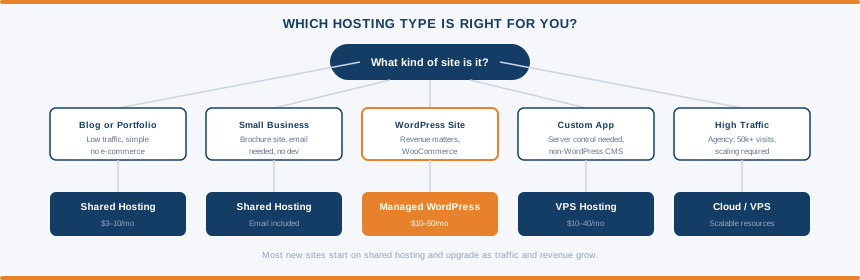
Simple blog, portfolio, or small business site with no e-commerce: Shared hosting covers almost everything at this level. Multiple websites share the same server and resources, which keeps the price low. Technical overhead is minimal. Performance is adequate for sites with modest traffic and straightforward requirements. It’s where most sites start and where many stay indefinitely without any problems.
WordPress site that needs to be reliable, with specific plugin requirements and no in-house developer: Managed WordPress hosting removes the maintenance burden. The host handles WordPress core updates, server-level caching, security, and backups. You focus on running the site. Worth the premium for business sites and WooCommerce stores where reliability directly affects revenue.
Non-WordPress application, need for server control, or want dedicated resources without managing the server entirely yourself: VPS hosting gives you an isolated slice of server resources that aren’t shared with other accounts. More control, more flexibility, more responsibility than shared hosting. Managed VPS options exist if you want the resources without the server administration overhead.
Agency managing multiple client sites, or a site generating significant revenue: Managed WordPress or VPS at minimum. Cloud hosting is worth considering at this scale. Resources scale on demand rather than being fixed, which handles traffic spikes without you doing anything.
High-volume site with custom configuration requirements, dedicated resources, or compliance needs: Dedicated server hosting puts the entire physical server at your disposal. The most powerful and most expensive option. Relevant for a small percentage of sites.
The Specs That Actually Matter
Hosting plan specs are often padded with numbers that sound impressive but don’t translate to real-world performance. Here are the ones worth paying attention to.
Storage type. NVMe SSD is faster than standard SSD. Standard SSD is faster than HDD. Most modern shared hosts use SSD at minimum, but budget plans sometimes still run on older HDD-based storage. Check which you’re actually getting rather than assuming.
PHP workers. This determines how many simultaneous requests your site can process at once. More workers means better performance when multiple visitors are on the site at the same time. PHP worker allocation is often not listed on basic shared plans. It’s a meaningful spec on managed WordPress and VPS plans where you can see exactly what you’re getting.
Uptime guarantee. A 99.9% uptime guarantee allows for around 8.7 hours of downtime per year. A 99.99% guarantee allows around 52 minutes. The percentage matters less than the SLA behind it. What does the provider actually do if they breach their uptime guarantee? Credits, refunds, or nothing? Check the terms.
Data centre location. Server location affects time to first byte for visitors in that region. A host with data centres in Europe is faster for European visitors than one with US-only infrastructure. If your audience is geographically concentrated, data centre location is a meaningful differentiator. If your audience is global and the host includes a CDN, it matters less.
Bandwidth. Most modern shared hosting plans offer unmetered or generous bandwidth allocations. For new sites this is rarely a concern. It becomes relevant for sites hosting large downloadable files or video.
What to Check Before You Pay
The hosting sales page shows you what the provider wants you to see. Here’s the checklist for what to look for yourself before committing.
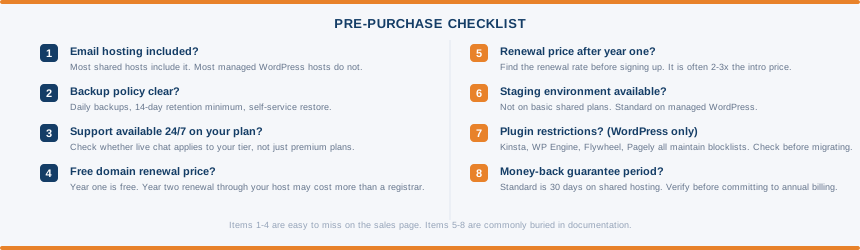
Does it include email? Most shared hosting plans include business email as standard. Most managed WordPress hosts do not. If you need a professional email address at your domain, verify whether the plan includes it before signing up. Finding out after the fact means either paying extra for an add-on or setting up a separate email provider like Google Workspace.
What is the backup policy? How often are backups taken, how long are they retained, and is restoring from a backup self-service or does it require a support ticket? Daily automated backups with at least 14 days of retention and one-click restore is the baseline worth looking for. Anything less deserves scrutiny.
Is there a staging environment? A staging environment lets you create a private copy of your live site to test updates, new plugins, or design changes before they go public. Not included on basic shared plans. Standard on managed WordPress hosting. If you make regular changes to a live site, having staging available is worth confirming before you commit.
What are the support channels and hours? Live chat is better than ticket-only support for urgent issues. Phone support adds another option when things are serious. Check whether 24/7 support is available on your specific plan or only on higher tiers. Some providers list 24/7 support as a feature but bury the fact that it applies only to premium plans.
Is there a free domain? Most annual plans include a free domain for year one. The renewal price for that domain through the hosting provider is often significantly higher than at a dedicated registrar. Namecheap and similar registrars typically renew .com domains for $10-12 per year. Some hosting providers charge $20 or more. Worth transferring the domain to a separate registrar at renewal.
What is the money-back guarantee? The standard on shared hosting is 30 days. Some providers offer more. Verify the policy before committing to an annual plan, especially if you haven’t used the provider before.
What is the renewal price? Most hosts advertise introductory rates locked to a long-term commitment. The price after that first term is significantly higher. A plan advertised at $2.99/mo commonly renews at $8.99/mo or more. Find the renewal rate before signing up.
If You’re Running WordPress
Almost every mainstream hosting provider supports WordPress. The question is which environment suits your specific needs.
Shared hosting works well for WordPress sites at moderate traffic. You manage plugin and theme updates yourself, configure caching through a plugin, and handle security either manually or through a security plugin. The technical overhead is manageable for most site owners and the price is low.
Managed WordPress hosting removes that maintenance layer entirely. Updates, caching, and security run at the server level. You gain reliability and performance at the cost of flexibility and price. For business sites and WooCommerce stores where the site generates revenue, that trade-off is usually worth it.
One specific thing to check before committing to a managed WordPress host: plugin restrictions. Kinsta, WP Engine, Flywheel, and Pagely all maintain lists of plugins that are not permitted on their infrastructure. Caching plugins and certain backup tools are the most commonly restricted categories, because the host already handles those functions at server level and plugin-level duplication causes conflicts. Check the blocklist of any managed WordPress host before migrating an existing site. This does not apply to managed VPS hosting.
How to Test a Host Before You Commit
Most people choose a host based on a review article and a price. A few extra steps give you a much better signal about what you’re actually signing up for.
Raise a pre-sales question via live chat and time the response. Ask something specific about the plan you’re considering, such as whether plugin X is supported or what the PHP worker allocation is on a particular tier. The speed and quality of the response is a reasonable proxy for the support you’ll receive as a paying customer. A vague answer or a long wait before you’ve spent a penny is informative.
Check their status page. Reputable hosting providers publish a public status page showing historical uptime and the timeline of past incidents. Look for a history going back at least six months. A host without a status page, or one that shows only green regardless of what you’ve read elsewhere, is a yellow flag. A host that publishes honest incident reports with clear timelines is generally one that takes reliability seriously.
Test server response time on their own site. Use our server response tester to check TTFB on the host’s marketing or documentation site. It runs on their own infrastructure. Not a perfect proxy for how your site will perform, but a hosting provider whose own website is slow on their own servers is telling you something.
Search for recent outage reports. A quick search for “[host name] down” or “[host name] outage” on Twitter/X surfaces recent complaints quickly. Every host has incidents. A pattern of complaints over recent weeks is a more useful signal than a single bad review from two years ago.
Frequently Asked Questions
How much should I pay for web hosting? For a basic blog or small business site, shared hosting at $3 to $8 per month covers your needs. Managed WordPress hosting starts around $3.49/mo at the budget end and goes to $25-50/mo for premium providers. VPS hosting typically starts at $10-20/mo. The more useful question is what your second-year cost will be after introductory pricing expires.
Does web hosting include a domain name? Most annual shared hosting plans include a free domain for the first year. After that, the domain renews separately, often at a higher price than dedicated registrars. Domain registration and web hosting are separate services even when bundled together at signup.
What is the difference between shared and VPS hosting? On shared hosting, your website shares server resources with many other websites. On VPS hosting, you get a dedicated allocation of CPU, RAM, and storage that isn’t shared. VPS is more expensive but provides more consistent performance and greater control. Our shared vs VPS guide covers when to make the switch.
What uptime percentage should I look for? 99.9% is the industry standard minimum. Better providers offer 99.95% or 99.99%. More important than the percentage is the SLA backing it. Check what compensation the host provides if they breach their uptime guarantee. A 99.99% guarantee with no SLA is worth less than a 99.9% guarantee backed by meaningful credits.
Is cheap web hosting safe? Reputable budget hosts like Hostinger run legitimate, secure infrastructure at low introductory prices. The risks with cheap hosting are more about performance and support quality than security. Shared servers can be slow under load, and support on budget plans is often limited to ticket or email only. Security basics like SSL, firewalls, and malware scanning are standard even on cheap plans from reputable providers.
Can I switch hosting providers later? Yes. Moving a WordPress site to a new host is a standard process. Most hosts offer migration assistance or one-click migration tools. The main considerations are timing the DNS change to minimise disruption and ensuring your database and files transfer cleanly.