If your site runs on shared hosting or sits behind Cloudflare, the short answer is you probably don’t need to do anything. The longer answer depends on your setup.
- This Isn’t Just a Let’s Encrypt Change
- What’s Actually Changing and When
- What This Means Depending on How Your Site Is Set Up
- The One Setup That Actually Needs Attention
- What About Paid SSL Certificates?
- The Bigger Picture: Why Shorter Is More Secure
- How to Check Your Current SSL Status
- Common Questions About SSL Certificate Changes
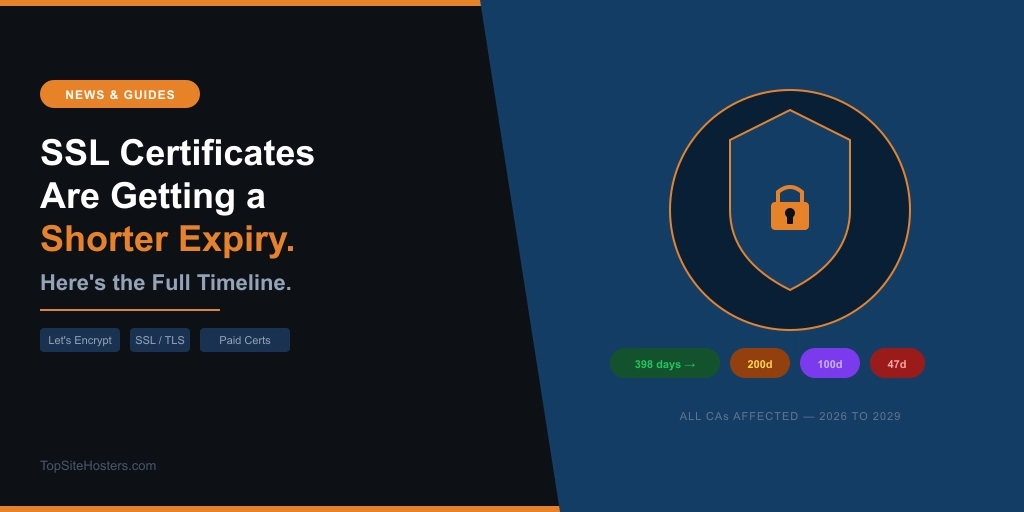
SSL certificates are getting shorter-lived across the entire web industry, not just from Let’s Encrypt. The change is already underway. DigiCert, one of the largest paid certificate authorities in the world, capped new certificates at 199 days from February 24, 2026. Let’s Encrypt is doing the same, on its own faster timeline. By 2028 on Let’s Encrypt, and by 2029 for the industry as a whole, the maximum certificate lifetime will be 47 days.
That sounds alarming. For most site owners, it isn’t. For some, it requires a specific fix. This post breaks down who needs to act and who doesn’t.
This Isn’t Just a Let’s Encrypt Change
Most headlines about this topic focus on Let’s Encrypt. That framing misses the bigger story.
The CA/Browser Forum is the industry body that sets the rules for SSL and TLS certificates. Its members include Apple, Google, Mozilla, Microsoft, DigiCert, Sectigo, Comodo, and every other major certificate authority and browser vendor. In April 2025, they voted overwhelmingly to mandate shorter certificate lifetimes across the entire industry. The ballot passed with support from all four major browser vendors.
That means if you pay for an annual SSL certificate from your hosting provider, that certificate is also affected. The one-year SSL renewal you’ve been buying for years is being phased out. New certificates issued after March 15, 2026 can be a maximum of 200 days. After March 2027, the maximum drops to 100 days. By 2029, 47 days.
Let’s Encrypt is simply moving faster than the mandate requires, which is consistent with their history. They were the ones who pushed the industry toward 90-day certificates years ago when most certificates were valid for one to two years.
What’s Actually Changing and When
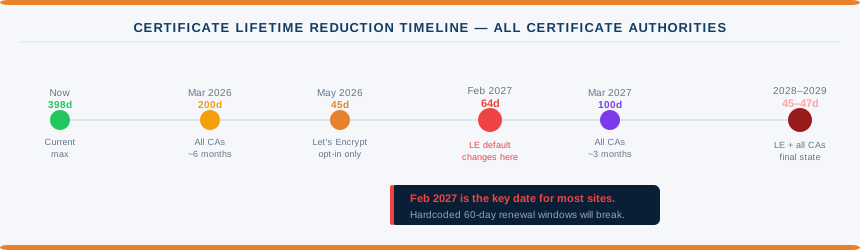
Two parallel timelines are running simultaneously. One covers the entire industry. The other is Let’s Encrypt specifically.
| Date | What Changes | Who It Affects |
|---|---|---|
| Feb 24, 2026 | DigiCert caps new certificates at 199 days | Paid SSL certificates from DigiCert |
| Mar 15, 2026 | All CAs: maximum certificate lifetime drops to 200 days | All paid and free SSL certificates |
| May 13, 2026 | Let’s Encrypt: opt-in 45-day certificates available | Let’s Encrypt users who opt in |
| Feb 10, 2027 | Let’s Encrypt default switches to 64-day certificates, 10-day auth reuse | All Let’s Encrypt users on default profile |
| Mar 15, 2027 | All CAs: maximum drops to 100 days | All paid and free SSL certificates |
| Feb 16, 2028 | Let’s Encrypt default switches to 45-day certificates, 7-hour auth reuse | All Let’s Encrypt users on default profile |
| Mar 15, 2029 | All CAs: maximum drops to 47 days | All paid and free SSL certificates |
The February 2027 row is highlighted because it’s the date that matters most for the majority of site owners. May 2026 is opt-in only. February 2027 is when the Let’s Encrypt default changes, and that’s when any automation configured around a 60-day renewal window will start failing.
What This Means Depending on How Your Site Is Set Up
The impact varies significantly depending on where your SSL certificate comes from and how it’s managed.
Shared hosting with cPanel and AutoSSL
cPanel’s AutoSSL feature runs daily checks and triggers renewal when a certificate is within 15 days of expiry. On a 45-day certificate, that means renewal at day 30. On a 90-day certificate, the same logic applies. The renewal window is based on time remaining, not certificate lifetime, so AutoSSL adapts automatically. Standard shared hosting on cPanel requires no action from you.
The only scenario where cPanel users could see problems is if their hosting provider is running a very outdated cPanel version with an equally outdated AutoSSL module. For the vast majority of users on mainstream hosts, this isn’t a concern.
Shared hosting with Plesk and SSL It!
Plesk’s SSL It! extension renews Let’s Encrypt certificates 30 days before expiry by default, via an hourly scheduled task. On a 45-day certificate, renewal at 30 days before expiry means renewing at day 15. That’s fine. The extension handles it automatically.
The configurable value is renew-before-expiration in panel.ini. The default is 30 days. Unless a server administrator has changed that to something unusual, Plesk users are unaffected.
Sites behind Cloudflare
Cloudflare issues its own Universal SSL certificates to visitors. These are Cloudflare’s certificates, not Let’s Encrypt’s, and Cloudflare manages their renewals entirely independently. The Let’s Encrypt lifetime changes have zero impact on what your visitors see.
The origin certificate, which runs between Cloudflare and your hosting server, may use Let’s Encrypt if your host provisions it that way. Cloudflare handles that chain separately as well. For sites proxied through Cloudflare, there is nothing to do.
WordPress.com, Wix, Squarespace, and other hosted builders
The platform manages SSL entirely. No action needed.
The One Setup That Actually Needs Attention
VPS users running certbot with hardcoded renewal intervals.
If you have a cron job configured to run certbot every 60 days, that configuration breaks in February 2027 when Let’s Encrypt’s default certificate lifetime drops to 64 days. A 60-day renewal interval on a 64-day certificate means you’re either trying to renew before the current renewal window opens, or you’re cutting it too close and one missed run causes an expired certificate.
The fix has two parts.
First, update certbot. Version 4.1.0, released in June 2025, added support for ACME Renewal Information (ARI). With ARI, Let’s Encrypt tells your certbot client when to renew based on the actual certificate lifetime, rather than your client guessing based on a hardcoded interval. If you’re below 4.1.0, update now.
Check your version:
certbot --version
Update on Ubuntu or Debian:
sudo apt update && sudo apt upgrade certbot
Second, if you can’t update certbot immediately, change your renewal cron to run every 30 days instead of 60. This works safely at any certificate lifetime Let’s Encrypt currently issues or plans to issue.
The same applies to any other ACME client with a hardcoded renewal interval. The principle is the same: the interval must be shorter than the certificate lifetime, with enough buffer to handle a failed run or two.
What About Paid SSL Certificates?
A lot of hosting providers sell paid SSL certificates bundled into their plans or as optional add-ons. If you’ve been renewing an annual SSL certificate from your host, those certificates are also subject to the CA/Browser Forum mandate.
DigiCert has already moved. New certificates issued by DigiCert from February 24, 2026 are capped at 199 days. Sectigo, Comodo, and other major CAs will follow the same mandate on the same schedule.
What this means practically: if you paid for a one-year SSL renewal before March 15, 2026, your certificate will run its full term. After that date, new certificates issued by any CA are capped at 200 days. Hosting providers that currently charge for annual SSL renewals will need to update their renewal workflows and billing cycles. Some already have.
For users on shared hosting where the host manages SSL on your behalf, this change should be invisible. Your host should handle the shorter renewal cycle automatically. Worth checking with your host if you have a manually provisioned paid certificate and you’re not sure whether renewals are automated.
The Bigger Picture: Why Shorter Is More Secure
The reason for all of this is security, and the logic is straightforward.
If a private key is stolen or a certificate is mis-issued, a shorter lifetime limits how long that certificate can be abused before it expires naturally. A stolen certificate valid for one year is a problem for one year. The same certificate valid for 45 days expires in 45 days regardless of what anyone does to revoke it.
Certificate revocation has always been the weak point in the system. The mechanisms for telling browsers “this certificate is no longer valid” are slow, unreliable, and often ignored. Shorter lifetimes reduce dependence on revocation actually working. The certificate ages out before the revocation message even matters.
The third driver is automation. Manual certificate management is error-prone. Certificates expire because someone forgot to renew. Making certificates expire more frequently forces the adoption of automated renewal tools, which eliminates the human error that causes the vast majority of SSL-related outages.
A new validation method called DNS-PERSIST-01 is in development and expected to arrive in 2026. It will allow a single persistent DNS record to authorise ongoing certificate issuance without updating DNS at every renewal, removing the main remaining friction point for automated wildcard certificate management.
The direction is clear and it’s not reversing. The question for site owners is whether their setup handles automation, or whether it still relies on someone remembering to renew.
How to Check Your Current SSL Status
If you want to see exactly what certificate your site is using, who issued it, and when it expires, the SSL Checker pulls that data live from your domain. Enter your URL and it returns the issuer, expiry date, and security grade.
A certificate issued by Let’s Encrypt will show “Let’s Encrypt” as the issuer. A certificate managed by Cloudflare will show a Cloudflare issuer. A paid certificate from your hosting provider will show the CA name, typically DigiCert, Sectigo, or similar. That tells you which of the setups described above applies to your site.
If the certificate is expiring within 30 days and you’re not sure whether auto-renewal is configured, contact your hosting provider and ask. Most mainstream hosts have auto-renewal enabled by default. The ones that don’t should.
Common Questions About SSL Certificate Changes
Do I need to do anything if I’m on shared hosting?
Almost certainly not. cPanel’s AutoSSL and Plesk’s SSL It! both handle renewals automatically and adapt to shorter certificate lifetimes without any configuration changes. Your host manages the process.
Does this affect my Cloudflare SSL?
No. Cloudflare manages its own Universal SSL certificates independently. What your visitors see is Cloudflare’s certificate, not Let’s Encrypt’s. The 45-day change has no impact on Cloudflare-proxied sites at the visitor layer.
When does the Let’s Encrypt default actually change?
May 2026 is opt-in only. The default profile changes to 64-day certificates on February 10, 2027. The default switches to 45-day certificates on February 16, 2028.
What if I manually renew my SSL certificate?
Manual renewal will become increasingly impractical as lifetimes shorten. A 45-day certificate renewed manually means renewing every six weeks. The strong recommendation from Let’s Encrypt and the wider industry is to switch to automated renewal now rather than waiting until manual management becomes untenable.
Are paid SSL certificates also affected?
Yes. The CA/Browser Forum mandate applies to all publicly trusted certificate authorities, not just Let’s Encrypt. DigiCert already capped new certificates at 199 days from February 24, 2026. All other major CAs follow the same phased schedule, reaching a 47-day maximum by March 2029.
Information verified April 2026. Check letsencrypt.org and your hosting provider’s documentation for the latest details.