Service Level Agreements Explained
An SLA (Service Level Agreement) is a formal commitment from your hosting provider guaranteeing specific levels of service.
Every hosting provider promises reliability. An SLA is where that promise gets specific. It’s the part of your contract that says “here is exactly what we’re committing to, and here is what happens if we don’t deliver.”
- What an SLA covers
- What uptime percentages actually mean
- What counts as downtime
- Service credits: what you actually get when they miss the SLA
- How to claim an SLA credit
- SLA vs uptime guarantee: is there a difference?
- What a good hosting SLA looks like
- Managed hosting SLAs vs shared hosting
- Monitoring your own uptime
Most people never read their hosting SLA. That’s a mistake, because the details matter a lot more than the headline percentage.
What an SLA covers
A web hosting SLA typically covers three areas.
Uptime. The percentage of time your server and website will be operational. This is the headline figure most providers advertise. 99.9%, 99.95%, 99.99%. Each percentage point represents a significant difference in allowed downtime.
Response times. How quickly the provider will respond when something goes wrong. Some SLAs distinguish between different severity levels: a site being completely down gets a faster response commitment than a minor performance issue.
Resolution times. How long the provider has to fix a problem once they’ve acknowledged it. Not all SLAs include this, and it’s arguably more useful than the response time commitment.
Some enterprise-level SLAs also cover network availability, storage performance, and data recovery timelines. For most shared and VPS hosting, uptime is the primary metric.
What uptime percentages actually mean
The numbers look similar but represent very different amounts of potential downtime per year.
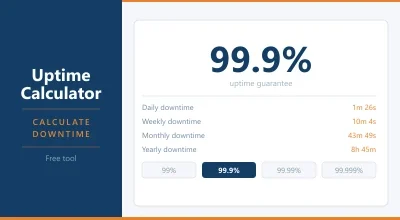
The difference between 99.9% and 99.99% is roughly 8 hours of allowed downtime per year. For a small blog, that might be acceptable. For an e-commerce site doing hundreds of transactions a day, every minute of downtime has a direct revenue cost.
The short version: 99.9% is baseline. 99.95% is decent. 99.99% is what hosting providers targeting business users typically promise.
| Uptime Guarantee | Downtime Per Year | Downtime Per Month |
|---|---|---|
| 99% | 87.6 hours | 7.3 hours |
| 99.5% | 43.8 hours | 3.65 hours |
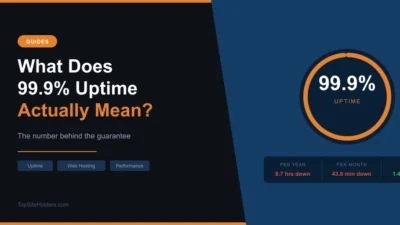
| 99.9% | 8.76 hours | 43.8 minutes |
| 99.95% | 4.38 hours | 21.9 minutes |
| 99.99% | 52.6 minutes | 4.4 minutes |
| 99.999% | 5.26 minutes | 26 seconds |
What counts as downtime
This is where SLAs get complicated, and where providers can be less than straightforward.
Many SLAs only count downtime that the provider considers “unplanned” and “their fault.” Scheduled maintenance windows are often excluded. Brief intermittent outages below a certain threshold might not count. Network issues caused by upstream providers (rather than the host itself) may be excluded.
Some SLAs calculate downtime on a monthly basis rather than annual. So a 99.9% monthly SLA allows 43.8 minutes of downtime per month. That’s 8.76 hours per year. Phrasing it as “99.9% monthly” sounds equivalent to “99.9% annual” but produces very different actual commitments depending on how months are counted.
Read the definition of downtime carefully. The headline percentage only means something if the definition of “downtime” is honest.
Service credits: what you actually get when they miss the SLA
Here’s the part that surprises most people. When a host fails to meet their SLA, the compensation is almost never a cash refund. It’s a service credit, a reduction on a future bill.
Typical credit structures look like this:
- Uptime between 99.0% and 99.9% of monthly uptime: 10% credit
- Uptime between 95% and 99%: 25% credit
- Uptime below 95%: 50% credit
On a £10 per month shared hosting plan, a 25% credit is £2.50 off your next bill. Not exactly life-changing compensation for hours of downtime.
Enterprise and business hosting SLAs tend to be more meaningful. Some providers offer service credits worth several months of fees. A few offer 100% refunds for violations. But on budget shared hosting, the SLA credit is more of a goodwill gesture than genuine compensation.
How to claim an SLA credit
Most providers don’t automatically issue credits. You have to request them. Typically within a specific window after the incident, often 30 days.
To make a claim you’ll usually need evidence of the outage. Your server access logs, uptime monitoring data, or records from a third party monitoring tool. The provider will cross reference this against their own incident logs.
This is one reason running your own uptime monitoring is useful. Services like UptimeRobot (free) or Better Uptime check your site every minute and log every outage with timestamps. That data is your evidence if you ever need to make a claim.
SLA vs uptime guarantee: is there a difference?
Technically, yes. An uptime guarantee is a promise about availability. An SLA is a formal agreement that includes the guarantee plus the consequences if it’s missed.
In practice, hosting companies use these terms interchangeably. When you see “uptime guarantee” without an accompanying SLA document, it’s worth asking: what actually happens if you miss it?
Some hosts promise 99.9% uptime in their marketing but bury in the terms that “this is an aspiration, not a contractual commitment.” That’s not an SLA. That’s a marketing line.
A real SLA is a legal document, part of your service contract, with specific defined terms and defined remedies.
What a good hosting SLA looks like
Clear percentage with a clear definition of downtime. Not just “99.99% uptime” but “99.99% uptime, calculated on a rolling monthly basis, excluding scheduled maintenance of less than X hours with Y hours’ notice.”
Meaningful credits. The compensation should be proportional to the impact. Some business hosting SLAs offer credits worth 10x or more the cost of the affected period.
No excessive exclusions. Some SLAs exclude so many scenarios (scheduled maintenance, force majeure, third party network issues, issues caused by your content or code) that the guarantee becomes almost worthless. The exclusion list should be reasonable, not a loophole catalogue.
A clear claims process. How do you submit a claim? What evidence do you need? How quickly will it be processed?
Response and resolution commitments. Not just “we’ll be available” but “we’ll respond to critical issues within X minutes and resolve them within Y hours.”
Managed hosting SLAs vs shared hosting
The SLA gap between shared and managed hosting is significant.
On a £3 per month shared plan, a 99.9% uptime guarantee with service credits capped at one month’s fee is standard. You’re getting what you paid for.
Managed hosting providers targeting businesses typically offer 99.99% or higher, meaningful credit structures, 24/7 support with defined response times, and SLA documents that are actually built to be enforced.
If your business genuinely depends on its website being available, paying £30 to £100 per month for managed hosting with a real SLA is usually the right calculation. The cost of downtime exceeds the cost of the upgrade quickly.
Monitoring your own uptime
Don’t rely solely on your host to tell you when you’re down. Set up independent monitoring.
UptimeRobot checks your site every 5 minutes on its free plan, every minute on paid plans. It sends alerts by email, SMS, or Slack when your site goes down and back up. Free for up to 50 monitors.
Better Uptime is a more feature-rich option with incident management and status page tools.
Freshping and StatusCake are other solid options with free tiers.
These tools serve two purposes. First, you know immediately when your site goes down rather than finding out from a visitor. Second, you have timestamped logs of every outage if you ever need to make an SLA claim.
Frequently Asked Questions
Is a 99.9% uptime guarantee good? It’s the baseline for reputable hosting providers. It allows about 8.7 hours of downtime per year. For most small sites and blogs this is acceptable. For e-commerce or business sites that generate revenue, 99.95% or 99.99% is a better target.
What happens if my host has more downtime than their SLA allows? You’re typically entitled to a service credit on your account. The amount and process for claiming it varies by provider. Credits are almost never issued automatically; you usually have to request them within a set window.
Can I sue a hosting provider if they violate their SLA? Technically the SLA is a contractual commitment, so breach of contract remedies apply in principle. In practice, the service credits defined in the SLA are usually the intended remedy, and terms of service often limit liability to those credits. For most shared hosting plans, litigation over downtime isn’t realistic given the cost involved.
Does scheduled maintenance count as downtime? Usually not. Most SLAs explicitly exclude scheduled maintenance windows. Providers are typically required to notify customers in advance (24 to 72 hours is common) for maintenance not to count against uptime.