The sales page makes it sound simple. Pay a bit more, and someone else handles everything. No maintenance, no security headaches, no late-night update disasters. Just a fast, reliable WordPress site that runs itself.
The reality is more specific than that. Managed WordPress hosting does handle a meaningful amount of the technical work. It also leaves quite a bit in your hands, restricts some things you might expect to control freely, and skips features that shared hosting often includes as standard. Knowing exactly what falls on which side of that line before you sign up is worth the five minutes it takes to find out.
What Managed WordPress Hosting Means
Managed WordPress hosting is not a different version of WordPress. It’s the same software, running on infrastructure that’s been configured, secured, and maintained specifically for WordPress rather than for general purpose hosting.
On shared hosting, a single server account handles any kind of website. PHP settings, caching rules, and security configurations are generic. They work for WordPress, but they’re not built around it.
On managed WordPress hosting, the entire stack is designed for one CMS. The PHP configuration, the caching layer, the security rules, the server-side optimisations. All of it is tuned specifically for how WordPress generates and serves pages. That focus is where the performance gains come from. It’s also why certain plugins don’t work on managed hosts, which is covered below.
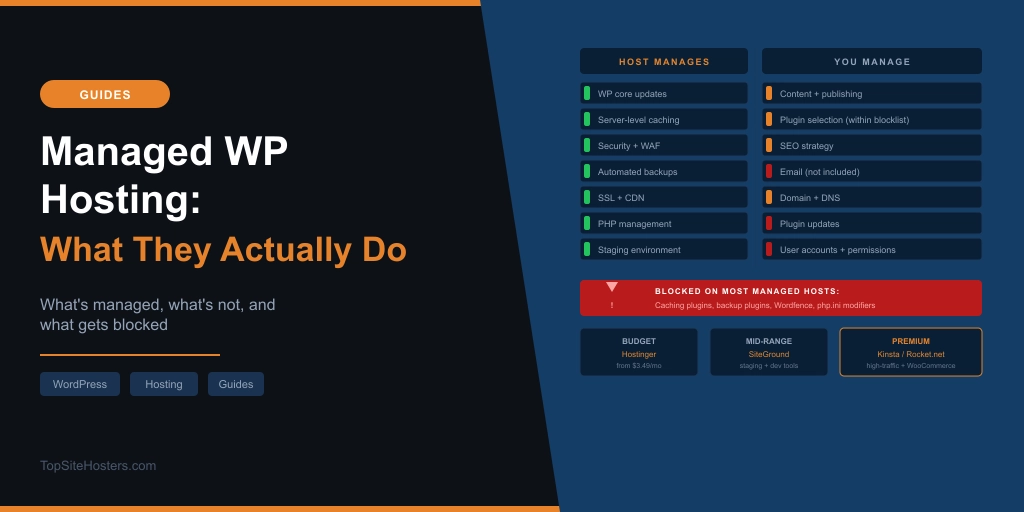
What the Host Manages For You
Here’s what you’re actually getting when you pay for managed WordPress hosting.
WordPress core updates. The host applies them automatically, usually within hours of a new release. You don’t need to log into the dashboard and click Update. It happens in the background.
PHP version management. When PHP releases a new version, your host tests compatibility and upgrades your environment. On self-managed hosting, this is your job. On a managed host, it isn’t.
Server-level caching. This is one of the most significant performance advantages. Managed WordPress hosts run caching at the server level: object caching with Redis, full-page caching, and often a CDN layer on top. It’s faster than any plugin-level caching solution and it’s configured correctly from day one. You don’t need to install a caching plugin. On many managed hosts, you can’t install one even if you wanted to. More on that in a moment.
CDN. Most managed WordPress plans include a content delivery network that serves static assets from edge locations close to your visitors. This is handled automatically. You don’t configure it.
Security. The host runs a web application firewall, malware scanning, brute force protection, and DDoS mitigation at the infrastructure level. Security incidents are monitored and handled by the host rather than by a plugin you installed and hoped was working correctly.
Backups. Automated backups run daily at minimum. Premium managed hosts run real-time or near-real-time backups with one-click restore. You don’t need a backup plugin. You also don’t need to remember to run them.
SSL certificates. Provisioned and renewed automatically. One less thing to track.
Staging environments. Most managed WordPress hosts include a staging environment where you can create a private copy of your live site, test changes, and push them live when you’re satisfied. Shared hosting rarely includes this as standard.
WordPress-specific support. When something goes wrong with a managed WordPress host, the support team understands WordPress. They can diagnose plugin conflicts, database issues, and theme problems. Generic hosting support can’t always do that.
What You Still Manage Yourself
This is the section most managed hosting articles don’t write. The managed layer handles the server. Everything above it stays your responsibility.
Content creation and publishing are yours. The host doesn’t write your posts or manage your editorial calendar. User accounts and permissions are yours. If you need to add a contributor or restrict admin access, that’s your job.
Plugin and theme selection remain yours, within limits. You choose what to install, what to update, and what to remove. The host manages the WordPress core and the server environment. Your plugins and theme are your territory, though as covered below, that territory has boundaries.
SEO is yours. A managed host can make your site faster, which helps rankings. It doesn’t run your keyword research, write your meta descriptions, or manage your internal linking. A plugin like Rank Math or Yoast handles some of that, but the strategy is entirely yours.
Domain registration and DNS are yours. You register your domain at a registrar like Namecheap, point the DNS at your managed host, and manage renewals yourself. The host doesn’t touch your domain.
Email is yours to sort out separately, which leads to the next point.
Does Managed WordPress Hosting Include Email?
Rarely. This catches more people out than any other limitation.
Most managed WordPress hosts, including Kinsta, Rocket.net, and the managed tiers at SiteGround, do not include business email hosting. If you need a you@yourdomain.com address, you set it up separately using Google Workspace, Zoho Mail, Titan Email, or another provider.
Shared hosting almost always includes email as standard. When you’re comparing the monthly cost of managed WordPress against a shared hosting plan, factor in the email cost. Google Workspace starts at $6 per user per month. For a small business with a few email accounts, that adds meaningfully to the total.
If email hosting matters to you, check specifically whether the managed host you’re evaluating includes it before you commit. Most don’t. A few do. It’s not something to discover after you’ve migrated.
The Plugin Restriction Nobody Warns You About
Every major managed WordPress host maintains a list of plugins you cannot install. This is the thing most prospective customers don’t find out until after they’ve signed up, and it’s the thing this article exists to explain clearly.
The reason for it is logical once you understand the managed hosting model. The host provides caching, backups, and security at server level. If you install a caching plugin, it conflicts with the host’s caching layer. The result is slower performance, unpredictable behaviour, or outright errors. The same applies to backup plugins running against a database that’s already being backed up continuously, and to security plugins duplicating firewall rules that are already in place at the server.
So the host blocks them. Not because the plugins are bad, but because they’re redundant and sometimes actively harmful in a managed environment.
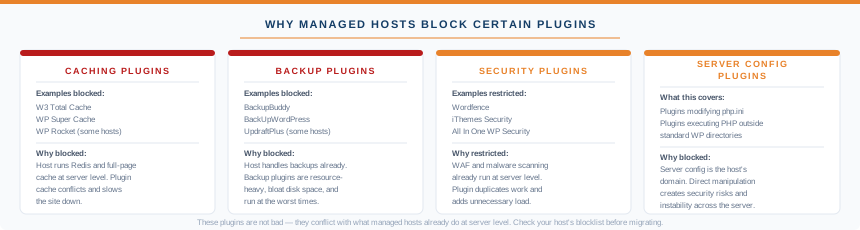
The categories commonly blocked across most major managed hosts:
Caching plugins. W3 Total Cache, WP Super Cache, and WP Rocket are blocked or heavily restricted on most managed WordPress hosts. The server cache is faster anyway. You don’t need them.
Backup plugins. BackupBuddy, BackUpWordPress, and similar tools are commonly disallowed. Backup plugins are resource-intensive, consume disk space, and often run their jobs at the worst possible times. The host’s backup system replaces them.
Security plugins that duplicate infrastructure. Wordfence is restricted or discouraged on several managed hosts because it duplicates scanning and firewall work already happening at a level the plugin can’t reach. Some hosts let you run it in monitoring-only mode. Others block it.
Plugins that modify server configuration. Any plugin that attempts to change php.ini settings, write server-level rules, or execute code outside the standard WordPress directory structure is typically blocked.
WP Engine, Kinsta, Flywheel, Pagely, and GoDaddy Managed WordPress all publish blocklists. The specific plugins vary, but the categories are consistent. Before migrating to any managed host, look up their blocked plugin list and verify that the plugins your site depends on are not on it.
One practical step worth taking: make a list of every active plugin on your current site and cross-reference it against the blocklist of the host you’re considering. Five minutes of checking can save a messy migration.
Is It Worth the Price?
The honest answer depends entirely on what your site does and how much traffic it gets.
Managed WordPress hosting makes clear financial sense when your site generates revenue, handles significant traffic, or when downtime and performance problems would cost you money or clients. A site doing $5,000 a month in WooCommerce sales cannot afford the instability that comes with an overloaded shared server. A managed host at $25 to $50 per month is cheap insurance against that.
For a simple blog or portfolio with modest traffic, shared hosting performs adequately and costs a fraction of the price. Paying $25 or more per month for managed hosting on a site getting a few hundred visits per week doesn’t make financial sense unless you have very specific reasons for wanting the managed environment.
A rough threshold to use as a guide:
Under 10,000 monthly visitors and no e-commerce: shared hosting is almost certainly fine. The performance gap between shared and managed is real but not material at this traffic level. Use our uptime calculator to check what 99.9% uptime actually means in practice.
Between 10,000 and 50,000 monthly visitors, or running WooCommerce: worth evaluating managed WordPress seriously. Server load starts to matter at this scale and plugin conflicts become more expensive.
Over 50,000 monthly visitors or generating meaningful revenue: managed hosting pays for itself. The performance infrastructure, automatic failover, and real-time backups are not optional at this level.
The other legitimate case for managed hosting at any traffic level is time and confidence. If you don’t have the technical knowledge to manage updates, security, and backups yourself, and you can’t afford to learn, paying a managed host to handle it is cheaper than the cost of a security incident or a site that goes down because a plugin update conflicted with your PHP version.
If you want a managed WordPress environment at the lowest possible entry cost, WordPress.com now includes plugins, automatic updates, and security on all paid plans from $4 per month.
Which Managed WordPress Hosts Are Worth Considering
There are three clear tiers. Where you land depends on budget and requirements.
Budget tier. Hostinger offers managed WordPress plans starting around $3.49 per month. Core updates, automated WordPress backups, and server-level caching are included. It’s the most accessible entry point and covers what most small sites need. Bluehost is the other well-known budget option, particularly popular with beginners.
Mid-range. SiteGround, InMotion, and Scala Hosting offer more developer tools, staging environments, and stronger support at this tier. ScalaHosting’s managed VPS with SPanel is worth considering if you want more control than shared managed hosting allows without the complexity of managing a server yourself. HostArmada also sits in this range with strong performance at competitive pricing.
Premium. Kinsta and Rocket.net are where performance-critical sites belong. Kinsta runs on Google Cloud Platform’s premium tier network. Rocket.net runs on Cloudflare’s global infrastructure. Both suit high-traffic sites, agencies managing multiple client sites, and WooCommerce stores where performance directly affects conversion rates. The price reflects the infrastructure. At this tier, you’re not paying for convenience. You’re paying for reliability at scale.
Frequently Asked Questions
Do I still need to update plugins on managed WordPress hosting? Yes. Managed WordPress hosting handles WordPress core updates and PHP version management. Plugin and theme updates remain your responsibility unless your host includes automated plugin updates as an add-on. Some hosts offer this as an optional feature. Most don’t include it by default.
Can I use WooCommerce on managed WordPress hosting? Yes. WooCommerce works on all managed WordPress hosts and performs well on managed infrastructure. Higher traffic WooCommerce stores benefit significantly from the server-level caching and performance optimisations that managed hosts provide. Check that your host supports the specific WooCommerce extensions you need, as some managed hosts restrict plugins that handle payments in non-standard ways.
What plugins are banned on managed WordPress hosting? The categories most commonly blocked are caching plugins, backup plugins, and security plugins that duplicate server-level functions. Specific examples include W3 Total Cache, WP Super Cache, BackupBuddy, and Wordfence on some hosts. Every major managed host publishes a blocklist. Check it before migrating.
Does managed WordPress hosting include email? Not usually. Most managed WordPress hosts do not include business email hosting. You need a separate provider such as Google Workspace, Zoho Mail, or Titan Email. Factor this cost into any price comparison with shared hosting, which typically includes email as standard.
What is the difference between managed WordPress hosting and shared hosting? Shared hosting puts your WordPress site on a server alongside many other sites of any kind. The configuration is generic. Managed WordPress hosting puts your site in an environment built specifically for WordPress: server-level caching, automatic core updates, WordPress-specific security, and support from people who understand the platform. Managed hosting costs more. Whether the premium is worth it depends on your traffic, revenue, and technical confidence.
Is managed WordPress hosting worth it for a small site? For most sites under 10,000 monthly visitors with no e-commerce, shared hosting is likely sufficient. The performance gap between shared and managed is real but not material at low traffic levels. Managed hosting becomes worth the cost when your site generates revenue, handles significant traffic, or when you need the reliability guarantees that managed infrastructure provides.