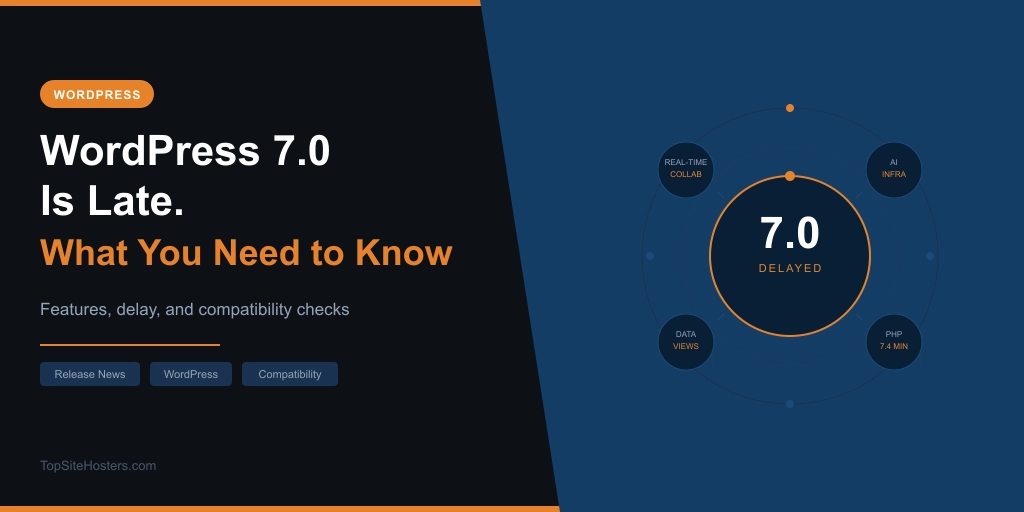
WordPress 7.0 was supposed to be the headline moment at WordCamp Asia in Mumbai on April 9. The conference happened. Over 3,000 people attended. The release didn’t ship.
Pre-release builds are paused through April 17. A revised schedule will be published by April 22. Community speculation points to mid-to-late May as the likely window, but no official date is confirmed. If you’re running a live WordPress site right now, the stable version to be on is 6.9.4.
This is the most significant WordPress release in years. The delay was the right call. Here’s the full picture.
WordPress 7.0 has been officially rescheduled to May 20, 2026. The cycle was extended to rework the database architecture behind the real-time collaboration feature, with RC 3 on May 8, RC 4 on May 14, code freeze on May 19, and general release on May 20.
Where Things Stand Right Now
The original April 9 date was set months ago to align with WordCamp Asia. That strategic timing is now irrelevant. What matters is the revised schedule, which the core team has committed to publishing no later than April 22.
The delay itself happened in two stages. On March 19, RC1 slipped from its scheduled release after concerns were raised about real-time collaboration performance, client-side media optimisation, and package size. That was the first warning. On March 31, release lead Matias Ventura announced the final release would be delayed by weeks to finalise key architectural details. He described it as “weeks, not months.” Matt Mullenweg called for “extreme stability” before shipping to millions of sites.
By April 2, the core team confirmed what the delay actually means in practice: returning to beta-like testing after having already reached RC2. That has never happened in WordPress’s modern release history.
The April 22 announcement will set the final stretch timeline. Until then, 6.9.4 is what production sites should be running.
Why It Was Delayed
The specific problem is the real-time collaboration feature and its database architecture.
Real-time collaboration requires a new database table to store synchronisation data as multiple users edit the same post simultaneously. The current implementation has a performance issue at the storage layer that cannot be fixed with a late-cycle patch. It requires a deeper architectural change. The core team decided that locking in a flawed database design in a major release, one that would be difficult to change without breaking backwards compatibility later, was not acceptable.
That reasoning is sound. WordPress ships to tens of millions of sites. A significant portion run automatic background updates. Shipping a foundational feature with a known performance problem and hoping nobody notices is not a viable option at that scale.
The RC1 slip on March 19 should have been a signal. In retrospect, the concerns raised then about RTC performance were the early symptoms of the same underlying problem. The March 31 announcement was the confirmation.
What’s Actually in WordPress 7.0
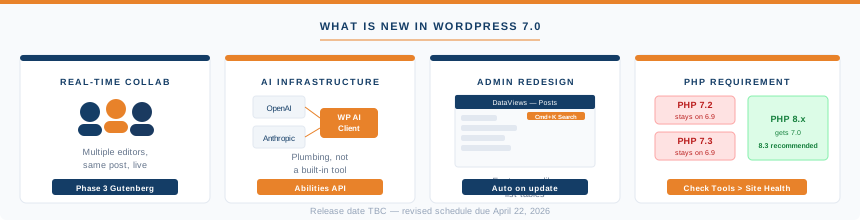
Four things. Here’s what each one actually means for site owners.
Real-time collaboration
Multiple people can edit the same post simultaneously inside the block editor. If you’ve ever sent a draft to a colleague and waited for them to finish before making your own changes, this is the feature that removes that workflow. Changes sync between editors in real time using HTTP polling as the default transport. WordPress deliberately chose polling over WebSockets for broader compatibility across different hosting environments.
Real-time collaboration is optional. It can be disabled in Settings > Writing. Classic meta boxes, those old-style plugin panels that sit below the editor in some setups, automatically disable it for that post. You don’t need to configure anything for that to happen.
This is Phase 3 of the Gutenberg roadmap. It’s the biggest change to how WordPress handles editing since the block editor launched in version 5.0 back in 2018.
AI infrastructure
WordPress 7.0 does not ship with a built-in AI writing assistant. What it ships is infrastructure for future AI tools.
The Abilities API, introduced in 6.9 and significantly expanded in 7.0, standardises how plugins expose their capabilities to AI systems. A new WP AI Client provides a uniform way for WordPress to communicate with any AI provider, whether that’s OpenAI, Anthropic, Google, or others. A new Connectors page under Settings > Connectors gives site admins a central place to add and manage those provider connections.
The practical implication: plugin developers can now build AI-powered tools that work against a consistent WordPress API rather than each building their own integration from scratch. For site owners today, this means nothing has changed. For site owners in twelve months, it means a new generation of AI-powered plugins will be available that work cleanly with WordPress rather than bolting on from outside. What hosting companies actually mean when they say AI is worth reading for context on why this infrastructure layer matters.
Admin redesign
DataViews replaces the traditional list tables in the WordPress admin. The Posts, Pages, Media, and similar screens now use a faster, app-like interface with better filtering, sorting, and grouping. The practical difference: the admin feels less like a spreadsheet and more like a modern content tool.
The Command Palette, accessible via Cmd+K on Mac or Ctrl+K on Windows, is now available across the entire admin via an Omnibar button rather than just inside the editor. There’s a new default colour scheme and a cleaner dashboard overall. These changes apply automatically when you update. Nothing to configure.
There is no new default theme in 7.0. WordPress has moved away from shipping a new theme with every major version. Twenty Twenty-Five remains the current default.
PHP 7.4 minimum
Sites running PHP 7.2 or 7.3 will not receive the WordPress 7.0 update. They stay silently on the 6.9 branch. The 6.9 branch receives security backports but is not the active release branch. PHP 8.3 or higher is recommended for best performance. The next section covers how to check and fix this.
Will My Site Break When I Update?
Most sites will update without problems. WordPress maintains a strong backward compatibility commitment and the core team does not break documented APIs between major versions. Plugins and themes following WordPress coding standards will continue working.
That said, three specific areas carry genuine risk.
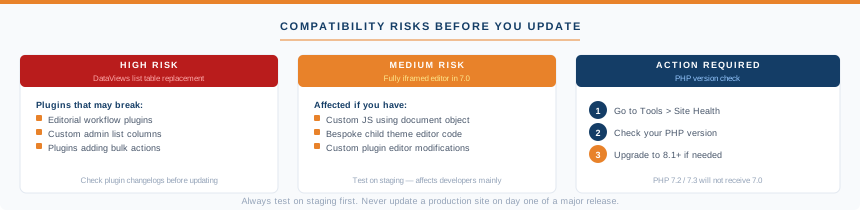
Plugins that touch Posts, Pages, or Media list screens
DataViews is a structural replacement of those screens, not a visual refresh. Any plugin that hooks into the existing list tables, adding columns, custom filters, bulk actions, or workflow states may break. This is the highest-risk compatibility change in 7.0. Check any editorial workflow plugins, content management tools, or custom admin plugins against their changelogs or developer announcements before you update. Major plugins like Yoast, ACF, WooCommerce, and Gravity Forms are expected to ship compatibility updates before or around launch.
Custom JavaScript in or around the editor
The Post Editor is fully iframed in 7.0. Any JavaScript code that reaches into the editor via direct document object manipulation will break. This mainly affects bespoke custom development in child themes or custom plugins, not mainstream commercial plugins. If your site has custom code written by a developer that touches the editor, get it reviewed before updating.
Old or unmaintained plugins
Plugins that rely on undocumented internal WordPress functions or haven’t been updated in two or more years carry more upgrade risk than well-maintained ones. If a plugin in your stack was last updated in 2022 and has no 7.0 compatibility note, test it on staging before you go anywhere near production.
Classic themes continue to work. They won’t benefit from Phase 3 collaboration features, but nothing will break. If you’re on a classic theme and considering migrating to a block theme, the period before updating to 7.0 is a reasonable time to plan that work.
The PHP Check You Need to Do Now
Sites on PHP 7.2 or 7.3 will not receive the 7.0 update. WordPress will silently keep them on 6.9. Most site owners won’t notice until they wonder why their WordPress version hasn’t changed.
Combined usage of PHP 7.2 and 7.3 has dropped below 4% of monitored WordPress installations globally, so most readers won’t have this problem. But if your site was set up several years ago and the PHP version was never explicitly updated, it’s worth checking.
How to check: go to Tools > Site Health in your WordPress admin. The PHP version appears in the Server section. If it’s showing 7.2 or 7.3, you need to update before 7.0 ships.
On cPanel hosting: look for PHP Settings or Select PHP Version in your cPanel dashboard. On Plesk: go to Domains, select your domain, then PHP Settings. If you’re on managed WordPress hosting your host likely manages this for you, but it’s still worth confirming.
The safe target is PHP 8.1 or 8.2. PHP 8.3 is recommended by WordPress for best performance. If you’re unsure whether your host supports those versions, check their documentation or raise a support ticket. Most mainstream shared hosts have supported PHP 8.x for several years.
A New Competitor Arrived the Same Week
The week of the WordPress 7.0 delay, Cloudflare launched EmDash. They described it as “the spiritual successor to WordPress.” Built entirely in TypeScript, MIT licensed, running serverless on Cloudflare Workers with sandboxed plugins. Cloudflare’s argument: 96% of WordPress security issues come from plugins that have unrestricted access to the database and filesystem. EmDash solves that with isolated plugin sandboxes.
Matt Mullenweg responded within 24 hours, saying EmDash “was created to sell more Cloudflare services” and noting that the plugin sandboxing only fully works on Cloudflare infrastructure.
The community consensus is accurate: EmDash is technically interesting and currently v0.1.0. It has no theme ecosystem, a fraction of the plugin library, and no track record. WordPress powers 43% of the web. The timing is notable. The competitive threat is not immediate.
What to Do Before You Update
Run the PHP check first. Go to Tools > Site Health and confirm you’re on PHP 8.1 or higher. If you’re not, update before 7.0 ships.
Update all plugins and themes now, before the 7.0 release lands. Most major plugin developers have already shipped or are preparing 7.0 compatibility updates. Running outdated plugin versions into a major WordPress release is unnecessary risk.
Check anything that modifies Posts, Pages, or Media admin screens. DataViews is the highest-risk change. Look for compatibility notes from those plugin developers specifically.
Don’t update production sites on day one. Wait a week after the final release for early bug reports and the likely 7.0.1 patch. This applies especially to sites with e-commerce, membership functionality, or complex custom development.
Use a staging environment if you can. If your host provides staging (most managed WordPress hosting providers like WordPress.com do), run the update there first. Run your standard workflows: creating posts, editing, publishing, checking forms and payments. If something breaks in staging it’s a five-minute fix. On a live site it’s an emergency.
Watch for the April 22 announcement. That’s when the revised timeline becomes official. Once you know the date, you have a clear planning window.