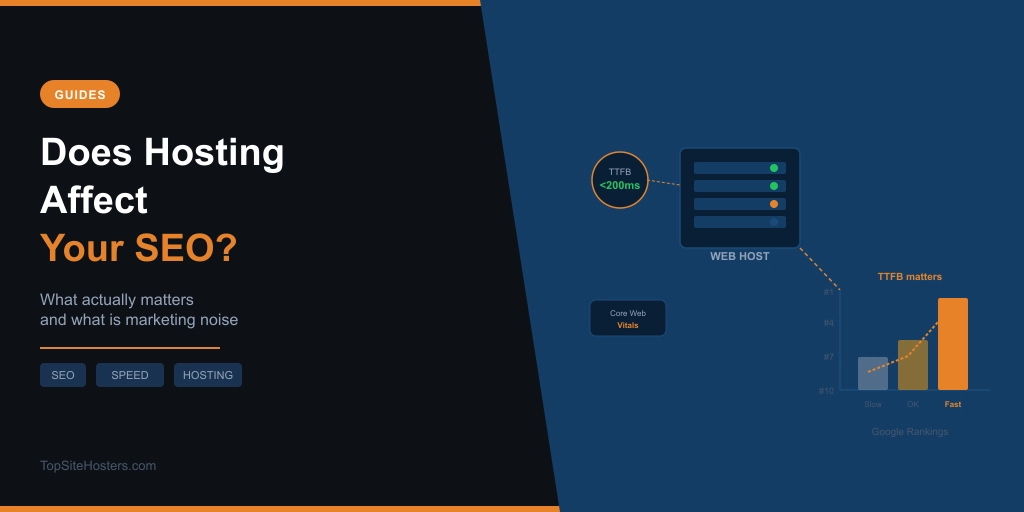
Every article on this topic is written by someone selling you hosting or selling you the agency that manages it. The conclusion is always the same: hosting matters enormously for SEO, and you should upgrade immediately.
The honest version is more useful. Hosting does affect SEO, but it works as a floor, not a ceiling. Good hosting removes technical barriers that hold rankings back. It won’t rescue thin content. It won’t replace backlinks. What it does is ensure your pages load fast enough, stay online long enough, and run securely enough that nothing on the infrastructure side is holding back what you’ve already built.
Here’s exactly where hosting connects to rankings, and where it doesn’t.
Speed is the biggest connection
Google has used page speed as a ranking signal since 2010. By 2026 that’s grown into Core Web Vitals, a set of three specific metrics Google uses to score your page experience. The three are Largest Contentful Paint (LCP), Interaction to Next Paint (INP), and Cumulative Layout Shift (CLS). Your hosting directly controls LCP and INP. CLS is mostly a design and JavaScript issue.
LCP measures how long it takes for the largest visible element on your page to fully render. INP measures how quickly the page responds when a visitor interacts with it. Both depend on how fast your server responds to requests. A slow server produces a slow LCP. There’s no workaround. Our web hosting by country guide covers the best local options by region.
Sites that consistently fail Core Web Vitals thresholds face measurable ranking penalties in competitive niches where multiple pages offer similar content quality. If two pages cover the same topic with similar depth and backlinks, the faster one has a real advantage.
What TTFB is and why it sets a ceiling
Time to First Byte, usually written as TTFB, is the time it takes your server to start sending data after a browser makes a request. It’s not officially one of the three Core Web Vitals, but Google includes it as a diagnostic metric in its performance tools and recommends keeping it under 800ms. Competitive sites target under 200ms.
Here’s the insight most articles bury: TTFB sets a hard ceiling on your LCP score. If your server takes 800ms to respond, your LCP cannot possibly be better than 800ms before the browser has even started rendering anything. In practice, LCP ends up 1,500–2,500ms higher than TTFB because of the subsequent phases: HTML parsing, resource loading, and rendering all stack on top.
That means a site with excellent content, a strong backlink profile, and perfectly optimised images can still underperform in Core Web Vitals if the server is slow. No amount of image compression, lazy loading, or plugin tweaks can fix a server that consistently responds above 600ms. The ceiling is set before the browser does anything visible.
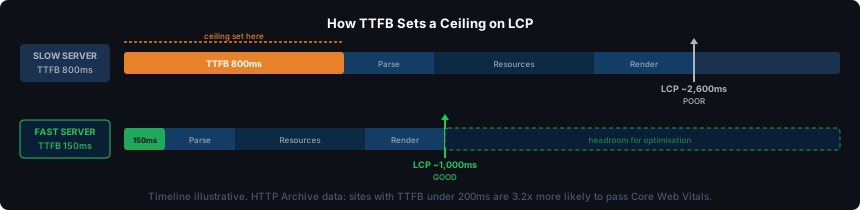
According to HTTP Archive data from late 2025, sites with TTFB under 200ms are 3.2 times more likely to pass all Core Web Vitals thresholds than sites with TTFB over 600ms. That’s not a marginal difference.
You can test your own server’s response time with the Server Response Tester. The TTFB glossary entry explains the metric in more detail if you want the full picture.
Uptime and how Google sees it
Google crawls your site on its own schedule. When Googlebot visits and finds your server down or returning errors, it logs the problem and moves on. One missed crawl isn’t a crisis. Pages don’t vanish from the index because of a single server hiccup. Repeated errors are a different story.
If Googlebot consistently hits errors on your site, two things happen. Your pages get marked as unreliable, which can reduce how frequently Google crawls them. On larger sites with thousands of pages, it also affects crawl budget: Google starts allocating fewer resources per session to a site that keeps returning errors.
For most small sites, the crawl budget impact is minimal. A site with ten pages isn’t going to suffer measurably from brief downtime. For an ecommerce store with thousands of product pages, or a news site where fresh content needs fast indexing, reliable uptime matters more. The standard to look for is a 99.9% uptime guarantee as a minimum, which translates to under nine hours of downtime per year.
The 99.9% uptime guide breaks down what different SLA percentages actually mean in real downtime terms. Our Uptime Calculator lets you convert any percentage into hours and minutes.
Server location and your audience
Google uses your server’s IP address as one signal for geographic relevance. A server in Frankfurt suggests your site targets European users. It’s not the only signal: hreflang tags, Google Search Console geographic targeting settings, and ccTLDs all contribute, but server location is real.
The practical impact comes through latency. A server physically close to your audience delivers lower latency, which reduces TTFB, which improves LCP. A CDN handles this for static content: images, CSS, and JavaScript get cached at edge locations close to your visitors, so those files load quickly regardless of where your origin server sits. But dynamic content, database queries, server-side rendering, checkout pages, and anything that changes per user, always comes from the origin server. A CDN doesn’t help with that.
This is why server location still matters even if you use a CDN. If the majority of your audience is in a specific region, a host with data centres there will deliver lower TTFB on dynamic requests than one whose nearest data centre is on another continent. For Core Web Vitals purposes, that gap is measurable.
The shared hosting question
The most widespread claim about hosting and SEO is that shared hosting hurts your rankings because you share an IP address with other sites. If a neighbour on that IP sends spam or gets penalised, the theory goes, your site suffers too.
That’s largely wrong for search rankings. Google has confirmed it evaluates sites individually, not by shared IP. An IP association with a spammy neighbour does not translate into a ranking penalty for your site. The exception is email deliverability: if your shared IP gets blacklisted by spam filters, legitimate email from your domain can end up in junk folders. But that’s an email problem, not an SEO problem.
The real shared hosting risk is resource contention. When a noisy neighbour on the same server consumes a large share of CPU and RAM, every other site on that server responds more slowly. That slower response time means higher TTFB, which means worse LCP, which does affect SEO. The route from shared hosting to ranking problems runs through performance degradation, not IP contamination.
The practical implication: a dedicated IP won’t help your rankings. Consistent server performance will. The question to ask about a shared host isn’t “do I get my own IP?” but “how does performance hold up under load?” See Shared Hosting vs VPS for a full breakdown of when it’s time to move.
HTTPS and security
Google confirmed HTTPS as a ranking signal in 2014. Every reputable host now includes free SSL certificates via Let’s Encrypt, so this is no longer a differentiator between hosts. It’s a baseline. A site without HTTPS gets a “Not Secure” warning in Chrome and a small rankings disadvantage. A site with HTTPS gets neither.
Security goes slightly further. Sites infected with malware can receive manual actions from Google, which remove pages from search results until the issue is resolved. A host with automatic malware scanning, a web application firewall, and automatic SSL renewal reduces the risk of getting there. This is hosting as protection, not as a ranking booster. The difference matters: clean security practices keep you in the index; they don’t push you up it.
What hosting does not affect
This is the section most articles skip, because it undermines the case for upgrading your hosting right now. Worth saying clearly.
Hosting has no direct effect on your content quality or relevance, your backlink profile, your on-page keyword optimisation, your schema markup, or your internal linking structure. These are the things that actually determine whether a page ranks for a competitive term. A fast server with perfect uptime will not rescue a thin page with no backlinks. A slow shared hosting plan won’t stop a page with genuinely better content from outranking a competitor on faster infrastructure.
The sites that rank are the ones with good content on adequate hosting, not the ones with premium hosting and mediocre content. Hosting sets a floor. Everything above that floor is content, relevance, and authority.
What to look for if SEO matters to you
Based on everything above, here’s what moves the needle:
- TTFB under 200ms on cached pages
- Test this before committing to a host using the TTFB Tester. Some hosts publish benchmark data; independent testing is more reliable.
- 99.9% uptime guarantee as a minimum
- Uptime needs to be backed by a track record rather than just a marketing promise. Independent uptime monitoring services show what hosts actually deliver versus what they advertise.
- Free SSL included and auto-renewed
- All mainstream hosts offer this now. If one doesn’t, move on.
- Server location close to your primary audience
- For sites targeting a single region, proximity matters. For global sites, a CDN matters more.
- NVMe storage over standard SSD where available
- NVMe drives have faster read speeds than older SSD drives, which reduces TTFB on dynamic pages where file access is part of the response chain.
- Caching at the server level for WordPress
- Plugin caching helps, but caching handled at the server or environment level is faster and more reliable. This is one of the main things premium managed WordPress hosts do differently from standard shared plans.
If you’re not sure where to start, our list of web hosting providers covers speed, uptime, and server location for every host we’ve tested.
Frequently Asked Questions
Does web hosting affect Google ranking?
Yes, indirectly. Hosting influences page speed, uptime, and security, all of which Google uses as ranking signals. The impact is strongest through Core Web Vitals: a slow server produces a slow LCP score, which affects rankings in competitive niches. Hosting won’t make mediocre content rank, but poor hosting can prevent good content from performing as well as it should.
Does changing web host affect SEO?
A host migration can cause short-term ranking fluctuations, usually lasting days to a few weeks. This happens because Google needs to recrawl your pages from the new server and update its records. If the migration is handled correctly, URLs stay the same, redirects are in place where needed, and the new host is properly configured, rankings typically recover and often improve if the new host is faster. The key risk is a poorly handled migration that changes URLs or breaks crawlability.
Does shared hosting hurt SEO?
It can, but not in the way most articles claim. The shared IP address myth is mostly wrong: Google evaluates sites individually, not by IP neighbourhood. The real risk is resource contention: a heavily loaded shared server produces higher TTFB and worse Core Web Vitals for every site on it. Whether shared hosting hurts your specific site depends on how well the host manages server load and resource allocation.
What is a good TTFB for SEO?
Google recommends a TTFB under 800ms. Competitive sites typically achieve under 200ms for cached pages. The practical benchmark: under 200ms puts you in the range where TTFB is no longer the limiting factor for your Core Web Vitals scores. Above 600ms, no amount of optimisation on the browser side can compensate for the ceiling it sets on LCP.
Does server location affect SEO?
Yes, through latency. A server closer to your audience delivers lower TTFB, which improves LCP. Google also uses server IP as a geographic signal, though it’s one of several. A CDN mitigates the location effect for static content but not for dynamic pages. If most of your audience is in a specific region, choosing a host with data centres there is a practical step toward better Core Web Vitals scores for those visitors.
Does SSL affect SEO?
Yes. Google confirmed HTTPS as a ranking signal in 2014. Sites without SSL get a “Not Secure” browser warning and a rankings disadvantage. Every reputable host now includes free SSL, so this should be a given rather than a selling point. If a hosting plan doesn’t include SSL, choose a different plan or host.