Most mistakes you make when building a website are fixable. You can switch hosting providers, redesign your layout, rewrite your content. A domain name is different. Once you’ve registered it and started building, changing it means starting from scratch on SEO, reprinting everything with your URL on it, and hoping your visitors find you again.
- Why This Decision Is Harder to Undo Than You Think
- Start With What the Name Needs to Do
- How to Actually Come Up With a Name
- The Rules That Actually Matter
- The Hidden Words Trap
- .com or Something Else? The Honest Answer
- Check More Than Just Availability
- The Renewal Price Trap Nobody Warns You About
- Where to Register Your Domain
- Check Availability With Our Free Tool
- Questions People Ask About Domain Names
So it’s worth getting right the first time.
Why This Decision Is Harder to Undo Than You Think
People spend an afternoon picking a domain, click buy, and move on. Then two years later they’ve outgrown the name, or realised it means something unfortunate, or discovered a competitor with a nearly identical one.
There’s also a technical wrinkle most guides don’t mention: once you register a domain, you can’t transfer it to another registrar for 60 days. That’s not a long time, but if you picked a cheap registrar on impulse and want to move it quickly, you’re stuck waiting.
Take the decision seriously. Ten minutes of clear thinking now saves a lot of pain later.
Start With What the Name Needs to Do
Before you brainstorm names, it helps to be clear on what you’re building. A personal blog, a local business, a SaaS product, and an e-commerce store all call for different naming approaches.
Ask yourself three things:
- Who is the audience, and what do they need to feel when they see the name?
- Will this site stay focused on one thing, or might it expand later?
- Is this a brand name, or does the domain need to describe what the site does?
A local plumber can go descriptive: londonpipeworks.com tells visitors and search engines exactly what the site is. A startup that might pivot or grow into something broader needs a brandable name: something unique that doesn’t lock you into one product or location.
Getting this clarity before you open a domain search tool saves you from falling in love with a name that doesn’t fit.
How to Actually Come Up With a Name
This is where most guides leave you hanging. They tell you what a good name needs to be, but not how to generate one. Here are the approaches that consistently produce workable options.
Descriptive names say exactly what the site does. LondonPipeworks.com, BudgetTravelGuide.com, OnlineAccountingSoftware.com. They’re clear, they rank well for relevant searches, and visitors know immediately what they’re getting. The downside is they can box you in. If you ever want to expand or pivot, a name that describes one thing becomes a liability.
Brandable names are invented or borrowed words that carry no prior meaning in your context. Google, Spotify, Zapier, Stripe. None of those words meant anything before the companies made them famous. The advantage is flexibility: a brandable name grows with you and never limits what you can become. The trade-off is that you start from zero. There’s no built-in search signal, and you have to work harder to make the name stick.
Compound names combine two existing words into something new. Facebook, YouTube, WordPress, Snapchat. This approach sits between the two above: you get some descriptive signal from the component words while creating something that feels original. It’s one of the most reliable strategies for small businesses and blogs because the options are virtually endless.
Modified words take a real word and tweak the spelling slightly: Flickr, Tumblr, Fiverr. This can work well for a memorable brand with a young or tech-savvy audience. For everyone else it creates a spelling problem. If customers have to ask “is that Fiber with an e or Fibre without one?”, you’re adding unnecessary friction.
Your own name is the obvious choice for freelancers, consultants, and personal brands. JaneDoe.com or JaneDoeDesign.com signals that the work comes from a real person, which builds trust fast. It also ages well: your name doesn’t go out of style the way a trend-based brand name can.
The most practical approach is to pick a strategy that fits your situation, then brainstorm 10 to 15 variations before touching a domain search tool. You’ll register the first available option that sounds decent if you go straight to searching, which is how people end up with names they regret.
The Rules That Actually Matter
There’s a lot of advice floating around about domain names. Most of it boils down to a few things that genuinely move the needle.
Keep it short. Aim for two or three words maximum. Shorter names are easier to type, harder to misspell, and more memorable. If you have to explain how to spell it every time you say it, it’s too long.
Make it pass the radio test. Imagine someone hears your domain on a radio ad. Can they spell it correctly without seeing it? Can they remember it five minutes later? If the answer to either is no, keep looking. Say the name out loud to a friend and ask them to type it. You’ll find out very quickly whether it works.
Avoid hyphens and numbers. Hyphens look like a workaround for a name that’s already taken, because that’s usually what they are. Numbers create confusion: does the site use “4” or “four”? Neither looks professional. Both are forgettable.
Think about your email address. Your domain becomes your professional email. A long or awkward domain makes for an email address nobody wants to type out. hello@yourdomain.com should roll off the keyboard easily.
The Hidden Words Trap
This one catches more people than you’d expect.
When you combine words in a domain name, the spaces disappear. What looks perfectly sensible as two words can read very differently as one string of characters. It happens more often than you’d think, and it’s always noticed by someone other than the person who registered it.
Before you register anything, read the domain as one single word and ask whether there’s anything awkward hiding in there. Show it to someone else. It takes thirty seconds and can save considerable embarrassment later.
The same applies to abbreviations. If your business name has initials that spell something unintended, a domain built on those initials isn’t going to work in your favour.
.com or Something Else? The Honest Answer
The extension at the end of your domain; .com, .net, .io, is called a top-level domain (TLD). There are over 1,400 of them available. Most of them are irrelevant to the vast majority of people building websites.
There are hundreds of domain extensions available now. You’ll see .io, .ai, .co, .shop, .blog, and dozens more. Some of them are gaining real traction. Most people still default to .com and there are good reasons for that.
.com is what people type by instinct. If someone hears your domain name and doesn’t know the extension, they’ll try .com first. If that takes them somewhere else, you’ve lost them.
The numbers back this up. Of the roughly 360 million registered domains worldwide, over 160 million are .com. That’s more than all other extensions combined. The next largest, .net, isn’t even close. People aren’t defaulting to .com out of habit, they’re doing it because the web has trained them to for 30 years.
That said, the rules have loosened. Here’s a straightforward breakdown:
- .com; the default choice for most sites. Use it if it’s available at a reasonable price.
- .co.uk / .de / .fr; country extensions make sense for local businesses targeting a specific market. They can also help with local search rankings.
- .io and .ai; widely accepted in the tech and SaaS space. If you’re building a developer tool or software product, these read as credible.
- .org; still best suited to non-profits and community organisations. Using it for a commercial site can feel misleading.
- Everything else; proceed with caution. Extensions like .shop, .blog, and .online are technically fine, but you’ll need to be more deliberate about making sure people know your full domain rather than assuming .com.
If your ideal .com isn’t available at a reasonable price, look at whether a slightly different name works in .com before accepting a different extension. A clean, distinct name at .com is usually better than a compromised name with an unusual extension.
Check More Than Just Availability
Checking that a domain is available is the obvious step. There are a few other checks worth running before you commit.
Social media handles. Your domain name and your social handles should match, or at least be very close. If @yourbrandname is taken on every platform, that’s going to cause friction. Check handle availability before registering the domain.
Trademark conflicts. If another business is already using that name as a registered trademark, registering the domain doesn’t protect you. They can force you to hand it over. A quick search on the USPTO website (for the US) or the EUIPO (for Europe) takes a few minutes and can save you a legal headache.
Domain history. A domain that’s been registered before might have a past. If the previous owner used it for spam, was penalised by Google, or hosted problematic content, that history can affect your new site. Use our Domain Checker to confirm availability and then run the domain through a tool like Wayback Machine to see what it was used for previously. A clean history matters more than most people realise.
If you’re still unclear on the difference between a domain and the hosting that actually powers your site, this piece on domain names and web hosting is worth a read first.
The Renewal Price Trap Nobody Warns You About
This is the part most domain name guides skip, and it’s where people get caught out.
Registrars advertise domain names at very low introductory prices: $0.99 for the first year, sometimes $1.99, sometimes free with a hosting plan. The renewal price is a different story entirely. That same domain often jumps to $15–20 per year at renewal, sometimes more depending on the registrar and the extension.
It’s the same pattern as hosting renewal prices: the intro price gets you in the door, the renewal price is where they make their money.
Before you register anywhere, check the renewal price explicitly. It’s usually in small print on the checkout page or in the registrar’s pricing FAQ. A domain that costs $1 in year one and $22 in year two isn’t cheap. It’s a delayed charge.
Namecheap is one of the more transparent registrars on renewal pricing and includes WHOIS privacy for free, which many registrars charge extra for. WHOIS privacy keeps your personal contact details out of the public domain registration records, which matters if you’d rather not receive unsolicited outreach.
Where to Register Your Domain
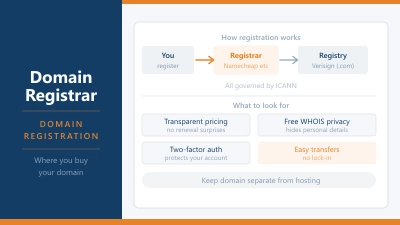
Once you’ve settled on a name, you need a registrar to buy it through. A few things to look for: transparent renewal pricing, free WHOIS privacy included as standard, and a clean interface that doesn’t bury you in upsells at checkout.
Namecheap is the most popular choice among people who know what they’re doing. Pricing is straightforward, WHOIS privacy is free, and the dashboard is easy to navigate. Our Namecheap review covers what you get in more detail.
Your hosting provider is another option if you’re setting up a site at the same time. Many providers include a free domain for the first year with a hosting plan. It’s convenient, but check what the renewal price looks like before committing — free year one doesn’t mean cheap year two, and some hosting providers charge more for domains than standalone registrars do.
GoDaddy is the biggest registrar in the world and fine for most people, but they’re known for aggressive upselling during checkout and WHOIS privacy is sometimes an add-on rather than included. Read the cart carefully before you pay.
Whichever registrar you use, keep your account login and contact details current. If your contact email becomes unreachable and your domain comes up for renewal, you can lose it without warning.
Check Availability With Our Free Tool
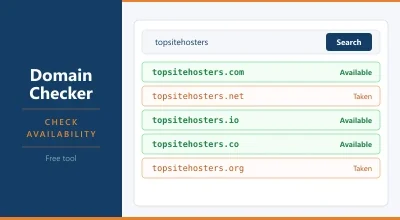
Once you’ve got a shortlist of names, the fastest way to check what’s available is to use the Domain Availability Checker. It checks across multiple extensions at once so you can see your options without running separate searches for each one.
It’s free, requires no signup, and takes about ten seconds.
Questions People Ask About Domain Names
Does my domain name affect my SEO? It has a small influence. Having a relevant keyword in your domain can help search engines understand what your site is about, but it’s a minor factor compared to your content, backlinks, and site structure. Don’t contort your domain to fit a keyword if it means sacrificing a name that’s memorable and clean.
What should I do if my preferred domain isn’t available? Try a small variation first: add a word, change the word order, or consider a different extension if the .com version belongs to a genuinely different business. If the domain is parked or unused, you can sometimes buy it directly from the owner, though prices vary wildly. If nothing works, starting fresh with a different name is often better than settling for a compromised version of your first choice.
Should I buy my domain and hosting from the same company? Not necessarily. It’s convenient, and some hosting providers offer a free domain for the first year, but there’s no technical reason they need to be together. Many people register domains at a dedicated registrar and host elsewhere. The important thing is to keep your domain registration details up to date so you never accidentally let it expire.
How much does a domain name cost per year? A standard .com domain costs between $10 and $20 per year at most reputable registrars once you’re past any introductory offer. Premium domains, which are previously registered names being resold, can cost hundreds to millions of dollars. Stick to new registrations unless you have a very specific reason to pay a premium.
Can I change my domain name later? Technically yes, but practically it’s painful. You’d need to redirect all your old URLs to the new domain, rebuild your SEO authority, update every link and reference, and risk losing traffic in the transition. It’s possible and sometimes necessary, but it’s not a clean process. Get the name right upfront.
Picking a domain name doesn’t need to take days, but it does deserve more than five minutes. Run through the radio test, check the hidden words, look up the renewal price before you buy, and verify the history before you commit. Do those four things and you’ll be in far better shape than most people who register on impulse and only notice the problems later.