What Is an EPP Code?
An EPP code is the password that unlocks a domain transfer to a new registrar.
You’ve found a cheaper registrar, or you’re tired of paying renewal prices that keep creeping up. You start the transfer at the new registrar, and the first thing it asks for is an EPP code. Your old registrar never mentioned one.
An EPP code is a password for moving your domain. It proves you own the domain and gives the new registrar permission to take it over. Without it, the transfer can’t start.
You’ll also see it called an auth code, an authorization code, an AuthInfo code or a transfer code. They all mean the same thing.
What EPP Stands For, and Why the Code Exists
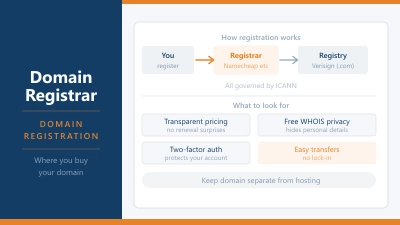
EPP stands for Extensible Provisioning Protocol. It’s the system registrars use to talk to the registries that run each domain extension. Verisign runs .com, for example, and every registrar that sells .com domains sends its requests to Verisign through EPP.
When you move a domain, the new registrar sends a transfer request to the registry. The registry only accepts it if the request includes the correct EPP code. That stops anyone who knows your domain name from moving it to their own account.
The code is usually a random string of letters, numbers and symbols, something like Xk8#pQ2r!vN7. Treat it like a password. Anyone who has it, and has an unlocked domain, can start a transfer.
How to Get Your EPP Code
You get the code from the domain registrar where your domain is registered now, not from the one you’re moving to. The steps differ a little between registrars, but they follow the same pattern:
- Log in to your current registrar and open the domain’s settings
- Turn off the transfer lock (sometimes called registrar lock or domain lock)
- Look for an option named “Transfer out”, “Authorization code” or “EPP code”
- Copy the code from the screen, or wait for it to arrive by email
Some registrars show the code instantly. Others email it to the address on your account, so make sure that address still works before you start. Under ICANN’s rules, a registrar that doesn’t let you generate the code yourself has to give it to you within five calendar days of asking.
How a Domain Transfer Works
Once you have the code, the transfer follows the same steps at almost every registrar.
| Step | What happens | Who does it |
|---|---|---|
| 1. Unlock | Remove the transfer lock on the domain | You, at the old registrar |
| 2. Get the code | Request the EPP code | You, at the old registrar |
| 3. Start the transfer | Enter the domain and code, then pay for the transfer | You, at the new registrar |
| 4. Approve | Confirm the transfer by email, or wait for it to approve itself | You and the old registrar |
| 5. Complete | The registry moves the domain to the new registrar | The registry |
Most transfers finish within five to seven days. If the old registrar doesn’t respond within five days, the registry approves the transfer by default. Some registrars let you approve it straight away from the transfer email, which can cut the wait to a few hours.
For most extensions, including .com, .net and .org, the transfer fee also renews the domain for one more year. You don’t lose the time you already paid for. That year gets added on top, up to the 10 year maximum.
When You Can’t Transfer Yet
The right code won’t help if the domain is still inside a lock period. Under ICANN’s current Transfer Policy, registrars can block a transfer for 60 days after either of these, and almost all of them do:
- It was first registered
- It was last transferred between registrars
Registrars may also apply a 60 day lock after you change the owner’s name, organization or email address, although many let you opt out before you make the change. If you plan to move a domain soon, update your contact details after the transfer, not before.
Watch the expiry date too. An expired domain can’t always be transferred, and a transfer started in the last few days before renewal can get messy. Start at least two weeks before the expiry date to stay safe.
Keep Your Website and Email Running During a Transfer
Here’s what catches most people out: transferring a domain moves the registration, not your website. Your site stays where it is, as long as the domain keeps pointing to the same nameservers.
The risk comes from DNS that’s hosted by the old registrar. Plenty of registrars run your DNS for free while the domain is with them, and many delete those records once it leaves. If your records live there, your website and email can stop working the moment the transfer completes.
Before you start, check where your nameservers point:
- Your web host or Cloudflare: nothing changes, and the transfer won’t affect your site
- The old registrar: copy every DNS record first, recreate them at the new registrar or your host, then switch the nameservers before you transfer
Pay special attention to your MX and TXT records. Those control your email, and they’re the ones people forget to copy.
Not Every Domain Uses an EPP Code
Country code domains follow the rules of their own registry, and some don’t use EPP codes at all. The best known example is .uk. Instead of a code, you ask your current registrar to change the domain’s IPS tag to the tag of the new registrar. The new registrar then picks it up, and no code is needed.
Other country domains use a code but follow different time limits and fees. If you’re moving a .de, .nl, .no or similar domain, check the new registrar’s help page for that extension before you start.
The Transfer Rules Are Changing
In June 2026, the ICANN Board adopted a new set of transfer rules. They haven’t taken effect yet, because ICANN still has to turn them into final policy and give registrars time to adapt. Once they do, you can expect these changes:
- The EPP code gets a new official name: the Transfer Authorization Code, or TAC
- The lock after registration and after a transfer drops from 60 days to 30 days
- Each code can only be used once and expires after a set period
- Changing your name or email address no longer triggers a transfer lock
Until then, the current rules apply, including the 60 day locks.
Common Questions About EPP Codes
Is an EPP code the same as an auth code?
Yes. EPP code, auth code, authorization code and AuthInfo code all describe the same thing. Registrars just use different labels in their dashboards.
Does an EPP code expire?
It can. Some registrars generate a fresh code each time you ask and cancel it after a set period or once it’s been used. If the new registrar says your code is invalid, request a new one rather than retyping the old one.
Can my registrar refuse to give me the code?
Only for specific reasons listed in ICANN’s policy, such as suspected fraud, a court order, unpaid fees for an earlier registration period or a domain still inside its 60 day lock. Outside of those, ICANN requires the registrar to provide it. If yours won’t, you can file a complaint with ICANN.
Will my website go down during a transfer?
Not if your DNS is hosted by your web host or a service like Cloudflare. The main risk is DNS hosted by the old registrar, which can disappear once the domain leaves. Moving your DNS before the transfer avoids that completely.
Where to Move Your Domain
If renewal prices are the reason you’re moving, compare the renewal price at the new registrar, not just the transfer price. The Spaceship review and the Namecheap review both cover domain pricing, including what you’ll pay at renewal.