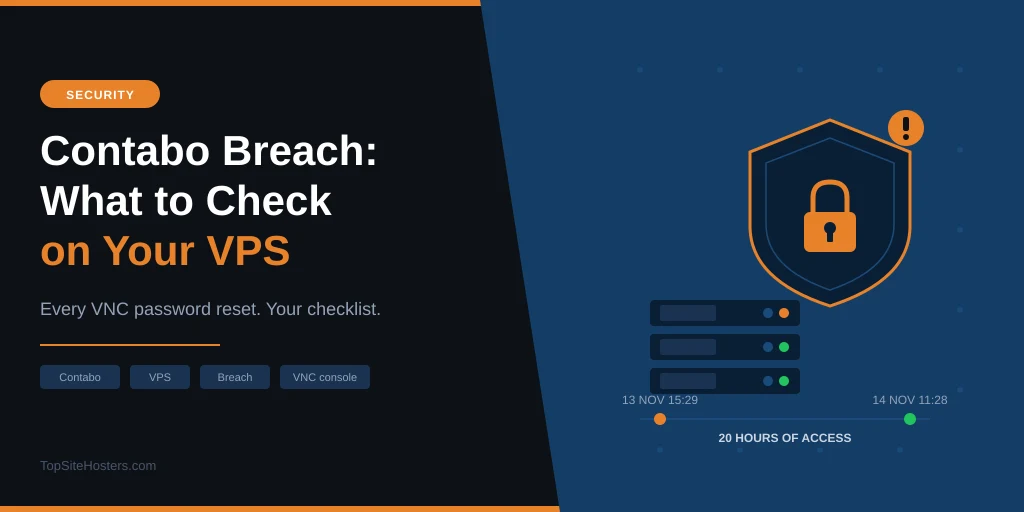
For about 20 hours on 13 and 14 November, someone outside the company had access to part of Contabo’s internal systems. The German VPS host stopped the access on Saturday morning, reset the VNC console password on every customer server, and told customers on Monday evening.
If you run a Contabo VPS or VDS, there’s no reason to panic. Contabo has found no sign that personal data leaked and hasn’t reported any problem with customer servers. What it hasn’t explained yet is how the attacker got in or what they could reach. Until it does, half an hour of checks on your own server is time well spent.
Below you’ll find the confirmed timeline, the questions that are still open, and a checklist you can work through in one sitting.
What Contabo Has Confirmed
Contabo published an incident notice on its help site and has added to it twice so far. This is the timeline it has given, in Central European Time.
| When (CET) | What happened |
|---|---|
| Fri 13 Nov, 15:29 | Unauthorized access to part of Contabo’s internal infrastructure begins |
| Sat 14 Nov, 11:28 | Access stopped, containment starts |
| Mon 16 Nov, 21:00 | Incident notice published, customers emailed |
| Tue 17 Nov, 13:45 | First update: still no sign that personal data leaked |
| Wed 18 Nov, 13:45 | Second update: incident reported to the authorities, still no sign that personal data leaked |
Once it found the intruder, Contabo reset all VNC passwords, blocked the access paths it knew about and replaced its internal credentials. It has also added extra monitoring and brought in an outside digital forensics firm. Operations are running as usual. On 18 November, Contabo said it had reported the incident to the relevant authorities and is working with them as its legal obligations require.
The disclosure itself is better than many hosts manage. Contabo published exact times, named an outside investigator and set a fixed schedule for updates. Two things count against it, though. The intruder had about 20 hours before anyone noticed, and customers only heard about it two and a half days after the access was stopped.
What Contabo Hasn’t Said Yet
The notice is short on detail, and Contabo says it may not be able to answer individual questions while the investigation runs. These are the gaps that matter most if you’re a customer:
- How the attacker got in
- Which internal systems they reached
- Whether they saw or used any VNC password, or reached any customer server
- Any technical clues you could check for yourself, such as IP addresses or file names
One detail is easy to misread. “No indications that personal data was leaked” refers to Contabo’s own records, such as your account details. It doesn’t tell you anything about the files, databases or passwords stored on your server. That part is yours to check.
Why the VNC Password Reset Matters
VNC is the remote screen Contabo gives you for every VPS and VDS. It connects to your server below the operating system, the same as plugging a monitor and keyboard into the machine. That’s why it still works when your SSH access is locked down or your network settings are broken.
It also means your own firewall doesn’t stand in the way. Anyone with a server’s VNC password can reboot it, reach the login screen or a recovery shell, and type commands as if they were sitting in front of it. That applies to Linux and Windows servers alike.
Contabo hasn’t said that any VNC password was taken. Resetting every one of them is a sensible precaution while the investigation continues. Treat it the same way: assume nothing is wrong, but close that door yourself rather than relying on the reset alone.
What to Check on Your Contabo Server Today
Start with your account, then move to the server. If you manage several servers, do the account steps once and the server checks on each machine.
In the Customer Control Panel
- Change your panel password. Use a long, unique one. The password generator makes one in a second.
- Turn on 2FA, or reset it if it’s already on. In the new panel, go to Account, then Security & Access, then Authentication. In the original panel, it’s at the bottom of Customer details. Contabo’s own advice for accounts that may be at risk is to switch 2FA off and set it up again from scratch, because that cancels any login tokens malware may have copied. If you use both panels, do it in both.
- Deal with VNC. If you never use the console, turn it off: click Manage next to the server and choose the VNC option to disable it. If you do use it, set a new VNC password of your own rather than keeping the one Contabo generated.
- Replace your API credentials. If you use the Contabo API for automation, create new credentials and delete the old ones.
On a Linux Server
These commands work on most Linux servers. Run them as root, and look back to at least early November.
Check who logged in. Look for logins at odd hours or from addresses you don’t recognise, and for unplanned reboots:
last -F | head -50
lastb | head -50
last -x reboot | head
journalctl -u ssh --since "2026-11-01"
On some distributions the service is called sshd rather than ssh.
Check users and SSH keys. Every account and key should be one you created:
awk -F: '$3 == 0 || $3 >= 1000 {print $1, $3}' /etc/passwd
cat /root/.ssh/authorized_keys
cat /home/*/.ssh/authorized_keys
Only one account should show a 0 after its name, and that’s root.
Check scheduled tasks and services. Attackers like to leave something behind that starts again on its own. Look for cron jobs, timers and services you didn’t set up:
crontab -l
ls -la /etc/cron.d /etc/cron.daily /var/spool/cron
systemctl list-timers
ls -lt /etc/systemd/system | head
On a Windows Server
Contabo also sells Windows Server VPS plans. The same idea applies: check logins, accounts and anything set to run on its own. Open PowerShell as Administrator.
Check who logged in. This lists successful logins since 1 November with the user, the logon type and the source address:
Get-WinEvent -FilterHashtable @{LogName='Security'; Id=4624; StartTime=(Get-Date '2026-11-01')} |
  Where-Object { $_.Properties[8].Value -in 2,10 } |
  Select-Object TimeCreated,
    @{n='User';e={$_.Properties[5].Value}},
    @{n='Type';e={$_.Properties[8].Value}},
    @{n='From';e={$_.Properties[18].Value}}
Logon type 2 means someone logged in at the console, which is what a VNC session looks like. Type 10 is Remote Desktop. Look for user names, times or addresses you don’t recognise. The Security log has a size limit, so on a busy server the oldest entries may already be gone. If the list starts after 13 November, that’s why.
Check accounts and administrators. Look for users you didn’t create, and for anyone in the Administrators group who shouldn’t be there:
Get-LocalUser | Select-Object Name, Enabled, LastLogon
Get-LocalGroupMember -SID S-1-5-32-544
Get-WinEvent -FilterHashtable @{LogName='Security'; Id=4720; StartTime=(Get-Date '2026-11-01')} -ErrorAction SilentlyContinue
The last command shows any account created since 1 November. No output means none were.
Check scheduled tasks, services and startup items. These are the Windows versions of cron jobs and services:
Get-ScheduledTask | Where-Object {$_.TaskPath -notlike '\Microsoft\*'} |
  Select-Object TaskName, TaskPath, State
Get-CimInstance Win32_Service | Where-Object {$_.PathName -notlike '*\Windows\*'} |
  Select-Object Name, StartMode, PathName
Get-CimInstance Win32_StartupCommand | Select-Object Name, Command, User
Lock down Remote Desktop. Change the Administrator password, and if Remote Desktop is open to the whole internet, limit it to your own IP address in the Contabo firewall. That’s good practice on any Windows server, breach or not.
Watch Your Inbox
Incidents like this are a gift to phishing gangs, who send fake “security alert” emails with login links. Open the panel by typing the address yourself, and read Contabo’s incident page directly rather than through a link in an email.
If Something Looks Wrong
Don’t try to clean a server you no longer trust. A hidden user, an unknown key or a strange service can mean there’s more you haven’t found.
Copy your data instead: databases, website files, uploads and any config you wrote yourself. Then reinstall the server from a fresh image, restore the data and change every password, key and token that was stored on the old one. Skip snapshots of the affected server, because a snapshot brings back whatever was hiding in it.
Do You Have to Report It?
Only if you find evidence that someone got into a server holding personal data. Under GDPR, you’re responsible for the personal data on your server, not Contabo. That covers customer accounts, contact form messages and shop orders.
If you do find signs of access to that kind of data, you generally have 72 hours from the moment you become aware of it to notify your national data protection authority, unless the breach is unlikely to put anyone at risk. This is general information, not legal advice. If you find nothing on your server, there’s nothing to report.
Should You Leave Contabo?
Not because of this alone. Large hosts are attacked all the time, and the test is how they respond. So far Contabo has stopped the access, reset the console passwords, published a precise timeline and started daily updates.
Two things would change that picture: confirmation that customer servers were reached, or updates that stop before the investigation gives answers. Keep an eye on the incident page over the coming days.
If you were already thinking about a move, Hetzner and Netcup are the closest European alternatives on price, and Webdock costs more but runs its own green data centre.
Common Questions About the Contabo Breach
Was Contabo breached?
Yes. Contabo confirmed a breach: an unauthorized third party had access to part of its internal infrastructure from 15:29 on 13 November to 11:28 on 14 November 2026 (CET). The access has been stopped, and an outside forensics firm is investigating.
Was customer data stolen?
As of 17 November, Contabo says there are no indications that personal data was leaked. The investigation is still running, so check the incident page for updates. That statement covers Contabo’s own records, not the data stored on your server.
Do I need to change my Contabo password?
It’s a sensible step. Contabo advises customers to review their credentials and turn on multi factor authentication, and changing the panel password takes two minutes.
What is VNC on Contabo, and should I turn it off?
VNC is the remote console that lets you control your server even when SSH, Remote Desktop or the network isn’t working. If you never use it, turning it off removes one way into your server. You can switch it back on from the panel whenever you need it.
Is Contabo still safe to use?
Contabo hasn’t reported any access to customer servers, and services are running normally. Do the checks above, keep backups of your data, and follow the daily updates. If Contabo confirms access to customer servers, that changes the answer.