In August 2026, thousands of WordPress site owners logged into their admin dashboards and triggered a hack without knowing it. They did not click a suspicious link. They did not install a dodgy plugin from a shady website. They installed a legitimate plugin from a trusted developer, kept it updated, and logged in as normal. The moment they did, malicious code ran silently in their browser, created a hidden admin account on their site, and installed a backdoor. They saw nothing unusual. Most still do not know it happened.
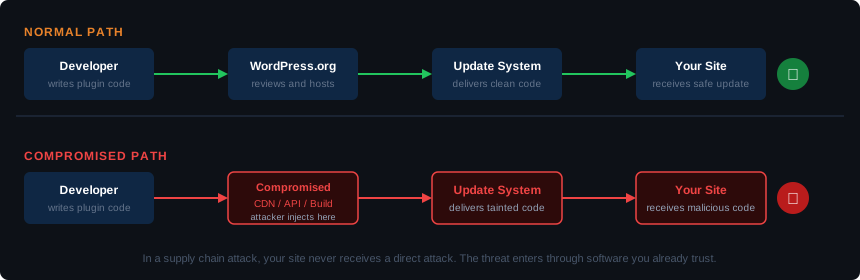
That attack, targeting plugins from a developer called BdThemes, is the clearest example yet of a shift that has been building throughout 2026. Hackers are no longer trying to sneak bad code into plugins you install. They are targeting the infrastructure that delivers plugins to you after you already trust them. The result is that the standard advice is no longer enough on its own: install from WordPress.org, keep plugins updated, remove anything you do not use.
Here is what changed, what four real attacks in 2026 show about how this works, and what you can actually do about it.
The Old Advice Was Right. Until 2026.
For years, keeping WordPress plugins updated was genuinely good security advice. Most plugin vulnerabilities were coding mistakes in older versions. Update to the latest version and the vulnerability disappears. Install from WordPress.org and you get code that has been reviewed before publication. Simple, effective, and mostly sufficient.
That logic still holds for many threats. But it assumes the update itself is clean, the developer’s infrastructure has not been compromised, and the plugin is not pulling in code from an external server that has been tampered with. In 2026, attackers have systematically tested all three assumptions. In several cases, they broke them.
Four Attacks That Changed the Rules
The Plugin Portfolio Buyout (April 2026)
Someone bought more than 30 WordPress plugins on Flippa, the marketplace for digital businesses, for a six-figure sum in late 2024. The plugins had a combined 400,000 active installations and a clean reputation built up over years. That attack is covered in detail in the WordPress plugin supply chain attack post from April, but the short version is striking.
The buyer’s first code commit included 191 lines of hidden PHP: a deserialization backdoor that granted remote code execution. The changelog entry read “Check compatibility with WordPress version 6.8.2.” The backdoor sat dormant for eight months. No one noticed. On April 6, 2026, it activated for six hours and 44 minutes, pushing cloaked SEO spam to every affected site. The spam was invisible to human visitors and site owners. Only Google’s crawler saw it.
When a plugin is sold through Flippa, the new owner inherits the original developer’s commit access to WordPress.org. There is no identity review, no code audit on transfer, and no mechanism that flags a change of ownership to the people who installed the plugin. The buyer had the same trusted status as the developer who spent years building the plugin’s reputation. That is the gap this attack exploited.
The CDN Credential Theft (June 2026)
OptinMonster is one of the most widely used lead generation plugins for WordPress, with sister products PushEngage and TrustPulse used across millions of sites. In June 2026, attackers stole the API credentials for the CDN account used to serve OptinMonster’s scripts. They replaced legitimate files with malicious ones. Those files were then served through the official CDN to every site running the plugins.
You did not need to update anything for this to affect you. You just needed the plugin installed and active. Security researchers caught it live on June 13. Some CDN edges continued serving the malicious payload until June 14, a window of more than 24 hours. Estimated reach: around 1.6 million sites.
The attack had nothing to do with the plugin code itself. The plugin was fine. The problem was a compromised third-party service the plugin depended on to function.
The Build Pipeline Breach (June 2026)
ShapedPlugin is a WordPress software company with more than 400,000 active free plugin installations, selling premium plugins for carousels, testimonials, product displays, and similar use cases. In June 2026, attackers breached ShapedPlugin’s private commercial update pipeline, the system that delivered updates to paying customers.
Here is the detail that matters: they left the free versions on WordPress.org completely clean. Only premium plugin packages, distributed through the vendor’s own infrastructure, were tampered with. The malware that came with those updates stole admin passwords, database credentials, and two-factor authentication secrets. It also installed multiple remote access mechanisms. The severity score assigned by researchers was 9.8 out of 10.
Sites with automatic updates enabled received the malicious code silently. Auto-updates, the thing every hosting provider recommends, delivered the attack. Updating to the clean version after the fact removes the malicious code, but does not undo what already ran. Sites that updated during the affected window need a full cleanup, not just a version bump.
The API Feed Poisoning (August 2026)
This is the one that should get your attention if you use any plugins that connect to external services, which most do.
Several popular BdThemes plugins, including Element Pack, Prime Slider, and Ultimate Post Kit (350,000+ active installations combined), contained a component called Biggop. Its job was simple: fetch promotional banner data from a BdThemes API server and display it in the WordPress admin dashboard. It ran automatically every time an admin loaded any wp-admin page.
Attackers compromised the DigitalOcean Spaces storage bucket where BdThemes stored that banner data. They replaced the legitimate JSON responses with malicious JavaScript. From that point, every time an admin on an affected site logged in, the malicious JS ran in their browser using their authenticated admin session. It created a rogue admin account, installed a fake plugin containing a backdoor webshell, and reported home to an attacker-controlled server.
The rogue accounts were hidden from the WordPress user list using manipulated database queries. You would not have seen them in your dashboard. No plugin files were changed. No update was pushed. Nothing on WordPress.org was touched. The entire attack passed through a remote API response that runs automatically on every admin login.
Wordfence, the security firm that caught it, alerted on August 7. BdThemes plugins were pulled from WordPress.org on August 8. The poisoned API endpoints were cleaned up around the same time. But any rogue accounts or webshells installed before the fix are still there unless manually removed.
The Pattern Behind All Four
These attacks used different technical methods, but the logic was the same in every case. Rather than finding a vulnerability in plugin code and hoping site owners do not patch it, the attacker goes upstream. They compromise the infrastructure that delivers the plugin, or the API the plugin depends on, or the credentials that control how updates are pushed. By the time the malicious code reaches your site, it has already passed through every layer you were told to trust.
WordPress.org reviews code when a plugin is first submitted. It does not continuously audit plugins after publication, does not scrutinise ownership transfers, and has no visibility into external APIs or private commercial update systems. That is not a criticism of WordPress.org, it is simply the reality of how the ecosystem works. The platform was not built with the assumption that plugin developers’ own infrastructure would become an attack target at this scale.
The same structural weakness exists in every ecosystem where software updates can be delivered automatically. npm, PyPI, and browser extension stores all face versions of this problem. WordPress is not uniquely vulnerable. But with WordPress powering over 40% of all websites, each compromised plugin reaches more sites than in almost any other ecosystem.
It is also worth knowing that the cPanel authentication bypass covered in our April security post follows a similar pattern: trusted infrastructure, compromised in a way that bypasses the checks users rely on. Plugin supply chain attacks are part of a broader trend, not a WordPress-specific anomaly.
What You Can Actually Do
None of this means you should stop using plugins. It means auditing more carefully and knowing what to check when something is wrong.
Audit your plugin list and remove anything you are not using. Every inactive plugin on your site is attack surface with no benefit. Go through your installed plugins and deactivate and delete anything that is not actively doing something. Pay attention to plugins with no recent updates and no clear sign of an active developer. The Flippa attack targeted a portfolio of plugins that still had a combined 400,000 installations long after the original developers stopped maintaining them.
Check your admin user accounts. Go to Users in your WordPress dashboard and look at everyone listed as an administrator. If there are names or email addresses you do not recognise, investigate immediately. The BdThemes attack used database manipulation to hide rogue accounts from this view, but that hiding technique was specific to that campaign. A routine user audit is still your first line of detection for most account-based compromises.
Think about which plugins connect to external servers. Most site owners do not consider this. If a plugin fetches data from a remote API on a regular basis, that remote server is now part of your security perimeter. The BdThemes attack did not require a vulnerability in any plugin code. It just required that the remote API the plugin depended on was under attacker control. Ask yourself whether you know what external connections your active plugins make.
Be more cautious with automatic updates on premium plugins. Auto-updates make sense for free plugins on WordPress.org, where code goes through a review process before publication. For premium plugins distributed through a vendor’s own update infrastructure, the ShapedPlugin breach showed that auto-updates can silently deliver malicious code with no warning. Consider reviewing premium plugin changelogs before applying updates, or waiting 24 to 48 hours to see whether anything surfaces in security forums.
Consider paid security monitoring if you run a business site. Wordfence Premium subscribers received detection signatures for the BdThemes attack on August 7, the same day it was discovered. Free Wordfence users are scheduled to receive those protections after a 30-day delay. For a live supply chain attack, 30 days is not a useful protection window. The full guide to securing a WordPress site covers your options in more detail, but for business sites where downtime or a breach carries real cost, paid security monitoring has a clear value case.
Common Questions About WordPress Plugin Security
What is a WordPress supply chain attack?
A supply chain attack targets the developer, infrastructure, or distribution channel behind a plugin rather than the plugin code itself. Instead of finding a vulnerability you need to patch, the attacker compromises the system that delivers updates to your site. Your plugin looks legitimate, comes from a trusted source, and may even be fully up to date, but the code it last delivered was malicious.
How do I know if my WordPress site has been compromised through a plugin?
Check your admin user list for accounts you do not recognise. Look through your installed plugins for anything you did not install yourself. Check your file system for unexpected PHP files, particularly in plugin directories. Tools like Wordfence or Sucuri can scan for known malware signatures. If you had any of the affected BdThemes plugins installed between June 23 and August 8, 2026, check specifically for a file called emer-run.php and for a plugin named wp-smart-thumbnails.
Is it safe to auto-update WordPress plugins?
For free plugins on WordPress.org, auto-updates are generally still sensible. The code goes through a review before publication, and updates are typically the fastest way to close known vulnerabilities. For premium plugins distributed through a vendor’s own update system, the ShapedPlugin breach shows that auto-updates can deliver malicious code without warning. For premium plugins, manually reviewing updates before applying them adds a meaningful layer of caution.
Should I stop using plugins from WordPress.org?
No. WordPress.org is still the most reliable source for plugins, and the review process catches a significant amount of problematic code. The attacks covered in this post exploited gaps outside of that review process, not weaknesses within it. Continue installing from WordPress.org, but audit your installed plugins regularly, remove anything you are not actively using, and pay attention to security announcements from researchers like Wordfence and Patchstack.
What happened to BdThemes plugins in 2026?
Attackers compromised a storage bucket used by BdThemes’ internal promotional banner system. They replaced legitimate data with malicious JavaScript that ran automatically in any admin’s browser on wp-admin page load. The code created hidden rogue admin accounts and installed a backdoor webshell on affected sites. Seven BdThemes plugins were temporarily removed from WordPress.org on August 8 while the investigation continued. The poisoned API endpoints were cleaned up around the same time, but any compromise that occurred before the fix requires manual cleanup.
The Honest Bottom Line
Plugins are still the right way to extend WordPress. Installing from WordPress.org is still the right starting point. Keeping things updated is still better than not. None of that changes.
What changes is the assumption that doing those things is sufficient. The four attacks above show that the threat has moved upstream, into the infrastructure behind the plugins you already trust. That makes regular auditing, a shorter plugin list, and awareness of what your plugins connect to more important than they used to be.
The sites most at risk are the ones with too many plugins, too many forgotten installs, and auto-updates doing the work silently. The attacks above do not require you to make a mistake. But keeping a shorter, more deliberate plugin list gives attackers fewer ways in.