Visit almost any hosting provider’s website in 2026 and you’ll find the word “AI” within the first scroll. Hostinger has Kodee. GoDaddy has Airo. Bluehost has WonderSuite. SiteGround has AI Studio. The marketing is relentless, and most of it sounds the same.
The problem is that “AI” means completely different things depending on who’s using it. Some of what gets labelled AI hosting is genuinely useful. Some of it is a chatbot with a friendly name. And some of the most meaningful AI in hosting is invisible, running quietly in the background without a marketing name at all.
Here’s how to tell them apart.
There Are Two Types of Hosting AI
The most useful distinction nobody makes clearly: there’s AI for your website, and there’s AI for your hosting account. They’re not the same thing, and conflating them is how hosts get away with calling a site builder an “AI hosting platform.”
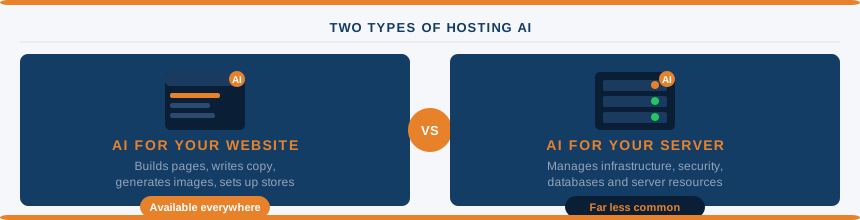
AI for your website helps you build pages, write copy, generate images, set up a store, or get through WordPress onboarding faster. It operates at the content level. It doesn’t know anything about your server, your databases, or your hosting plan.
AI for your hosting account knows what plan you’re on, what’s installed on your server, how your resources are performing, and can take action on your behalf. Restarting a service, checking firewall rules, scanning for malware, adjusting a PHP setting. That’s a meaningfully different category.
The majority of “AI hosting” products in 2026 are the first type dressed up as the second. That’s not necessarily bad. Site-building AI is useful for a lot of people. It’s just worth knowing which one you’re actually getting.
AI for Your Website (The Common Stuff)
These tools are widely available across almost every mainstream host now. Most of them work reasonably well for their intended purpose, which is getting a non-technical user from zero to a live website faster than they could manage alone.
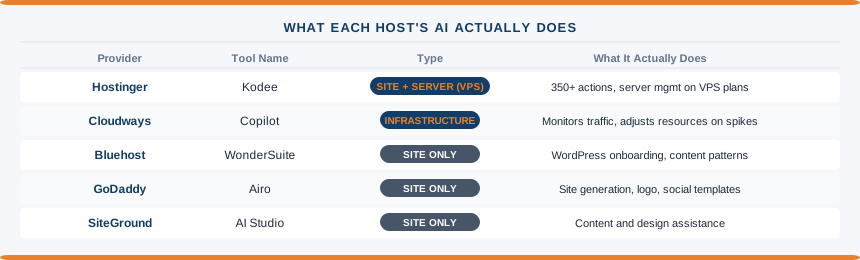
GoDaddy Airo generates a full website from a brief description: theme, copy, images, and core pages. It also produces logo options, social media post templates, and email marketing content. It relaunched in early 2026 with responses under 10 seconds. Fine for a small business that just needs a site up quickly and isn’t precious about the result.
Bluehost WonderSuite takes a WordPress-native approach with five components: WonderStart collects your business details and applies them across the site, WonderTheme handles design templates, WonderBlocks provides content patterns, WonderHelp gives in-editor guidance, and WonderCart adds e-commerce tools. The most useful of these for a beginner is WonderStart. Getting a WordPress site configured properly from scratch takes time, and anything that shortens that process has real value.
SiteGround AI Studio is primarily a content and design tool. It generates page content, helps with copy, and assists with design decisions. There are no server management capabilities. Good for what it is, but don’t mistake it for infrastructure control.
DreamHost Remixer, launched in March 2026, is a conversational AI site generator. You describe what you need, it builds a starting point. Same category as the others.
Wix Harmony, launched in January 2026, integrates natural language instructions into the existing Wix editor via an assistant called Aria. Hybrid approach: AI creates a starting point and then the normal drag-and-drop editor takes over.
Tools like Extendify, which powers AI-assisted WordPress onboarding inside several hosting dashboards as a white-label product, also fall into this category. They accelerate the setup process for first-time site owners without touching the underlying server.
Webhuset recently launched a WordPress AI tier using Extendify as the underlying builder. It’s a useful illustration of how white-label AI onboarding tools are being repackaged by individual hosts as named product tiers, complete with their own pricing and support levels. The AI layer handles layout and content generation from prompts. The WordPress installation underneath is standard, so you’re not trading flexibility for convenience.
None of these are AI hosting in the infrastructure sense. They’re AI website tools that come bundled with hosting. The distinction matters when you’re comparing plans or making a decision based on “AI features.”
AI for Your Hosting Account (The Useful Stuff)
This is where things get more interesting, and where the provider list gets much shorter.
Hostinger’s Kodee is the most capable AI assistant available on a mainstream shared hosting plan. On shared hosting, it covers over 350 actions including WordPress migrations, WooCommerce setup, and general site management questions. On VPS plans, it gains roughly 200 additional server-level capabilities: firewall configuration, resource monitoring, snapshot management, malware scanning, and SSH access management. If you’re managing a VPS and want an AI that can actually interact with your server rather than just answer questions about it, Kodee on Hostinger VPS is the most practical option at this price point.
The honest limitation: Kodee operates through a web chat interface only. No Telegram, no voice, no external integrations. And on shared hosting, its server-level knowledge is limited to what Hostinger exposes to it. It can’t do things the shared hosting environment doesn’t permit.
Cloudways Copilot watches server traffic in real time and adjusts resources when unexpected spikes arrive. It’s a narrower tool than Kodee but operates at a genuine infrastructure level. Useful for anyone hosting sites with unpredictable traffic patterns.
For everyone else, server-level AI is largely something that happens without a branded interface. Your hosting provider’s systems are making decisions about caching, scaling, and security automatically. You just don’t get a chatbot to interact with.
The Infrastructure AI You Never See (But Benefit From)
The most significant AI in hosting in 2026 isn’t a product feature you can toggle on. It’s running inside the provider’s platform, making decisions invisibly.
Predictive auto-scaling is one example. Traditional scaling kicks in after your server is already struggling. Modern systems analyse hundreds of signals: traffic trends, Search Console data, social media activity, scheduled promotions. When confidence is high enough, additional resources spin up before the spike arrives. Visitors never experience the slowdown that used to define shared hosting under load.
Smart caching is another. A CDN combined with AI-driven caching logic knows that a blog post published last year can be served from cache for hours, while a checkout page needs fresh data on every request. It also converts images to modern formats on the fly, inlines critical CSS, and defers non-essential JavaScript automatically. The performance improvements from this kind of system are real, even if you never interact with a named AI product.
Security threat detection works similarly. An exploit discovered on one customer’s site can be blocked across an entire hosting network within minutes, because the security system learns from attacks in real time rather than waiting for a human to write a rule. This has been happening for years but the speed and accuracy have improved substantially.
None of this requires you to do anything. You benefit from it based on which provider you choose and how much they’ve invested in their infrastructure. It’s one of the less visible factors that separates serious hosting providers from the ones running on thin margins and older systems.
What’s Mostly Marketing
A few patterns that signal AI claims worth scepticism:
“AI-optimised servers” with no specifics. Every server can be called AI-optimised if you squint. Ask what the AI actually optimises, how it works, and where you can see evidence of it.
A support chatbot rebranded as an AI assistant. If the AI can only answer questions from a knowledge base and escalate to a human, it’s a chatbot. Useful, but not the same as an AI that can manage your account.
AI website builders presented as hosting AI. If the only AI feature on a hosting plan is a site builder, the host is selling you a tool, not infrastructure intelligence. That’s fine if the tool is what you need. Just call it what it is.
Vague AI security claims. “AI-powered security” means very little without specifics. Does it block threats in real time? Does it learn from attacks across the network? What does it actually detect? Genuine AI security tools have specific, verifiable claims. Generic ones don’t.
The question that cuts through almost everything: what does the AI have access to? If the answer is “your website content,” you’ve got a site tool. If the answer is “your server, databases, and hosting configuration,” you’ve got something more substantive.
So What Should You Actually Care About?
For most people running a WordPress site on shared hosting, the AI features that make a practical difference right now are:
The setup tools. AI-assisted onboarding genuinely reduces the time it takes to get a site live and configured correctly. If you’re new to hosting, that has real value. WonderSuite, Airo, and similar products are decent at this.
The support assistant. An AI that can answer common questions accurately and quickly is useful when you’re stuck at 11pm and don’t want to wait for live chat. Kodee handles this well on Hostinger. So do most AI chatbots on other major hosts, for straightforward questions.
The invisible infrastructure. When you’re comparing hosts, the ones that have invested in predictive scaling, smart caching, and real-time security aren’t always the ones with the most visible AI branding. Performance test data, independent uptime monitoring, and how providers handle traffic spikes tell you more than a named AI product does.
For anyone managing a VPS and wanting an AI that can actually interact with the server, Hostinger’s Kodee is the most accessible option in the mainstream market. For everything else, focus on whether the host performs well rather than what they’re calling their AI.
The AI will get more capable quickly. The fundamentals of good hosting, fast servers, honest pricing, reliable uptime, real support, won’t change.
Questions Worth Asking
Does AI hosting cost more?
Not necessarily. Hostinger includes Kodee on all plans from $2.99/mo. Most AI site-building tools are bundled with standard hosting plans at no extra charge. The hosts charging a premium for AI features are typically in the managed or enterprise space where AI is doing genuine infrastructure work.
What is Kodee in Hostinger?
Kodee is Hostinger’s AI assistant, available across hPanel, the website builder, WordPress admin, and VPS management. On shared hosting it handles over 350 actions covering WordPress and site management. On VPS plans it gains server-level capabilities including firewall management, malware scanning, and resource monitoring.
Is an AI website builder the same as AI hosting?
No. An AI website builder helps you create and design a website. AI hosting, in the meaningful sense, involves artificial intelligence managing or assisting with your hosting infrastructure: server resources, security, performance, databases. Most AI branding in hosting refers to the former, not the latter.
Which hosting provider has the best AI tools?
For server-level AI you can actually interact with, Hostinger’s Kodee on VPS is the strongest mainstream option. For AI-assisted WordPress setup, Bluehost’s WonderSuite and GoDaddy’s Airo are both functional. For invisible infrastructure AI, the providers that score well on independent performance benchmarks tend to be the ones doing the most here, regardless of their AI branding.