Hostinger quietly added something interesting to its product lineup in March 2026: a one-click deployment for OpenClaw, the open-source AI agent platform. No server setup. No Docker configuration. No API key management. Pay, click, and your AI assistant is running in under four minutes.
That’s the pitch. The reality is a bit more nuanced, and the cost picture is one that most coverage has skipped entirely.
What Is OpenClaw?
OpenClaw is an open-source AI assistant platform that runs on your own server rather than inside a browser tab. You connect it to your messaging apps: WhatsApp, Telegram, Slack, Discord. From there, it handles tasks continuously, even when your laptop is closed.
The kinds of things people actually use it for: sorting incoming messages, qualifying leads, scheduling meetings, drafting follow-ups, running web searches, and managing workflows across platforms. Think of it less like a chatbot and more like a persistent background assistant that acts on instructions.
The catch has always been setup. Getting OpenClaw running properly requires a VPS, Docker, environment variables, API keys from at least one AI provider, and some tolerance for terminal errors. For developers it’s a weekend project. For everyone else it’s been an obstacle.
That’s what Hostinger is trying to fix.
What Hostinger Actually Launched
There are two separate things worth separating here, both announced in March 2026.
One-click OpenClaw is a pre-packaged VPS product at hostinger.com/vps/openclaw-hosting. You pick a plan, pay, and Hostinger handles the Docker environment, the dependencies, and the initial configuration automatically. The server is accessible in under four minutes. You then connect your messaging channels and start using your assistant.
The pricing starts at $6.99 per month on an introductory rate, renewing at $14.99 per month on a two-year plan. That gets you 2 vCPU cores, 8GB RAM, and 100GB NVMe storage. Hostinger recommends their KVM 2 plan or higher for OpenClaw, which matches that spec.
One feature worth understanding is the Nexos AI credits system. Rather than requiring you to set up accounts with OpenAI, Anthropic, or Google and manage separate API keys, Hostinger lets you purchase AI credits directly through their dashboard. Those credits power your OpenClaw instance. It simplifies the setup considerably. The credits aren’t free though, and we’ll get to that in a moment.
Hostinger Horizons in ChatGPT is a separate launch from the same month. Hostinger’s Horizons AI site builder is now available directly inside ChatGPT, so you can go from describing an idea to a live website without leaving the chat interface. It’s a different product aimed at a different use case: building sites, not running agents.
The Real Cost
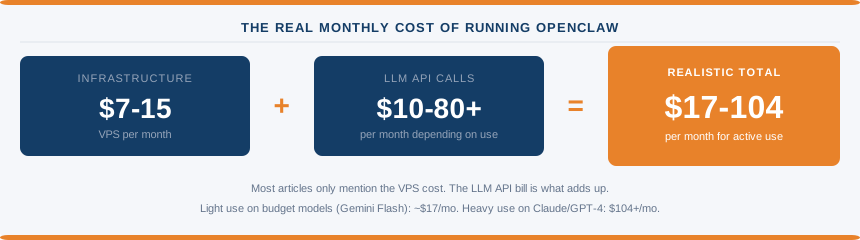
OpenClaw is open-source software. It costs nothing to download. Running it, however, involves two separate ongoing costs that most coverage bundles together or ignores entirely.
Infrastructure cost: the VPS that keeps OpenClaw online 24/7. At Hostinger, that’s $6.99/mo intro or $14.99/mo at renewal. Budget options elsewhere (Hetzner, Contabo) start around $3.96 to $6.59/mo for equivalent specs.
LLM API cost: every time OpenClaw thinks, searches, drafts, or acts, it calls an AI model. Those calls cost money. At moderate use, Claude Sonnet runs around $30 to $50 per month. Gemini Flash is significantly cheaper and can cut those costs by 70 to 80% if you switch routine tasks to it. Light use on budget models: $10 to $20 per month. Heavy use on premium models: $80 or more.
Add those together and the realistic monthly cost for active OpenClaw use sits between $17 at the low end (light usage, budget LLM, cheap VPS) and $104 or more at the high end (moderate usage, premium models, renewal pricing). To work out your own estimate, try our OpenClaw Cost Calculator.
Hostinger’s Nexos AI credits simplify the API key situation but don’t change the underlying economics. You’re still paying per AI call. The convenience is real. The cost is still there.
This isn’t a criticism of Hostinger specifically. It’s the honest picture of what running any self-hosted AI agent actually costs. Most articles stop at “starting from $6.99/mo” without explaining what comes next.
Who Is This Actually For?
The one-click setup removes the biggest barrier to running OpenClaw: the server configuration. What it doesn’t remove is the learning curve inside OpenClaw itself once it’s running. Connecting channels, setting up workflows, configuring automations, and troubleshooting when something breaks still requires time and patience.
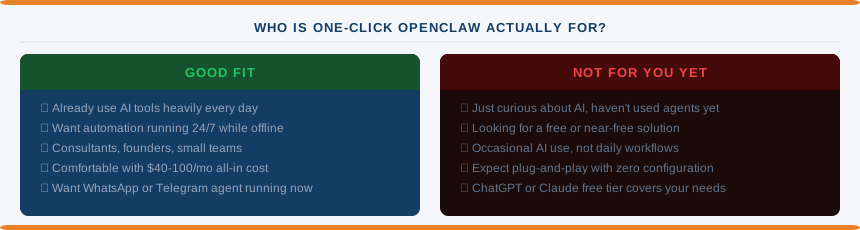
The people this product genuinely suits are those who already use AI tools heavily and want something that stays active around the clock without manual intervention. Consultants who want a lead qualification bot running on WhatsApp while they sleep. Founders who want their calendar, email, and Telegram managed by a persistent assistant. Small teams who want automation workflows that run without someone babysitting a browser tab.
If you’re curious about AI but haven’t really used agents yet, the honest advice is to start with the free tiers of ChatGPT or Claude before spending $17 to $100 per month on infrastructure. The one-click setup removes the technical barrier but not the usage learning curve.
For existing Hostinger VPS customers, the Docker Manager deployment path lets you add OpenClaw to a plan you already own without buying a new one. That’s the most cost-efficient entry point if you’re already paying for a VPS there.
What About Hostinger Horizons in ChatGPT?
Worth a brief mention since it landed in the same announcement cycle. Hostinger Horizons is their AI site and app builder, and it’s now accessible directly from a ChatGPT conversation. You describe what you want, refine it in chat, and Horizons builds and hosts the result.
It’s a different audience from OpenClaw. One is for people who want to build something and put it online. The other is for people who want an automated assistant running in the background. Both remove a layer of technical friction from a task that previously required more knowledge to attempt.
The Bigger Picture
The one-click OpenClaw launch isn’t an isolated product decision. Taken alongside Horizons in ChatGPT, Kodee on VPS, and the general direction of hPanel development, Hostinger is clearly positioning itself as the easiest on-ramp to AI infrastructure for people who aren’t developers.
That’s a defensible position. The hosts competing on raw price or raw specs have a race to the bottom problem. Competing on accessibility for a genuinely new category of use cases is a different strategy.
Whether OpenClaw specifically becomes mainstream depends on how the broader AI agent ecosystem develops. Right now it’s a product for early adopters who already know what they want. Hostinger’s packaging makes it more accessible. The underlying economics of running it still add up to more than the headline price suggests.
If you want to read more about what hosting companies mean when they say AI, and how to separate what’s genuinely useful from what’s marketing, that’s worth reading alongside this. For context on OpenClaw itself, our OpenClaw vs NanoClaw comparison covers how the platform compares to its main alternative.
Common Questions About Hostinger OpenClaw
What is OpenClaw?
OpenClaw is an open-source AI assistant platform you run on your own server. It connects to messaging apps like WhatsApp, Telegram, Slack, and Discord, and handles tasks automatically around the clock. Unlike browser-based AI tools, it stays active even when you’re offline.
How much does Hostinger OpenClaw cost per month?
The VPS starts at $6.99 per month on an introductory rate, renewing at $14.99 per month on a two-year plan. On top of that, you’ll pay for AI model usage through Nexos AI credits or your own API keys. Realistic total cost for moderate use is $37 to $67 per month.
Do I need technical knowledge to run OpenClaw on Hostinger?
Less than you would without Hostinger’s packaging. The server setup and Docker configuration are handled automatically. You still need to connect messaging channels, configure workflows, and troubleshoot issues inside OpenClaw itself. It’s accessible to non-developers but not completely hands-free.
What messaging apps does OpenClaw connect to?
WhatsApp, Telegram, Slack, and Discord are supported out of the box. You can also connect it to email and other services depending on your configuration.
What is the difference between Hostinger’s one-click OpenClaw and a regular VPS?
A regular VPS gives you a server and root access. You then install Docker, configure OpenClaw manually, and manage everything yourself. Hostinger’s one-click product pre-installs and configures the OpenClaw environment for you, includes Nexos AI credits to skip the API key setup, and gets you from purchase to a running instance in under four minutes.
Pricing verified April 2026. Check hostinger.com for current rates before signing up.