Most Norwegian hosting providers get lumped in with the international crowd. Webhuset is different. It has been running servers in Norway since 1998, survived an acquisition by one of the world’s largest hosting companies, and then had its founder buy it back. That backstory matters more than you’d think when you’re choosing a host.
This review covers everything you need to make a decision: the actual plan pricing (intro and renewal), what you get for your money, where the host genuinely delivers, and where it falls short. If you’re running a Norwegian site or need a host with data centres inside Norway, keep reading.
What Is Webhuset?
Webhuset was founded in 1998 by Erik Windahl Olsen in Skien, Norway. The early years were lean: the company started out of Olsen’s family basement, relying on American data centre capacity while it built its Norwegian customer base. Within two years, the server volume justified building its own data centre in Norway, and the company grew steadily from there.
By 2018, Webhuset had become one of Norway’s largest independent hosting and domain providers, which made it an attractive acquisition target. GoDaddy bought the company that year, and Olsen stayed on as Director for GoDaddy’s Nordic operations for five years. Then in 2022, Olsen and the original management team completed a management buyout, taking Webhuset back into independent ownership. The company now sits under the Lucky River investment portfolio.
That history matters for one reason: the “100% norsk” badge on Webhuset’s homepage is accurate. The GoDaddy-era icon assets still visible in some of their image files are just legacy code from the acquisition period, not a sign of current ownership. Today Webhuset is genuinely independent, with 20,000+ customers, data centres in Oslo and Bergen, and a Norwegian-first approach to everything from support to data handling.
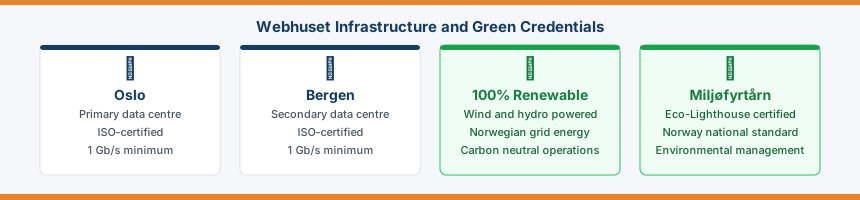
Webhuset runs its own data centres in Oslo and Bergen, keeping all data within Norway’s borders. For customers with Norwegian or EU data residency requirements, that’s a practical plus. The company doesn’t publish green energy credentials or hold any verified sustainability certifications at this time.
Webhuset Hosting Plans and Pricing
All Webhuset prices are listed in Norwegian krone (NOK). The approximate USD conversions below use a rate of NOK 10.7 = $1 and are for reference only. Actual costs will vary with exchange rates.
The most important thing to know about Webhuset’s pricing is that the introductory rates are promotional. Most plans roughly double at renewal. Here’s the full picture:
| Plan | Storage | Databases | Intro Price | Renewal Price | Approx USD (intro) |
|---|---|---|---|---|---|
| Web Hobby | 1 GB | 1 | kr 15/mo | kr 30/mo | ~$1.40/mo |
| Web Pluss | 10 GB | 5 | kr 30/mo | kr 60/mo | ~$2.80/mo |
| Web Pro | 50 GB | 10 | kr 45/mo | kr 120/mo | ~$4.20/mo |
| Web Max | 200 GB | 100 | kr 90/mo | kr 200/mo | ~$8.40/mo |
Web Pro deserves a closer look. At kr 45/mo introductory, it looks like a fair deal for 50 GB storage and 10 databases. At renewal it jumps to kr 120/mo; a 166% increase. Web Max goes from kr 90 to kr 200, a 122% jump. If you’re budgeting for year two, plan around the renewal price, not the introductory one. Our guide to hosting renewal pricing explains why this practice is so common across the industry.
Every shared plan includes free SSL/TLS, full DNS control, daily backup with 14-day retention, choice of Linux or Windows, FTP access, SSH (Linux only), MySQL and Microsoft SQL Server, phpMyAdmin, and one-click installation for WordPress, Joomla, Magento, and Drupal. Traffic is unmetered. There is a 30-day money-back guarantee. There is no free domain included with any plan.
WordPress AI Plans
Webhuset recently added a WordPress AI tier, powered by Extendify, an AI-assisted site builder that works as a WordPress plugin. It lets you generate a website layout and content using prompts, without needing to know WordPress first. The plans sit above the standard shared hosting tier in price but include phone support alongside live chat.
The AI builder is genuinely useful if you want to get a WordPress site live without spending hours configuring themes and plugins from scratch. It’s not a replacement for a proper WordPress build, but for small business owners who want something functional fast, it lowers the barrier considerably. You can still install any standard WordPress plugin alongside it.
| Plan | Storage | Intro Price | Renewal Price |
|---|---|---|---|
| WP AI Hobby | 5 GB | kr 45/mo | kr 90/mo |
| WP AI Pluss | 10 GB | kr 75/mo | kr 150/mo |
| WP AI Pro | 50 GB | kr 95/mo | kr 190/mo |
| WP AI Max | 100 GB | kr 145/mo | kr 290/mo |
Website Builder
Webhuset offers a drag-and-drop website builder called WebSiteBuilder, aimed at users who want a site live quickly without touching WordPress or any code. It works directly in the browser, starting from kr 87/mo, and includes a free two-week trial at demo.websitebuilder.no.
Key features: drag-and-drop editing, 20+ responsive templates, unlimited storage and pages, built-in SEO tools, e-commerce with PayPal and Stripe, multilingual support, social media integrations, and Google Analytics support. Free SSL via Let’s Encrypt is available as an add-on through Kundesenter.
The honest verdict: this is a tool for Norwegian small businesses that want something simple and fast, not a competitor to Squarespace or Wix in terms of design flexibility. The template range is limited and the builder itself is clearly GoDaddy-era technology from the image assets. For anyone comfortable with WordPress the AI plans are a better route. For someone who genuinely never wants to touch a backend, it does the job.
Performance and Uptime
Webhuset does not publish an uptime SLA for shared hosting plans. That’s worth noting up front. The company does commit to network and power redundancy on its VPS tier, with dual power supply, battery backup, and diesel generators at both data centres, but the shared hosting tier carries no percentage guarantee in writing.
In practice, customer feedback across hundreds of Trustpilot reviews suggests reliability is strong. Downtime complaints are rare, and the ones that do appear tend to involve specific incidents rather than chronic instability. One notable example involved an SSL certificate renewal delay, which Webhuset attributed to a third-party service provider. They resolved it, but it took longer than customers expected.
Server locations in Oslo and Bergen mean fast load times for visitors in Norway and across Scandinavia. If your audience is primarily based outside the Nordic region, you’ll likely see higher latency compared to using a host with data centres in the US or Western Europe. Check your server response time after sign-up if performance for international visitors matters to you.
All data centres run with minimum 1 Gb/s line speeds in and out, and storage across all plans uses SSD.
Features and Control Panel
Webhuset uses its own custom control panel called Kundesenter. Several competitor reviews incorrectly list this as cPanel, it isn’t. Kundesenter handles domain management, file access via a browser-based file manager, FTP/SFTP configuration, one-click app installation, database management, and email setup from a single interface. It’s straightforward to navigate, though it lacks some of the visual polish of more modern panels.
The one-click installer supports WordPress, Joomla, Magento, Drupal, and a range of other applications. For most users, getting WordPress running takes a few minutes.
The choice of Linux or Windows on all shared plans is a genuine differentiator. Most budget hosts only offer Linux. If you’re running ASP.NET applications or need Microsoft SQL Server rather than MySQL, Webhuset covers that. Both database types are available on all plans at no extra cost, and you can create unlimited subdomains.
Free SSL is provided via Let’s Encrypt and activates automatically for new hosting accounts. DNS propagation is claimed to take under 10 minutes for changes made within the control panel, which is faster than the 24 to 48 hours you’ll sometimes see quoted elsewhere. SSH access is available on Linux plans.
Daily backups are included and retained for 14 days. Restoring from backup carries a small fee. If you need longer retention or more frequent snapshots, Webhuset offers backup as a paid add-on service.
Cloud Server Options
Beyond shared hosting, Webhuset offers a self-managed VPS hosting tier under the Cloud Server label. Plans run from kr 99/mo (1 GB RAM, 10 GB SSD, 1 CPU) up to kr 1,449/mo (32 GB RAM, 320 GB SSD, 8 CPU). The most popular tier sits at kr 249/mo: 4 GB RAM, 40 GB SSD, 2 CPU cores, 1 TB traffic.
| RAM | SSD | CPU | Traffic | Price/mo |
|---|---|---|---|---|
| 1 GB | 10 GB | 1 core | 1 TB | kr 99 |
| 2 GB | 20 GB | 1 core | 1 TB | kr 199 |
| 4 GB | 40 GB | 2 cores | 1 TB | kr 249 |
| 8 GB | 80 GB | 4 cores | 2 TB | kr 449 |
| 16 GB | 160 GB | 6 cores | 2 TB | kr 799 |
| 32 GB | 320 GB | 8 cores | 4 TB | kr 1,449 |
OS options include Rocky Linux, CentOS Stream, Debian, Ubuntu, and Windows Server. Webhuset’s own pricing comparison against AWS and Azure shows meaningful savings at the mid to high tiers; their 4 GB RAM plan at kr 249 sits well below equivalent AWS and Azure configurations at kr 312 and kr 310 respectively.
Management features include hard reboot, reinstall, server cloning, console access (useful if you’ve accidentally locked yourself out), and snapshot/restore. A managed firewall is available as an add-on. You can add up to four extra IP addresses and create your own VLAN. Maximum configuration is 500 GB disk, 64 GB RAM, 16 CPU cores. Servers are provisioned within minutes of ordering.
These are unmanaged servers. You’re responsible for the software, security updates, and configuration. If you want a managed WordPress environment, Webhuset’s WordPress AI plans are a better fit, or consider a fully managed host like Kinsta for high-traffic WordPress sites.
Customer Support
Support at Webhuset is a mixed picture, and it’s worth being clear about both sides.
The positive side is well-documented. Trustpilot reviews consistently name individual support agents — Sanna, Tiril, Felicia, Thomas, and others appear repeatedly, and praise their technical competence, willingness to stay on complex problems, and ability to explain things clearly to people who aren’t technical. One reviewer with nearly 25 years of professional hosting experience described their experience after a DDoS attack as among the best technical support they’d ever received. That kind of consistency across 598 reviews isn’t an accident.
The catch is the hours. Support is available weekdays only, 09:00 to 17:00 Norwegian time. No evenings. No weekends. Channels are live chat, phone, and email (via a form in Kundesenter). There’s no 24/7 option.
For a Norwegian small business, this is probably fine. Most issues can wait until Monday morning. For anyone running a site that serves international audiences, or an e-commerce store that needs help when it goes down on a Saturday night, this is a real limitation. Go in with that expectation and it won’t come as a surprise.
Support is primarily in Norwegian. English is handled, but this is a Norwegian-market host and that’s reflected in the default support experience.
Who Should Use Webhuset?
Webhuset is the right call for Norwegian small businesses, freelancers, and professionals who want their data hosted inside Norway. GDPR compliance under Norwegian law, fast load times for local audiences, .no domain registration, and Norwegian-speaking support make it a strong choice for anyone whose customers are primarily in Norway or Scandinavia. Developers who want competitively priced VPS infrastructure with Norwegian data centres, without paying hyperscaler prices for AWS or Azure, will also find it worth a look.
It’s not the right fit if your audience is global and latency matters, if you need 24/7 support, or if you don’t speak Norwegian and want to interact with support in English as a default. International users building sites for a non-Norwegian audience would likely get better value and more flexibility from a global host like Hostinger or FastComet, both of which offer European data centre options with broader language support.
What People Ask About Webhuset
Does Webhuset include a free domain with hosting?
No. Webhuset does not include a free domain with any hosting plan. Domains are purchased separately, starting from kr 7 for the first year on some extensions. You can register .no, .com, and a wide range of other TLDs directly through their platform.
What control panel does Webhuset use?
Webhuset uses its own custom control panel called Kundesenter. It’s not cPanel. Kundesenter handles domains, files, databases, email, and app installation from a single interface. It’s functional and straightforward, though not as polished as some third-party panels.
Is Webhuset still owned by GoDaddy?
No. GoDaddy acquired Webhuset in 2018, but in 2022 founder Erik Windahl Olsen and the original management team completed a management buyout. Webhuset is now independently owned under the Lucky River investment portfolio. The GoDaddy-era assets still visible in some image filenames on the site are legacy code that hasn’t been cleaned up, not a sign of current ownership.
Does Webhuset offer an uptime guarantee?
Not for shared hosting. There’s no published SLA percentage on the shared hosting tier. VPS plans benefit from redundant power and network infrastructure at both data centres, but again without a written uptime guarantee. Customer feedback on reliability is largely positive, but the absence of a written commitment is worth factoring in if uptime is critical to your site. Use our uptime calculator to see what different uptime percentages mean in hours of potential downtime per year.
What are Webhuset’s renewal prices?
Renewal prices are roughly double the introductory rates on most plans. Web Hobby goes from kr 15 to kr 30 per month, Web Pro from kr 45 to kr 120, and Web Max from kr 90 to kr 200. These are disclosed on the pricing page in small print. Always budget based on the renewal price if you plan to stay past the first term.
Final Verdict
Webhuset is a solid, uncomplicated choice for a specific audience: Norwegian-based businesses and individuals who want their data hosted inside Norway, strong local support, and a host that has been operating in this market for over 25 years. The founder-buyback story gives the “100% norsk” positioning real weight, not just marketing.
The weaknesses are real but predictable. Renewal prices roughly double, which is an industry-wide habit but still worth knowing before you sign up. Support hours of 09:00 to 17:00 on weekdays only mean you’re on your own evenings and weekends. And there’s no published uptime guarantee on shared plans. None of these are dealbreakers for the target audience, but they’d rule Webhuset out for certain use cases.
If you’re in Norway and want a host that knows the market, speaks the language, stores your data locally, and picks up the phone during business hours with actual technical knowledge: Webhuset delivers. If you’re outside Norway or need round the clock support, look elsewhere.
TopSiteHosters has no affiliate relationship with Webhuset. This review was written independently and no commission is earned from clicks or sign-ups. Our advertising disclosure explains how we handle affiliate relationships across the site.
Pros and Cons
✓ Pros
- Norwegian data centres; GDPR compliant, fast for Nordic audiences
- Independently owned since 2022 management buyout
- Linux or Windows on all plans
- Competitive VPS pricing vs AWS and Azure
- Support team consistently praised on Trustpilot
- Monthly billing available, no annual lock-in
- 30-day money-back guarantee
✗ Cons
- Renewal prices roughly double on most plans
- No free domain included
- Support weekdays only, 09:00–17:00
- No published uptime SLA on shared hosting
- Site and support primarily in Norwegian
- Web Hobby's 1 GB storage is very tight
Key Features
| Free Domain | No |
|---|---|
| Control Panel | Kundesenter |
| Free Migration | No, self-service migration only |
| Money-Back | 30 days |
| Support | Weekdays 09:00–17:00 |
| Green Credentials | No verified certification |
| Backups | Daily, 14-day retention |
Data Centres
| Name | Country | Tier | Certifications | Green |
|---|---|---|---|---|
| Oslo DC | Norway | Unknown | — | ✓ |
| Own data centre, Oslo. Dual power supply, battery backup and diesel generators. All data within Norway's borders — strong data sovereignty for Norwegian and EU customers. Norway runs on nearly 100% hydroelectric power, making this one of the greenest hosting locations in Europe. Low latency for Oslo and Eastern Norway. All Norwegian law applies — no data disclosure without a valid Norwegian court order. | ||||
| Bergen DC | Norway | Unknown | — | ✓ |
| Own data centre, Bergen (Nygårdsgaten 114). Webhuset HQ location. Dual power supply, battery backup and diesel generators. All data within Norway's borders. Norway runs on nearly 100% hydroelectric power. Low latency for Bergen and Western Norway. Founded in Bergen in 1998 — one of Norway's longest-running independent hosting providers. | ||||