What Is XML-RPC? xmlrpc.php Explained
XML-RPC lets apps talk to your WordPress site through xmlrpc.php. Learn why attackers target it and how to block it properly.
XML-RPC is a way for one program to ask another program to do something over the internet. In WordPress, it lives in a file called xmlrpc.php in the root of your site, and it lets apps and services publish posts, manage comments and send pingbacks without using the dashboard.
It was useful for years, but most of what it did has moved to newer technology. Today, xmlrpc.php is better known as a target: attackers use it to guess passwords, to flood other sites with traffic, and in 2026 to crash WordPress sites through a flaw in the Brotli compression library. This guide explains what XML-RPC does, why it’s a risk, and how to switch it off without breaking anything you rely on.
What XML-RPC Means
The name describes how it works. XML is the format used to package the data, RPC stands for remote procedure call, which means running a function on another computer, and the request travels over ordinary HTTP. The protocol was created in 1998 by Dave Winer of UserLand Software together with Microsoft, long before modern web APIs, and it became a common way for blogging tools to talk to each other.
A request to XML-RPC is a block of XML that names a method, such as wp.newPost, and includes the details, such as a username, password and post content. WordPress reads the request, runs the method and sends the result back as XML.
What WordPress Uses XML-RPC For
WordPress supports XML-RPC through its own API and through older blogging standards, including the Blogger, metaWeblog and Movable Type APIs. It has been switched on by default since WordPress 3.5 in 2012. Before that, you had to enable it under Settings, Writing.
It’s still used for a handful of things:
- Remote publishing: older desktop editors and apps that post to your site without opening the dashboard
- Pingbacks: automatic notifications between blogs when one links to another
- Jetpack: the Jetpack plugin uses XML-RPC to connect your site to WordPress.com services
- Some management tools: older services that manage many sites from one place
If you don’t use Jetpack, an old publishing app or pingbacks, your site most likely doesn’t need XML-RPC at all.
XML-RPC vs the REST API
The REST API has replaced XML-RPC for almost everything. It became part of WordPress core in version 4.7 in 2016, and it’s what the block editor, modern apps and most plugins use today. Since WordPress 5.6, application passwords give apps a safer way to log in, with a separate password for each app that you can revoke at any time. They work with both the REST API and XML-RPC.
The difference matters for security. Unless an app uses an application password, XML-RPC receives your normal username and password with every request that needs a login, and it can bundle many requests into one. The REST API handles each request separately, which makes it easier to rate limit and protect.
Why Attackers Target xmlrpc.php
Because XML-RPC is enabled by default on millions of sites, attackers scan for it automatically. Three types of attack explain why so many hosts and security plugins block it.
Brute force attacks, multiplied
XML-RPC includes a method called system.multicall that runs many methods in a single request. Attackers use it to try hundreds or thousands of username and password combinations in one HTTP request. In 2015, Sucuri recorded more than 60,000 of these requests in a single day, each carrying hundreds of password guesses. A login limiter that only watches wp-login.php never sees them.
Pingback DDoS attacks
When your site receives a pingback, it visits the page that claims to link to you, to check the link. Attackers abuse this by sending fake pingbacks to thousands of WordPress sites at once, all pointing at the same victim. In March 2014, Sucuri reported an attack that used more than 162,000 WordPress sites to flood one target. The site owners had no idea their sites were taking part.
Making your server fetch an attacker’s URL
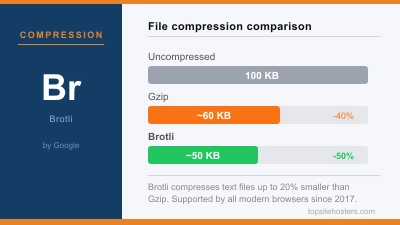
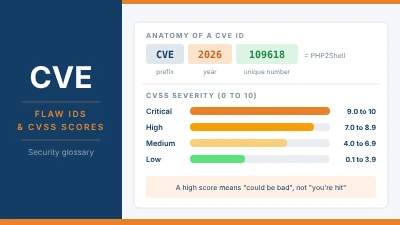
The same pingback behaviour can be turned against your own site. In October 2026, Patchstack showed that a pingback request could make WordPress download a specially crafted response that crashes the server process through a flaw in the Brotli compression library, CVE-2026-111497. No login is needed, and repeated requests can keep a site offline. The fix sits on the server, but blocking xmlrpc.php removes the easiest way in. Our article on the WordPress 7.1.4 security release covers another flaw from the same week.
Why the Popular “Disable XML-RPC” Code Isn’t Enough
Many guides tell you to add one line to your theme’s functions.php file:
add_filter( 'xmlrpc_enabled', '__return_false' );The name suggests it switches XML-RPC off. According to WordPress’s own developer documentation, it doesn’t. The filter only disables methods that need a login, such as publishing. Pingbacks and other methods that need no login keep working. That means this line stops password guessing through XML-RPC, but it does nothing against pingback DDoS abuse or the Brotli crash.
Some plugins that promise to disable XML-RPC use the same filter, so check what a plugin actually does before you rely on it.
How to Disable XML-RPC Properly
There are several ways to turn XML-RPC off, and they don’t all protect you equally. The safest option blocks the file before PHP or WordPress even starts.
| Method | Stops login attacks | Stops pingback abuse | Who can use it |
|---|---|---|---|
| xmlrpc_enabled filter or basic plugin | Yes | No | Anyone |
| Removing pingback methods | No | Yes | Anyone who can edit code |
| Blocking xmlrpc.php on the server | Yes | Yes | Apache, LiteSpeed or Nginx access |
| Firewall rule, such as Cloudflare | Yes | Yes | Sites behind a firewall or CDN |
Block it on Apache or LiteSpeed
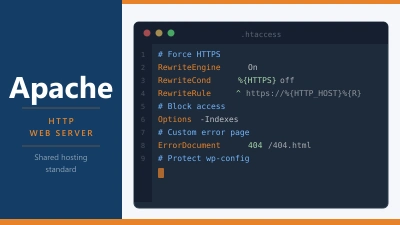
Most shared hosting runs Apache or LiteSpeed. Add these lines to the .htaccess file in your site’s root folder, above the # BEGIN WordPress block:
<Files xmlrpc.php>
Require all denied
</Files>
Block it on Nginx
On Nginx, add this to your site’s server block. In Plesk, you’ll find the field under Apache and nginx Settings, Additional nginx directives:
location = /xmlrpc.php {
    deny all;
}
Block it with a firewall rule
If your site runs behind Cloudflare, you can create a custom rule in the dashboard under Security, WAF, Custom rules. Set the condition to URI Path equals /xmlrpc.php and the action to Block. The requests are then stopped before they reach your server at all, which also saves server resources.
Only remove pingbacks
If you need XML-RPC for something but don’t use pingbacks, you can remove just the pingback methods and the multicall method with a small snippet in a plugin or your theme’s functions.php:
add_filter( 'xmlrpc_methods', function ( $methods ) {
    unset( $methods['pingback.ping'] );
    unset( $methods['pingback.extensions.getPingbacks'] );
    unset( $methods['system.multicall'] );
    return $methods;
} );
After any change, open yoursite.com/xmlrpc.php in your browser. A blocked file returns a 403 Forbidden error. If you still see the message “XML-RPC server accepts POST requests only”, the file is still reachable.
When You Should Keep XML-RPC
Before you block it, check that nothing on your site depends on it. The main one is Jetpack: blocking xmlrpc.php completely can break its connection to WordPress.com, which stops features such as stats, downtime monitoring and the activity log. If you use Jetpack, use your host’s or your security plugin’s XML-RPC protection instead of a full block, or allow only Jetpack’s servers through.
The same applies if you still publish from an older desktop editor or a remote management service that hasn’t moved to the REST API. In those cases, removing pingbacks and system.multicall keeps the tool working while closing the most abused methods. Some managed WordPress hosts already rate limit or block xmlrpc.php for you, so ask your host what it already does before you add your own rules.
Common Questions About XML-RPC
Is xmlrpc.php a virus?
No. It’s a standard WordPress core file that comes with every installation. Its presence on your site isn’t a sign of an infection, although lots of requests to it in your logs usually mean bots are probing your site.
Can I just delete xmlrpc.php?
You can, but it isn’t a good fix. WordPress restores the file with the next core update, so your protection disappears without you noticing. Blocking it in your server configuration or with a firewall rule keeps working after updates.
Does disabling XML-RPC affect SEO?
No. Search engines don’t use XML-RPC to crawl or rank your site. The only visible change is that you stop receiving pingback notifications when other blogs link to you.
Does WordPress still need XML-RPC?
Core WordPress doesn’t. The block editor and most modern tools use the REST API instead. XML-RPC is only needed if you use Jetpack, an older publishing app or a service that hasn’t been updated.
How do I know if XML-RPC is enabled on my site?
Open yoursite.com/xmlrpc.php in your browser. If you see “XML-RPC server accepts POST requests only”, it’s enabled and reachable. A 403 or 404 error means it’s blocked.