What Is Server RAM? How Memory Affects Your Website’s Performance
Server RAM is the working memory your hosting server uses to handle requests.
Your website lives on a server, and that server has RAM. How much it has, and how much of it your site can actually use, has a direct effect on how your site performs under load. Most hosting buyers never think about RAM until their site slows down, throws errors, or their host tells them they’ve hit a resource limit.
- What Is Server RAM?
- How RAM Is Allocated in Hosting Plans
- Types of Server RAM: What the Specs Actually Mean
- How Much RAM Does a WordPress Site Actually Need?
- RAM and Page Speed
- Why AI Is Making Server RAM More Expensive
- What to Look for When Evaluating a Hosting Plan’s RAM
- Common Questions About Server RAM
This explainer covers what server RAM is, how it differs from the storage on your hosting plan, why the type of RAM in a server matters, and why RAM is becoming a more contentious resource in hosting infrastructure than it has been at any point in the last decade.
What Is Server RAM?
RAM stands for Random Access Memory. In a server context, it’s the short-term working memory that the machine uses to handle active processes. When a visitor loads your site, the server reads files from storage, loads them into RAM, processes any PHP or database queries, and sends the result back to the visitor’s browser. All of that active processing happens in RAM, not on the hard drive or SSD.
The distinction between RAM and storage trips people up because they sound similar. Storage is where your files permanently live: your WordPress installation, your images, your database. RAM is where the server temporarily holds data it’s actively working with right now. Think of storage as your filing cabinet and RAM as your desk. A bigger desk means you can have more files open at once and switch between them faster. A cluttered desk slows everything down regardless of how large your filing cabinet is.
When a server runs low on RAM, it starts using a portion of the SSD or hard drive as temporary overflow memory. This is called swap space, and it’s significantly slower than actual RAM. A server hitting swap under load is a server that’s struggling, and your visitors will feel it.
How RAM Is Allocated in Hosting Plans
Shared hosting, VPS hosting, and dedicated servers handle RAM very differently, and understanding the difference helps explain why upgrading from shared hosting often produces such a noticeable performance improvement.
On shared hosting, the server’s total RAM is divided across every account on that machine, sometimes hundreds of accounts. No individual account is guaranteed a specific amount. Your site gets whatever is available at that moment. During quiet periods this works fine. During traffic spikes, multiple accounts competing for the same RAM pool is exactly what causes shared hosting sites to slow down or return errors under load.
A VPS (Virtual Private Server) allocates a fixed amount of RAM to your account. If your VPS plan states 4GB of RAM, that 4GB is reserved for your use and not shared with other accounts on the same physical machine. This is the core reason upgrading from shared hosting to VPS typically improves performance consistency more than almost any other change.
Managed WordPress hosting sits somewhere in the middle. The host controls the server environment and optimises the stack specifically for WordPress, which means RAM is used more efficiently through opcode caching, object caching, and query optimisation. The effective RAM available per site is often better than raw numbers suggest, because a well-tuned WordPress stack wastes less of it.
Dedicated servers give you the entire physical machine’s RAM. If the server has 64GB, all 64GB is yours. This is relevant for high-traffic sites, database-heavy applications, and anything running complex server-side processes simultaneously.
Types of Server RAM: What the Specs Actually Mean
When you look at VPS or dedicated server specs, you’ll see RAM described in ways that can seem technical but matter practically. Here’s what the main distinctions mean.
DDR4 vs DDR5
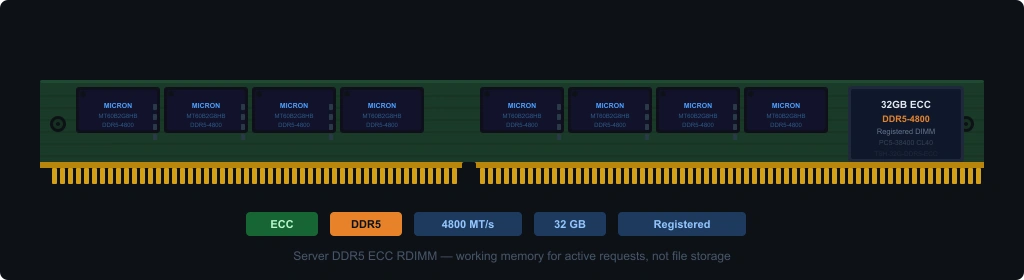
DDR stands for Double Data Rate. The number that follows indicates the generation. DDR4 has been the standard in servers for most of the last decade. DDR5 is the current generation, delivering around 50% more bandwidth than DDR4 at base speeds, with higher-end configurations approaching double DDR4’s throughput. Power consumption per gigabyte transferred is also lower.
For most shared and entry-level VPS hosting, the DDR generation doesn’t make a dramatic difference to your site’s day-to-day performance. Where DDR5 matters is in high-throughput environments: servers handling thousands of simultaneous database queries, large e-commerce operations with complex product catalogues, or applications doing significant in-memory computation. If a host specifies DDR5 as a selling point, it’s a real advantage at scale, not just a marketing term.
ECC RAM
ECC stands for Error-Correcting Code. This is the most practically important RAM distinction for hosting infrastructure, and it’s the one most buyers never ask about.
Standard RAM occasionally produces single-bit errors: tiny corruptions in the data being processed. In a desktop computer this might cause a program to crash. In a server running hundreds of simultaneous transactions, undetected memory errors can cause data corruption, silent calculation errors, or in severe cases, filesystem damage. ECC RAM detects and automatically corrects these single-bit errors before they cause problems.
Most professional server infrastructure uses ECC RAM, from major cloud providers to well-run shared hosting platforms. Some budget VPS providers cut costs by using non-ECC consumer-grade memory. This isn’t disclosed in most hosting plan specs. If you’re running anything where data integrity matters, e-commerce transactions, user account data, medical or financial records, ECC RAM in the underlying infrastructure is worth asking about.
LPDDR (Low Power DDR)
LPDDR variants are optimised for low-power consumption and appear mainly in mobile devices and some edge computing hardware. You’re unlikely to encounter LPDDR in standard hosting infrastructure, but it’s relevant to the broader AI hardware discussion below.
HBM (High Bandwidth Memory)
HBM is a specialist memory type used in GPUs and AI accelerator chips rather than in standard server CPUs. It delivers extremely high memory bandwidth at the cost of capacity per chip. Its relevance to hosting is indirect: the servers running large language models and AI inference workloads use HBM-equipped GPUs, and the demand for HBM has contributed to the broader server memory market tightening.
How Much RAM Does a WordPress Site Actually Need?
WordPress sets a default PHP memory limit of 40MB, though most hosts enforce a minimum of 64MB. WordPress.org recommends 256MB for most sites. That’s the PHP memory limit, which governs how much RAM a single PHP process can use, not the total server RAM available.
In practice, the RAM a WordPress site needs depends on several factors:
- Plugin count and complexity. Every active plugin adds to the memory footprint of each page request. A site running 30 plugins will use more RAM per request than one running 8.
- Traffic volume. More simultaneous visitors mean more simultaneous PHP processes, each consuming RAM. A site averaging 10 concurrent visitors needs far less than one handling 200.
- WooCommerce. WooCommerce significantly increases RAM requirements because cart, checkout, and product queries are memory-intensive. A WooCommerce store typically needs a minimum of 512MB PHP memory limit and benefits from dedicated RAM allocation.
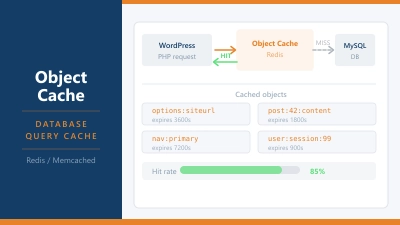
- Caching. Object caching with Redis or Memcached stores database query results in RAM, which reduces repeat query overhead. This uses RAM but often reduces total RAM pressure by eliminating redundant processing.
For a simple WordPress blog or small business site under 10,000 monthly visitors, 512MB to 1GB of RAM on a VPS is typically sufficient. A growing WooCommerce store or a site with complex functionality should plan for 2GB minimum, with room to scale.
RAM and Page Speed
RAM affects page speed in ways that aren’t always obvious from speed test results. A single test run on GTmetrix or PageSpeed Insights hits your server under ideal conditions: one visitor, no competing processes. Real performance under concurrent traffic is where RAM constraints show up.
When your server runs low on available RAM, three things can happen. PHP processes get queued rather than executed immediately, adding latency to every page load. The server may throttle processes to prevent a crash, causing intermittent slowdowns that are difficult to reproduce on demand. Or it may start using swap, which adds significant disk read latency to every operation that overflows into it.
If your site tests well on speed tools but receives complaints about slowdowns at specific times of day, RAM exhaustion during traffic peaks is one of the first things to investigate. The pattern is typically fast performance during off-peak hours and sluggishness during busy periods. That’s the exact inverse of what a caching or CDN problem looks like.
Why AI Is Making Server RAM More Expensive
The AI boom has created a RAM shortage working its way through the entire hosting industry, and it’s one of the factors behind why your hosting costs are going up.
Running large language models requires enormous amounts of memory. GPT-4 class models require hundreds of gigabytes of GPU memory for inference. Smaller models that run on more modest hardware still require far more RAM than a standard web application. As every major cloud provider races to build AI infrastructure, they’re competing for the same pool of server-grade memory that hosting providers use to build their platforms.
The knock-on effects are measurable. DDR5 server memory prices increased significantly through 2024 and into 2025 as AI infrastructure buildout competed with traditional server demand. HBM, used in AI accelerators, became one of the most constrained components in the global semiconductor supply chain. Data centre power consumption, driven substantially by AI workloads, pushed energy costs higher across all hosting infrastructure.
Hosting providers absorb some of these cost increases before passing them on. The underlying dynamic is that the hardware inputs for web hosting, memory, compute, and power are now in direct competition with AI infrastructure spending at a scale that wasn’t true three years ago.
What to Look for When Evaluating a Hosting Plan’s RAM
Most shared hosting plans don’t specify RAM allocation per account because the resource is shared. That’s normal and expected. What matters more is how the host manages resource limits and what happens when you hit them.
For VPS plans, the RAM figure in the plan spec is the number that matters. Check whether it’s guaranteed RAM or burstable RAM. Guaranteed RAM is always available to your account. Burstable RAM allows you to temporarily exceed your allocation when the physical host has spare capacity, but it’s not reliable under sustained load. If a VPS plan lists “up to 4GB RAM” rather than “4GB RAM,” burstable is likely what’s being offered.
For shared hosting, look for hosts that use CloudLinux or a similar container system. CloudLinux enforces per-account resource limits that prevent one account from consuming RAM at the expense of neighbours. Without it, a traffic spike on one shared account can degrade performance for every other account on the same server.
The RAM allocation is often the single most meaningful difference in performance consistency when you move from shared to VPS hosting. The question isn’t just how much RAM the plan includes, but how it’s allocated, whether it’s guaranteed, and what happens when the limit is reached.
Common Questions About Server RAM
Is server RAM the same as the storage on my hosting plan?
No. Storage is where your files permanently live. RAM is temporary working memory the server uses to handle active requests. They’re completely separate resources. A hosting plan can have 100GB of storage and 512MB of RAM, or 10GB of storage and 8GB of RAM. Both matter, for different reasons.
How do I know if my site is running out of RAM?
Common signs include PHP memory limit errors in your WordPress error log, sites that test fast individually but slow down under simultaneous traffic, and intermittent 503 or 500 errors that resolve on their own. Your hosting provider’s control panel may show resource usage graphs that include memory consumption over time.
What is the PHP memory limit, and how does it relate to server RAM?
The PHP memory limit is a cap on how much RAM a single PHP process can use. It’s set in your server’s PHP configuration and can usually be adjusted in your hosting control panel or via a php.ini file. The server’s total RAM is the ceiling; the PHP memory limit is a per-process guardrail within that ceiling.
Why does ECC RAM matter for hosting?
ECC RAM detects and corrects single-bit memory errors automatically. Standard RAM can produce silent data corruption under certain conditions. For hosting infrastructure running transactional data, e-commerce orders, user accounts, database writes, ECC RAM reduces the risk of data integrity issues caused by hardware-level memory errors.
Does more RAM always mean a faster site?
Not automatically. RAM is one factor among several. A site with plenty of RAM but slow storage, an unoptimised database, or a poorly configured caching layer can still be slow. RAM matters most when it becomes the constraint: when the server is running out of working memory and has to slow down or start using swap space as overflow.
How is AI affecting hosting RAM costs?
AI infrastructure requires vast amounts of server-grade memory. As cloud providers and AI companies compete for the same memory components that hosting providers use, prices for DDR5 and HBM have risen. This is one of the structural reasons hosting costs have been increasing beyond simple inflation.