What Is HTTPS? How Secure Web Connections Work
HTTPS encrypts the connection between your browser and a web server, protecting data in transit.
When you visit a website and see a padlock icon in the address bar, that padlock represents HTTPS. When you see a “Not Secure” warning instead, that’s HTTP without the S. The difference between those two states is more consequential than most site owners realise, and it has grown more significant every year since Google first confirmed it as a ranking signal in 2014.
Here is what HTTPS actually does, how it works under the hood, and why running a site without it in 2026 carries real costs.
What HTTPS Stands For
HTTPS stands for Hypertext Transfer Protocol Secure. The first part, HTTP, is the foundation of how browsers and web servers communicate. When you type a URL and hit enter, your browser sends an HTTP request to the server, the server responds with the page data, and your browser renders it. That basic exchange happens millions of times per second across the web.
The problem with HTTP on its own is that the communication is unencrypted. Anyone positioned between your browser and the server, such as someone on the same network or an attacker intercepting traffic in transit, can read what’s being sent. Login credentials, form data, payment details. All of it travels as readable text.
HTTPS adds a security layer on top of HTTP using a protocol called TLS (Transport Layer Security). TLS encrypts the data before it leaves your browser and decrypts it only at the destination server. An interceptor sees encrypted noise rather than readable content.
SSL, TLS and HTTPS: What Is the Difference?
These three terms appear together constantly and are often used interchangeably, which causes confusion. Here’s what each one actually means:
SSL (Secure Sockets Layer) was the original encryption protocol developed by Netscape in the mid-1990s. It had multiple versions, all of which were eventually found to have security weaknesses. SSL is now deprecated. No modern browser supports it.
TLS (Transport Layer Security) is the replacement for SSL and is what every HTTPS connection actually uses today. TLS 1.2 and TLS 1.3 are the current versions. TLS 1.3, released in 2018, is faster and more secure than 1.2 and is now the default for most hosting environments.
HTTPS is the combination of HTTP and TLS. When people say “SSL certificate” they almost always mean a TLS certificate. The industry kept the SSL name out of habit even though the underlying technology is TLS.
So when your host says they provide a free SSL certificate, they mean a TLS certificate that enables HTTPS on your domain. The terms are used interchangeably in the hosting industry even though they’re technically distinct.
How HTTPS Actually Works
Every time you visit an HTTPS site, a TLS handshake happens in the background before any page content loads. It takes milliseconds and involves several steps:
- Your browser connects to the server and says which TLS versions and encryption methods it supports
- The server responds with its TLS certificate, which contains its public key and is signed by a Certificate Authority
- Your browser checks the certificate is valid, hasn’t expired, and was issued by a trusted Certificate Authority
- Browser and server use the public key to securely agree on a temporary session key without that key ever travelling across the network in readable form
- All subsequent communication in that session is encrypted using the session key
The Certificate Authority (CA) in step 3 is the trust anchor. CAs are organisations that verify domain ownership before issuing certificates. When your browser trusts the CA, it trusts any certificate that CA has signed. Let’s Encrypt is the largest CA and provides free automated certificates that most hosting providers now issue by default.
The session key in step 4 is temporary and unique to that session. Even if someone recorded all the encrypted traffic and later obtained the server’s private key, they couldn’t decrypt past sessions because each session key is discarded when the session ends. This property is called forward secrecy and is one of the improvements TLS 1.3 made mandatory.
What HTTPS Protects Against
HTTPS protects specifically against attacks on data in transit. The three main threats it addresses are:
Eavesdropping. Without encryption, anyone who can observe network traffic can read what’s being sent. This is particularly relevant on shared networks like public Wi-Fi in cafes, airports, and hotels, where intercepting unencrypted traffic requires minimal technical skill.
Tampering. An attacker who can intercept HTTP traffic can also modify it before it reaches the recipient. Injecting ads, modifying content, or redirecting to malicious pages are all possible with unencrypted HTTP. HTTPS includes integrity checking that detects any modification in transit.
Impersonation. The certificate verification step confirms you’re communicating with the genuine server and not an impostor. Without it, an attacker could redirect your connection to their own server and present a convincing copy of the site.
What HTTPS does not protect against is attacks on the server itself, vulnerabilities in the website’s code, phishing sites that obtain legitimate certificates to appear trustworthy, or any threat that doesn’t involve intercepting traffic in transit. A site can run HTTPS and still be compromised at the application layer.
HTTPS and SEO
Google confirmed HTTPS as a ranking signal in August 2014. The signal itself is lightweight. Google has consistently described it as a tiebreaker rather than a significant standalone factor. A thin, low-quality page on HTTPS will not outrank a genuinely useful page on HTTP.
The more significant impact is indirect. Chrome marks every HTTP page as “Not Secure” in the address bar, a policy that has been in place since 2018. From April 2026, Chrome’s Enhanced Safe Browsing started showing a security warning page before loading any HTTP site for opted-in users. By October 2026, that warning becomes the default for all Chrome users, which controls over 65% of the global browser market.
Research suggests around 64% of users leave a site immediately after seeing a security warning. That exit behaviour feeds negative engagement signals that affect rankings indirectly, regardless of the direct weight of the HTTPS ranking signal itself.
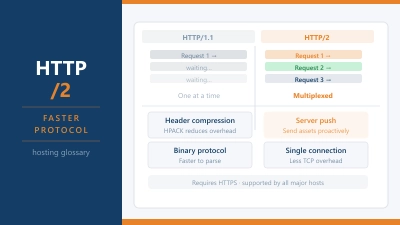
There’s also a technical SEO dimension. HTTP/2 and HTTP/3, the faster modern versions of the HTTP protocol that improve page load speed and TTFB, require HTTPS. A site running plain HTTP is limited to HTTP/1.1, which is structurally slower. That speed difference shows up in Core Web Vitals measurements, which are a confirmed ranking factor.
How to Get HTTPS on Your Site
Most hosting providers now include a free TLS certificate with every plan, issued automatically via Let’s Encrypt. On cPanel hosting, look for AutoSSL in the SSL/TLS section. On most managed WordPress hosts, HTTPS is enabled by default. On SiteGround, you enable it via Site Tools. On Hostinger, it’s available in hPanel under SSL.
After installing a certificate, two additional steps matter:
Set up a redirect. Every HTTP URL on your site should permanently redirect to its HTTPS equivalent using a 301 redirect. Without this, some visitors will still land on the unencrypted version. On WordPress, most security plugins handle this with a single toggle. On other setups, an .htaccess rule or server configuration change is needed.
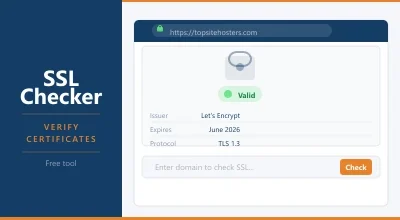
Fix mixed content. Mixed content occurs when an HTTPS page loads resources (images, scripts, stylesheets) from HTTP URLs. Browsers block or warn about mixed content, which can break page functionality and trigger security warnings even on an otherwise secure site. A browser developer tools audit or a tool like the SSL Checker will identify any mixed content issues.
Certificate Types
Not all certificates are the same level of validation, though all provide the same encryption:
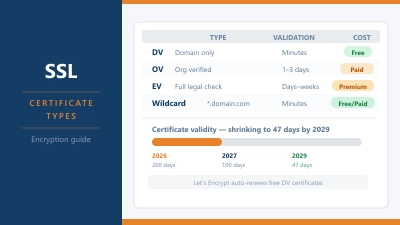
Domain Validation (DV) certificates verify that the applicant controls the domain. Let’s Encrypt issues DV certificates. They’re free, automatic, and sufficient for the vast majority of websites. The padlock looks identical to more expensive certificate types.
Organisation Validation (OV) certificates verify the organisation behind the domain as well as domain ownership. They cost money and take longer to issue. Browsers don’t display OV status differently to visitors in most cases.
Extended Validation (EV) certificates undergo the most thorough verification. They were historically displayed with a green address bar showing the company name, but major browsers removed that visual distinction in 2019. They now look identical to DV certificates to most users.
For most websites, a free DV certificate from Let’s Encrypt provides the same browser padlock, the same encryption, and the same ranking signal as a paid EV certificate at a fraction of the cost.
Common Questions About HTTPS
Does HTTPS make my site completely secure?
No. HTTPS encrypts data in transit between browser and server. It doesn’t protect against vulnerabilities in your website’s code, weak passwords, compromised plugins, or attacks on the server itself. Think of it as securing the channel, not the building at the end of it.
Will switching to HTTPS hurt my rankings?
A properly executed migration, with 301 redirects from all HTTP URLs to their HTTPS equivalents, causes no ranking loss according to Google’s own documentation. The transition may take a few weeks to be fully reflected in rankings as Google recrawls and reindexes your pages.
Does HTTPS cost money?
Not for most sites. Free DV certificates from Let’s Encrypt are available on virtually every hosting plan and provide the same encryption and browser padlock as paid certificates. Paid certificates add organisation validation features that matter for specific enterprise or financial use cases, but not for typical websites.
What is mixed content and why does it matter?
Mixed content is when an HTTPS page loads some resources over plain HTTP. Browsers block or warn about mixed content because a secure page loading insecure resources defeats the purpose of encryption. After switching to HTTPS, check your site for any remaining HTTP resource URLs and update them to HTTPS.