Most cloud providers will tell you your data is safe. Scaleway is one of the few that can actually prove where it lives. Every server the company operates sits inside the European Union, outside the reach of US jurisdiction, and powered by renewable energy. That’s not a marketing claim. It’s an infrastructure decision baked into every plan they sell.
The catch is that Scaleway isn’t a beginner hosting company. It started as a cloud infrastructure provider and built a shared hosting product on top of that. If you want a dashboard that holds your hand through setting up WordPress, this probably isn’t your first stop. But if you’re a developer, a growing startup, or a business that needs to keep its data on European soil, Scaleway deserves a serious look.
This review covers the shared hosting plans, the VPS and cloud instances, performance, support, and who this provider actually makes sense for.
What Is Scaleway?
Scaleway started in 1999 under the name Online.net, offering web hosting and domain registration out of Paris. The company built its own physical infrastructure from the ground up rather than renting space from third parties, which became the foundation of everything that followed. Over the next decade, it grew into one of France’s largest independent hosting operations before being rebranded as Scaleway to reflect its evolution into a full cloud platform.
The parent company is Iliad Group, the French telecoms giant founded by billionaire Xavier Niel. Iliad also owns Free, one of France’s largest mobile and broadband operators, and has the financial backing to invest seriously in infrastructure. That matters for a cloud provider: Scaleway isn’t a reseller or a startup burning venture capital. It’s a subsidiary of a well-capitalised European telecoms group with its own data centres, its own fibre network, and over two decades of operational history.
Today, the company serves over 25,000 businesses across 160 countries and employs around 550 people. It ranks as the second largest hosting company in France behind OVHcloud. It’s not a household name in the same way as AWS or the big US-based shared hosts, but it’s been quietly building one of the more complete European cloud ecosystems available, and that’s increasingly what a certain kind of buyer is looking for.
What makes Scaleway unusual is the breadth within a single account. You can start with a €3.99/month shared hosting plan and, if your needs grow, move into managed databases, Kubernetes clusters, GPU instances, and bare metal servers without creating a new account or migrating to a different provider. Most hosting companies make you jump ship when your requirements outgrow a shared plan. Here, the growth path is built in from day one.
Data Centres and Where Your Data Lives
This is the section most reviews of this provider skim over. It shouldn’t be, because data location is the single strongest reason to choose Scaleway over a US-based alternative.
The company runs 10 availability zones across four European regions: Paris, Amsterdam, Warsaw, and Milan. The Milan region was added in March 2026 and is already supporting instances, Kubernetes, block storage, databases, and more. All data stays within EU jurisdiction. Operations fall under French and European law, not US law, which means the platform isn’t subject to the CLOUD Act. For businesses handling European customer data, that distinction matters.
The company holds ISO/IEC 27001:2022 certification for information security and HDS certification for hosting health data, which is the French standard for medical and healthcare infrastructure. These aren’t easy certs to acquire.
The green credentials are equally notable. The DC5 facility in Paris runs on 100% renewable electricity and uses a patented adiabatic cooling system that saves over 90% of the water a standard data centre would consume. The company also partners with Qarnot Computing to repurpose server heat to warm buildings and water, a setup Scaleway calls “digital boilers.” Hardware is kept in service for an average of 10 years, compared to the industry standard of around five. Real-time PUE (Power Usage Effectiveness) data is published and an Environmental Footprint Calculator lets customers track the carbon impact of their own usage.
One nuance worth flagging: the Warsaw data centres offset fossil energy usage rather than running on fully renewable power directly. The company is transparent about this, but it’s worth knowing if you’re evaluating eco-friendly hosting options against strict criteria.
Shared Web Hosting Plans and Pricing
Scaleway offers three shared hosting plans, all built on cPanel and priced before VAT. Unlike most budget hosts, there’s no introductory pricing that doubles at renewal. What you see is what you pay from month one.
| Plan | vCPU | RAM | Storage | Price/month |
|---|---|---|---|---|
| Mini | 1 | 1 GB | 1 GB SSD | €3.99 |
| Essential | 1 | 2 GB | 8 GB SSD | €9.99 |
| Advanced | 1 | 6 GB | 64 GB SSD | €24.99 |
All plans include cPanel, JetBackup for automated backups, RoundCube webmail, anti-spam and anti-virus protection, and access to 420+ click-to-deploy apps including WordPress. There’s no free domain bundled with any plan. SSL certificate inclusion on the Mini plan should be verified directly before purchase, as this detail has varied over time.
Which plan you actually need depends on what you’re hosting. The Mini plan’s 1 GB of storage is genuinely tight. It’s sufficient for a placeholder page or a very simple brochure site, but a standard WordPress install with a theme and a handful of plugins will eat through that quickly. For most users, the Essential plan at €9.99/month is the practical starting point: 8 GB of storage and 2 GB of RAM gives you room to run a real site without constantly hitting resource limits. The Advanced plan at €24.99/month makes sense if you’re running a resource-intensive application, a high-traffic site, or multiple subdomains under the same account.
The flat pricing model is worth highlighting. Most budget hosts advertise a low introductory rate that jumps significantly at renewal. With these shared plans, you pay the same price from month one. There’s no bait-and-switch. If you’re used to seeing renewal pricing caveats buried in the small print, this is a genuine differentiator. For context on why renewal pricing matters and what to watch for across the industry, the renewal pricing guide breaks it down.
Prices went up in June 2026. The increase was announced in April and explained publicly, citing hardware costs and infrastructure pressures. That level of transparency is uncommon in this industry, and it’s worth crediting. The new rates are still competitive for EU-hosted shared plans with genuine environmental credentials.
There’s no money-back guarantee period prominently stated. Verify this directly before signing up if it’s a deciding factor for you.
VPS and Cloud Instances
This is where the product range gets more interesting, and more complex. There are two main routes for moving beyond shared hosting: Dedibox VPS and Virtual Instances. They serve different needs, so it’s worth understanding the difference before you choose.
Dedibox VPS starts at €4.99/month. These are fixed-spec virtual private servers available across 60 locations worldwide via the Dedibox network. Good for anyone who wants a predictable monthly bill and a specific location without thinking about hourly billing.
Virtual Instances use hourly billing and integrate deeply into Scaleway’s cloud ecosystem. This is the route for development, staging, and production workloads that need to scale. The entry-level STARDUST1-S instance costs just €0.0006/hour, which works out to around €0.43/month if you leave it running constantly. More practically, you’d spin one up for testing and only pay for the hours you use.
Here’s a cross-section of the Virtual Instance range in the Paris region (prices ex. VAT):
| Instance | vCPU | RAM | Bandwidth | Price/hr | Approx/month |
|---|---|---|---|---|---|
| STARDUST1-S | 1 | 1 GB | 100 Mbps | €0.0006 | ~€0.43 |
| DEV1-S | 2 | 2 GB | 200 Mbps | €0.00898 | ~€6.55 |
| DEV1-M | 3 | 4 GB | 300 Mbps | €0.0202 | ~€14.74 |
| DEV1-L | 4 | 8 GB | 400 Mbps | €0.04284 | ~€31.27 |
| PLAY2-PICO | 1 | 2 GB | 100 Mbps | €0.01428 | ~€10.42 |
One pricing advantage that doesn’t get enough attention: listed instance prices include egress. You’re not paying extra every time data leaves the network. With AWS and Google Cloud, egress fees are a significant hidden cost that only becomes apparent once you’re running real workloads. The transparent approach here makes bills genuinely predictable.
Savings Plans are also available, offering up to 25% off monthly compute costs when you commit to a workload. Worth considering if you know what resources you’ll need over the medium term.
One honest downside: scaling up or down a Virtual Instance is more awkward than it should be. To change your instance size, you create a snapshot of your current server, spin up a new instance from that snapshot at the size you want, migrate your IP address to the new instance, then delete the old one. It works, but it’s several steps more than competitors like DigitalOcean or Hetzner require. Worth knowing before you commit to a workflow that depends on fast resizing.
Performance
The infrastructure delivers solid performance for European workloads. Latency from most EU locations to the Paris facilities runs around 15 to 25ms. Amsterdam and Warsaw offer similar latency profiles for users in the Netherlands, Germany, and Eastern Europe. The Milan region, launched in March 2026, extends that coverage further south into Italy and the Mediterranean.
Network bandwidth consistently hits advertised rates. There’s no throttling reported during peak hours. Local NVMe storage delivers strong sequential read/write speeds, which benefits database-heavy applications and WordPress sites with large content libraries. For AI and machine learning workloads on GPU instances, GPU-to-GPU communication within racks is a noted strength.
Where Scaleway has an edge over many competitors is compute consistency. Because instances use dedicated or well-isolated shared resources depending on the tier, performance doesn’t degrade unpredictably when neighbouring tenants spike their usage. That’s not always guaranteed on the cheapest shared infrastructure, but it becomes important the moment you’re running anything production-grade.
No independent speed tests were run for this review. Performance will vary depending on your instance type, workload, and the region you deploy in. If server response time is a priority for your setup, use the Server Response Tester to benchmark your own configuration after deployment.
Uptime SLA details vary by product type. Confirm the specific SLA for your plan in Scaleway’s current documentation before signing up, particularly if you need a contractual uptime commitment.
What the Control Panel Looks Like
The experience depends heavily on which product you’re using, and the gap between the two interfaces is wider than you might expect from a single provider.
The shared Web Hosting plans run on cPanel, which is the most widely used hosting control panel in the industry. If you’ve used any major shared host before, you’ll feel at home. File management, email accounts, MySQL databases, subdomains, SSL certificates, and one-click WordPress installs are all handled through a familiar tabbed layout. JetBackup handles automated backups and makes restoring a previous version of your site a straightforward process: choose your backup point, select the files or database you want to recover, and confirm. No command-line knowledge required.
Installing WordPress takes a few minutes via the Softaculous app installer. You pick your domain, set your admin credentials, choose a language, and the install completes automatically. From there, you’re managing WordPress through the standard WordPress dashboard, which is the same regardless of which host you’re on. The hosting environment is effectively invisible once you’re up and running.
Virtual Instances use Scaleway’s own web console. The design is clean by cloud provider standards. Provisioning a new instance takes under a minute: you choose a region, select an image (Ubuntu, Debian, Fedora, or a range of pre-configured app images including WordPress), pick your instance type, configure networking, and deploy. The console covers snapshots, flexible IP management, private networking configuration, and security groups for firewall rules. Most developers find it well-organised. The recurring criticism is that some sections assume a higher level of familiarity with cloud infrastructure than the documentation always supports.
The broader ecosystem sits alongside all of this: managed databases, Kubernetes via Kapsule, serverless functions, object storage, and load balancers each have their own sections within the same console. For a team already comfortable with cloud infrastructure, this depth is an advantage. Everything is in one place, billed from one account, and configurable from a single interface. For someone who just wants to put a WordPress site online and not think about servers, the sheer scope of what’s available can feel like more than they signed up for.
Customer Support
Support is the area where the most mixed feedback appears, and it’s worth being direct about that.
Ticket-based support is the primary channel. Response times are generally good: multiple users report replies within two hours on standard support. The quality of those replies is competent, particularly for technical infrastructure questions. An active Slack community is also available, where experienced users and staff engage regularly. For developers, this is a genuine resource.
The flip side: there’s no social media support. Attempts to reach the team via Facebook or Twitter have reportedly gone unanswered. If you’re used to raising an issue publicly and getting a quick response, that won’t work here. Premium support plans are available at additional cost if you need faster guaranteed response times or phone access.
Some billing-related complaints appear in user reviews, including disputes that took extended back-and-forth to resolve. These aren’t the majority experience, but they’re consistent enough to note. If you’re running a production environment here, understanding what your support tier covers before something goes wrong is worth the time.
The support structure suits technical buyers. It’s less suited to first-time hosting customers who need hand-holding through basic setup.
Who Is Scaleway For?
The clearest way to answer this is with some direct comparisons, because the right answer depends almost entirely on what you’re trying to do.
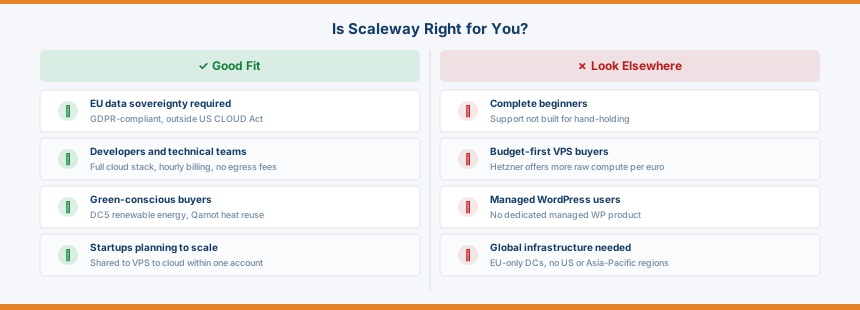
Use Scaleway if: you’re building or running something that needs to stay within the EU. A SaaS product serving European customers, a healthcare application that needs to comply with French HDS certification, a startup that processes personal data under GDPR and wants to keep that data on European soil with a provider that isn’t subject to US jurisdiction. The data sovereignty story is real and verifiable, not just a marketing line.
Also a good fit if: you want one provider that can handle your needs as they grow. Starting with shared hosting is fine. When you outgrow it, you move to a Virtual Instance or Dedibox VPS inside the same account, with no data migration, no new billing setup, and no learning curve on a completely different control panel. That continuity has practical value.
Look elsewhere if: budget is your primary driver for VPS or compute. Hetzner will give you more raw compute per euro, and if EU data residency isn’t a business requirement, the cost difference is hard to ignore on any meaningful workload. Hetzner also runs on renewable energy in its German and Finnish facilities, so the green angle doesn’t disappear entirely.
Also look elsewhere if: you’re new to hosting and want hand-holding. The shared plans are accessible enough, but the moment you need support or want to explore beyond cPanel, the experience becomes more technical than many beginners are comfortable with. For a first WordPress site, look at SiteGround, which pairs managed WordPress hosting with a support team built around guiding non-technical users.
The sweet spot is developers and technical teams who need EU-compliant cloud infrastructure, want flat predictable pricing with no egress surprises, and value the option to grow within a single ecosystem. The shared plans also make sense for cost-conscious small businesses who want EU hosting without paying premium managed-hosting prices, provided they’re comfortable managing their own WordPress install via cPanel.
Common Questions About Scaleway
Who owns Scaleway?
Scaleway is owned by Iliad Group, a major French telecommunications company founded by Xavier Niel. Iliad also operates the Free mobile and broadband brand in France. Scaleway functions as an independent subsidiary with its own infrastructure, pricing, and product roadmap.
Where are Scaleway’s data centres located?
Scaleway operates 10 availability zones across four European regions: Paris (France), Amsterdam (Netherlands), Warsaw (Poland), and Milan (Italy, added March 2026). All data centres are within the EU, outside the reach of US jurisdiction and the CLOUD Act.
Is Scaleway good for WordPress hosting?
It depends on the plan. The shared hosting plans include cPanel and 420+ one-click apps including WordPress, making setup straightforward. For advanced users, Virtual Instances give you full control over the server stack. Scaleway doesn’t offer a dedicated managed WordPress product, so if you want automated updates, staging environments, and hosting-level caching included out of the box, a specialist managed WordPress host is a better fit.
Does Scaleway offer a free plan or free trial?
There’s no permanent free plan. Scaleway does offer startup credit programmes: up to €1,000 for early-stage founders, up to €9,000 for pre-seed to seed stage companies over six months, and up to €36,000 for growth-stage startups over a year. If you’re building a product and qualify, these programmes provide meaningful runway to test the platform.
How does Scaleway compare to OVHcloud?
OVHcloud is the closer competitor. Both are French, both run their own EU data centres, and both pitch hard on data sovereignty. The differences come down to scale and approach. OVHcloud is significantly larger, with data centres across Europe, North America, and Asia-Pacific, which suits businesses that need global infrastructure.
Scaleway stays deliberately EU-focused, which is either a limitation or a feature depending on your requirements. On pricing, OVHcloud is competitive at the dedicated server level but Scaleway’s no-egress-fee policy on Virtual Instances gives it a meaningful edge for cloud workloads where data transfer costs add up. For a pure EU deployment with a stronger sustainability posture, Scaleway is the better fit. For global reach or bare metal at scale, OVHcloud has more range.
Final Verdict
Scaleway occupies a specific lane in a crowded market, and it fills it well. It’s not trying to be the cheapest. It’s not trying to be the easiest option for newcomers. What it is doing is building a complete European cloud infrastructure with transparent pricing, genuine environmental responsibility, and full EU data sovereignty. That’s a narrow brief, but it’s executed with consistency.
The shared hosting plans are solid entry points with flat pricing and no renewal surprises. The VPS and cloud instance range gives you room to grow without changing providers. The data centre network, now covering Paris, Amsterdam, Warsaw, and Milan, covers the EU well. The no-egress-fee pricing model is a meaningful practical advantage once you move beyond small workloads. And the green credentials, particularly the DC5 adiabatic cooling system and the Qarnot heat reuse partnership, are among the most substantive of any host reviewed on this site.
The weaknesses are real too. Scaling instances up or down is more involved than it should be. Support is competent but not built for first-time users. Billing disputes appear often enough in user reviews to flag. No free domain, no clearly stated money-back guarantee. And at shared hosting level, the Mini plan’s 1 GB of storage is thin. You’ll likely need the Essential plan for anything beyond a basic holding page.
For developers, technical teams, and businesses with EU data requirements, this is a serious option worth evaluating. For beginners who want a host to make things simple, the learning curve is steeper than it needs to be. Know which category you’re in before you sign up.
Pros and Cons
✓ Pros
- All data centres within the EU, outside US jurisdiction
- No egress fees on Virtual Instances
- Flat pricing on shared plans, no renewal price jump
- Genuine green credentials, DC5 adiabatic cooling, Qarnot heat reuse
- Single account covers shared hosting through to GPU and bare metal
- Milan region added March 2026, strong EU coverage
✗ Cons
- No free domain on any plan
- Mini plan storage (1 GB) is too thin for most real sites
- Scaling Virtual Instances up or down requires multiple manual steps
- Billing disputes appear regularly in user reviews
- No clearly stated money-back guarantee
- Not suited to beginners who need hand-holding
Key Features
| Free Domain | None included |
|---|---|
| Control Panel | cPanel (shared hosting), Scaleway Console (Virtual Instances and Dedibox) |
| Data Centres | Paris, Amsterdam, Warsaw, Milan (10 availability zones) |
| Money-Back | Not clearly stated |
| Support | Ticket-based (~2hr response), Slack community, premium plans available |
| Green Credentials | DC5 100% renewable electricity, adiabatic cooling system, Qarnot heat reuse partnership |
| Backups | JetBackup included on all shared hosting plans |
Data Centres
| Name | Country | Tier | Certifications | Green |
|---|---|---|---|---|
| Paris PAR1 (Vitry-sur-Seine) | France | Tier 3 | ISO 27001, SOC 2 | ✓ |
| Scaleway primary Paris availability zone, Vitry-sur-Seine. First Tier-III certification in France by Uptime Institute (January 2014). 11,800m² facility. 9 green powered data centres overall with one of the lowest PUEs in Europe. GDPR compliant EU data residency. SecNumCloud certified region. Subsidiary of Iliad group. Part of PAR1/PAR2/PAR3 multi AZ Paris region. | ||||
| Paris PAR2 | France | Tier 3 | ISO 27001, SOC 2 | ✓ |
| Second Paris availability zone. Part of Scaleway's multi AZ Paris region providing geo-redundancy within the Greater Paris area. GDPR compliant EU data residency. 100% renewable energy. SecNumCloud certified as part of the Paris region. Low latency for French and Western European audiences. | ||||
| Paris PAR3 | France | Tier 3 | ISO 27001, SOC 2 | ✓ |
| Third Paris availability zone. Completes the three AZ Paris region for full redundancy. GDPR compliant EU data residency. 100% renewable energy. Part of Scaleway's SecNumCloud certified French cloud infrastructure. | ||||
| Amsterdam AMS1 | Netherlands | Tier 3 | ISO 27001, SOC 2 | ✓ |
| First Amsterdam availability zone. GDPR compliant EU data residency. Connected to AMS-IX. Low latency for Netherlands, Belgium, Germany and Northern Europe. Part of Scaleway's three AZ Amsterdam region (AMS1/AMS2/AMS3). 100% renewable energy. | ||||
| Amsterdam AMS2 | Netherlands | Tier 3 | ISO 27001, SOC 2 | ✓ |
| Second Amsterdam availability zone. Opened to strengthen Scaleway's European multi AZ presence. GDPR compliant EU data residency. 100% renewable energy. Part of AMS1/AMS2/AMS3 three AZ Amsterdam region. | ||||
| Amsterdam AMS3 | Netherlands | Tier 3 | ISO 27001, SOC 2 | ✓ |
| Third Amsterdam availability zone. Completes the three AZ Amsterdam region. GDPR compliant EU data residency. 100% renewable energy. Connected to AMS-IX for low latency European routing. | ||||
| Warsaw WAW1 | Poland | Tier 3 | ISO 27001, SOC 2 | ✓ |
| First Warsaw availability zone. Scaleway's Eastern European hub, first opened before other dominant cloud players entered the Polish market. Highly secured Polish data centre targeting Eastern European market. GDPR compliant EU data residency. Low latency for Poland, Czech Republic, Romania, Eastern Germany and Balkans. Part of WAW1/WAW2/WAW3 three AZ Warsaw region. | ||||
| Warsaw WAW2 | Poland | Tier 3 | ISO 27001, SOC 2 | ✓ |
| Second Warsaw availability zone. Dual-path and dual-feed electrical/UPS systems. 24/7 monitoring and controlled access. Supports full Scaleway product suite including VMs, bare metal, GPU and storage. Sovereign-aware cloud infrastructure for Central and Eastern European workloads under EU jurisdiction. | ||||
| Warsaw WAW3 | Poland | Tier 3 | ISO 27001, SOC 2 | ✓ |
| Third Warsaw availability zone. Completes the three AZ Warsaw region for full geo-redundancy in Central and Eastern Europe. GDPR compliant EU data residency. Part of Scaleway's 10 availability zones across 4 European regions. | ||||
| Milan MIL1 | Italy | Tier 3 | ISO 27001, SOC 2 | ✓ |
| Milan availability zone. Scaleway's fourth European region, expanding into Southern Europe. GDPR compliant EU data residency. Low latency for Italy, Switzerland, Austria and Southern European markets. Part of Scaleway's 10 availability zone, 4 region European infrastructure. SecNumCloud certified in December 2025 across Scaleway's infrastructure. | ||||