
Most hosting providers hide one number: the renewal price. DigitalOcean hides nothing. What you see on the pricing page is exactly what you pay next month, and the month after that. No introductory discount, no bait price, no shock at renewal. That alone sets it apart from the majority of hosts this site has reviewed.
- What Is DigitalOcean?
- Who Is DigitalOcean For, and Who Should Look Elsewhere?
- DigitalOcean Pricing: What a Droplet Actually Costs
- The Billing Gotcha You Need to Know
- What You Get With Every Droplet
- DigitalOcean for WordPress: Realistic Expectations
- DigitalOcean vs Cloudways: What’s the Difference?
- DigitalOcean vs Hetzner vs Vultr
- Performance and Uptime
- Customer Support
- Who This Isn’t For
- Common Questions About DigitalOcean
- Final Verdict
The catch is that DigitalOcean is not a traditional web host. There’s no cPanel, no bundled email, no phone support line. What you get instead is a raw cloud server: powerful, flexible, and built for people who know what to do with one.
If that sounds like you, read on. If you’re setting up your first site and just want something that works without touching a command line, the answer you need is in the “Who This Isn’t For” section below.
What Is DigitalOcean?
DigitalOcean was founded in 2011 and launched in 2012 with a clear mission: make cloud infrastructure accessible to developers who didn’t want to wrestle with the complexity of Amazon Web Services. The company went public on the NYSE in 2021, and in 2022 it acquired Cloudways for $350 million, adding a managed hosting layer to its product portfolio.
Headquartered in New York, DigitalOcean now serves millions of developers across more than 185 countries. Its core product is the Droplet, the company’s name for a virtual private server (VPS), and it has since expanded into managed databases, Kubernetes, object storage, app deployment, and more recently GPU infrastructure for AI workloads.
Data centres sit across 9 regions: New York, San Francisco, Amsterdam, London, Frankfurt, Toronto, Bangalore, Singapore, and Sydney. That’s 20 data centres across 11 global regions in total, giving you reasonable coverage for most audiences including Europe.
What makes DigitalOcean different from the crowd is its positioning. It sits deliberately between two categories: raw hyperscale cloud (AWS, Google Cloud) and traditional managed hosting (Hostinger, IONOS). More approachable than the former, more hands on than the latter.
Who Is DigitalOcean For, and Who Should Look Elsewhere?
This is the question most reviews bury. It’s worth answering up front.
DigitalOcean works well for:
- Developers and freelancers who want a clean, powerful cloud server without the billing complexity of AWS
- Startups and SaaS teams deploying custom web applications, APIs, or internal tools
- Agencies managing multiple client sites on a single server with full control
- Technical WordPress users who want to configure their own stack and keep costs low
- Anyone who already uses Linux servers and wants straightforward infrastructure at honest pricing
It’s the wrong choice if you:
- Are setting up your first website and don’t want to touch a terminal
- Need cPanel or a traditional hosting control panel
- Want bundled email hosting out of the box
- Need phone support when something goes wrong
- Want managed WordPress where updates, backups, and security are handled for you
For that last group: if you like the idea of DigitalOcean’s infrastructure but want someone else to manage the server, Cloudways runs on top of DigitalOcean and handles the technical side for you. It costs more, but that’s the cost of the managed layer.
For developers watching their budget with a European audience, Hetzner is worth comparing. You get more spec for less money in Europe, though with fewer add-on services.
DigitalOcean Pricing: What a Droplet Actually Costs
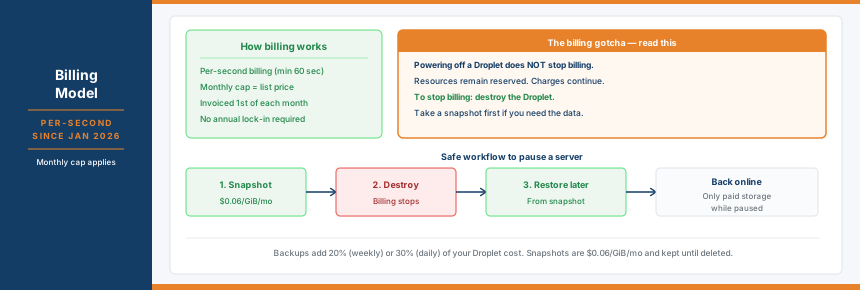
DigitalOcean doesn’t sell hosting plans in the traditional sense. You pay for compute resources: RAM, CPU, storage, and bandwidth. Pricing is billed per second since 1 January 2026, with a minimum charge of 60 seconds and a monthly cap. In practice, that means you’ll never pay more than the listed monthly price for an always-on server. Short-lived workloads cost only what they actually use.
There are no introductory prices here. No renewal surprises. The price you see below is the price you’ll pay next month.
Basic Droplets are the entry point. They use shared CPU, which means performance can vary slightly under heavy load. For most sites and projects, they’re perfectly adequate.
| RAM | vCPU | Transfer | Storage | Price/mo |
|---|---|---|---|---|
| 512 MiB | 1 | 500 GiB | 10 GiB SSD | $4 |
| 1 GiB | 1 | 1,000 GiB | 25 GiB SSD | $6 |
| 2 GiB | 1 | 2,000 GiB | 50 GiB SSD | $12 |
| 2 GiB | 2 | 3,000 GiB | 60 GiB SSD | $18 |
| 4 GiB | 2 | 4,000 GiB | 80 GiB SSD | $24 |
| 8 GiB | 4 | 5,000 GiB | 160 GiB SSD | $48 |
| 16 GiB | 8 | 6,000 GiB | 320 GiB SSD | $96 |
All prices are in USD. EU, UK, and Norwegian customers pay in USD and will have local VAT applied on top.
If you need consistent, dedicated CPU performance rather than shared, there are more powerful Droplet types to step up to:
- Premium Droplets (Intel or AMD): NVMe storage, faster processors, starting at $7–$8/mo
- CPU-Optimized: dedicated vCPUs in a 2:1 memory-to-CPU ratio, from $42/mo. Suited to video encoding, analytics, and applications that demand heavy compute
- General Purpose: balanced dedicated CPU, from $63/mo. Good for most production workloads
- Memory-Optimized: 8 GiB RAM per vCPU with NVMe, from $84/mo. Best for databases and caching layers
Bandwidth overage is charged at just $0.01 per GiB on Basic and Premium plans, one of the lowest rates in the cloud hosting space.
That’s a meaningful trial. You can spin up a $24/mo Droplet for a month and still have credit left. There’s no formal refund policy, but per-second billing means you’re not committed to a full month if you decide it’s not for you.
The Billing Gotcha You Need to Know
Here’s something that catches new users off guard: powering off a Droplet does not stop billing.
When you shut down a Droplet, the resources (RAM, CPU, storage, IP address) remain reserved for your account. You’re still charged. To stop being billed, you need to destroy the Droplet entirely. If you want to keep the data, take a snapshot first ($0.06/GiB per month), then destroy. Recreate from the snapshot later when you need it again.
That’s how cloud infrastructure billing works in general, not just here. But it’s worth understanding before you launch a test server and forget about it for three weeks.
Backups add cost too. Automated weekly backups are priced at 20% of your Droplet cost; daily backups at 30%. So a $12/mo Droplet with daily backups actually costs $15.60/mo. Not a problem, but factor it in when budgeting.
What You Get With Every Droplet
The monthly Droplet price includes more than raw compute. Every plan comes with:
- Outbound transfer included (starting at 500 GiB/mo on the smallest plan)
- 99.99% uptime SLA backed by service credits
- Per-second billing with a monthly cap: you never overpay for a server you ran all month
- Free monitoring and alerting on 15+ metrics via the DigitalOcean console
- 1-click app marketplace with 100+ pre-configured stacks (WordPress, LAMP, Docker, Node.js, and more)
- IPv6 support
- Private networking between Droplets in the same region
- API access and CLI tools for automation
What’s not included: email hosting, a free domain, cPanel, Plesk, or any managed service layer. You’re managing the server yourself.
The control panel is DigitalOcean’s own. It’s clean and well designed, making common tasks like launching a Droplet, resizing, enabling backups, or checking metrics straightforward even for newcomers. You won’t find it overwhelming. That said, once you’ve deployed a Droplet, most of the real work happens over SSH.
DigitalOcean for WordPress: Realistic Expectations
You can absolutely run WordPress on DigitalOcean. The 1-click marketplace installs WordPress on a LAMP stack in under a minute. Plenty of developers and agencies host WordPress sites this way and achieve excellent performance.
The thing to understand is what “1-click” actually means here. It installs the software. Everything else is yours to handle: security hardening, updates, caching, backups, SSL setup, performance optimisation. This is unmanaged hosting in the truest sense.
For a developer comfortable with a Linux server, that’s not a problem. You set it up once, properly, and it runs. For someone who just wants a WordPress site without any of that overhead, it’s the wrong environment.
If you want proper cloud infrastructure under your WordPress site without the server management, Cloudways is the logical next step. It runs on DigitalOcean (and other cloud providers), adds a managed layer with staging, automated backups, caching, and 24/7 support. It charges accordingly for that. The two products serve different users, even though they share infrastructure.
DigitalOcean vs Cloudways: What’s the Difference?
Since DigitalOcean owns Cloudways, the question comes up constantly. They’re genuinely different products.
| DigitalOcean | Cloudways | |
|---|---|---|
| Type | Raw cloud infrastructure (IaaS) | Managed cloud hosting |
| Entry price | $4/mo | $11/mo |
| Server management | You handle it | Cloudways handles it |
| WordPress support | 1-click install, you manage it | Fully managed with caching and staging |
| Control panel | DigitalOcean console | Custom Cloudways dashboard |
| 24/7 live support | Paid add-on ($50+/mo) | Included on all plans |
| Renewal markup | None | None |
| Best for | Developers, agencies, custom stacks | WordPress sites, less technical users wanting cloud performance |
The short version: choose DigitalOcean if you’re comfortable managing a server. Choose Cloudways if you want the infrastructure without the responsibility.
DigitalOcean vs Hetzner vs Vultr
If you’re evaluating cloud VPS providers in 2026, these three names come up together constantly. Here’s how they compare at an equivalent spec level.
| DigitalOcean | Hetzner | Vultr | |
|---|---|---|---|
| Entry price | $4/mo | ~€4.50/mo | $6/mo |
| 4 GiB / 2 vCPU price | $24/mo | ~€7.99/mo | ~$18/mo |
| Global regions | 9 | 3 (EU + US) | 32 |
| Managed databases | Yes | Limited | Some |
| Documentation quality | Excellent | Good | Decent |
| Best for | Ecosystem + developer experience | EU audience, price-per-spec | Global reach, raw performance |
Hetzner wins on value, particularly for European audiences. A comparable server costs significantly less, and you get more storage and bandwidth for the price. The downside is fewer global regions and a smaller ecosystem of managed add-on services.
Vultr edges ahead on raw benchmark performance, particularly with its High Frequency instances, but the developer experience and documentation don’t quite match what DigitalOcean offers.
DigitalOcean’s real advantage is its platform depth. Managed databases (PostgreSQL, MySQL, Redis, MongoDB), Kubernetes, a proper App Platform, and an API that’s been refined for over a decade. If you’re building something that will eventually need those services alongside your compute, staying in one ecosystem makes life easier.
Performance and Uptime
DigitalOcean backs Droplets with a 99.99% monthly uptime SLA, including service credits if it’s not met. That’s a credit-backed commitment, not just marketing copy.
Independent testing on a standard 2 vCPU / 4 GiB Basic Droplet shows TTFB results in the range of 200–400ms depending on region and server configuration. Premium Droplets with NVMe storage and dedicated CPU perform better. Basic Droplets on shared CPU can show some variance during peak load on the host node. That’s expected behaviour for shared infrastructure at this price point.
The network includes 20 data centres across 11 global regions. For European audiences, London, Amsterdam, and Frankfurt are all available. Check server latency before committing to a region. DigitalOcean has a speed test tool in the console to help with this.
You can use the Server Response Time Tester to benchmark your Droplet after setup, or the Uptime Calculator to understand what a 99.99% SLA actually means in hours of downtime per year.
Customer Support
Support is where DigitalOcean’s pricing transparency extends beyond compute. There are four tiers, and what you get depends entirely on which one you pay for. There is no phone support at any tier.
| Plan | Price | Channels | Response time |
|---|---|---|---|
| Starter | Free | Under 24 hours | |
| Developer | $24/mo | Under 8 hours | |
| Standard | $99/mo | Email + live chat | Under 2 hours |
| Premium | $999/mo | Email, live chat, Slack, video | Under 30 minutes |
The Starter plan comes included with every account. It covers email support and access to the documentation library and community forums, which is more useful than it sounds. The Developer plan at $24/mo cuts response times to under 8 hours but stays email-only. Live chat only appears from the Standard plan upward at $99/mo. The Premium tier at $999/mo adds a dedicated Slack channel, video calls, and a Technical Account Manager, that’s firmly in the enterprise bracket.
The documentation deserves separate mention. DigitalOcean’s community tutorial library is one of the best in the industry. Thousands of detailed guides covering everything from setting up Nginx to deploying a Node.js app to configuring SSL certificates. If you hit a problem, there’s an excellent chance a detailed guide already exists. This doesn’t replace responsive human support, but it does mean you can often solve problems without waiting on a ticket.
The honest reality: on the free Starter tier, something breaking at 2am means working from documentation and community posts until a ticket gets picked up. For most developer use cases that’s manageable. For production environments where every minute of downtime costs money, the Standard plan at $99/mo is the minimum worth considering.
Who This Isn’t For
DigitalOcean is a genuine product that serves its audience well. That audience is not everyone.
Skip it if you want a traditional hosting setup with cPanel, a bundled email address, or a free domain at signup. Those things don’t exist here.
Skip it if you need phone support or a live chat agent available to users without technical knowledge at any hour without paying extra. The free support tier is ticket-only.
Skip it if you’re launching a WordPress blog and just want something that works without any server setup. Hostinger or Namecheap will serve you better at a lower price with far less friction. If you want cloud performance for WordPress without the server management, Cloudways is the more appropriate route.
Skip it if your audience is primarily in regions where DigitalOcean has no nearby data centre. Vultr’s 32-location network has better coverage in parts of Asia, South America, and the Middle East.
Common Questions About DigitalOcean
Does DigitalOcean offer managed WordPress hosting?
Not directly. The 1-click marketplace installs WordPress on a server you manage yourself. For managed WordPress on DigitalOcean infrastructure, look at Cloudways, which handles server configuration, updates, caching, and backups on your behalf.
Does powering off a Droplet stop the billing?
No. Powering off a Droplet does not stop charges because the underlying resources remain reserved. To stop billing, you need to destroy the Droplet. Take a snapshot first if you want to restore it later.
Is DigitalOcean good for beginners?
It depends on the type of beginner. If you’re a developer new to cloud hosting, the clean interface and excellent documentation make it approachable. If you’ve never managed a Linux server and don’t intend to learn, it’s the wrong environment. A traditional shared host will serve you better.
Does DigitalOcean include email hosting?
No. Email is not included with any Droplet. You’ll need a separate email provider such as Google Workspace, Zoho, or Fastmail.
How does DigitalOcean compare to Hetzner on price?
Hetzner is substantially cheaper for equivalent specs in Europe. A 2 vCPU / 4 GiB server costs around €7.99/mo at Hetzner versus $24/mo at DigitalOcean. The downside is fewer global locations and a smaller managed services ecosystem. See the full Hetzner review for a detailed breakdown.
Is there a refund policy?
No formal refund policy exists. New accounts receive $200 in free credits for 60 days, and per-second billing means you can test a Droplet and destroy it after a few hours without paying for a full month.
Final Verdict
DigitalOcean has earned its reputation. The pricing is honest, the infrastructure is solid, and the documentation is genuinely the best in this category. If you’re a developer who wants cloud infrastructure without the billing complexity of AWS or the constraints of a traditional host, it remains one of the most compelling options available in 2026.
The caveats are real, though. No managed layer, no email, no phone support, and the “powering off doesn’t mean free” billing behaviour will catch someone out at some point. These aren’t hidden. They’re just how cloud infrastructure works, and DigitalOcean is upfront about them.
Right for developers, agencies, and technical site owners who want control, transparent pricing, and a solid ecosystem. The wrong fit for anyone who expects traditional hosting with a guided setup and bundled extras.
Pros and Cons
✓ Pros
- Prices never changes
- Per-second billing means you only pay for what you use
- 99.99% uptime SLA with service credits
- Excellent documentation and community tutorials
- 50+ global data centre locations across 9 regions
- $200 free credit for new accounts
- Clean, well-designed control panel
- Managed databases, Kubernetes and App Platform all in one ecosystem
- Bandwidth overage at just $0.01/GiB
✗ Cons
- No managed WordPress — you handle the server yourself
- No email hosting included
- No phone support on any plan
- No refund policy
- Powering off a Droplet does not stop billing — you must destroy it
- No free domain
Key Features
| Free Domain | No |
|---|---|
| Control Panel | Proprietary DigitalOcean console (no cPanel or Plesk) |
| Free Migration | Self service |
| Money-Back | No refund policy; $200 free credit for 60 days on new accounts |
| Support | Email all plans, live chat from $99/mo, Slack and video from $999/mo, no phone support |
| Green Credentials | Not verified |
| Backups | Automated weekly (20% of Droplet cost) or daily (30% of Droplet cost) |
Data Centres
| Name | Country | Tier | Certifications | Green |
|---|---|---|---|---|
| New York NYC1 | USA | Unknown | ISO 27001, ISO 9001, ISO 14001, SOC 2, PCI DSS | — |
| Equinix/Telx colocation, New York. Legacy region, limited feature availability. SOC 1 Type II, SOC 2 Type II, ISO 27001, ISO 9001, ISO 14001, ISO 22301, ISO 45001, ISO 50001, PCI DSS. | ||||
| New York NYC2 | USA | Unknown | ISO 27001, ISO 9001, ISO 14001, SOC 2, PCI DSS | — |
| Equinix colocation, New York. Droplets, managed databases, Kubernetes, block storage, load balancers. SOC 1 Type II, SOC 2 Type II, ISO 27001, PCI DSS. | ||||
| New York NYC3 | USA | Unknown | ISO 27001, ISO 9001, ISO 14001, SOC 2, PCI DSS | — |
| Equinix colocation, New York. Most feature-complete US East region. Droplets, GPU, Kubernetes, managed databases, object storage, VPC, load balancers. SOC 1 Type II, SOC 2 Type II, ISO 27001, PCI DSS. | ||||
| San Francisco SFO2 | USA | Unknown | ISO 27001, ISO 9001, ISO 14001, SOC 2, PCI DSS | — |
| Telx/Digital Realty colocation, San Francisco. US West region. ISO 9001, 14001, 22301, 27001, 45001, 50001, PCI DSS, SOC 1 Type II, SOC 2 Type II. | ||||
| San Francisco SFO3 | USA | Unknown | ISO 27001, ISO 9001, ISO 14001, SOC 2, PCI DSS | — |
| San Francisco, California. Most feature-complete US West region. Full Droplets, GPU, Kubernetes, databases, object storage, VPC. ISO 9001, 14001, 22301, 27001, 45001, 50001, PCI DSS, SOC 1 Type II, SOC 2 Type II. | ||||
| Amsterdam AMS3 | Netherlands | Unknown | ISO 27001, ISO 9001, ISO 14001, SOC 2, PCI DSS | — |
| Equinix colocation, Amsterdam. EU West region. Droplets, managed databases, Kubernetes, object storage, load balancers. ISO 27001, SOC 2 Type II, PCI DSS. | ||||
| Frankfurt FRA1 | Germany | Unknown | ISO 27001, ISO 9001, ISO 14001, SOC 2, PCI DSS | — |
| Equinix colocation, Frankfurt. EU Central region. Full feature availability: Droplets, GPU, Kubernetes, managed databases, object storage, block storage, VPC, load balancers. ISO 27001, SOC 2 Type II, PCI DSS. | ||||
| London LON1 | United Kingdom | Unknown | ISO 27001, ISO 9001, SOC 2, PCI DSS | — |
| Equinix colocation, London. EU West region. Droplets, managed databases, Kubernetes, block storage, load balancers. ISO 27001, SOC 2 Type II, PCI DSS. | ||||
| Toronto TOR1 | Canada | Unknown | ISO 27001, SOC 2, PCI DSS | — |
| Colocation, Toronto, Canada. North America region. Droplets, managed databases, Kubernetes, block storage, load balancers. | ||||
| Singapore SGP1 | Singapore | Unknown | ISO 27001, SOC 2, PCI DSS | — |
| 110 Paya Lebar Road, Singapore. Colocation. Asia Pacific region. Full Droplets, GPU, Kubernetes, databases, object storage available. | ||||
| Bangalore BLR1 | India | Unknown | ISO 27001, SOC 2 | — |
| Colocation, Bangalore, India. Asia Pacific region. Basic Droplets, managed databases, Kubernetes, block storage, load balancers. | ||||
| Sydney SYD1 | Australia | Unknown | ISO 27001, SOC 2, PCI DSS | — |
| Sydney, Australia. Opened 2022. 400 Gbps on-net access to Asia, North America and Europe via private backbone. Redundant network and power. Serves Australia and New Zealand market. | ||||