What Is VNC? Remote Server Access Explained
VNC lets you see and control a server’s screen when SSH or Remote Desktop won’t connect, and its password needs protecting like a key to the server.
VNC (Virtual Network Computing) lets you see another computer’s screen and control it with your own keyboard and mouse over a network. On a VPS, it’s the console in your control panel that still works when SSH, Remote Desktop or the server’s network won’t.
You may go months without opening it. When you do need it, something has usually gone wrong, so find out now where your provider keeps it and how to lock it down.
How Does VNC Work?
VNC has two parts. A server runs on the machine you want to control and sends pictures of its screen. A viewer runs on your computer, shows those pictures and sends your keystrokes and mouse clicks back.
The two talk using a protocol called RFB, short for Remote Framebuffer. The server sends the parts of the screen that changed, and the viewer redraws them. Because it only deals in pixels, VNC doesn’t care what operating system is underneath. A Windows viewer can control a Linux machine and the other way round.
VNC dates back to the late 1990s. It was built at the Olivetti and Oracle Research Lab in Cambridge, and the first RFB specification was published in January 1998. When AT&T closed the lab in 2002, four of the original developers founded RealVNC, and the open source code led to popular versions such as TightVNC, TigerVNC and UltraVNC.
By default, a VNC server listens on port 5900. If a machine runs several virtual displays, each one takes the next port up: display 1 uses 5901, display 2 uses 5902, and so on.
Two Kinds of VNC on a Server
When hosting companies talk about VNC, they can mean one of two different things, and each carries different security risks.
The Provider’s Console
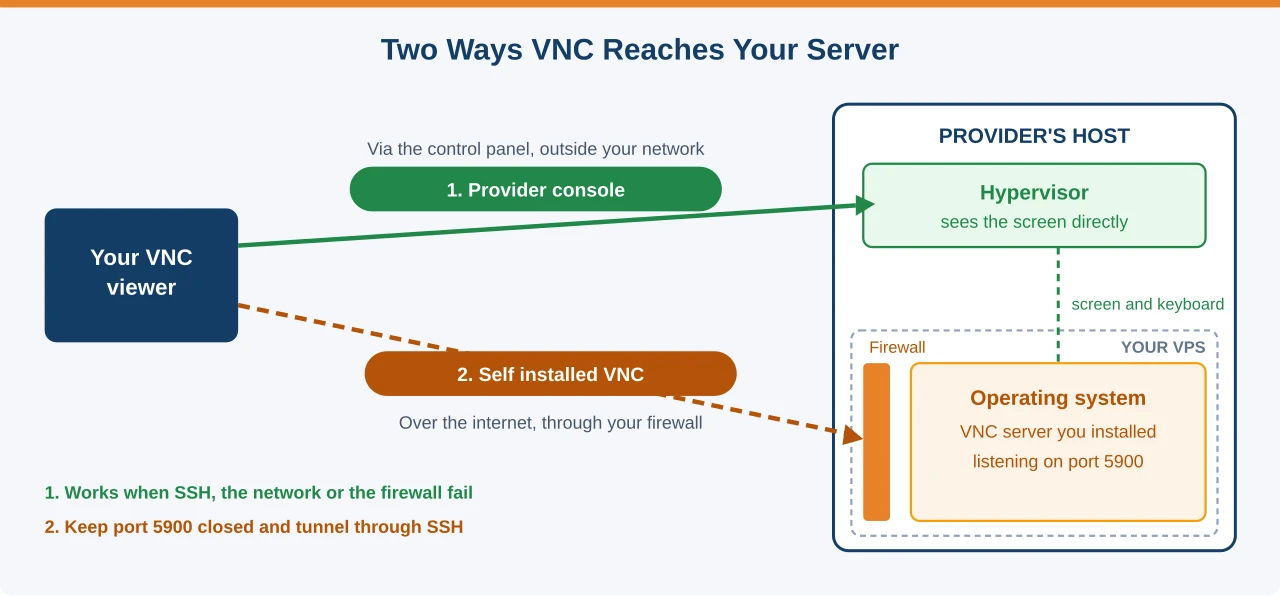
Most VPS hosting providers give you a console in their control panel. It connects to your server through the virtualisation layer, not through your server’s own network. It works like a monitor and keyboard plugged straight into the machine.
That’s why it still works when your firewall blocks everything, your network settings are broken or the server is stuck at boot. Many providers open it in your browser using noVNC, a VNC viewer that runs in a web page, so you don’t need to install anything. You log in with your server’s normal username and password once the console is open.
Other providers, Contabo among them, give each server a VNC address, port and password instead, and you connect with a desktop VNC viewer such as UltraVNC. That password is separate from your server login and your control panel login.
A VNC Server You Install Yourself
The other kind is a VNC server you install inside your own operating system, usually to get a graphical desktop on a Linux server. Recent TigerVNC versions only listen locally by default, but many setup guides tell you to change that, and other VNC servers listen on your public IP address on port 5900 or 5901 straight away.
Once it listens publicly, anyone on the internet can reach it unless you block it. Port 5900 is one of the ports automated scanners check constantly, so an exposed VNC server will see login attempts soon after it goes online.
VNC, SSH and Remote Desktop Compared
All three give you remote access to a server, but they’re built for different jobs. This table shows where each one fits.
| Tool | What you get | Best for | Encrypted by default? |
|---|---|---|---|
| SSH | Command line | Everyday Linux server work | Yes |
| Remote Desktop (RDP) | Full Windows desktop | Everyday Windows server work | Yes |
| Provider console (VNC) | The server’s screen, at any stage | Recovery when nothing else connects | Depends on the provider |
| Self installed VNC | A graphical desktop | Desktop apps on a Linux server | Depends on the software |
For day to day work, SSH on Linux and Remote Desktop on Windows are faster and safer. Keep VNC for the moments when they fail.
When You’d Use VNC
You’ll reach for the provider’s console when:
- You changed a firewall rule and locked yourself out of SSH
- A network change or update left the server unreachable
- The server won’t boot and you need to read the error on screen
- You’re installing an operating system from an ISO image
- You need to reset a forgotten root or Administrator password
Contabo’s own guide makes the same point: it recommends using VNC only when your server can’t be reached over SSH. Once SSH works again, close the console.
Is VNC Secure?
The original VNC login has two weak points.
First, the classic VNC password is cut to eight characters. Anything you type after the eighth is ignored, so even a long password only counts as eight. With modern hardware, that’s short enough for a brute force attack to be realistic.
Second, the original protocol doesn’t encrypt the session itself. Someone who can watch the traffic between you and the server may be able to see your screen and what you type. TigerVNC and RealVNC add encryption, TightVNC doesn’t, and browser consoles from providers usually run over HTTPS, so check what your setup uses rather than assuming.
Treat the console password like a key to the server. Anyone with it can reach the login screen or a recovery shell, and your firewall won’t stop them.
This is why Contabo reset every customer’s VNC password after the unauthorised access it detected on 14 November 2026, covered in our Contabo security incident article. Contabo hasn’t said whether any of the old passwords were misused, but a leaked console password goes around every other defence you’ve set up.
How to Keep VNC Safe
Five steps cover most of the risk:
- Turn the console off if you don’t use it. Some control panels, Contabo’s included, let you disable VNC per server and switch it back on in seconds when you need it.
- Set your own password. Replace any password your provider generated, and use all eight characters with a mix of letters, numbers and symbols.
- Protect the control panel. Turn on two factor login for your hosting account, since that’s where the VNC details live.
- Never expose a self installed VNC server. Block ports 5900 and up in your firewall and connect through an SSH tunnel instead, so the session travels inside an encrypted connection.
- Check your login history after any incident. On Linux, look for console logins you don’t recognise. On Windows, logon type 2 in the Security log is a console login.
Common Questions About VNC
What does VNC stand for?
Virtual Network Computing. It’s a way to view and control a computer’s screen remotely, using the RFB protocol.
What port does VNC use?
Port 5900 by default, plus one for each extra display, so the first virtual display uses 5901. Provider consoles that open in your browser usually run over the normal HTTPS port instead.
Is VNC the same as Remote Desktop?
No. Remote Desktop is Microsoft’s protocol for Windows and usually starts its own login session. VNC shares the screen that’s already there and works with any operating system.
Do I need VNC on my VPS?
You need to know where your provider’s console is, because it’s how you get back in when SSH fails. You don’t need to use it day to day, and if your panel lets you, it’s safer to keep it switched off until you need it.
Why is my VNC password limited to eight characters?
The original VNC login only uses the first eight characters of the password. Some newer versions and provider consoles support longer passwords, but many still follow the old limit.
Know Where Your Console Is
VNC is your way back into a server when everything else is broken. Find out where your provider’s console lives before you need it, set your own password, and switch it off if your panel allows. If you install a VNC server yourself, keep it behind your firewall and reach it through SSH.