What is a firewall?
A firewall is a security system that monitors and controls network traffic to protect devices and networks from unauthorized access.
Every hosting plan claims to include a firewall. That statement is almost always technically true. It is also frequently misleading, because “firewall” is a single word that covers three completely different security products, and the one your host includes is rarely the one you were picturing.
Here is what a firewall actually is, what the three types do, and what to check if you want to know whether your site is genuinely protected.
The Short Answer
A firewall is a security system that monitors and filters network traffic based on a set of rules. When a connection or request arrives at a server, the firewall checks it against those rules. Traffic that passes the checks gets through. Traffic that does not gets blocked before it reaches anything it could damage.
That definition applies to all three types. Where they differ is in what layer of traffic they inspect and what kinds of threats they can actually stop.
The Three Things Hosting Providers Call a Firewall
Network Firewall
A network firewall operates at the lowest level: it checks IP addresses, ports, and protocols. It decides whether traffic is allowed to reach the server at all. It does not read the content of what is being requested. It only sees the envelope.
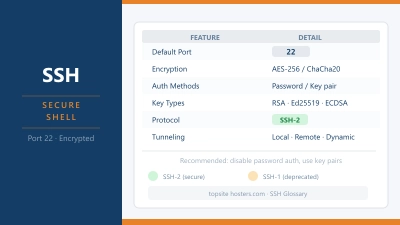
Every serious server has one. On Linux servers it is typically iptables or nftables running under the hood. It is useful for closing ports that should not be open, blocking known malicious IP addresses, and reducing brute-force login attempts on SSH and FTP by rate-limiting connection attempts from a single source. If you want to know more about SSH and why it is a common attack target, the glossary entry covers it.
What a network firewall cannot do: read what is inside an HTTP request. It knows a request arrived. It does not know whether that request is a legitimate page load or a SQL injection attempt. Those look identical at the network level.
Server Security Suite
This type runs on the machine itself and watches behaviour rather than connections. Common examples are CSF (ConfigServer Security and Firewall) on cPanel servers and Imunify360 on managed shared hosting environments.
CSF and tools like it monitor login attempts, file changes, running processes, and script activity. If an IP address fails fifty login attempts in a row, the tool blocks it. If a PHP script starts behaving like malware: making unexpected outbound connections, modifying core files. The suite can kill the process and alert the server owner.
This is what most shared hosting providers mean when they say “firewall included.” It is a real security tool and it does real work. But it is watching the server’s behaviour, not reading your visitors’ HTTP requests. It would not catch a SQL injection attack arriving through your contact form.
Web Application Firewall (WAF)
This is the type most buyers have in mind when they ask whether their host includes a firewall. It is also the one they are least likely to actually have on standard shared hosting.
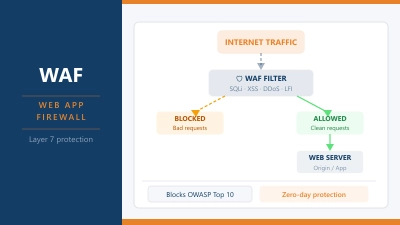
A WAF operates at the HTTP layer. It reads every incoming request to your site and checks it against known attack patterns before that request reaches your application. A contact form submission containing SQL commands, a URL designed to trigger a file inclusion exploit, a request probing a known WordPress plugin vulnerability. A WAF catches all of these because it understands what the request is asking, not just who sent it.
ModSecurity is the most widely deployed open source WAF engine. The OWASP Core Rule Set provides the detection rules. Cloudflare’s WAF is the most widely used cloud based implementation, sitting in front of millions of sites at the CDN layer before traffic reaches the origin server at all. The WAF glossary entry covers how it works in more technical detail.
What a Firewall Protects Against
The honest answer splits by type.
A network firewall protects against: unauthorised connections to open ports, brute-force login attempts on SSH, FTP, and control panels, and traffic from known malicious IP addresses.
A WAF protects against: SQL injection attacks through forms and URLs, cross-site scripting (XSS), file inclusion exploits, known vulnerability probes targeting WordPress plugins and themes, abusive bots and credential stuffing attempts.
What neither type protects against: compromised passwords. If someone has your login credentials, a firewall sees an authorised connection and lets them in. Software vulnerabilities in your own code that have no existing rule coverage will also get through. A WAF reduces exploitation risk for known attack patterns but does not replace keeping plugins, themes, and WordPress core updated. Our WordPress security guide covers the full picture of what a firewall handles and what you still need to manage yourself.
What Type of Firewall Does Your Host Include?
The answer varies significantly by hosting type.
On shared hosting, you almost certainly have a network firewall and likely CSF or Imunify360 at the server level. Whether you have a WAF depends entirely on the provider and is often not disclosed clearly on the plan page. If your shared host runs cPanel, check whether ModSecurity is listed under security settings. Some providers enable it by default, others offer it as an optional toggle, and some do not include it at all. Adding Cloudflare in front of your shared hosting account brings a WAF above whatever the host provides, at no cost on Cloudflare’s free tier.
On a VPS, you typically manage your own firewall. UFW (Uncomplicated Firewall) is the most accessible option on Ubuntu and Debian. CSF is popular on VPS servers running cPanel. A WAF requires either installing ModSecurity yourself or running the server behind Cloudflare. If you are not comfortable with server administration, this is one of the genuine reasons to consider managed hosting instead of unmanaged VPS.
On managed WordPress hosting, most providers include a WAF as part of the managed service. Kinsta, Rocket.net, and WP Engine all include Cloudflare WAF or an equivalent at the infrastructure level. This is one of the clearest practical advantages managed WordPress has over shared hosting for sites handling sensitive data, user accounts, or payments.
Common Questions About Firewalls
What is the difference between a firewall and a WAF?
A standard firewall operates at the network layer: it checks IP addresses and ports, deciding whether traffic can reach the server at all. A WAF operates at the HTTP layer: it reads the content of web requests and blocks ones that match known attack patterns. They solve different problems and are often used together. A network firewall is not a substitute for a WAF, and a WAF does not replace a network firewall.
Do I need a firewall for my website?
Yes, in some form. Any server connected to the internet receives automated attack traffic continuously. A network level firewall is a minimum requirement and is included with every serious hosting plan. Whether you also need a WAF depends on what your site does. A static brochure site with no forms or user logins has a much smaller attack surface than a WooCommerce store or a membership site. The more your site accepts user input, the more a WAF earns its place.
Does shared hosting include a firewall?
It includes a network firewall and usually a server security tool like CSF or Imunify360. Whether it includes a WAF depends on the specific provider and plan. Check whether ModSecurity is mentioned in the plan features or in the cPanel security section after signup. If it is not, adding Cloudflare in front of your site is the most practical way to add WAF protection to a shared hosting account.
What is ModSecurity?
ModSecurity is an open source WAF engine that runs as a module on web servers including Apache, Nginx, and IIS. It inspects incoming HTTP requests against a ruleset and blocks those that match known attack patterns. The OWASP Core Rule Set is the most widely used ruleset for ModSecurity, covering SQL injection, cross-site scripting, file inclusion, and other common attack categories. Many cPanel hosts include ModSecurity as an optional or default feature. Look for it under cPanel’s Security section.
Can a firewall stop all attacks?
No. A firewall is one layer of defence, not a complete security solution. Network firewalls stop network layer threats but cannot read application layer attacks. WAFs catch known attack patterns but do not protect against zero-day exploits with no existing rule, and they cannot compensate for weak passwords or unpatched software. Effective site security combines a WAF, regular software updates, strong credentials, and monitoring. No single tool does it all. The cPanel authentication bypass covered earlier this year is a good example of how a vulnerability at the application layer bypasses firewall protection entirely.