What Is DNSSEC? A Plain English Guide for Site Owners
DNSSEC adds a tamper seal to your domain’s DNS records, and this guide explains when it’s worth turning on and how to do it without breaking your site.
DNSSEC is a security layer for DNS that adds digital signatures to your domain’s records, so the systems looking up your site can check the answer is real and hasn’t been changed along the way. Think of it as a tamper seal on the internet’s address book.
That matters because DNS, the system that turns your domain name into a server address, was never built to prove anything. Without DNSSEC, a well placed attacker can feed visitors a fake answer and send them somewhere else entirely.
The catch is that DNSSEC isn’t a switch you flip and forget. Set up badly, it can knock your own site offline. So this guide covers how it works, whether your site needs it, and how to turn it on without breaking anything.
The Problem DNSSEC Solves
When someone types your domain into a browser, their device asks a resolver where to find it. That resolver is usually run by their internet provider, or by a public service like Cloudflare or Google. It tracks down the answer and caches it so the next lookup is faster.
Standard DNS has no way to prove that answer came from the right place. If an attacker slips a forged answer into the cache, a trick called cache poisoning, everyone using that resolver can be sent to a fake copy of your site. The address bar still shows your domain. The login form looks the same. The passwords go somewhere else.
DNS dates back to the 1980s, when the internet was a small network of people who mostly trusted each other. Proving where an answer came from simply wasn’t part of the design. DNSSEC was added later to close that gap without replacing DNS itself, which is why sites without it keep working exactly as before.
How DNSSEC Works
DNSSEC uses the same idea as a signed document. Your DNS provider signs your records with a private key that only it holds, and publishes a matching public key. Any resolver can use that public key to check the signature. If a record was changed along the way, the signature won’t match and the resolver throws the answer out.
A signature only helps if you can trust the key behind it. So DNSSEC builds a chain of trust. The DNS root vouches for top level domains like .com and .no, and each top level domain vouches for the domains under it, including yours. A validating resolver follows that chain all the way down, checking every link.
Three record types do most of the work:
| Record | What it holds | In plain English |
|---|---|---|
| DNSKEY | Your public signing keys | The key anyone can use to check your seal |
| RRSIG | The signature for a set of records | The seal itself |
| DS | A fingerprint of your key, stored one level up | The link that joins your domain to the chain |
Behind the scenes there are usually two keys: one that signs your everyday records and one that signs the keys themselves. A good DNS provider creates and rotates both without you touching anything.
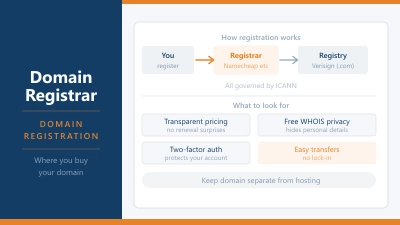
Now for the part that trips most people up. Signing happens at your DNS provider, the company running your nameservers. The DS record, though, gets published through your registrar, the company you bought the domain from. If those are two different companies, you’ll be working in two dashboards, and they have to agree with each other.
What DNSSEC Doesn’t Protect You From
DNSSEC answers one question: is this DNS answer authentic? It’s easy to assume it does more than that.
- It doesn’t encrypt anything. Lookups are verified, not hidden.
- It doesn’t replace your SSL certificate, which protects the connection between visitor and site.
- It doesn’t stop DDoS attacks or keep a struggling server online.
- It doesn’t stop fake domains that look like yours. If someone registers yourbrand-login.com, DNSSEC will happily validate it.
Treat it as one layer among several. HTTPS still does the heavy lifting for visitor safety, and you can confirm yours is set up properly with our SSL checker.
Do You Actually Need DNSSEC?
It depends on what your site does and who handles your DNS.
It’s worth switching on if you run an online store, take payments, have customer logins, or own a brand that already attracts phishing. Those are the sites attackers actually bother to impersonate, and a convincing fake can do real damage.
For a blog, portfolio, or small business site, the odds of someone targeting your DNS specifically are low. Even so, if your provider turns DNSSEC on with a single click and manages the keys for you, there’s little reason not to. Problems start when the setup is manual and nobody keeps an eye on it.
There’s one more limit to know about. DNSSEC only protects visitors whose resolvers actually check signatures. A European Commission report put the DNSSEC validation rate at 49.4% across the EU in Q3 2025, against 35.4% globally. So a perfectly signed domain is only verified for part of its audience today. That share has been rising, and a signed domain benefits automatically as it does.
Does Your Host Support DNSSEC?
Support varies more than you’d expect, even among the big names. Some providers offer a simple toggle. Others don’t support it on their own nameservers at all.
Here’s how a few common providers handle it:
| Provider | Support | What to know |
|---|---|---|
| Cloudflare | Yes, one click | Generates the DS record for you, and adds it automatically for domains on Cloudflare Registrar |
| Bluehost | Yes, portal toggle | Available for supported domain extensions |
| cPanel hosts | Depends on host | cPanel can generate the records if your host has enabled the feature |
| Hostinger | Not on its nameservers | Says it uses its own protections instead, and recommends disabling DNSSEC before transferring a domain in |
The Hostinger detail catches a lot of people out. If your domain points at Hostinger’s nameservers, DNSSEC simply isn’t available. You can still use it with a domain registered at Hostinger, as long as your DNS runs somewhere else, such as Cloudflare. Our Hostinger review covers the rest of what you get there.
How to Turn DNSSEC On Safely
If your domain and DNS live with the same company, setup is often a single toggle. When they’re split between two companies, it happens in two places, in this order:
- Turn on signing at your DNS provider. That’s wherever your nameservers point. In Cloudflare, go to DNS, then Settings, then Enable DNSSEC. The provider signs your zone and shows you the DS record details.
- Add the DS record at your registrar. Copy the values exactly: key tag, algorithm, digest type, and digest. Cloudflare uses algorithm 13, which some registrars list as ECDSA P-256 with SHA-256.
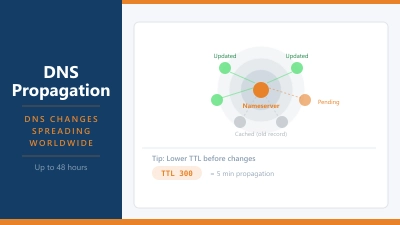
- Wait, then check. Changes take a while to show up. Once they do, run your domain through DNSViz or the Verisign DNSSEC Debugger. An unbroken chain from the root down to your domain means it’s working.
Only do this once your nameservers are settled. Turning on DNSSEC right before a move is asking for trouble, which leads straight to the biggest risk.
The Mistake That Takes Sites Offline
The DS record at your registrar is a promise. It tells every validating resolver that your domain is signed, and with which key. If that promise stops being true, those resolvers don’t fall back to ordinary DNS. They refuse to answer, and your site and email vanish for everyone behind them.
This usually happens during a move. You switch hosts or DNS providers, the old provider stops signing, but the old DS record is still sitting at the registrar. Now the chain points to a key that no longer exists.
When you move a WordPress site to a new host or change DNS providers, follow this order:
- Remove the DS record at your registrar.
- Wait for it to expire from caches. The parent zone’s TTL for DS records is often one to two days.
- Switch your nameservers.
- Turn on signing at the new provider and add its new DS record.
Big teams get caught by this too. In September 2021, Slack’s attempt to enable DNSSEC on slack.com caused an outage that lasted 24 hours for under 1% of its users. Once the broken answers were cached, the change couldn’t be undone quickly. A rushed migration on a small site can go wrong in exactly the same way.
Common Questions About DNSSEC
Does DNSSEC slow down my website?
Not in any way your visitors will notice. Signed responses are a little larger and resolvers do some extra checking, but the effect is tiny next to page weight and server speed.
Can I turn DNSSEC off later?
Yes, as long as you do it in the right order. Remove the DS record at your registrar first, wait for it to clear, then stop signing at your DNS provider. Reversing those steps breaks your domain straight away.
Does DNSSEC replace an SSL certificate?
No. DNSSEC proves the DNS answer is authentic, while SSL encrypts the connection between your visitor and your site. You want both.
Should I turn off DNSSEC before transferring my domain?
If the transfer also changes your nameservers, yes. Hostinger and Cloudflare both recommend disabling it first. Turn it back on once the transfer is done and the new DNS is stable.
How do I check if my domain uses DNSSEC?
The quickest way is our free DNSSEC Checker. Enter your domain and it shows whether a DS record exists, whether it matches your signing keys, and whether the chain validates, with plain English steps if anything is wrong. For a more technical view, DNSViz and the Verisign DNSSEC Debugger work too. Most registrar dashboards also list any DS records on your domain.
The Short Version
DNSSEC stops attackers from faking your domain’s DNS answers. It’s well worth having on any site that handles logins or money, and a sensible extra for everyone else when your provider manages it for you.
Start by checking whether your domain is already signed. If it isn’t and your nameservers aren’t changing soon, turn on signing at your DNS provider, add the DS record at your registrar, and confirm the chain validates. If a host move is on the horizon, wait until it’s finished.