What is an IP Address
An IP address is the unique number that identifies every device and server on the internet.
Every device connected to the internet has an address. Not a street address, but a numerical one: a string of numbers that identifies it uniquely on the network. That’s an IP address. Your laptop has one. Your phone has one. The server hosting your website has one. Without IP addresses, data on the internet would have nowhere to go.
- What is an IP address?
- IPv4: the original format
- IPv6: the new format
- Public vs private IP addresses
- Static vs dynamic IP addresses
- Shared vs dedicated IP addresses in web hosting
- How IP addresses relate to your domain
- IP addresses and email deliverability
- How to find an IP address
- IP geolocation and why it matters for hosting
- Frequently Asked Questions
For most website owners, IP addresses stay in the background. But they come up more often than you’d expect: when you’re pointing a domain at a server, checking whether a host change has propagated, troubleshooting an email delivery problem, or trying to understand why your site is blocked in a particular country. Here’s what you actually need to know.
What is an IP address?
IP stands for Internet Protocol. An IP address is a unique numerical label assigned to every device that connects to a network using the Internet Protocol. It serves two purposes: identifying the device and giving it a location on the network that other devices can send data to.
Think of it like a postal address. When you send a letter, the postal system needs a specific address to deliver it to the right building. When your browser requests a webpage, the internet needs a specific IP address to deliver the response to the right device.
There are two versions of IP addresses currently in use: IPv4 and IPv6. They look different and work slightly differently, but serve the same function.
IPv4: the original format
IPv4 is the older format, and still the most commonly referenced. An IPv4 address looks like this: 192.168.1.1. It’s four groups of numbers, each between 0 and 255, separated by dots.
The math: each group uses 8 bits, giving 256 possible values (0-255). Four groups of 8 bits gives 32 bits total. That means IPv4 can theoretically support around 4.3 billion unique addresses.
Sounds like a lot. It isn’t. The internet has roughly 5.4 billion active users, each with multiple devices, plus billions of servers and network devices. IPv4 addresses ran out years ago. The internet has been operating on workarounds ever since, which is why IPv6 exists.
IPv6: the new format
IPv6 uses 128 bits instead of 32, which produces a vastly larger address space. An IPv6 address looks like this: 2001:0db8:85a3:0000:0000:8a2e:0370:7334. Eight groups of four hexadecimal characters, separated by colons.
The number of possible IPv6 addresses is approximately 340 undecillion. That’s 340 followed by 36 zeros. The internet is not running out of IPv6 addresses any time soon.
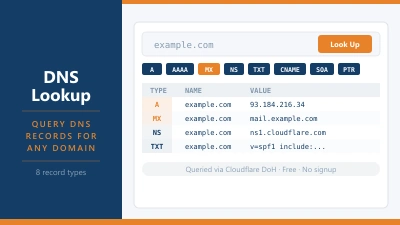
Most modern hosting providers support both IPv4 and IPv6. When you look up the DNS records for your domain using the DNS Lookup tool, you’ll typically see an A record (IPv4) and an AAAA record (IPv6) pointing to your server.
Public vs private IP addresses
Not all IP addresses are visible on the public internet. There are two types.
A public IP address is globally unique and reachable from anywhere on the internet. Your hosting server has a public IP address. Your home router has a public IP address assigned by your internet service provider.
A private IP address is used within a local network and not routable on the public internet. When your router assigns addresses to the devices in your home, those are private addresses: typically in ranges like 192.168.x.x or 10.x.x.x. Your laptop’s IP address on your home Wi-Fi is a private address. Nobody on the internet can connect to it directly.
Your router acts as a translator between your private network and the public internet, a process called Network Address Translation (NAT). This is part of how billions of devices share a limited pool of public IPv4 addresses.
Static vs dynamic IP addresses
IP addresses can also be static or dynamic.
A static IP address is fixed. It doesn’t change. Hosting servers typically have static IP addresses, which is why you can point a DNS A record at an IP and trust it’ll still be there next month.
A dynamic IP address is assigned temporarily and can change. Your home internet connection almost certainly uses a dynamic IP. Every time your router reconnects, your ISP may assign it a different public IP from their pool. For home users, this doesn’t matter. For servers, it’s a problem: if your server’s IP changes, anyone trying to reach your domain at the old IP gets nothing.
This is why web hosting plans include a static IP for your server, and why you should never point your domain’s A record at a dynamic IP.
Shared vs dedicated IP addresses in web hosting
On shared hosting, multiple websites share a single IP address. Your site and potentially hundreds of others all sit on the same server with the same public-facing IP. The hosting server uses the domain name in the HTTP request header to work out which site to serve.
A dedicated IP address means your site has its own IP that isn’t shared with anyone else. This used to matter more than it does today. In the early days of SSL certificates, a dedicated IP was required for HTTPS to work. That’s no longer the case. Server Name Indication (SNI) allows multiple SSL certificates to coexist on a single IP address, which is how modern shared hosting manages HTTPS for all its customers at once.
So do you need a dedicated IP? For most sites, no. The main remaining reasons to get one are: certain server-level configurations that require it, some payment processor requirements for older systems, or accessing your server directly by IP before DNS has propagated after a host migration.
How IP addresses relate to your domain
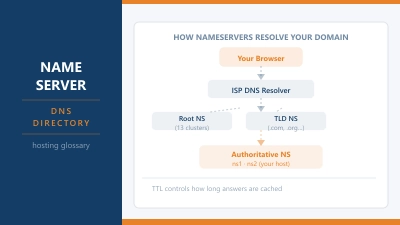
Your domain name and your server’s IP address are linked by a DNS A record. When someone visits your domain, the nameserver for your domain returns the A record, which contains your server’s IP address. The visitor’s browser then connects to that IP.
This is why changing web hosts involves updating your DNS records or nameservers: you’re telling the internet to use the new server’s IP address instead of the old one. Until that change propagates through the DNS system, some visitors may still reach the old server. The propagation process takes between a few minutes and 48 hours depending on the TTL settings on your records.
IP addresses and email deliverability
IP addresses matter more than most people expect for email. When your server sends an email, it goes out from a specific IP address. Spam filters and email providers check that IP against blacklists. If your server’s IP has been used to send spam in the past, your legitimate email may end up in junk folders.
On shared hosting, you share an IP with other sites. If one of those sites sends spam and gets the shared IP blacklisted, your email deliverability suffers too. This is one genuine reason to consider a dedicated IP if you send a significant volume of email through your hosting server, or to use a dedicated email service like Google Workspace or Fastmail rather than relying on your host’s mail server entirely.
How to find an IP address
There are a few different IP addresses you might want to look up depending on what you’re trying to do.
Your own public IP address: Search “what is my IP” in any browser and you’ll see it immediately. This is the IP your internet traffic appears to come from online.
Your website’s IP address: Use the DNS Lookup tool and look up the A record for your domain. The value returned is your server’s public IPv4 address.
Any domain’s IP address: The same DNS Lookup tool works for any domain. Look up the A record and you’ll see the IP. If the domain is behind Cloudflare or another proxy, you’ll see Cloudflare’s IP rather than the origin server’s IP.
Your server’s IP address (if you’re a hosting customer): This is usually shown in your hosting control panel, either in the account summary or in the DNS management section.
IP geolocation and why it matters for hosting
IP addresses are associated with geographic locations. Every IP block is assigned to an organisation in a specific country and region, and IP geolocation databases map those assignments to approximate physical locations.
This matters for website owners in a few ways. Some content delivery decisions are made based on a visitor’s IP: which server to route them to, what currency to show in a store, whether to apply regional pricing. Geo-blocking works by checking visitor IPs against geolocation databases and restricting access by country.
For hosting, the location of your server’s IP matters for latency. A visitor in Germany connecting to a server whose IP resolves to a US data centre will experience higher latency than one connecting to a server in Frankfurt. This is why choosing a host with data centres close to your audience matters for performance.
Frequently Asked Questions
What does an IP address tell you?
An IP address identifies a device on a network and gives it a location that other devices can send data to. From a public IP address, you can usually determine the approximate country and region of the device or server, the organisation or ISP it’s assigned to, and whether it’s associated with any known spam or abuse records. You can’t determine an exact physical address or the identity of the user from an IP address alone.
What is the difference between IPv4 and IPv6?
IPv4 uses 32 bits and supports around 4.3 billion unique addresses, expressed as four groups of numbers (e.g. 192.168.1.1). IPv6 uses 128 bits and supports an astronomically larger number of addresses, expressed in hexadecimal (e.g. 2001:0db8::1). IPv6 was created because the world ran out of available IPv4 addresses. Both versions are in active use today.
Do I need a dedicated IP for my website?
For most websites, no. Shared IP addresses work fine for HTTPS thanks to SNI (Server Name Indication), and search engines treat shared and dedicated IPs equally. The main reasons to consider a dedicated IP are: certain legacy payment processor requirements, server-level configurations that need it, or avoiding the risk of a shared IP being blacklisted due to another site on the same server.
Can someone find my location from my IP address?
Approximately, yes. IP geolocation databases can typically identify your country and city with reasonable accuracy. They can’t pinpoint your street address. If you’re concerned about IP-based location tracking, a VPN routes your traffic through a different IP address, masking your real location from websites and services you visit.
Why does my IP address change?
If you’re on a home internet connection, your ISP likely assigns you a dynamic IP that can change when your router reconnects or periodically at the ISP’s discretion. If your IP has recently changed, any service that had your old IP allowlisted (a firewall rule, a remote access configuration) may need to be updated. Web hosting servers use static IPs that don’t change unless you specifically move servers or request a change.
What is a localhost IP address?
The localhost IP address is 127.0.0.1 (or ::1 in IPv6). It’s a special address that always refers to the device itself. When developers run a website locally on their own computer, they access it at 127.0.0.1 or localhost. Data sent to this address never leaves the machine. It’s used for testing and development without needing a live server or internet connection.