What Is a Data Centre?
A data centre is the physical facility that houses your hosting provider's servers.
Every website you’ve ever visited lives somewhere physical. Behind every domain, every page load, and every file transfer is a building full of hardware keeping it all running. That building is a data centre.
A data centre is a secure, purpose-built facility that houses servers, networking equipment, and storage systems. Hosting providers rent space in these facilities (or own them outright) to store the websites and applications their customers pay to run. When someone visits your site, their browser sends a request to a server sitting inside one of these buildings, and your files travel back across the internet in milliseconds.
Understanding what a data centre is, and why it matters, helps you make a better decision when choosing a hosting provider. The location, quality, and redundancy of a host’s data centres directly affect your site’s speed, uptime, and reliability.
What’s Inside a Data Centre?
A data centre is more than a room full of computers. It’s a system engineered around a single goal: keeping servers online continuously, no matter what happens outside the building.
Walk into a large data centre and you’d find rows of metal server racks stretching across a warehouse-sized floor, each rack packed with hardware running around the clock. The temperature is precisely controlled. The hum of cooling systems is constant. Access requires biometric authentication. This is where the internet physically lives.
The core components fall into four categories.
Servers and storage. These are the physical machines that store and serve your website’s files, databases, emails, and everything else. Servers are mounted in racks, with dozens or hundreds of units stacked in each bay. Storage systems sit alongside them, holding the data that servers need to retrieve and deliver.
Power infrastructure. Servers need uninterrupted electricity. Data centres address this at multiple layers: an uninterruptible power supply (UPS) kicks in instantly during any grid fluctuation, diesel generators provide backup power for extended outages, and most serious facilities have redundant power feeds from separate substations. Losing power in a data centre means websites going down, so this infrastructure is taken extremely seriously.
Cooling systems. Servers generate significant heat. Left unchecked, that heat causes hardware failure. Data centres use specialist air conditioning units called CRAC (Computer Room Air Conditioning) units, typically maintaining temperatures between 18°C and 27°C. Many modern facilities use hot aisle and cold aisle layouts, alternating rack orientations so hot exhaust air from one row flows directly into the intake of the cooling units rather than mixing with the cooler air elsewhere. Some of the largest data centres use liquid cooling to handle particularly dense server configurations.
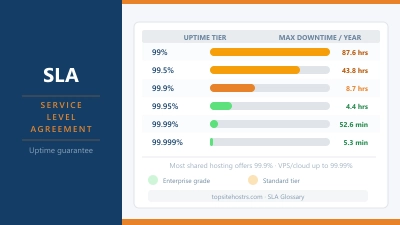
Networking hardware. Switches, routers, and fibre cables connect the servers inside the building to the internet outside it. Quality data centres maintain connections to multiple internet service providers simultaneously. If one connection goes down, traffic reroutes through another automatically. This redundancy is a large part of why reputable hosting providers can offer uptime guarantees above 99.9%.
Physical security. The hardware inside a data centre is worth millions and holds sensitive data for thousands of customers. Access is typically controlled through multiple layers: perimeter fencing, security personnel, CCTV, mantrap entry systems, and biometric scanners. Visitors must be escorted. Unauthorised access is effectively impossible at a well-run facility.
Data Centre Tier Ratings
Not all data centres are built to the same standard. The Uptime Institute developed a Tier classification system that grades facilities from Tier 1 to Tier 4 based on their resilience and redundancy.
Tier 1 is the most basic level. A single path for power and cooling, no redundant components, and scheduled downtime required for maintenance. This level is rarely used by hosting providers.
Tier 2 adds some redundant components but still relies on a single distribution path. Partial protection against failures, with limited ability to carry out maintenance without interruption.
Tier 3 is where most quality hosting providers operate. Multiple power and cooling paths, with enough redundancy that maintenance can be carried out without taking the facility offline. This tier targets 99.98% annual uptime: roughly 1.6 hours of downtime per year.
Tier 4 is the highest level. Fully fault-tolerant across every system, meaning even a simultaneous failure across multiple components won’t bring the facility down. Used by banks, government agencies, and large enterprises. Targets 99.995% uptime: around 26 minutes of downtime per year.
When a hosting provider mentions “Tier 3 data centre” in their marketing, this is what they mean. It’s worth looking for, because it tells you the facility was built for serious reliability rather than just minimum viability.
Does Data Centre Location Affect Your Website?
Yes, and significantly so.
TTFB (Time to First Byte) is the time between a visitor’s browser making a request to your server and receiving the first byte of data back. It’s the clearest measure of how quickly your server is responding. Data travels fast, but it still has to physically move through fibre cables across real distances. A visitor in Berlin connecting to a server in Sydney will always wait longer than one connecting to a server in Frankfurt.
The practical rule is straightforward: choose a hosting provider with a data centre close to where the majority of your visitors are located. If your audience is in the UK, a provider with European data centres will serve them faster than one based solely in the US. If you’re building for a global audience, look for providers with multiple data centre locations or a CDN that caches your content closer to each visitor.
The table below shows where some popular hosting providers locate their data centres, and which audiences they serve best as a result.
| Provider | Data Centre Locations | Best Audience Region |
|---|---|---|
| Hostinger | US, UK, Netherlands, Lithuania, Singapore, Brazil, India | Global |
| SiteGround | US (x4), UK, Netherlands, Singapore, Australia | Global |
| Kinsta | 35 locations via Google Cloud | Global |
| IONOS | Germany, UK, US, Spain, France | Europe + US |
| Hetzner | Germany, Finland, US | Europe-first |
| Namecheap | US (Phoenix), UK, Netherlands, Singapore | US, Europe, Asia |
| Krystal | UK (London) | UK-only |
You can test how quickly any hosting provider’s server responds from your location using the Server Response Tester.
Types of Data Centres
Not every data centre works the same way. There are a few distinct models you’ll encounter when researching hosting providers.
Enterprise data centres are owned and operated by a single organisation for their own internal use. Large corporations and government bodies run these to keep full control over their infrastructure. You won’t interact with these as a hosting customer.
Colocation facilities (sometimes called “colo”) are third-party data centres that rent physical space, power, and connectivity to other companies. A hosting provider may own its servers outright but house them in a colocation facility rather than building its own. This is common among mid-sized hosting companies who want the benefits of a purpose-built facility without the capital cost of constructing one.
Cloud data centres are the facilities operated by providers like Amazon Web Services, Google Cloud, and Microsoft Azure. These house virtualised infrastructure that thousands of companies share, with resources allocated dynamically on demand. Managed WordPress hosts like Kinsta and Rocket.net run on top of cloud infrastructure, which is why they can offer data centre locations across dozens of countries.
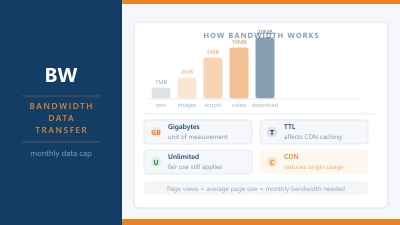
Edge data centres are smaller facilities positioned close to end users, designed to reduce latency for time-sensitive applications. Content delivery networks rely on edge locations to serve cached copies of your site from nearby servers rather than routing every request back to the origin.
Data Centres and Green Hosting
Data centres consume a significant amount of electricity: both for the servers themselves and the cooling systems that keep them from overheating. The industry has developed a standard metric called PUE (Power Usage Effectiveness) to measure how efficiently a facility uses that energy.
A PUE of 1.0 would be theoretically perfect: every watt consumed goes directly to computing. In practice, older facilities average a PUE of around 1.5 to 2.0, meaning for every watt powering a server, another half to full watt is spent on cooling and other overhead. Modern, well-designed data centres typically achieve PUE between 1.1 and 1.3.
Some hosting providers have invested in renewable energy to power their facilities, either by sourcing green electricity directly or by purchasing Renewable Energy Certificates (RECs). GreenGeeks offsets its energy use at 300%, matching each unit consumed with three units of renewable energy credits. Krystal operates from a UK data centre powered by 100% renewable energy.
If environmental impact matters to you when choosing a host, the Green Host Checker lets you verify whether a provider is recognised by the Green Web Foundation. The eco-friendly hosting guide covers the full picture of what green claims actually mean in practice.
What to Look for in a Hosting Provider’s Data Centre
When comparing hosting providers, the data centre is worth looking at directly rather than taking marketing claims at face value. A few things worth checking:
Location relative to your audience. This is the most practical factor. If most of your visitors are in Europe, a provider with European data centres will deliver faster page loads than one with infrastructure solely in the US. Many providers let you choose your preferred data centre location at signup.
Tier rating. Tier 3 or above is the standard to look for. Some providers publish this openly; others don’t. If it’s not listed, it’s reasonable to ask.
Redundancy. Look for providers that mention redundant power feeds, multiple internet uplinks, and backup generator capacity. These details often appear in their infrastructure or “about” pages rather than the main marketing copy.
Whether they own or colocate. Neither is inherently better. Providers that own their data centres have more direct control over the hardware environment. Those using colocation can still access excellent facilities. It depends entirely on which facility they’ve chosen.
Certifications. ISO 27001 is the internationally recognised standard for information security management. SOC 2 is common in the US market. Seeing these certifications attached to a host’s data centre suggests the facility has been independently audited.
Common Questions About Data Centres
Is a data centre the same as a server?
No. A server is a single machine. A data centre is the facility that houses hundreds or thousands of servers, along with the power, cooling, networking, and security infrastructure they all depend on. Think of it as the building versus the computers inside it.
Does my hosting provider own its data centres?
Not always. Smaller providers often rent space in third-party colocation facilities. Larger providers like Hetzner and IONOS build and operate their own. Neither approach is inherently better. What matters is the quality of the facility and the redundancy built into it.
How do I find out where my host’s data centres are?
Check the provider’s website, usually under “About”, “Infrastructure”, or the individual plan pages. Most providers list their locations. If it’s not visible, ask support before purchasing. It’s a reasonable question and a good indicator of how transparent a host is willing to be.
Can I change my data centre location after signing up?
Sometimes. Some providers allow migrations between data centre locations on request, though this usually involves a brief period of downtime and may require raising a support ticket. It’s worth confirming the available options before you sign up if location is a priority.
What happens if a data centre goes offline?
Quality hosting providers operate from facilities with enough redundancy that a complete outage is rare. If it does happen, due to a natural disaster, major power failure, or infrastructure fault, websites hosted there will go down until power and connectivity are restored. This is why serious providers use Tier 3 or Tier 4 facilities, and why some offer multi-region failover for customers who can’t afford any downtime at all.