What Is a Subdomain?
A prefix added to your domain name that creates a separate address, like shop.example.com, on the same root domain.
A subdomain is a prefix you add to your existing domain name to create a separate section or address on your site. If your domain is example.com, then shop.example.com, blog.example.com, and staging.example.com are all subdomains of it.
You’ve used dozens of subdomains without thinking about it. When you log into a web app and end up on app.something.com, that’s a subdomain. When a support portal sits at help.company.com, same thing. They’re one of the most common structural tools in web publishing, and they’re available on almost every hosting plan.
How Subdomains Work
To understand subdomains, it helps to understand how domain names are structured. A domain like example.com has two parts: example (the second level) and .com (the top level). Everything you add to the left of the second level domain becomes a subdomain.
So in blog.example.com, the structure reads right to left: .com is the top level domain, example is the second level, and blog is the subdomain. You can technically go further: store.blog.example.com would be a sub-subdomain, though you rarely see this in practice.
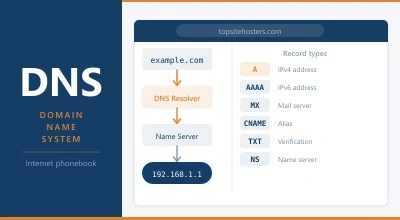
Subdomains are set up through your DNS records. You create an A record or CNAME record pointing the subdomain to a server or another domain. Most hosting control panels let you do this through a subdomain or DNS management interface without touching raw DNS records manually. Once the DNS is in place and propagated, the subdomain is live.
On shared hosting with cPanel, for example, adding a subdomain takes about thirty seconds in the interface and the DNS is handled automatically. On a VPS or managed server, you’d typically need to also configure the web server to handle requests for that subdomain and point it to the right directory or service.
Subdomain vs Subdirectory: What’s the Difference?
This is the question that comes up most often, and for good reason. Both achieve similar things structurally, but they behave differently from a technical and SEO perspective.
A subdirectory (also called a subfolder) puts content inside your main domain’s folder structure: example.com/blog/. A subdomain separates it at the domain level: blog.example.com.
From a visitor’s perspective, the difference is mostly cosmetic. From a hosting perspective, a subdomain can run on a completely separate server, use a different CMS, or have its own hosting account entirely. A subdirectory sits within the same installation and shares resources with the main site.
The SEO question is where people get stuck. Google has stated it treats subdomains and subdirectories similarly, but in practice most SEOs advise using subdirectories for content you want to benefit from your main site’s authority. The reasoning: a subdomain can be treated as a separate entity, which means it doesn’t automatically inherit the link authority or ranking signals your main domain has built up.
For a blog, a shop, or a documentation section, a subdirectory is usually the safer choice if SEO matters to you. For a staging environment, a completely separate web app, a user dashboard, or anything that runs on different software, a subdomain makes more sense.
When to Use a Subdomain
Subdomains are the right tool in several situations:
Staging and development environments. Running staging.yourdomain.com or dev.yourdomain.com as a test copy of your live site is one of the most common uses. It keeps the test environment separate from production, on the same domain, without the risk of test content appearing in search results (assuming you’ve blocked it with robots.txt or a password).
Separate web applications. If your marketing site runs on WordPress but your customer dashboard is a completely different application, a subdomain makes sense. app.yourdomain.com can point to a Node.js server while yourdomain.com stays on WordPress. They share the domain name without sharing infrastructure.
Country or language versions. Some sites use subdomains for localisation: de.example.com for German content, fr.example.com for French. This is one approach to international SEO, though subdirectories (example.com/de/) or separate country code domains (example.de) are often preferred. Google supports all three approaches.
Large-scale content separation. A news site might run its live blog on live.site.com, its video section on video.site.com, and its archive on archive.site.com. This kind of separation makes infrastructure management easier when different sections need to scale independently.
Email. Your email already uses a subdomain, whether you realise it or not. When you receive email at name@yourdomain.com, the mail. or smtp. records in your DNS are subdomain-level configurations that route email traffic to the right server.
How Many Subdomains Can You Have?
Technically, hundreds. The DNS system supports up to 127 levels of subdomains, and the full domain name (including all levels) can be up to 253 characters. In practice, most sites use between one and ten, and most hosting plans support unlimited subdomains.
On shared hosting plans, the number of subdomains you’re allowed varies by plan. Budget shared plans sometimes cap you at five or ten. Most mid-range and above plans allow unlimited subdomains. Check your hosting plan’s spec sheet if you’re unsure, since this is one of the details buried in the fine print.
On VPS hosting or dedicated servers, there’s no practical limit imposed by the hosting plan. You’re constrained only by your DNS configuration and server setup.
Do Subdomains Cost Extra?
Usually not. Creating a subdomain on an existing hosting account is free in most cases. You’re using the domain you already own and adding a DNS record, which costs nothing beyond the time it takes to set it up.
Where costs can come in is if you want to run a subdomain on separate hosting. If shop.yourdomain.com is a separate WooCommerce installation on its own hosting account, you’re paying for that hosting account in the same way you’d pay for any site. But the subdomain itself, as a DNS configuration, has no fee attached.
SSL certificates are worth checking too. A certificate that covers yourdomain.com and www.yourdomain.com doesn’t automatically cover subdomains. A wildcard SSL certificate covers yourdomain.com and all first-level subdomains (*.yourdomain.com). Most hosts that offer free SSL via Let’s Encrypt can issue wildcard certificates, but you may need to request one specifically. If you’re adding a subdomain and want HTTPS on it, check whether your existing certificate covers it or whether you need to issue a new one.
Subdomains and SEO: The Practical Answer
Google has consistently said it can handle subdomains. The concern isn’t whether Google can crawl and index them, it’s whether content on a subdomain benefits from the authority signals your main domain has accumulated.
The safe general rule: if you want search traffic to a section of content, use a subdirectory. If the subdomain is for something that operates as a separate product or tool, a subdomain is fine.
There’s one scenario where subdomains actively help SEO: international sites. Using country code top level domains (example.de, example.fr) or subdomains with hreflang tags is a well-supported approach for targeting different countries. Google uses hreflang to understand which version of content to show to which audience, and subdomains work as well as subdirectories in this context.
Whatever structure you choose, make sure staging subdomains are either password protected or blocked from indexing. A staging copy of your site appearing in search results alongside the live version creates duplicate content problems and can suppress rankings for the real pages. Use a robots.txt disallow rule, a password, or a noindex tag on staging environments.
How to Set Up a Subdomain
The process varies slightly depending on your hosting setup, but the steps are broadly the same:
- Log into your hosting control panel (cPanel, Plesk, or your host’s custom interface)
- Find the Subdomains or DNS management section
- Enter the subdomain name (just the prefix, not the full domain)
- Choose which domain it belongs to if you have more than one
- Set the document root: the folder on the server where the subdomain’s files will live
- Save and wait for DNS propagation, which typically takes a few minutes to a few hours
If you’re using a DNS provider like Cloudflare separately from your hosting, you’d create the DNS record there rather than in your hosting panel. The record type is usually an A record pointing to your server’s IP address, or a CNAME pointing to another domain.
Once DNS has propagated, you can check your subdomain is resolving correctly using the DNS Lookup tool to confirm the records are in place. For SSL, you’ll want to run the SSL Checker to verify the certificate covers the subdomain.
Frequently Asked Questions
Is a subdomain a different website?
It can be, or it can be a different section of the same site. A subdomain can point to a completely different server running different software, making it functionally a separate website that shares your domain name. Or it can point to a subfolder on the same server as your main site. The subdomain itself doesn’t determine this. Your DNS and hosting configuration does.
Does a subdomain need its own SSL certificate?
Yes, unless your existing certificate is a wildcard certificate that covers *.yourdomain.com. A standard SSL certificate issued for yourdomain.com and www.yourdomain.com will not secure shop.yourdomain.com. Check your current certificate’s coverage and issue a new one if needed. Most hosts that offer free Let’s Encrypt certificates can issue wildcard certificates on request.
Can I use a subdomain as my primary site address?
Yes, though it’s unusual. Some platforms and services put your site on a subdomain of their own domain by default (like yoursite.wordpress.com or yourstore.myshopify.com). You can then point a custom domain at it. But if you own a domain, there’s rarely a reason to use a subdomain as your primary address over the root domain.
How long does it take for a subdomain to go live?
DNS propagation for a new subdomain typically takes a few minutes to a few hours. In rare cases it can take up to 48 hours. Most of the time you’ll see it working within an hour. You can track propagation using the DNS Lookup tool to check when your new record is visible.
Will a subdomain affect my main domain’s SEO?
Directly, no. A subdomain doesn’t hurt your main domain’s rankings by existing. The question is whether content on the subdomain benefits from your main domain’s authority, and the general consensus is that it benefits less than content in a subdirectory. For marketing content and blog posts you want to rank, use a subdirectory. For tools, apps, staging, and separate services, a subdomain is the right call. For more on how your hosting setup affects search rankings, see the guide on does web hosting affect SEO.