What is a nameserver?
A nameserver tells the internet where to find your website by storing the DNS records that point your domain to the right server.
When you type a domain name into a browser, something has to answer the question: “where does this website actually live?” That something is a nameserver. It’s one of the most fundamental parts of how the internet works, and it’s one of the things most website owners never think about until something breaks.
If you’ve ever switched web hosts and had to update your nameservers, or waited hours for a domain to “propagate,” you’ve already dealt with nameservers without necessarily knowing what they were doing. Here’s the full picture.
What is a nameserver?
A nameserver is a server that stores the DNS records for a domain. When someone visits your website, their browser doesn’t automatically know where to find your hosting server. It asks a nameserver. The nameserver checks its records, finds the IP address your domain is pointing to, and sends that information back so the browser can connect to the right server.
Every domain has at least two nameservers assigned to it. Usually it’s exactly two, labelled ns1 and ns2. The second one is a backup: if the first nameserver is unreachable for any reason, the second handles the query instead. Some providers assign three or four for additional redundancy.
Nameservers are part of the Domain Name System, the global directory that maps human-readable domain names to numeric IP addresses. Without nameservers, the DNS can’t function. Without DNS, you’d have to remember the IP address of every website you wanted to visit.
How nameservers actually work
The process is faster than it sounds. Here’s what happens in the roughly 50 milliseconds between you pressing Enter and a webpage starting to load.
Your browser first checks whether it already knows the answer from a recent visit. If not, it asks your internet service provider’s DNS resolver. The resolver checks its own cache, and if it doesn’t have the answer, it starts working through the DNS hierarchy.
At the top of that hierarchy are the root nameservers, a small set of servers that know where to find the authoritative nameservers for every top-level domain. Your resolver asks a root nameserver where to find the .com nameservers, for example. The .com nameserver then points to the authoritative nameservers for your specific domain.
Those authoritative nameservers are the ones registered with your domain registrar. They hold the actual DNS records for your domain: the A record pointing to your hosting server’s IP address, the MX records pointing to your email server, and anything else you’ve configured.
Your resolver retrieves the answer, passes it back to your browser, and caches it for the duration specified by the record’s TTL setting. The whole process typically completes in under 100 milliseconds.
Where nameservers come from
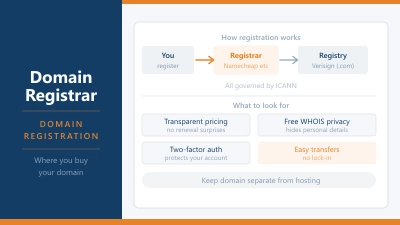
When you register a domain through a domain registrar, the registrar assigns default nameservers pointing to their own DNS infrastructure. That means your DNS records are hosted on the registrar’s servers by default.
When you buy hosting, your hosting provider usually asks you to update your nameservers to point at theirs instead. This moves control of your DNS records to the hosting provider, so they can manage the records that point your domain at their servers.
You don’t have to use your host’s nameservers. Many experienced users point their domain at a third-party DNS provider like Cloudflare and manage their records there instead. Cloudflare’s nameservers are faster and more resilient than most registrar or hosting nameservers, which is why this is a common configuration for performance-conscious site owners.
Nameservers vs DNS records: what’s the difference?
This is where people often get confused. Nameservers and DNS records are related but not the same thing.
A nameserver is the server that holds your DNS records. A DNS record is a specific instruction stored on that server. Your nameservers are the address of the filing cabinet. The DNS records are the files inside it.
The most common DNS records you’ll encounter are:
- A record: maps your domain to an IPv4 address, pointing yoursite.com to your hosting server
- AAAA record: the same as an A record but for IPv6 addresses
- CNAME record: maps one domain name to another, commonly used for www subdomains and third-party services
- MX record: directs email to the right mail server
- TXT record: stores text information, often used for domain verification and email authentication like SPF and DKIM
- NS record: specifies which nameservers are authoritative for a domain
When you change nameservers, you’re changing which server holds and answers for all of these records. When you update an individual DNS record, you’re changing a specific file within the same filing cabinet.
Why changing nameservers takes time
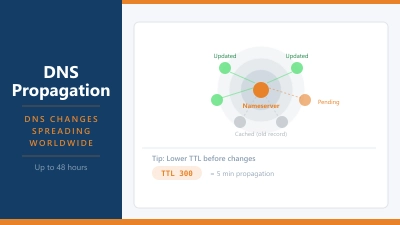
When you update your nameservers at your domain registrar, the change doesn’t appear instantly across the internet. This delay is called DNS propagation, and it happens because DNS information is cached at multiple points along the chain.
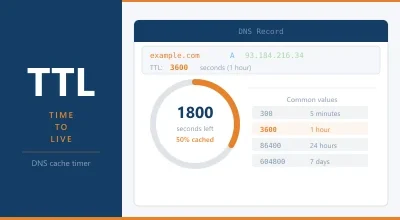
Every resolver that has previously looked up your domain has cached the old nameserver information. That cache expires according to the TTL value set on your NS records, which is typically between 24 and 48 hours. Until the cache expires, different resolvers may return different answers depending on whether they’ve refreshed yet.
This is why, after switching hosts and updating nameservers, you might see your new site on one device and your old site on another. It’s not a mistake. It’s different resolvers working from cached data of different ages.
The practical upshot: plan any nameserver change at a low-traffic time. Give it 24 to 48 hours before assuming something is wrong. You can use the DNS Lookup tool to check what nameservers are currently resolving for your domain.
What happens if your nameservers go down?
If your nameservers become unreachable, visitors can’t resolve your domain. The site itself might be running fine on the hosting server, but nobody can find it because the DNS lookup fails. This is why every domain has at least two nameservers: if ns1 goes down, ns2 takes over.
The risk is highest when both nameservers are on the same infrastructure. A hosting provider that goes down can take both its nameservers offline simultaneously, making every hosted domain unreachable even if the servers come back up quickly. Using a separate DNS provider like Cloudflare mitigates this: your DNS stays up even if your host’s servers are having issues.
Cloudflare’s network, for instance, has over 300 data centres globally and an uptime record that most hosting providers can’t match. Routing your DNS through Cloudflare while hosting your site elsewhere gives you an additional layer of resilience that costs nothing on the free plan.
How to find and change your nameservers
Your current nameservers are set at your domain registrar, not your hosting provider. Log in to wherever you registered your domain, find the DNS or nameserver settings, and look for entries labelled ns1 and ns2 (or similar).
To change them, replace the existing nameserver addresses with the ones provided by your new DNS provider or hosting company. They’ll look something like ns1.yourhostingcompany.com and ns2.yourhostingcompany.com, or, in Cloudflare’s case, something like anna.ns.cloudflare.com.
After saving the change, propagation begins. There’s nothing more to do on your end. The internet will catch up.
One thing worth knowing: if you change nameservers without first exporting your existing DNS records, you may lose mail settings, subdomain configurations, or third-party integrations that were set up on the old nameservers. Before switching, take a note of any DNS records you’ve added beyond the defaults. Your registrar or current DNS provider usually has an export option.
Frequently Asked Questions
What is a nameserver in simple terms?
A nameserver is a server that tells the internet where your website is located. When someone types your domain into a browser, their computer asks a nameserver for the IP address of your hosting server. The nameserver looks it up and sends back the answer so the browser knows where to connect.
How many nameservers does a domain need?
A minimum of two. Most domains use exactly two: a primary nameserver and a secondary one that acts as a backup. If the primary becomes unreachable, the secondary handles DNS queries instead. Some providers assign three or four for additional redundancy.
What’s the difference between a nameserver and DNS?
DNS (Domain Name System) is the overall system that translates domain names into IP addresses. A nameserver is one of the servers that makes DNS work. Nameservers store the DNS records for specific domains and answer queries about them. The relationship is similar to a library (DNS) and a specific bookshelf (nameserver) within it.
Why does changing nameservers take so long?
Because DNS information is cached at multiple points across the internet. When you update your nameservers, the change has to propagate to all those caches as they expire. Cache expiry times are controlled by the TTL (Time to Live) setting on your DNS records, which is typically set to 24 to 48 hours. Until those caches refresh, some visitors may still be directed to the old nameservers.
Should I use my host’s nameservers or Cloudflare?
Cloudflare nameservers offer faster DNS resolution, better global coverage, and higher resilience than most hosting provider nameservers. If your domain registrar supports Cloudflare, pointing your nameservers there and managing your DNS records in Cloudflare’s dashboard is generally the better option. It’s free and takes about ten minutes to set up.
Can I have different nameservers for different subdomains?
Not directly. Nameservers are set at the domain level, so all subdomains under the same domain use the same nameservers. What you can do is use CNAME records or NS records within your DNS zone to delegate specific subdomains to different services or servers, but the primary nameservers themselves apply to the whole domain.