
Is This Site Down?
Check if a website is down for everyone or just you. Fast, accurate uptime monitoring.
Enter the full URL including http:// or https://
Not sure if a website is actually offline, or if the problem is on your end? Our free Website Down Checker tests any site from an external server and tells you whether it is reachable from the internet. No signup, no install, just paste a URL and get an answer in seconds.
How Does the Website Down Checker Work?
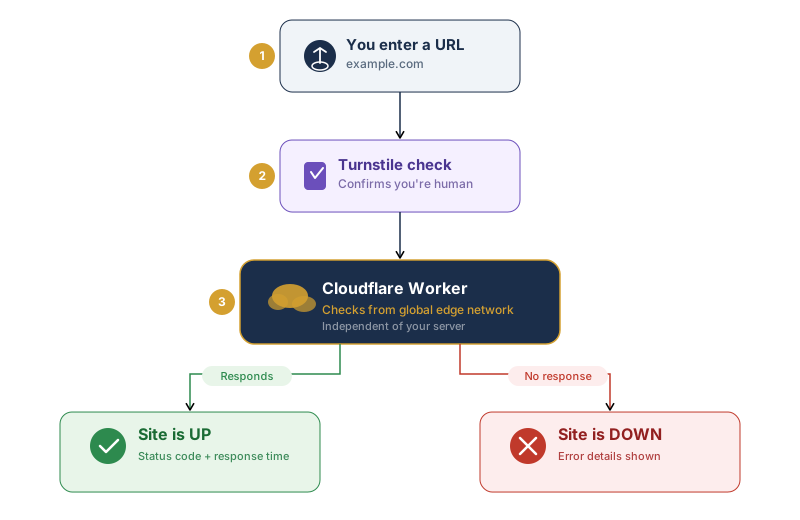
When you enter a URL, our tool sends an HTTP request to the website from an external server. This is the same type of request your browser makes when you visit a site, but it comes from a completely separate location and network. That distinction is what makes the tool useful.
If the site responds with a valid HTTP status code, we know it is online and serving content. If the request fails or times out, we know the server is not responding, which means the site is likely down for everyone, not just you.
The check takes a few seconds at most. Once it is complete, you will see one of two results. If the site is up, we show the HTTP status code and the server response time so you can see how quickly it loaded. If the site is down, we show the error that was returned so you have a starting point for troubleshooting.
Because the request comes from our server rather than your device, it bypasses anything local to you, including your DNS cache, browser extensions, VPN, firewall, or ISP. That is exactly why the tool works. If the site is up for us but not loading for you, the issue is almost certainly on your side.
What Do the Results Mean?
The results page shows a few key details depending on whether the site is reachable or not.
HTTP Status Code: This is the three-digit code the server sends back in response to the request. A 200 means everything is fine. Codes in the 300 range mean the site is redirecting you somewhere else, which is usually normal. Codes in the 400 range, like 403 (Forbidden) or 404 (Not Found), mean the server is online but something is wrong with the specific page. A 500 or 503 means the server itself is having problems.
Response Time: This tells you how long the server took to respond, measured in milliseconds. A fast response time (under 500ms) is a good sign. If it is significantly higher, the server may be under heavy load or located far from the test server. Consistently slow response times can point to a hosting performance issue.
Error Details: If the site is down, the tool shows what went wrong. Common errors include connection timeouts (the server did not respond at all), DNS resolution failures (the domain could not be found), and SSL errors (something is wrong with the site’s security certificate).
The tool will send a request to the website’s server and analyze the response.
What to Do if Your Own Website Is Down
If you run a website and discover it is offline, act quickly.
Log in to your hosting control panel first. Most providers have a server status page or resource usage dashboard that can tell you if the server is overloaded, out of disk space, or experiencing an issue on their end.
Check if you made any recent changes. A plugin update, a theme change, or a configuration edit can break a site. If you can pinpoint what changed, you can often roll it back.
Contact your hosting provider. If the issue is server-side, your host needs to know about it. Good providers have 24/7 support and should be able to diagnose the problem quickly.
Review your DNS and SSL. If you recently migrated hosts or changed nameservers, give DNS propagation up to 48 hours. If your SSL certificate has expired, renew it through your hosting dashboard or certificate provider.
Going forward, set up uptime monitoring so you know the moment your site goes down, rather than hearing about it from a visitor. Use a reliable host with a strong uptime record, keep regular backups, and test updates on a staging environment before pushing them live.