
InterServer has been around since 1999 and almost nobody talks about it. There are no Super Bowl ads. No YouTube sponsorship deals. No influencer codes. Just a hosting company in New Jersey quietly doing its thing for over 25 years while the big brands fight over who can offer the lowest introductory price.
About InterServer
InterServer was founded in 1999 by Mike Lavrik and John Quaglieri in Secaucus, New Jersey. Unlike most hosting companies you’ll come across today, it’s still privately owned by its founders. It hasn’t been absorbed into a conglomerate like Newfold Digital (which owns Bluehost, HostGator, and a dozen others) or sold off to private equity. That kind of independent ownership is increasingly rare in the hosting industry, and it shows in how they operate.
The company runs its own data centre infrastructure out of multiple facilities in Secaucus, NJ, with an additional location in Los Angeles, CA. Their primary facility, TEB4, spans 48,000 square feet and holds certifications including SSAE 18 Type II, SOC 2 Type II, and ISO 27001. As of 2025, InterServer hosts over 2 million websites for more than 250,000 customers.
Their product range is broader than most people realise. Beyond shared hosting, InterServer offers cloud VPS, storage VPS, Windows and ASP.NET hosting, dedicated servers, GPU servers, reseller hosting, colocation, and even domain registration. They also provide free hosting for verified non profit organisations and a free first year for students.
The thing that sets InterServer apart from the rest of the market is the price lock guarantee. The rate you sign up at (if you use the pricelock guarantee) is supposed to stay the same on renewal. No bait and switch. No doubling the bill after the first year. If that’s true, it’s one of the most honest pricing models in the hosting industry. If it’s not, that’s a problem.
I looked at InterServer’s shared hosting plans, VPS options, security features, and support quality to find out whether the value actually holds up in 2026. Here’s what I found.
Pricing and Plans
The biggest thing to know about InterServer is the price lock guarantee. Most hosting companies hook you with a cheap introductory rate and then double or triple the price on renewal. InterServer does the opposite. The rate you sign up at is supposed to stay the same for as long as you keep the plan.
The price lock is a specific plan rather than a blanket policy across all InterServer products. If you sign up for the standard shared hosting plan, the renewal pricing applies normally. The price lock guarantee applies to the dedicated price lock plan at $5 per month, which fixes your rate permanently regardless of how long you stay.
The distinction matters. Check which plan you are actually signing up for at checkout and confirm whether the price lock applies before committing to an annual cycle. The Boost plans, VPS plans, and dedicated server plans all maintain their stated pricing on renewal, but the specific price lock guarantee is tied to that particular plan.
Here’s what the shared hosting lineup looks like.
| Plan | Price | vCPUs | RAM | Storage | Backups |
|---|---|---|---|---|---|
| Standard | $2.50/mo | 1 | 2 GB | Unlimited SSD | Weekly |
| Boost 2 | $9.95/mo | 2 | 4 GB | Unlimited SSD | Daily |
| Boost 4 | $19.95/mo | 4 | 8 GB | Unlimited SSD | Daily |
| Boost X | $69.95/mo | 10 | 20 GB | Unlimited SSD | Daily |
All plans include free SSL, Cloudflare CDN integration, Quic, free website migration, unlimited email accounts, and access to the Softaculous one click installer with over 450 apps. There’s a 30 day money back guarantee on shared hosting.
One thing worth flagging: the Standard plan is the cheapest entry point but it is also the most limited in terms of resources. If you are running anything beyond a basic personal site or low-traffic blog, the Boost 2 plan at $9.95 per month is the more practical starting point. It doubles the CPU cores and RAM, adds daily backups instead of weekly, and sits at a price point that still undercuts most managed WordPress plans. For a small business site or a growing WordPress install, the Boost 2 is where the value proposition holds up properly.
InterServer doesn’t offer a free domain with any plan. Domains are available through their registration service starting around $7.99. This is a small but notable gap when competitors like Hostinger and Bluehost include a free domain for the first year.
Billing is flexible. You can pay monthly, every six months, annually, or every two years. The per month rate stays roughly the same across all cycles. That’s unusual. Most hosts punish monthly billing with a much higher rate to push you into long term contracts. InterServer doesn’t play that game.
Payment options include credit cards, PayPal, cryptocurrency (Bitcoin), wire transfer, and even checks.
The Price Lock Guarantee
Most hosting providers advertise low introductory prices that increase significantly at renewal. A plan at $2.99 per month in year one commonly renews at $8.99 or more. InterServer’s price lock guarantee works differently. The price you sign up at is the price you keep, permanently, with no conditions attached.
The price lock shared hosting plan sits at $5 per month. That rate stays fixed for the lifetime of the account on that plan. No renewal shock, no bait and switch, no fine print about promotional pricing windows.

One clarification worth making: the price lock applies to the base plan you sign up for. If you upgrade to a higher tier or add services, the new rate applies to those additions. The lock covers what you originally purchased.
For anyone who has been caught out by renewal price increases before, this is a genuinely meaningful differentiator. A small business or freelancer signing up at $5 per month knows exactly what hosting costs in year three and year five. That predictability is rare in a category where most competitors treat the signup price as a temporary incentive rather than an honest rate.
Beyond shared hosting
InterServer’s product range is one of the widest in the industry. Beyond shared Linux hosting, they also offer:
- ASP.NET Windows hosting at $8.00 per month with Plesk, supporting up to 25 domains. This is one of the last affordable Windows shared hosting options on the market, and it’s worth knowing about if you run anything on the .NET framework
- Cloud VPS starting at $6.00 per month using a slice model where each slice gives you 1 CPU core, 2 GB RAM, 30 GB SSD, and 1 TB bandwidth. Scale up to 16 slices as needed. Full root access, no contracts
- Storage VPS from $6.00 per month with 500 GB SATA per slice, designed for backups and large file storage
- Dedicated servers starting around $64 per month for bare metal hardware with AMD EPYC and Ryzen processors
- GPU dedicated servers with NVIDIA RTX 4090 hardware for AI training, 3D rendering, and machine learning workloads
- Reseller hosting from $19.95 per month with unlimited accounts
- Colocation at their owned facilities in Secaucus, New Jersey
The VPS slice model deserves a special mention. It’s one of the most straightforward VPS pricing systems around. You pick how many slices you need, each one adds more resources, and you pay monthly with no contract. If you outgrow shared hosting and want to step up to a VPS, InterServer makes that transition simple and affordable.
Security
This is where InterServer genuinely stands out from the competition, and it’s the section most competing reviews get wrong. They list it as a bullet point. It deserves more than that.
Every InterServer hosting plan includes the InterShield Security Suite at no extra cost. InterShield runs an automatic virus scanner, maintains a malware database, provides DDoS protection, and uses a firewall powered by machine learning. The system collects data from every server across the InterServer network and applies custom security rules after any attack. That means if one server gets targeted, the protection updates everywhere.
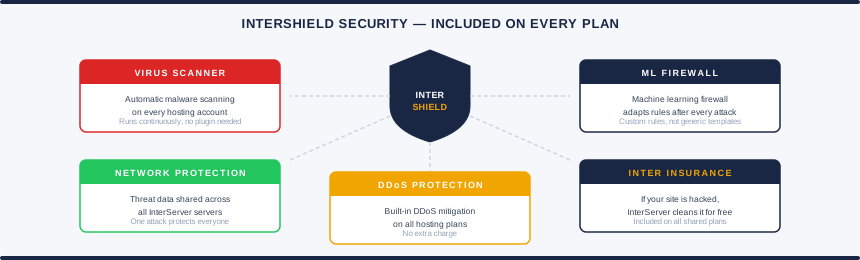
On top of that, every account gets what InterServer calls Inter Insurance. If your website is hacked, compromised, or exploited, InterServer’s team will clean it up and fully restore your account. For free. Most budget hosts charge extra for this or simply don’t offer it at all.
There’s also Cloudflare CDN integration with built in DDoS protection, and InterServer has a partnership with Path Network for advanced DDoS mitigation at the infrastructure level.
This is a lot of security for a host that starts at $2.50 per month. Most providers at this price point include a free SSL certificate and call it a day. InterServer goes significantly further.
Performance and Uptime
InterServer guarantees 99.9% uptime, which is the industry standard. But the real question is whether they actually deliver on that number.
Based on independent monitoring, InterServer’s uptime holds up in practice. UptimeRobot recorded 100% uptime over a two week monitoring period. Response times are consistently low for a shared hosting environment, with loading speeds typically under 1.5 seconds. For a shared plan at this price point, that performance is solid.
The catch is regional performance. InterServer only has data centres in the United States. The primary facility is in Secaucus, New Jersey, and there’s a second location in Los Angeles. Performance is strongest in North America and acceptable across Western Europe. If your audience is in Asia or South America, expect noticeable latency.
For European visitors specifically, InterServer’s Cloudflare CDN integration helps close the gap. A CDN caches your site’s static content on servers closer to your visitors, which reduces load times. It won’t match the performance of a host with a European data centre, but it’s a reasonable workaround. If you need a server in Europe and that’s non negotiable, Hetzner or Hostinger are better options.
One important performance note: the Standard plan underperformed in testing by AllAboutCookies, with slower page speeds and higher server response times compared to the Boost plans. If you’re running anything more than a simple brochure site, start with the Boost 2. The Standard plan is fine for testing or a single low traffic site, but it’s not where the real performance lives.
VPS and Dedicated Server Options
Most InterServer reviews only cover the shared hosting. That misses half the picture.
The VPS hosting uses a slice model that keeps things simple. Each slice adds a fixed block of resources to your server. Here’s how the Linux VPS scales.
| Slices | Cores | RAM | SSD | Transfer | Price |
|---|---|---|---|---|---|
| 1 | 1 | 2 GB | 30 GB | 1 TB | $6/mo |
| 2 | 1 | 4 GB | 60 GB | 2 TB | $12/mo |
| 4 | 2 | 8 GB | 120 GB | 4 TB | $24/mo |
| 16 | 16 | 32 GB | 480 GB | 16 TB | $96/mo |
All VPS plans run on KVM virtualisation with full root access. You choose your operating system from a wide range of Linux distributions. There are no contracts. You pay monthly, cancel anytime, and you’re only out what you’ve spent. VPS plans are unmanaged by default, but if you purchase four or more slices, InterServer provides managed support including help with security patches, failed services, and control panel configuration.
For users who need large amounts of storage, the Storage VPS line uses SATA drives with SSD caching. Starting at $6 per month for 500 GB, it’s one of the cheapest storage VPS options on the market. It works well for backups, media libraries, and file hosting. It’s not built for database workloads where speed matters, but for bulk storage at a low price it’s hard to beat.
Dedicated servers start around $64 per month for bare metal configurations with modern AMD EPYC and Ryzen processors. The lineup goes up to dual Xeon setups with 512 GB RAM and NVMe storage for users who need serious hardware.
InterServer also offers GPU dedicated servers running NVIDIA RTX 4090 cards. These are targeted at AI model training, 3D rendering, deep learning, and intensive computing workloads. GPU configurations support single and dual card setups, with the option to scale up to four or more cards. GPU servers are available from both the New Jersey and Seattle data centres. Pricing is custom, so you’ll need to contact their sales team for a quote.
Windows VPS plans are available too, starting at $10 per month, making InterServer one of the few budget providers offering both Linux and Windows VPS alongside Windows shared hosting.
Ease of Use and Control Panel
This is not the prettiest hosting dashboard you’ll ever see.
InterServer’s management interface has been described by multiple reviewers as looking like it belongs in the Windows XP era. It’s grey, segmented, and purely functional. If you’re used to Hostinger’s hPanel or a modern custom dashboard, InterServer’s panel will feel like a step backward.
By default, shared hosting plans come with DirectAdmin, which is included free. DirectAdmin gets the job done. It handles domain management, email setup, file access, database administration, and most things you’d need day to day. It just doesn’t look modern while doing it.
If you prefer cPanel, it’s available as a paid add on. The Boost plans include cPanel access in the price.
For building websites, InterServer includes the Softaculous one click installer with access to over 450 apps. WordPress, WooCommerce, Joomla, Magento, and hundreds of other applications can be installed in minutes. This is genuinely useful and works exactly as you’d expect.
There’s also a free website builder called SitePad included with shared hosting. SitePad offers drag and drop editing with responsive themes and over 40 widgets. The catch is that the free version is limited to just 3 pages and 15 themes. A paid upgrade at about $10 per year unlocks the full library. For most users, installing WordPress through Softaculous is a much better path than using SitePad.
DNS management is manual. Unlike modern hosts that automatically point your domain to the right server during setup, InterServer requires you to update DNS settings yourself. If you’ve done this before it takes a few minutes. If you haven’t, it’s one more thing to figure out. Our DNS lookup tool lets you check whether your domain is pointing to the correct nameservers after you make the change, which takes the guesswork out of confirming the update has propagated.
The honest take: InterServer is not built for people who want hosting that feels effortless from minute one. It’s built for people who care more about what’s under the hood than how the dashboard looks. If that’s you, nothing here will be a problem. If you’re setting up your first website and want the smoothest possible experience, this isn’t the right fit.
Customer Support
InterServer provides 24/7 support through live chat, phone, email, and a ticket system. They have international phone numbers covering the US, UK, Israel, Brazil, and Mexico. The support team is based in house at their New Jersey facilities, not outsourced.
Support is one of InterServer’s genuine strengths and also one of its inconsistencies. The team is US-based and in-house, which means you’re not dealing with outsourced agents reading from scripts. Individual support agents get called out by name in customer feedback, which is a reliable indicator of a team that actually engages rather than deflects.
In practice the experience varies. Live chat is sometimes unavailable or has longer wait times than the 24/7 promise suggests. Basic questions get answered quickly and clearly when you do connect. More complex technical issues can result in vague or incomplete first responses, requiring follow-up to get a full resolution. Ticket-based support tends to be more thorough than live chat for anything beyond straightforward queries.
Phone support is available, which puts InterServer ahead of most providers at this price point. For urgent issues where chat is slow or unavailable, having a phone number that reaches a real person is worth more than it sounds.
For VPS customers, managed support is only available if you purchase four or more slices. Below that threshold, you’re on your own for server administration. This is worth knowing before you sign up for a single slice VPS expecting the same level of help as shared hosting.
Free website migration is included with all plans and the feedback on this is consistently positive. InterServer’s team handles the transfer of files, databases, and email accounts, usually completing the process within 24 to 72 hours.
Who Should Use InterServer?
InterServer works best for a specific type of user. Here’s where it makes sense and where it doesn’t.
InterServer is a good fit if you:
- Want predictable renewal pricing with no surprises
- Are comfortable managing a hosting account through DirectAdmin or cPanel
- Need flexible VPS hosting you can scale up or down without contracts
- Run .NET applications and need affordable Windows hosting
- Want strong security features included at no extra cost
- Prefer a host that’s independently owned and has been around for over 25 years
InterServer is probably not for you if you:
- Need a European data centre for your primary audience
- Want a polished, modern dashboard experience
- Are setting up your first website and need everything to feel intuitive
- Need managed WordPress hosting with staging, automatic updates, and optimised caching
- Want a free domain included with your hosting plan
Frequently Asked Questions
Does InterServer really lock in your price on renewal?
The price lock guarantee applies to InterServer’s hosting plans. The Boost plans, VPS plans, and ASP.NET plans all clearly maintain their signup price on renewal. There is some conflicting information about whether the Standard plan at $2.50 per month renews at $7.00. Check the current terms on InterServer’s pricing page before committing.
Is InterServer good for WordPress?
InterServer supports WordPress with one click installation through Softaculous, free SSL, and automatic core updates. That said, it doesn’t offer managed WordPress features like staging environments, server level caching, or specialised WordPress support. For a basic WordPress site it works fine. For a WordPress focused setup you’ll get better performance and tools from a managed WordPress host.
Where are InterServer’s servers located?
InterServer operates data centres in Secaucus, New Jersey (their primary location) and Los Angeles, California. For GPU servers, they also have a presence in Seattle. All servers are US based. There are no European or Asian data centres, though Cloudflare CDN integration helps reduce latency for international visitors.
Does InterServer offer a free domain?
No. InterServer does not include a free domain with any hosting plan. Domain registration is available separately starting at around $7.99 per year.
Is InterServer’s unlimited hosting really unlimited?
Not exactly. InterServer’s terms of service cap individual accounts at 20% of server resources and 250,000 files (inodes) at any given time. Accounts using more than 1 GB of SSD space may be moved to SATA storage. For typical websites, blogs, and small online stores, you’ll never hit these limits. For heavy file hosting or resource intensive applications, a VPS or dedicated server is the better path.
How does InterServer compare to Hostinger?
Hostinger wins on global performance, ease of use, and introductory pricing. InterServer wins on renewal pricing, unlimited resources, security features, and VPS flexibility. If you want the smoothest experience at the lowest entry price and don’t mind higher renewal costs, go with Hostinger. If you want predictable pricing and don’t need a polished interface, InterServer is the better long term value.
Final Verdict
InterServer is not flashy. The website looks dated. The dashboard won’t win any design awards. There’s no AI assistant or drag and drop page builder that’s going to blow your mind.
What there is: 25 years of independent ownership, honest pricing, serious security features, and a product range that goes from $2.50 shared hosting all the way up to GPU servers running NVIDIA RTX 4090 hardware. That’s a spread very few hosting companies can match.
The price lock guarantee is the centrepiece. In an industry where the renewal price is almost always the real price, InterServer’s commitment to transparent billing is genuinely refreshing. The security package is the other standout. InterShield, Inter Insurance, and the machine learning firewall give you more protection than most hosts include at any price tier.
The downsides are real. US only data centres are a limitation if your audience is in Europe or Asia. The interface needs a refresh. The Standard plan is underpowered for anything beyond a basic site. And if you’re brand new to hosting, there are easier places to start.
For technical users, small businesses, and anyone who’s tired of watching their hosting bill double at renewal, InterServer earns a recommendation. It’s substance over style, and in this industry, that counts for something.
Pros and Cons
✓ Pros
- Price lock guarantee keeps renewal costs predictable
- InterShield security suite included free on all plans
- Unlimited storage, bandwidth, and email on shared hosting
- Highly flexible VPS with a simple slice model
- Massive product range from shared to GPU dedicated servers
- Monthly billing available with no forced long term contracts
✗ Cons
- Data centres are US only (New Jersey and Los Angeles)
- Dashboard and control panel feel outdated
- Standard plan underperforms at its price point
- No free domain with any plan
- Not built for beginners
Key Features
| Free Domain | No |
|---|---|
| Control Panel | DirectAdmin (included free); cPanel available as paid add-on; cPanel included on Boost plans |
| Free Migration | Yes, included on all plans |
| Money-Back | 30 days |
| Support | 24/7 live chat, ticket and phone; US-based support team |
| Green Credentials | Not GWF verified |
| Backups | Weekly on standard plans; daily on Boost plans; off-site backup available as add-on |
Data Centres
| Name | Country | Tier | Certifications | Green |
|---|---|---|---|---|
| Secaucus TEB4 (own) | USA | Tier 3 | ISO 27001, SOC 2 | — |
| InterServer primary own facility, Secaucus, New Jersey. 48,000 sq.ft. Founded 1999 by InterServer co-founders. SSAE 18 Type II, SOC 2 Type II, ISO 27001 certified. 100 Gbps Ethernet backbone via multiple Tier 1 IP providers. Cisco, Extreme Networks and Riverstone routing equipment. Vertical integration — own hardware and network management. 10 minutes from New York City. Primary facility for all shared, VPS and dedicated hosting. 99.9% uptime SLA. | ||||
| Secaucus (Equinix NY4) | USA | Tier 3 | ISO 27001, SOC 2, PCI DSS | — |
| Equinix NY4 colocation, Secaucus NJ. Tier III Equinix facility. Additional InterServer network presence in the New Jersey metro. Carrier-neutral, extensive peering options at one of the US East Coast's most connected exchange points. | ||||
| Secaucus (365 Data Centers) | USA | Tier 3 | ISO 27001, SOC 2 | — |
| 365 Data Centers partnership facility, Secaucus NJ. Expansion location for InterServer's New Jersey market footprint. Network-centric facility providing additional redundancy and connectivity options for InterServer customers. | ||||
| Los Angeles DC | USA | Tier 3 | ISO 27001, SOC 2 | — |
| US West Coast location, Los Angeles. Redundant power, advanced cooling and physical security. Low latency for US West Coast and Asia-Pacific markets. Customers can choose LA as their server location at sign-up for better performance outside US East. | ||||