What Is WHOIS? Domain Lookup Explained
WHOIS is the public database behind every domain registration. Here's what a lookup shows and what privacy protection hides.
WHOIS (pronounced “who is”) is a public database that stores registration information about domain names. When someone registers a domain, their name, address, email, phone number, and the name of their registrar are recorded. WHOIS is the system that makes those records publicly queryable.
The name comes from the original Unix command used to query the database: you typed whois domain.com and got back the registration details. The command became the database.
What a WHOIS Lookup Shows
A standard WHOIS record contains:
Registrant information: The name, organisation, email address, phone number, and postal address of the person or company that registered the domain. This is the data most people think of when they hear “WHOIS.”
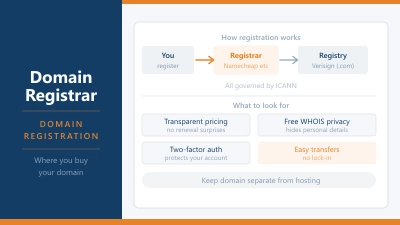
Registrar information: Which domain registrar the domain was registered through (Namecheap, GoDaddy, Google Domains, etc.) and their contact details.
Registration dates: When the domain was first registered, when it was last updated, and when it expires. The expiry date matters if you’re monitoring a domain you want to acquire.
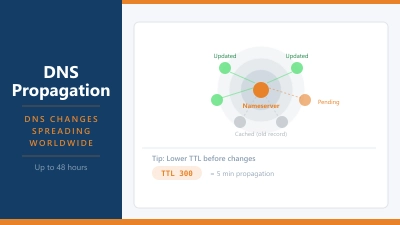
Name servers: The DNS nameservers the domain is pointing to. These tell you which hosting provider or DNS service is currently being used.
Domain status: Technical status codes that indicate whether the domain can be transferred, deleted, or modified. clientTransferProhibited means the registrar has locked the domain against transfer: standard practice to prevent domain hijacking.
What WHOIS Privacy Does
WHOIS privacy (also called domain privacy or WHOIS protection) replaces your real registrant information with the registrar’s contact details or a privacy service’s placeholder data. Instead of your name, address, and email appearing in the public WHOIS record, a visitor doing a lookup sees something like “Privacy Protection Service, 123 Privacy Lane” and a forwarding email address.
Most registrars offer WHOIS privacy either free or for a small annual fee. It’s worth enabling for personal domains and any domain you don’t want associated publicly with your identity.
WHOIS privacy does not affect how the domain works. Your DNS settings, nameservers, and hosting remain unchanged. It only affects what appears in the public record.
GDPR and WHOIS
The EU’s General Data Protection Regulation fundamentally changed WHOIS records for European registrants. Since GDPR came into force in 2018, registrars operating in the EU are no longer required to publish personal data in publicly accessible WHOIS records. The result is that WHOIS lookups for EU-registered domains now typically show redacted or anonymised registrant data regardless of whether the registrant paid for privacy protection.
ICANN, the organisation that oversees global domain names, implemented RDAP (Registration Data Access Protocol) as the solution: it replaced WHOIS in January 2025 and supports differentiated access, allowing verified parties (law enforcement, intellectual property holders) to request non-public registrant data through a formal process while keeping it hidden from general public lookups.
When Would You Use WHOIS?
Checking domain availability history: Before registering a domain, a WHOIS lookup tells you if it was previously registered and when it expired. A domain with a long history may carry existing SEO signals or, alternatively, a penalty history worth investigating.
Identifying site ownership: If you’re trying to contact the owner of a website to buy a domain, report abuse, or discuss a business relationship, WHOIS is the starting point. Though privacy protection makes this harder than it used to be.
Verifying a registrar: When buying a domain or transferring one, checking the WHOIS record confirms which registrar currently holds it and its lock status.
Monitoring expiry dates: WHOIS records show when a domain expires. Domain auction services and drop-catching services monitor these dates to acquire domains the moment they expire and become available.
Security research: Cybersecurity professionals use WHOIS to investigate malicious domains, trace infrastructure used in phishing campaigns, and map relationships between domain registrations.
WHOIS vs RDAP
RDAP (Registration Data Access Protocol) is the modern replacement for the traditional WHOIS protocol. While WHOIS was built in the 1980s and returns unstructured plain text, RDAP returns structured JSON data, supports HTTPS, and handles access control: meaning different levels of data can be shown to different types of requesters.
ICANN mandated RDAP support from all gTLD registries from 2019. On January 28, 2025, ICANN officially sunsetted WHOIS for gTLDs: registries and registrars are no longer required to maintain WHOIS port 43 services. RDAP is now the definitive standard for gTLD registration data. Most lookup tools still present the interface as a WHOIS lookup, but the protocol running underneath is RDAP. For everyday use the distinction doesn’t matter: the data you see is the same.
How to Do a WHOIS Lookup
Several tools let you query WHOIS records:
- Your registrar’s website: most registrars include a WHOIS lookup tool
- ICANN’s WHOIS lookup at lookup.icann.org: the authoritative source for gTLDs
- Country-specific registries: .co.uk domains use Nominet’s WHOIS, .de domains use DENIC, .com.au domains use auDA
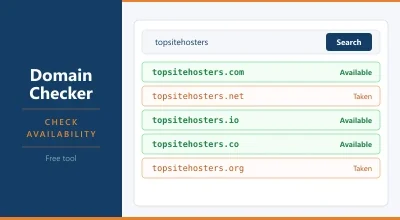
- The Domain Checker tool on TSH checks domain availability and returns basic registration status
For the full registrant details on a domain, use ICANN’s lookup or the registrar’s own tool. Third-party aggregators sometimes return cached or incomplete data.
WHOIS and Domain Security
Domain registrars use registrar lock (shown in WHOIS as clientTransferProhibited) as a default security measure. This prevents a domain from being transferred away without the account holder deliberately unlocking it first. If you’re not planning to transfer a domain, leaving the lock enabled is the correct posture.
If you see serverHold or clientHold in a WHOIS status, the domain is suspended and not resolving. This can happen due to payment failure, abuse reports, or legal holds. If your own domain shows this status unexpectedly, contact your registrar immediately.
Full WHOIS Status Code Reference
WHOIS records include EPP status codes that tell you exactly what state a domain is in. The most common ones:
clientTransferProhibited: The registrar has locked the domain against transfer. Standard and recommended for any domain you’re not actively moving.
clientDeleteProhibited: The registrar has locked the domain against deletion. Often set alongside the transfer lock.
clientUpdateProhibited: The domain’s WHOIS details cannot be changed until this lock is removed. Contact your registrar if you need to update information.
serverTransferProhibited: Set by the registry (not the registrar), often during the first 60 days after registration or transfer. Required by ICANN policy.
pendingDelete: The domain has expired, the redemption period has passed, and it is queued for deletion. Once a domain enters pendingDelete it typically becomes available for general registration within 5 days.
redemptionPeriod: The domain has expired but can still be recovered by the previous owner, usually for a significant redemption fee charged by the registrar. This period typically lasts 30 days.
pendingTransfer: A transfer to another registrar has been initiated and is waiting for confirmation.
WHOIS and Buying Expired Domains
Expired domains go through a predictable sequence visible in WHOIS data. After a domain expires, there is typically a grace period where the original owner can renew at the standard price. Then comes the redemption period where recovery costs significantly more. Then pendingDelete. Then the domain drops back into the general availability pool.
Domain investors and SEO practitioners monitor this sequence for domains with existing DNS history, backlinks, or brand value. Drop-catching services attempt to register the domain the instant it becomes available, sometimes within seconds of the registry releasing it. WHOIS expiry dates are the primary data source these services use.
If you’re registering an older domain name that was previously used, check its WHOIS history using services like DomainTools or Wayback Machine to understand what the domain was previously used for. A domain with a spam or adult content history may carry negative signals you’d inherit.
How to Read a WHOIS Record
A typical WHOIS response looks like this:
Domain Name: EXAMPLE.COM
Registry Domain ID: 2336799_DOMAIN_COM-VRSN
Registrar WHOIS Server: whois.registrar.com
Registrar URL: http://www.registrar.com
Updated Date: 2025-08-01T12:00:00Z
Creation Date: 2010-03-15T08:00:00Z
Registry Expiry Date: 2027-03-15T08:00:00Z
Registrar: Example Registrar, Inc.
Domain Status: clientTransferProhibited
Name Server: NS1.EXAMPLEHOST.COM
Name Server: NS2.EXAMPLEHOST.COM
The Creation Date tells you when the domain was first registered. Older registration dates generally carry more SEO weight. The Registry Expiry Date tells you when the domain will expire. The Name Server entries tell you which DNS provider or hosting company the domain currently points to, a quick way to identify what platform a site is running on.
WHOIS Lookup for Your Own Domain
Checking your own domain’s WHOIS record is a useful periodic maintenance task. Verify that:
- The registrant email address is one you still have access to. Registrars send renewal notices and transfer authorisation emails to this address. If you’ve lost access to it, you may lose the domain.
- The expiry date is far enough away that you won’t miss a renewal.
- The transfer lock is enabled.
- The name servers point to where you expect.
The Domain Checker covers availability and basic status. For the full WHOIS record including registrant details and status codes, use ICANN’s lookup at lookup.icann.org or your registrar’s own WHOIS tool.