What Is Object Cache?
Object cache stores database query results and other frequently used data in memory, helping WordPress load pages faster and reduce server workload.
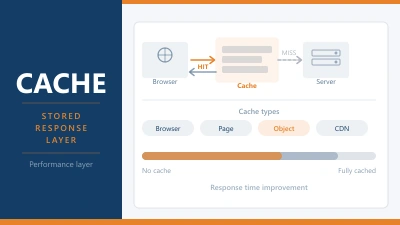
Object cache stores the results of database queries in memory, so WordPress doesn’t have to run the same query twice. Instead of asking the database for the same data on every page load, the result gets saved and reused.
It sits between your WordPress installation and your database. Fast to read from, zero database load on cache hits, and invisible to the visitor. Done well, it’s one of the most effective performance improvements you can make to a WordPress site.
Why WordPress Needs It
A typical WordPress page load triggers multiple database queries. The site title, navigation menus, widget content, post data, user roles, site options: each one is a round trip to the database. On a quiet site with a fast server, this is manageable. Under load, it adds up fast.
WordPress has to ask the database for the same information over and over again. Every visitor who loads your homepage triggers the same set of queries: what’s the site name, what’s in the nav, what are the latest posts, what widgets are active. None of that changes between page loads, but without caching, WordPress doesn’t know that.
Object caching breaks the pattern. The first time WordPress asks for something, it queries the database as normal. The result goes into the cache. Every subsequent request for that same data skips the database entirely and reads from memory instead.
The speed difference is significant. Memory reads are orders of magnitude faster than database queries. On a high-traffic site, object caching can reduce database load by 80% or more.
How Object Caching Works in WordPress
WordPress has a built-in object cache, but by default it only lasts for a single page request. The cache is populated as the page loads and then discarded. The next request starts fresh.
This is called a non-persistent cache. It prevents duplicate queries within a single page load but offers no benefit across requests. Visitor A’s page load doesn’t benefit Visitor B, even if they’re loading the same page a second later.
A persistent object cache changes this. Using Redis or Memcached as a backend storage layer, the cache survives between requests. Data stored during one visitor’s page load is available for the next visitor, and the one after that, without touching the database again.
To enable persistent object caching on WordPress, you need two things: a server running Redis or Memcached, and a drop-in file or plugin that connects WordPress to that server. The drop-in sits in wp-content/object-cache.php and tells WordPress to use the external cache instead of its internal one.
Popular options include the Redis Object Cache plugin by Till Krüss, and W3 Total Cache which can connect to either Redis or Memcached. Some managed WordPress hosts configure this automatically at the server level.
Redis vs Memcached
Both are in-memory data stores used as object cache backends. For WordPress, Redis is the more commonly used and better supported option.
Redis supports more data types, can persist data to disk (so the cache survives a server restart), and handles more complex operations. Memcached is simpler and slightly faster for basic key-value lookups, but it lacks persistence and some of Redis’s more advanced features.
If your host offers both, choose Redis. The plugin ecosystem around Redis for WordPress is more mature, and the persistence feature means you don’t lose your entire cache on a server restart.
Object Cache vs Page Cache
These are different things that work at different levels, and it’s worth being clear on the distinction.
Page caching stores the complete HTML output of a page. When the next visitor arrives, the server serves that pre-built HTML directly, skipping PHP and the database entirely. It’s the most effective performance improvement for public-facing pages.
Object caching stores individual pieces of data: query results, transients, options, user data. It doesn’t cache the full page. It caches the building blocks that WordPress uses to assemble a page.
On most sites, page caching has a bigger impact because it eliminates the PHP and database work entirely. Object caching becomes more valuable in situations where page caching can’t be used: logged-in users, WooCommerce carts, membership sites, pages with personalised content. For these cases, the page can’t be cached at the HTML level, but the underlying database queries can still be cached at the object level.
The two approaches are not mutually exclusive. Running both is common on high-traffic sites.
Transients: WordPress’s Built-in Caching
WordPress has its own lightweight caching mechanism called transients. These are temporary values stored in the database (or in the object cache if one is active) with an expiry time.
Plugins use transients to store the results of expensive operations: external API calls, complex database queries, feed imports. Instead of repeating the operation on every page load, the result is cached for a set period.
When a persistent object cache is active, transients are stored in Redis instead of the database, which accelerates them to read and reduces the total number of database queries even further. This is one of the less-discussed benefits of enabling object caching: it speeds up all transient operations without any additional configuration.
Which Hosts Support Object Caching
Object caching requires Redis or Memcached on the server. This isn’t available on basic shared hosting plans. You’ll typically find it on:
Managed WordPress hosts are the easiest route. Kinsta, WP Engine, and Rocket.net all include Redis by default with no configuration needed on your part. The cache is active from the moment your site is live.
VPS plans give you full control. On a Hetzner or similar VPS, you can install Redis yourself with a single command, then connect it to WordPress. If you’re comfortable with a command line, this is straightforward. If you’re not, it’s one of the steeper tasks involved in self-managing a server.
Higher-tier shared plans occasionally include Redis. SiteGround’s GrowBig and GoGeek plans include it. It’s worth checking your host’s feature list before assuming it’s not available.
If your host doesn’t offer object caching and your site is growing or running WooCommerce, it’s a meaningful reason to consider moving to a host that does.
How to Know If Object Caching Is Working
Install the Query Monitor plugin. It shows the number of database queries on each page load and flags duplicates. Before enabling object caching, note the query count on a typical page. After enabling it, the count should drop noticeably, and the total query time should decrease.
The Redis Object Cache plugin also shows a status indicator in the WordPress dashboard. Green means connected and active. If it shows as disconnected, the cache isn’t working even if the plugin is installed.
You can also check using WP-CLI from an SSH session:
wp cache get <key> --cache=redis
This confirms Redis is responding, and the connection is live.
Frequently Asked Questions
Do I need object caching on a small WordPress site? Probably not. For a site with low traffic and a decent server, the built-in WordPress cache handles most scenarios fine. Object caching becomes worthwhile when you’re running WooCommerce, have a lot of dynamic content, notice high database query counts in Query Monitor, or are seeing slow response times despite page caching being active.
Will object caching break my site? It shouldn’t. If a plugin caches stale data and something displays incorrectly, flushing the cache fixes it. Most Redis plugins have a flush button in the WordPress dashboard. The most common issue is cached data becoming out of date after an update, which resolves itself once the cache expires or is flushed.
What’s the difference between object caching and browser caching? Browser caching stores files (CSS, images, JavaScript) on the visitor’s device so they don’t have to re-download them on return visits. Object caching stores database query results on the server so WordPress doesn’t have to re-query the database. They operate at completely different levels and both are worth having.
Can object caching cause issues with WooCommerce? WooCommerce is specifically one of the cases where object caching helps most, since cart and session data involve frequent database reads. That said, cart contents and user-specific data must never be served from a page cache. Object caching is fine for WooCommerce. Page caching of cart and checkout pages is what you need to exclude.
How much does Redis hosting cost? On managed WordPress hosts, Redis is typically included in the plan price. On a self-managed VPS, Redis itself is free and open source. The cost is the slightly larger server instance you might need to accommodate it in memory. For most WordPress sites, the memory footprint is modest.