What is Nginx?
A high-performance web server and reverse proxy powering roughly 34% of all websites, including Netflix and Cloudflare.
Nginx (pronounced “engine-x”) is a web server. It receives requests from browsers, processes them, and sends back the files that make up your web page. It also works as a reverse proxy, load balancer, and caching layer.
It powers roughly 34% of all websites worldwide, including Netflix, Cloudflare, WordPress.com, and Dropbox. On the VPS and dedicated server end of hosting, it’s the default choice for most setups.
Why Nginx Exists
Apache had been the dominant web server for years when Igor Sysoev started writing Nginx in 2002. His goal was to solve a specific problem: the C10K problem, the challenge of handling 10,000 concurrent connections on a single server.
Apache’s architecture created a process or thread for each request. At 10,000 simultaneous connections, that’s 10,000 processes running at once. The memory and CPU overhead becomes unmanageable at that scale.
Nginx used a fundamentally different approach. A small, fixed number of worker processes each handle thousands of connections asynchronously using an event loop. Instead of blocking and waiting for each request to complete before handling the next one, worker processes can juggle many connections in parallel without creating new processes.
The result: Nginx uses dramatically less memory than Apache under high concurrency and maintains consistent response times as traffic scales. It was released publicly in 2004 and has grown steadily since.
How Nginx Handles Requests
When a browser requests a page, Nginx receives the connection and decides what to do with it.
For static files: images, CSS, JavaScript, fonts. Nginx serves these directly from disk at very high speed. No PHP, no database, no application server. Just file reading and response. This is one of Nginx’s greatest strengths: static file serving at near-maximum throughput with minimal resource usage.
For dynamic content like WordPress: Nginx can’t execute PHP itself. Instead, it passes the request to PHP-FPM (FastCGI Process Manager), which runs the PHP code, queries the database, builds the HTML, and returns it to Nginx. Nginx then sends the response to the browser.
This separation of concerns is efficient. Nginx handles the networking and file serving. PHP-FPM handles the application logic. Each does what it’s good at.
Nginx as a Reverse Proxy
A reverse proxy sits in front of one or more servers and forwards requests to them. From the client’s perspective, they’re talking to the proxy. From the backend server’s perspective, it’s receiving requests from the proxy.
Nginx is excellent at this. It can sit in front of multiple application servers and distribute load between them. It can cache responses so that repeated requests for the same content don’t hit the backend. It can terminate SSL, handle compression, and add security headers before the request even reaches your application.
Cloudflare operates at a much larger scale but works on the same principle: it’s a reverse proxy sitting between your visitors and your origin server. On a self-managed VPS, running Nginx as a reverse proxy in front of PHP-FPM is the standard WordPress hosting architecture.
Nginx Configuration
Nginx is configured through text files, not .htaccess. This is one of the key differences from Apache.
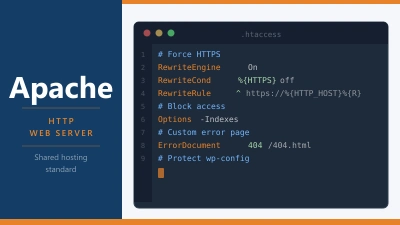
On Apache, each directory can have its own .htaccess file that controls how Apache handles requests in that location. This gives website owners control without server access, which is why it’s standard on shared hosting.
Nginx doesn’t support .htaccess. All configuration happens in server-level config files, typically in /etc/nginx/. This requires root or sudo access to the server. It means shared hosting customers can’t modify Nginx configuration directly.
The tradeoff is performance. Reading .htaccess files on every request adds overhead. Nginx’s single configuration file is read once at startup and cached in memory. This is part of why Nginx is faster for static file serving.
A basic WordPress Nginx configuration block looks like this:
server {
    listen 80;
    server_name example.com;
    root /var/www/example.com;

    index index.php;

    location / {
        try_files $uri $uri/ /index.php?$args;
    }

    location ~ \.php$ {
        fastcgi_pass unix:/run/php/php8.2-fpm.sock;
        include fastcgi_params;
        fastcgi_param SCRIPT_FILENAME $document_root$fastcgi_script_name;
    }
}
The try_files line is what handles WordPress permalinks: it tries to find a matching file or directory, and if nothing is found, sends the request to index.php for WordPress to handle.
Nginx and Managed WordPress Hosting
Most managed WordPress hosts run Nginx. Kinsta, Rocket.net, and WP Engine all use it as the web server layer. Their platform abstracts the configuration away: you never touch Nginx directly, but you benefit from its performance.
These hosts pair Nginx with server-level page caching. Kinsta uses its own custom caching layer built on top of Nginx. WP Engine uses its EverCache system. The result is similar to LiteSpeed with LSCache: full-page caching that serves pre-built HTML at the web server layer without invoking PHP.
The difference is that on LiteSpeed hosts, this caching is managed through the LiteSpeed Cache plugin in your WordPress dashboard. On Nginx-based managed hosts, it’s managed through the host’s own dashboard or happens automatically.
Nginx vs Apache vs LiteSpeed
These are the three main web servers you’ll encounter in hosting. They’re not interchangeable in all contexts.
Apache is the most widely used and has the most mature ecosystem. It supports .htaccess which makes it practical for shared hosting. Under high concurrency, it’s less efficient than the other two.
Nginx is the performance leader for high-traffic sites and VPS setups. No .htaccess means it’s not suitable for shared hosting where users need directory-level configuration control. It’s the go-to choice for managed hosting and self-managed VPS.
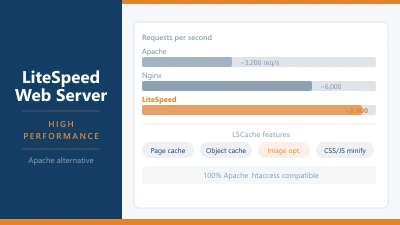
LiteSpeed bridges the gap: Apache-compatible (reads .htaccess), event-driven performance, and built-in caching via LSCache. It’s become the preferred server for performance-focused shared hosting.
Frequently Asked Questions
How do I know if my site runs on Nginx? Check your response headers. In Chrome DevTools, go to Network, reload the page, click the first request, and look for the Server header. It will say nginx if Nginx is running. Some hosts remove this header for security.
Is Nginx faster than Apache? Under high concurrent load, yes. For a low-traffic site, the difference is negligible. The server software is rarely the bottleneck on small sites. Caching, database performance, and PHP configuration have more impact on day-to-day response times.
Can I use Nginx on shared hosting? No. On shared hosting, the host controls the server software. You get whatever the host runs. You only choose your web server on a VPS or dedicated server. If Nginx matters to you, check the host’s stack before signing up or choose a managed WordPress host that uses it.
What’s the difference between Nginx and Nginx Plus? Nginx is the open-source version, free to use. Nginx Plus is the commercial product from F5 (which acquired Nginx). It adds features like active health checks, JWT authentication, and a dashboard. For web hosting, the open-source version is what you’ll encounter.
Does Nginx work well with WordPress? Yes, and it’s one of the better combinations for high-traffic WordPress sites. The setup requires server-level configuration, which is handled for you on managed WordPress hosts. On a self-managed VPS, the configuration is a one-time task and well-documented.