What Is MySQL?
MySQL is a relational database management system. In plain terms, it’s software that stores and organises data in structured tables, and allows applications to retrieve that data quickly using a query language called SQL (Structured Query Language).In this articleHow MySQL Stores DataMySQL and WordPressHow SQL Queries WorkMySQL Performance and Your HostingMySQL on Shared vs VPS […]
MySQL is a relational database management system. In plain terms, it’s software that stores and organises data in structured tables, and allows applications to retrieve that data quickly using a query language called SQL (Structured Query Language).
It powers a significant portion of the web. WordPress, Drupal, Magento, and thousands of other web applications are built on MySQL. When you publish a blog post, add a product to WooCommerce, or a visitor submits a contact form, that data goes into a MySQL database. When someone loads a page, MySQL is queried to retrieve the right content.
How MySQL Stores Data
MySQL organises data into databases, tables, rows, and columns, following the relational model.
A database is a container for related tables. A WordPress installation has one database that holds all of its data.
A table is a structured collection of related data, like a spreadsheet with defined columns. WordPress uses many tables: one for posts, one for users, one for comments, one for options, and so on.
A row is a single record in a table. One blog post is one row in the posts table.
A column defines the type of data stored. The posts table has columns for the post title, content, author, publication date, status, and so on.
A typical WordPress installation has around 12 to 15 default tables, with additional tables added by plugins. WooCommerce, for example, adds several tables for orders, products, and customer data.
MySQL and WordPress
WordPress is built on MySQL. Everything you see and manage in WordPress is stored there: every post, every page, every comment, every user account, every plugin setting, every theme option, every widget configuration.
When a visitor loads a WordPress page, WordPress runs SQL queries against the MySQL database to retrieve the right content. A simple blog post load might involve half a dozen queries. A complex page with dynamic content, widgets, and active plugins might run fifty or more.
This is why database performance matters so much for WordPress speed. Every query adds to your TTFB. Slow queries, missing indexes, or an overloaded database server translate directly into slow pages.
How SQL Queries Work
SQL is the language used to interact with MySQL. Four operations cover the vast majority of web application database interactions:
SELECT retrieves data:
SELECT post_title, post_content
FROM wp_posts
WHERE post_status = 'publish'
ORDER BY post_date DESC
LIMIT 10;
This retrieves the title and content of the 10 most recent published posts.
INSERT adds new data:
INSERT INTO wp_comments (comment_post_ID, comment_content, comment_author)
VALUES (42, 'Great article!', 'Jane');
UPDATE modifies existing data:
UPDATE wp_posts
SET post_status = 'draft'
WHERE ID = 42;
DELETE removes data:
DELETE FROM wp_posts
WHERE post_status = 'trash'
AND post_modified < '2024-01-01';
WordPress handles all of this through its own database abstraction layer ($wpdb), so you rarely write raw SQL when working with WordPress. But understanding what’s happening under the hood helps when diagnosing performance issues.
MySQL Performance and Your Hosting
The database is often the bottleneck in a slow WordPress site. Several factors determine how well MySQL performs on your hosting:
Server hardware: Faster CPUs process queries more quickly. More RAM allows MySQL to cache more data in memory, reducing disk reads. NVMe storage delivers much faster read/write speeds than SATA SSDs or HDDs, which directly affects query performance.
MySQL configuration: MySQL has many tunable parameters. Key ones include the innodb_buffer_pool_size (the amount of RAM MySQL uses to cache data and indexes) and the query cache settings. Well-tuned MySQL configuration makes a significant difference, particularly on high-traffic sites.
Query efficiency: Poorly written queries or missing database indexes can cause MySQL to scan entire tables instead of using indexed lookups. A query that should take a millisecond might take seconds if the database isn’t properly indexed. Some WordPress plugins are particularly bad at this.
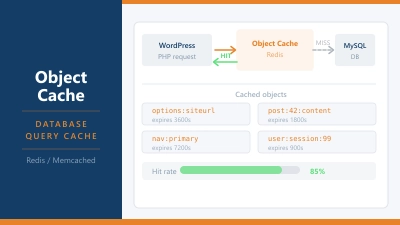
Object caching: Tools like Redis or Memcached can store the results of frequently run database queries in memory. When the same query runs again, the result is returned from memory instantly rather than hitting MySQL. This is called object caching and is one of the most impactful performance optimisations for dynamic WordPress sites.
MySQL on Shared vs VPS Hosting
On shared hosting, MySQL runs on a shared database server. Multiple customers’ databases live on the same machine. If another customer runs a particularly demanding query or has a traffic spike, it can affect MySQL performance for everyone on the server.
Most shared hosts impose limits on the number of simultaneous database connections and the complexity of queries to prevent one account from degrading performance for others.
On a VPS or dedicated server, MySQL runs on your own instance. You control the configuration, the resources allocated, and the indexing strategy. This is one of the key performance advantages of VPS hosting over shared hosting for database-heavy sites.
Managed WordPress hosts (like Kinsta, WP Engine, and Rocket.net) typically run MySQL on separate, dedicated database servers tuned specifically for WordPress. This isolation means your database isn’t competing with web server processes for CPU and RAM.
MySQL vs MariaDB
MariaDB is a fork of MySQL created by MySQL’s original developers after MySQL was acquired by Oracle. The two are largely compatible: WordPress and most web applications work on either without modification. Most of what you read about MySQL applies equally to MariaDB.
Many hosting providers have migrated from MySQL to MariaDB, though they often still refer to it as “MySQL” in their documentation. If you see MySQL referenced in hosting plans, it may actually be MariaDB running under the hood. For typical web hosting purposes, the distinction rarely matters.
Checking Your MySQL Version
The version of MySQL (or MariaDB) your hosting uses affects performance and compatibility. WordPress has minimum MySQL version requirements, and newer versions bring performance improvements and security fixes.
You can check your MySQL version in:
- cPanel: Databases > phpMyAdmin > Server connection collation (version shown at top)
- phpMyAdmin: Displayed on the dashboard when you log in
- WP-CLI:
wp db checkormysql --versionvia SSH - WordPress admin: Tools > Site Health > Info > Database (shows version)
Frequently Asked Questions
Does WordPress require MySQL specifically? WordPress officially supports MySQL 5.7 or higher and MariaDB 10.4 or higher. It doesn’t support other database systems like PostgreSQL or SQLite in its standard form, though community plugins exist for alternative databases.
Why is my WordPress site slow if the content is just text? Even simple text content requires database queries to retrieve. A post page might query for the post content, the author, related posts, sidebar widgets, menu items, and various options. Each query adds time. Slow queries, a sluggish database server, or too many queries per page can make a text site feel sluggish. Enabling a page cache eliminates most of these queries for regular visitors.
What is the WordPress database prefix? By default, WordPress tables use the wp_ prefix (e.g., wp_posts, wp_users). Changing this to something unique (e.g., x7k_posts) is a minor security practice that makes automated SQL injection attacks slightly harder, since attackers can’t assume your table names. You can set this during WordPress installation.
How do I back up my MySQL database? Most hosting control panels include a MySQL backup tool. In cPanel, you can export databases through phpMyAdmin or the Backup Wizard. WordPress plugins like UpdraftPlus can automate database backups and send them to remote storage. On a VPS, mysqldump is the standard command-line tool for creating database exports.
What is a MySQL connection limit and why does it matter? MySQL has a maximum number of simultaneous connections it will accept. On shared hosting this is typically low (around 25 to 100 per account). If your site gets a traffic spike and tries to open more simultaneous connections than the limit allows, visitors see database connection errors. This is one reason caching is so important: it dramatically reduces the number of database connections needed.