What Are PHP Workers?
PHP workers handle uncached tasks like dynamic page loads, forms, and logged-in users. More workers can improve performance during traffic spikes.
PHP workers are the server-side processes that handle dynamic requests on your website. Every time someone visits a page that requires PHP to run a WordPress post, a WooCommerce product page, a contact form submission, a PHP worker picks up that request, executes the code, and sends back the result.
Think of them as members of staff handling customer orders. If you have three workers and four customers arrive at the same time, one customer has to wait. If all your workers are busy processing complex orders, everyone slows down.
How PHP Workers Function
When a visitor requests a dynamic page, here’s what happens on the server:
- The request arrives at the web server (Nginx, Apache, or LiteSpeed)
- The web server passes the request to PHP-FPM (FastCGI Process Manager)
- PHP-FPM assigns it to an available worker
- The worker executes the PHP code: loading WordPress, running database queries, applying theme templates, processing plugin logic
- The worker returns the completed HTML to the web server
- The web server sends it to the visitor’s browser
The worker is occupied for the entire duration of step 4. On a fast, well-optimised WordPress site, that might take 50 to 200 milliseconds. On a slow site with heavy plugins and an uncached database, it could take several seconds.
While that worker is occupied, it cannot handle any other requests. That’s why the number of workers available directly determines how many simultaneous requests your site can process without queuing.
PHP Workers and Shared Hosting
On shared hosting, PHP workers are shared across all sites on the server. Each hosting account typically gets an allocation of two to four workers, though this varies by provider and plan.
Two workers sounds like very little, but it’s often sufficient for low-traffic sites because of two factors: caching and request duration.
If your site has proper page caching enabled, most page requests are served from a cached HTML file without involving PHP at all. PHP workers only get called for uncached requests, logged-in users, form submissions, and dynamic content that can’t be cached. On a well-configured WordPress site, the percentage of requests that actually need a PHP worker can be surprisingly low.
The problem comes when you have too many simultaneous uncached requests. A sudden traffic spike, a post going viral, a poorly configured site with caching disabled: these scenarios exhaust available workers quickly. When workers are fully occupied, new requests queue up. Visitors see slower load times. In worst cases, the server returns errors.
PHP Workers on VPS and Managed Hosting
On a VPS, you control your PHP-FPM configuration directly. You can set the number of worker processes, the minimum and maximum values, and how the pool scales under load.
The main PHP-FPM process management modes are:
Static: A fixed number of workers running at all times. Simple and predictable. Works well if your traffic is consistent and you know how much RAM each worker uses.
Dynamic: Workers start at a minimum and scale up to a maximum based on demand, then scale back down when traffic drops. More memory-efficient for variable traffic but takes a moment to spin up new workers under sudden spikes.
Ondemand: Workers are only created when requests arrive and are terminated after a period of inactivity. Lowest memory use. Best for sites with very irregular traffic.
On managed WordPress hosting (like Kinsta, Rocket.net, or DreamPress), the platform handles PHP-FPM configuration for you. They tune worker counts based on your plan’s resource allocation and traffic limits. The trade-off is less control in exchange for not having to think about it.
How Many PHP Workers Do You Need?
The right number of workers depends on:
Concurrent traffic: How many visitors arrive simultaneously during your peak periods? Each simultaneous uncached request needs one worker.
Request duration: How long does each PHP request take to complete? Faster execution means workers are freed up sooner and can handle more requests with the same pool size.
Available RAM: Each PHP worker consumes memory. A typical WordPress worker uses 20 to 50 MB of RAM depending on plugin load. A server with 1 GB of RAM dedicated to PHP-FPM can safely run around 20 to 40 workers before running into memory pressure.
A rough formula: divide your available PHP RAM by the average memory per request, then subtract 20% as a buffer.
For most small to medium WordPress sites getting under 50,000 monthly visits, four to eight workers is plenty combined with good caching. High-traffic sites or WooCommerce stores with a lot of uncached dynamic requests may need significantly more.
PHP Workers and WordPress Performance
WordPress is a PHP application. Every uncached WordPress page load fires PHP code: checking if the user is logged in, querying the database for post content, loading the active theme, running hooks from every active plugin.
The more complex your WordPress setup, the longer each worker is occupied per request. A lightweight blog with a minimal theme might process a page in 80 milliseconds. A heavily plugged site with an unoptimised theme might take 800 milliseconds or more.
This is why plugin count matters beyond just adding features. Every active plugin adds to PHP execution time. A site with 40 active plugins where each adds 10 milliseconds of execution time is using workers for 400 extra milliseconds per request. That’s 400 milliseconds during which the worker can’t handle anything else.
The practical optimisations are:
Enable page caching. This is the single most impactful change. A cached page bypasses PHP entirely. Workers only needed for requests that genuinely can’t be cached.
Optimise PHP execution time. Deactivate unused plugins, use a lightweight theme, enable OpCache to avoid recompiling PHP on every request.
Use the current PHP version. PHP 8.x is substantially faster than 7.x. The same code runs significantly faster on a newer PHP version, freeing workers sooner.
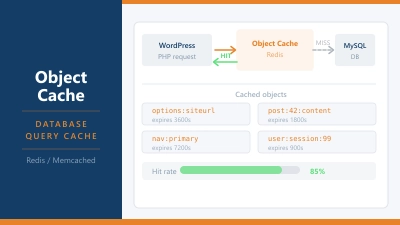
Use object caching. Redis or Memcached stores database query results in memory. Fewer database queries mean faster PHP execution and workers freed more quickly.
PHP Workers and Your Hosting Plan
When comparing hosting plans, PHP workers are one of the metrics worth checking. Some providers are transparent about worker allocations. Others bury the information or don’t disclose it at all.
Signs that a site has run out of PHP workers:
- Pages loading slowly only during peak traffic periods
- Intermittent 503 errors under load
- Admin panel becoming sluggish when the site is busy
- Page load times that are inconsistent rather than steady
If you’re experiencing these symptoms and your site is well-cached, the bottleneck is likely PHP workers. On shared hosting the solution is either upgrading to a higher plan with more worker allocation, or moving to a VPS where you control the configuration.
Frequently Asked Questions
How do I check how many PHP workers my hosting plan includes? Check your hosting control panel under PHP settings or ask your host’s support team directly. On a VPS, look at your PHP-FPM pool configuration file. The pm.max_children value shows the maximum number of workers allowed.
What happens when all PHP workers are busy? New requests queue up until a worker becomes available. If the queue fills up, the server returns a 503 error. Visitors see an error page or an empty response.
Can I increase my PHP workers without upgrading hosting? On shared hosting, no. Worker allocation is set by the host and isn’t user-configurable. On a VPS or dedicated server, you can adjust the PHP-FPM configuration directly. Be careful not to allocate more workers than your available RAM can support.
Do PHP workers affect static pages? No. Static files like images, CSS, and JavaScript are served directly by the web server without involving PHP. PHP workers only handle requests that require PHP execution. A well-cached WordPress site serves the majority of its traffic without touching PHP workers at all.
What’s the difference between PHP workers and PHP threads? PHP-FPM uses processes (workers), not threads. Each worker is an independent process with its own memory space. This makes them more stable than threads but more memory-intensive, since each worker carries its own PHP runtime. Some server configurations use thread-based PHP execution instead, but process-based FPM is the standard for WordPress hosting.