
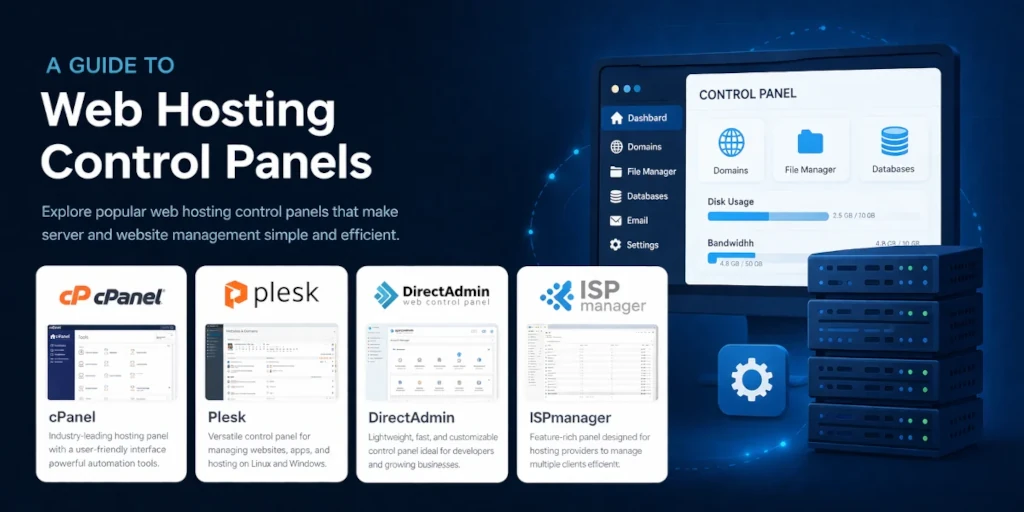
A hosting control panel is the dashboard you use to manage your web hosting account: it’s where you install WordPress, set up email addresses, upload files, manage domains, and handle backups. All through a visual interface instead of typing commands into a terminal.
- What Can You Actually Do With One?
- What Makes a Good Control Panel?
- The Major Control Panels Compared
- Other Panels Worth Knowing About
- How Much Server Resources Does a Control Panel Use?
- One Thing Nobody Tells You: cPanel and Plesk Are Owned by the Same Company
- Which Panel Comes With Which Host?
- Do You Actually Need a Control Panel?
- Frequently Asked Questions
- Final Verdict
If you’ve ever logged into your hosting account and clicked around to do something with your website, you’ve used a control panel. You might not have known that’s what it was called, but that’s what it is.
Think of it like your phone’s settings app. You could technically change everything on your phone by editing system files directly. But nobody does that. You open Settings, tap a few things, and you’re done. A hosting control panel does the same thing for your server.
What Can You Actually Do With One?
The short answer: almost everything you’d need to do with your hosting, without needing to know how servers work.
Here’s what that looks like in practice. You want to install WordPress on a new domain? A few clicks. Need to create a professional email address like [email protected]? There’s a form for that. Want to check how much storage you’re using, or download a backup of your site? It’s all in the panel.
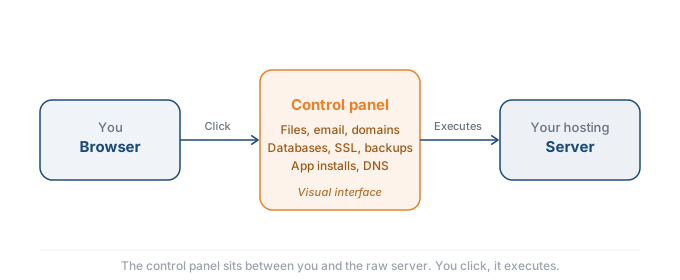
The core tasks most people use a control panel for include managing domains and DNS settings, uploading and organising website files, creating and managing email accounts, setting up databases (which WordPress and most CMS platforms need), installing SSL certificates to keep your site secure, running backups and restoring them when something goes wrong, and installing apps like WordPress with one click.
Without a control panel, every one of those tasks requires connecting to your server via SSH and typing specific commands. If you know what ssh root@yourserver means and you’re comfortable in a terminal, you can skip the panel entirely. Most people aren’t, and that’s exactly who control panels are built for.
What Makes a Good Control Panel?
Not all panels are created equal, and the feature list on a marketing page doesn’t always match what matters in daily use. Here’s what to actually look for.
One click app installers. This is the first thing most people use. You want to install WordPress, WooCommerce, or another CMS without touching a database or uploading files manually. Every major panel handles this, but some do it better than others. cPanel uses Softaculous, Plesk has its own installer, and hPanel bakes it directly into the dashboard. If you’re running WordPress, check whether the panel also handles automatic updates, because manually updating core files gets old fast.
Backup management. The panel should let you create, schedule, and restore backups without filing a support ticket. Some panels only offer full account backups. Others let you restore individual files or databases, which is far more useful when something specific breaks. Ask whether backups are stored on the same server or offsite. Same server backups won’t help if the whole machine goes down.
Email tools. If your hosting plan includes email (most shared plans do), the panel should make it easy to create accounts, set up forwarders, configure SPF, DKIM, and DMARC records, and manage spam filtering. cPanel and Plesk both handle this well. Simpler panels like hPanel cover the basics but may lack the finer controls.
File manager. Every panel includes one, but quality varies. A good file manager lets you edit files directly in the browser, set permissions, extract archives, and move things around without needing an FTP client. For quick fixes, this saves real time.
SSL management. Installing and renewing SSL certificates should be painless. Most modern panels support Let’s Encrypt with automatic renewal. If a panel makes you manually install or renew SSL certificates, that’s a red flag in 2026.
Staging. The ability to create a copy of your site to test changes before pushing them live. This used to be a premium feature, but Plesk’s WordPress Toolkit and some managed hosts now include it as standard. If you make regular changes to your site, staging saves you from breaking things in front of your visitors.
Interface clarity. This one is subjective but it matters. cPanel crams dozens of icons onto a single page. Plesk organizes things into a sidebar menu. hPanel strips it down to the essentials. None of these approaches is wrong, but you’ll spend real time in this interface, so pick one that makes sense to you.
The Major Control Panels Compared
There are dozens of hosting panels out there, but as a regular hosting customer, you’ll realistically encounter one of about five. Here’s how they compare.
| Panel | OS Support | Price (2026) | Best For | Included Free? |
|---|---|---|---|---|
| cPanel | Linux | $16–49/mo (license) | Shared hosting, familiarity | On shared plans only |
| Plesk | Linux + Windows | ~$13–44/mo (license) | VPS, Windows servers | Rarely |
| hPanel | Hostinger only | Included | Beginners on Hostinger | Yes (Hostinger plans) |
| DirectAdmin | Linux / BSD | $5–29/mo | Budget VPS, simplicity | Some VPS plans |
| Webmin | Unix / Linux | Free | Technical users, DIY | Yes (open source) |
cPanel
cPanel is the one most people have heard of, even if they don’t know exactly what it does. It’s been the default control panel for shared hosting for over two decades, and most hosting tutorials you’ll find online assume you’re using it.
The interface is split into two parts. cPanel itself is what you see as a customer: your files, email, domains, and databases. WHM (Web Host Manager) is the server administration side that your hosting provider or reseller uses behind the scenes. You probably won’t touch WHM unless you run your own server.
cPanel works well. It’s stable, it’s widely supported, and there’s a massive library of guides and tutorials for it. The downside? Pricing. Since 2019, cPanel has raised license costs every single year. The cheapest license (one account) now starts around $16/month. The Premier tier (up to 100 accounts) is roughly $49/month at partner rates, with an extra $0.35 for every account beyond that. On shared hosting, this cost is baked into your plan, so you don’t see it. On a VPS, you pay it yourself, and it can easily cost more than the server.
Plesk
Plesk is the main alternative to cPanel, and in many ways it’s the more modern option. It supports both Linux and Windows servers, which gives it flexibility cPanel doesn’t have. The interface is unified (no separate admin panel) and it looks cleaner, closer to something like a WordPress dashboard than a traditional server tool.
Plesk has a strong WordPress Toolkit built in, which lets you manage WordPress installs, plugins, themes, and security from one place. It’s a genuinely useful feature if you run multiple WordPress sites.
Pricing in 2026 starts at roughly $13.50/month for the Web Admin edition (up to 10 domains) and goes up to about $44/month for the Web Host edition (unlimited domains). Like cPanel, Plesk has increased prices annually. We run Plesk on our own VPS for TopSiteHosters, and it handles the job well, but the licensing cost is something you need to budget for.
hPanel
If you’re on Hostinger, hPanel is what you’ll use. It’s a custom panel built by Hostinger specifically for their hosting plans. You can’t buy it separately or install it on another server.
hPanel is simpler than cPanel or Plesk. That’s by design. It covers the basics: domain management, email, file uploads, databases, one-click WordPress installs, and Git integration, without overwhelming you with options you’ll never touch. For someone setting up their first website, it’s arguably easier to navigate than cPanel.
The tradeoff is that it’s locked to Hostinger. If you ever move to a different host, you’ll need to learn whatever panel they use. But while you’re on Hostinger, it does the job without getting in the way.
DirectAdmin
DirectAdmin is the quiet alternative that keeps gaining ground. It’s lightweight, affordable, and the simplest of the paid panels. The interface is clean and fast, even on modest servers.
It supports three access levels: administrator, user, and reseller, and covers all the fundamentals: DNS management, database administration, backups, email, and anti-spam tools. It doesn’t have the depth of cPanel’s ecosystem or Plesk’s WordPress Toolkit, but for straightforward hosting management, it does everything most people need.
The real selling point is the price. DirectAdmin starts at $5/month for a personal license and tops out at $29/month for unlimited accounts. Some hosts, including Hostinger, include a free DirectAdmin license with their VPS plans. When cPanel charges $49/month for the same tier, that gap is hard to ignore.
Free and Open Source Alternatives
If you’re technically comfortable and want to avoid license costs entirely, there are genuine options.
Webmin (with its hosting extension Virtualmin) is the most established. It’s free, open source, runs on any Unix system, and gives you enormous control. The tradeoff is a steeper learning curve and an interface that feels dated compared to commercial panels.
CyberPanel is built specifically for LiteSpeed web servers. It’s free, fast, and gaining a following among performance focused users. It handles WordPress well and includes automatic SSL, but it can be rough around the edges.
CloudPanel is a newer option designed for cloud hosting environments like AWS, DigitalOcean, and Google Cloud. It’s lightweight and modern, but it’s not a full replacement for cPanel if you need reseller features or email management.
These panels are real tools used by real hosting providers. But they require more hands-on setup than cPanel or Plesk, and community support replaces the dedicated helpdesks you’d get with a paid panel.
Other Panels Worth Knowing About
Beyond the major players, there are a few panels that don’t fit neatly into the categories above but are worth mentioning if you’re shopping for VPS management tools.
SPanel is ScalaHosting’s custom panel, built as a direct cPanel replacement for their managed VPS plans. It includes a built in security monitor (SShield), WordPress management, email hosting, and a WHM equivalent for server administration. The pitch is simple: everything cPanel does, without the license fee. SPanel comes free with ScalaHosting’s managed VPS plans. You can also license it separately for use on other providers through SPanel.io. If you’re considering a VPS and want to avoid cPanel’s pricing entirely, SPanel is one of the more polished alternatives available.
RunCloud takes a different approach. It’s a cloud based panel, meaning the interface runs on RunCloud’s servers and connects to your VPS remotely. You don’t install a full panel on your server, so the resource footprint is minimal. RunCloud supports Nginx, Apache, and OpenLiteSpeed, handles SSL, databases, WordPress management, and Git deployments. Pricing starts at $8/month for managing a single server. It’s popular with developers who want more control than a traditional panel offers but don’t want to manage everything via SSH.
ServerPilot is similar to RunCloud but even more stripped down. It focuses purely on PHP application hosting: you connect your VPS, ServerPilot installs its stack, and you manage sites through a clean web interface. It’s fast to set up and very light on resources. The free tier covers basic management. Paid plans start at $5/month per server and add features like automatic SSL and server monitoring. ServerPilot is best for developers running multiple PHP sites who want the simplest possible management layer.
None of these are replacements for cPanel on shared hosting. But for VPS users, they represent a growing middle ground between full traditional panels and raw command line management.
How Much Server Resources Does a Control Panel Use?
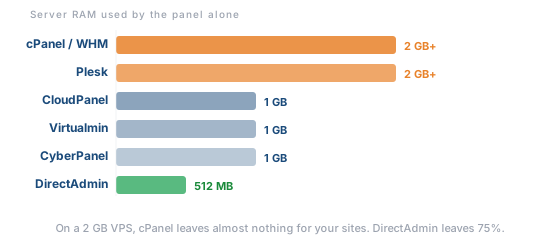
This only matters if you’re running a VPS, but when it does matter, it matters a lot. A control panel is software running on your server. It uses RAM and CPU that could otherwise go to serving your website. On shared hosting, this is your host’s problem. On a VPS, it’s yours.
Here’s a rough comparison of what each panel needs just to run:
| Panel | Minimum RAM | Comfortable RAM | Notes |
|---|---|---|---|
| cPanel/WHM | 1 GB | 2 GB+ | Heaviest option. Background services (cPHulk, monitoring) add overhead |
| Plesk | 1 GB | 2 GB+ | Similar to cPanel. Extensions add more load |
| DirectAdmin | 256 MB | 512 MB | Lightweight. Leaves most resources for your sites |
| CloudPanel | 512 MB | 1 GB | Modern and lean. Designed for cloud VPS |
| Virtualmin/Webmin | 512 MB | 1 GB | Varies by modules loaded |
| CyberPanel | 512 MB | 1 GB | Light if running OpenLiteSpeed |
Here’s why this matters in practice. A basic VPS from Hetzner with 2 GB of RAM costs around €4 to 5 per month. Install cPanel and 1 to 2 GB of that RAM goes to the panel itself, leaving very little for your actual websites, databases, and email. Install DirectAdmin instead and you’re using roughly 256 to 512 MB, leaving significantly more headroom for everything else.
If you’re running a single WordPress site on a small VPS, the difference between a heavy panel and a light one can be the difference between a site that loads quickly and one that struggles under even moderate traffic.
One Thing Nobody Tells You: cPanel and Plesk Are Owned by the Same Company
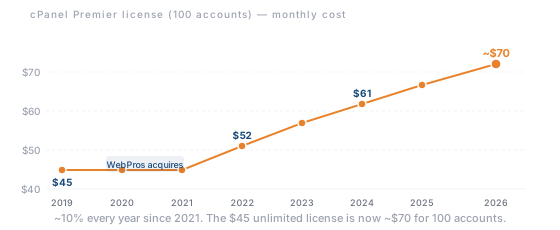
This matters, and most articles don’t mention it. In 2018, a private equity firm called Oakley Capital acquired cPanel through a holding company called WebPros. In 2020, WebPros also acquired Plesk. The two biggest hosting control panels in the world are now owned by the same parent company.
Since the acquisition, both panels have raised prices every single year. cPanel went from roughly $45/month for an unlimited license in 2019 to about $70 at retail for 100 accounts in 2026. That’s a 55% increase in seven years. Plesk announced approximately a 26% price increase for 2026, along with eliminating annual billing. Monthly only from now on.
This isn’t a conspiracy. It’s just business. When the two dominant products in a market are under one roof, there’s less competitive pressure to keep prices low. And it’s the main reason you’re seeing so many hosts move to DirectAdmin, custom panels, or free alternatives.
If you’re choosing a VPS and weighing up which panel to install, this context matters. The licensing cost you pay today will almost certainly be higher next year.
Which Panel Comes With Which Host?
On shared hosting, you don’t pick your control panel. Your host picks it for you, and the cost is included in your plan. This table maps the hosts we cover on TopSiteHosters to the panel you’ll actually use.
| Host | Shared Hosting Panel | VPS Panel Options | VPS Panel Cost |
|---|---|---|---|
| Hostinger | hPanel | Plesk, DirectAdmin, CyberPanel | DirectAdmin free with VPS |
| SiteGround | Custom Site Tools | N/A (no VPS product) | N/A |
| Bluehost | Custom (cPanel based) | cPanel | Included on VPS plans |
| IONOS | Custom panel | Plesk, cPanel | Paid add on |
| GreenGeeks | cPanel | N/A (no VPS product) | N/A |
| ScalaHosting | SPanel | SPanel, cPanel | SPanel free with managed VPS |
| Kinsta | MyKinsta (custom) | N/A (managed WP only) | N/A |
| Rocket.net | Custom dashboard | N/A (managed WP only) | N/A |
| Hetzner | N/A (no shared hosting) | Install your own | You pay the license directly |
The takeaway: on shared hosting, your panel choice is made for you. It’s only when you move to a VPS that you start choosing, and paying for, a panel yourself.
Do You Actually Need a Control Panel?
It depends on your hosting type and your technical comfort.
On shared hosting: yes, and it’s included. You don’t need to think about this. Your host provides a panel as part of your plan, and you use it to manage your site. The cost is built into what you’re already paying.
On a VPS: it’s optional. If you’re comfortable with the command line, you can manage everything via SSH without a panel. Many developers do exactly this. If you’re not comfortable with terminals and config files, a panel makes a VPS usable without calling in a sysadmin every time you need to add a domain or create a database.
The cost calculation matters here. A basic VPS from Hetzner might cost €4–5/month. Add a cPanel license at $49/month and you’re suddenly paying ten times the server cost just for the panel. DirectAdmin at $5/month or a free panel like Virtualmin changes that equation entirely.
On managed WordPress hosting: you get a custom dashboard instead. Hosts like Kinsta and Rocket.net don’t give you cPanel or Plesk. They give you a purpose built dashboard focused on WordPress management. The server side is handled for you. It’s simpler, but it’s also less flexible. That’s the whole point of managed hosting.
For most people reading this, the answer is: your host handles it. Pick the right host, and the right panel comes with it. You can read more about the differences between shared hosting and VPS hosting to figure out which setup fits your needs.
Frequently Asked Questions
What is the best hosting control panel?
There’s no single best option. cPanel has the widest support and the most tutorials. Plesk has a cleaner interface and works on Windows servers. DirectAdmin is the best value on a budget. hPanel is the simplest if you’re on Hostinger. For most beginners on shared hosting, the best panel is whichever one comes with the host you’ve chosen.
Which control panel is best for WordPress?
Plesk has the strongest WordPress integration thanks to its WordPress Toolkit, which handles installs, updates, staging, cloning, and security scanning from one place. On managed WordPress hosts, custom dashboards like MyKinsta and Rocket.net’s panel are purpose built for WordPress and handle everything automatically. On shared hosting, it depends on your host. hPanel, Site Tools, and cPanel with Softaculous all handle WordPress installs and basic management fine. The panel matters less than the server it runs on. A well configured host with any panel will outperform a poorly configured one with the “best” panel.
Is cPanel free with hosting?
On shared hosting plans, yes. The license cost is included in your monthly hosting fee. On a VPS or dedicated server, you pay for the cPanel license separately, and it’s not cheap. The cheapest cPanel license starts around $16/month, which is often more than the VPS itself.
Can I switch control panels?
On shared hosting, not easily. Switching panels usually means switching hosts. On a VPS, you can install a different panel, but migrating your sites, email, and databases between panels takes work. Some hosts offer free migration tools to help, particularly when moving from cPanel to DirectAdmin.
What is WHM?
WHM stands for Web Host Manager. It’s the server administration side of cPanel. If you’re a regular hosting customer on a shared plan, you won’t see WHM. Your host uses it behind the scenes. If you run your own VPS with cPanel, WHM is where you manage server settings, create hosting accounts, and configure security. Think of cPanel as the customer view and WHM as the admin view.
Are free control panels any good?
Some are genuinely solid. Webmin paired with Virtualmin is powerful and well maintained, though it has a learning curve. CyberPanel works well for LiteSpeed setups. The tradeoff with free panels is that you’re responsible for more of the setup, maintenance, and troubleshooting yourself. If you’re comfortable with that, they’re real alternatives. If you want things to just work out of the box, a paid panel or a host with a built-in panel is the safer bet.
Final Verdict
If you’re on shared hosting, don’t overthink the control panel. Pick the right host, and the panel comes with it. Whether that’s hPanel on Hostinger, Site Tools on SiteGround, or a cPanel variant on Bluehost, you’ll have everything you need to manage your site without touching a terminal.
If you’re setting up a VPS and watching your budget, think carefully before defaulting to cPanel. At $49/month for the Premier tier, it’s a significant recurring cost, especially when DirectAdmin does the job for $5/month, or Virtualmin does it for free. The annual price increases from WebPros show no signs of stopping, so whatever you pay today will likely be more next year.
And if you’re on managed WordPress hosting from a provider like Kinsta or Rocket.net, you don’t need a traditional control panel at all. The custom dashboard handles it.
The control panel is a tool, not a destination. Pick the one that fits your hosting setup, your budget, and your comfort level, then get back to building your site.