If you’ve spent any time comparing hosting plans or reading about website performance, you’ve probably come across the term CDN. It gets thrown around a lot, sometimes as a selling point, sometimes as a technical afterthought, and often without much explanation of what it actually does or why it matters. This guide covers everything you need to know about CDNs in plain language, including whether your hosting plan should include one and what to look for if it doesn’t.
- What Is a CDN?
- How a CDN Actually Works
- What Are the Main Benefits of Using a CDN?
- Who Needs a CDN?
- CDN Providers Compared
- CDN Comparison at a Glance
- Does Your Hosting Plan Include a CDN?
- What If Your Hosting Plan Does Not Include a CDN?
- CDN vs Web Hosting: Understanding the Difference
- How to Know If Your CDN Is Working
- Should Your Hosting Plan Include a CDN?
What Is a CDN?
CDN stands for Content Delivery Network. At its core, a CDN is a globally distributed network of servers that work together to deliver your website’s content to visitors as quickly as possible, based on where they are in the world.
To understand why that matters, it helps to first understand how a website without a CDN works.
When someone visits your website, their browser sends a request to your web server. That server, wherever it physically sits in the world, processes the request and sends back all the files needed to display your page. Images, scripts, stylesheets, fonts, and HTML all travel from that single server to your visitor’s device.
If your server is located in Frankfurt and your visitor is in Frankfurt, that journey is short and fast. But if your visitor is in Sydney, Tokyo, or Lagos, those files have to travel thousands of miles through multiple network hops before they arrive. That distance introduces what is called latency, and latency slows your site down.
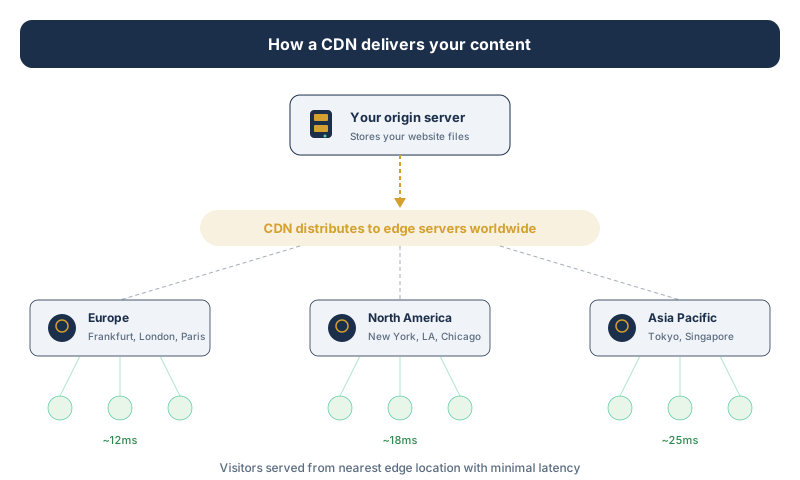
A CDN solves this problem by storing copies of your website’s static content on servers in dozens or even hundreds of locations around the world. These servers are called Points of Presence, or PoPs. When someone visits your site, the CDN automatically routes their request to the nearest PoP rather than all the way back to your origin server. The result is faster load times, regardless of where your visitor is located.
How a CDN Actually Works
When you set up a CDN, the network creates cached copies of your static assets. Static assets are the parts of your site that do not change between visitors: images, CSS files, JavaScript files, fonts, and sometimes entire HTML pages.
The first time someone in a new location visits your site, the CDN fetches those files from your origin server and stores a cached copy at the nearest PoP. Every subsequent visitor from a similar location gets served that cached copy directly, without the request ever needing to reach your origin server.
This process is mostly invisible to you and your visitors. From a visitor’s perspective, your site simply loads faster. From your server’s perspective, it is handling far fewer requests, which reduces load and improves stability.
It is worth noting that most CDNs handle static content much more efficiently than dynamic content. Dynamic content, like a personalised user dashboard, a shopping cart, or the results of a database query, typically still needs to be fetched from your origin server because it changes depending on who is asking for it. Some advanced CDNs have developed ways to cache and accelerate dynamic content too (QUIC.cloud is a notable example, which we will cover later), but the core benefit of a CDN is most clearly felt with static assets.
What Are the Main Benefits of Using a CDN?
Faster load times are the most obvious benefit, but a CDN does more than just speed things up for international visitors.
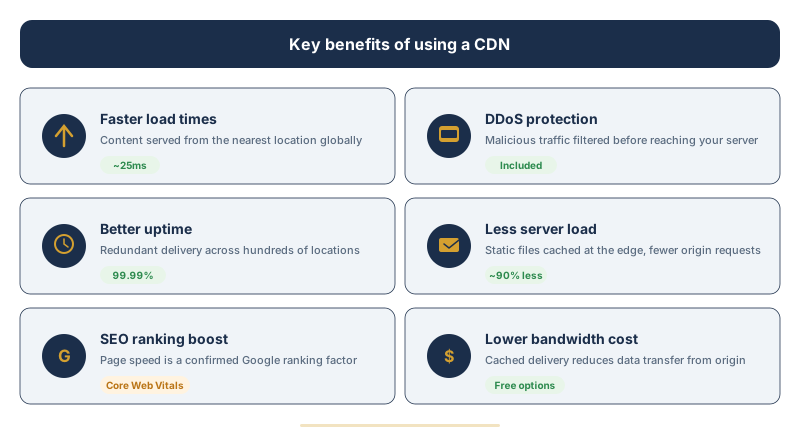
Faster load times for everyone. Even visitors who are geographically close to your origin server benefit from a CDN. CDN infrastructure is typically high performance and optimised for delivery in ways that a standard shared hosting server is not. Cached content is served almost instantly compared to a server that has to process each request from scratch.
Reduced server load. When a CDN handles the majority of your static file requests, your origin server has much less work to do. This means it can handle more simultaneous visitors without slowing down or crashing, which is particularly valuable during traffic spikes.
Better uptime and reliability. Because your content is distributed across many servers, a CDN adds a layer of redundancy to your site. If one PoP goes down, traffic is automatically rerouted to the next closest one. Your origin server becoming temporarily unavailable does not necessarily mean your entire site disappears, since cached versions may still be accessible.
Improved security. Most modern CDNs include built in security features. DDoS protection is one of the most significant, where the CDN absorbs and filters malicious traffic before it ever reaches your server. Many CDNs also offer a web application firewall (WAF), bot filtering, and SSL termination, which handles the encryption layer at the CDN level rather than at your server.
SEO benefits. Page speed is a confirmed ranking factor in Google’s algorithm. A faster site means better rankings, lower bounce rates, and more time spent on page. If your competitors are using a CDN and you are not, they may have a measurable performance advantage in search results.
Better user experience. This one is straightforward but worth stating clearly. People leave slow websites. Research consistently shows that even a one or two second delay in load time leads to significantly higher bounce rates. A CDN reduces the chance of a visitor leaving before your page finishes loading.
Reduced bandwidth costs. By serving cached content from edge servers, a CDN reduces the amount of data your origin server needs to transfer. This can result in meaningful savings on bandwidth, especially for sites with high traffic or large media files. Some CDNs include generous or even unlimited bandwidth in their plans, which further reduces your overall hosting costs.
Who Needs a CDN?
This is where things get more nuanced. Not every website needs a CDN, and the value it provides scales with the nature of your site and your audience.
You likely need a CDN if your audience is international or spread across a wide geographic area. If most of your visitors come from a single city or region that is close to your server location, the performance gains from a CDN will be less dramatic, though still present.
You benefit most from a CDN if your site is image heavy, media rich, or serves a lot of large files. A photography portfolio, a news site with lots of images, a site hosting video content, or an ecommerce store with hundreds of product photos will see significant improvements.
Ecommerce sites in particular should treat a CDN as essential. Slow load times directly affect conversion rates, and the security features that come with most CDN services add meaningful protection for a site handling customer data and transactions.
High traffic sites, or any site that experiences unpredictable traffic spikes, such as a blog that occasionally goes viral or an event based website, need the load distribution that a CDN provides. Without it, a sudden surge in visitors can overwhelm your server and take your site down at exactly the moment you want it to be reliable.
Smaller or simpler sites with a local audience, a basic personal blog, or a simple portfolio site with minimal imagery may see only modest gains from a CDN and might reasonably deprioritise it, at least initially. That said, with free CDN options available (most notably Cloudflare), there is very little reason not to use one even for small sites.
CDN Providers Compared
The CDN market ranges from free services with impressive capabilities to enterprise grade platforms with custom pricing. Here is a detailed look at the most relevant options for website owners in 2026.
Cloudflare
Cloudflare is by far the most widely used CDN and web security platform in the world. It operates over 330 data centres globally, which means content is served within approximately 50 milliseconds of 95% of the internet connected population. That is an extraordinary level of coverage.
Free plan. The free tier is remarkably capable. It includes CDN functionality, unmetered DDoS protection, a shared SSL certificate, basic WAF rules, global Anycast DNS, and HTTP/3 support. For most small to medium websites, the free plan is entirely sufficient. There are no bandwidth limits on the free plan, which is unusual and genuinely generous.
Pro plan ($20/month per domain). Adds image optimisation (Polish), mobile content optimisation (Mirage), more cache rules, enhanced WAF, and email support. The Pro plan is aimed at small businesses and professional websites that need finer control over caching behaviour and performance.
Business plan ($200/month per domain). Adds a 100% uptime SLA, PCI compliance, Railgun technology for accelerating dynamic content between your host and Cloudflare, advanced cache controls, and custom SSL certificates. This tier is for businesses with strict uptime and compliance requirements.
Enterprise plan (custom pricing). Dedicated account management, premium support, advanced bot management, and custom security configurations.
How to set it up. Setting up Cloudflare involves pointing your domain’s nameservers to Cloudflare. After that, it sits between your visitors and your origin server and handles delivery automatically. The process takes less than an hour for most sites. Cloudflare also offers a WordPress plugin called Automatic Platform Optimization (APO) that caches entire WordPress pages at the edge, including dynamic HTML. APO costs $5/month on top of any Cloudflare plan.
Best for: virtually any website. The free plan alone makes Cloudflare the default recommendation for most site owners.
BunnyCDN (bunny.net)
BunnyCDN has built a strong reputation as the best value paid CDN on the market. Founded in Slovenia in 2015, it now operates 119+ PoPs across six continents with over 200 Tbps of network capacity and an average global latency of approximately 25 milliseconds.
Pricing. BunnyCDN uses straightforward pay as you go pricing with no contracts. Bandwidth in Europe and North America costs $0.01/GB on the Standard network and $0.005/GB on the Volume network (which has fewer PoPs). Asia Pacific and South America regions cost slightly more. There is a minimum monthly charge of $1. For context, a site that transfers 100 GB per month in Europe would pay about $1.
Key features. Perma Cache stores content permanently at the edge, achieving near 100% cache hit rates and reducing origin server requests by up to 90%. Bunny Optimizer provides on the fly image compression, WebP conversion, and CSS/JS minification for $9.50/month. DDoS protection, token authentication, and IP blocking are included at no extra cost. Bunny Stream offers video hosting and delivery at $5 per 1,000 minutes of video stored.
14 day free trial. Full access to all features during the trial period. No credit card required to start.
Best for: sites that need predictable, low cost CDN with excellent performance. Particularly strong for image heavy sites and video hosting. BunnyCDN is a European company (Slovenia), which is a plus for GDPR conscious site owners.
KeyCDN
KeyCDN is a Swiss based CDN provider with 25+ PoPs distributed globally. It positions itself as a simple, fast, and affordable CDN with transparent pricing and developer friendly features.
Pricing. Pay as you go at $0.04/GB across all regions. There is a minimum credit top up of $50, which can be a consideration for very low traffic sites. No monthly fees or contracts. Credits do not expire.
Key features. HTTP/2 and HTTP/3 support, Brotli compression, free Let’s Encrypt SSL integration, instant cache purging, origin shield (reduces origin requests by serving from a central cache layer), real time analytics, RESTful API, and two factor authentication. KeyCDN supports 24+ CMS integrations including WordPress, Drupal, Joomla, and Magento.
No free plan. KeyCDN does not offer a free tier, though the $50 credit top up lasts a long time for small sites at $0.04/GB.
Best for: developers and technically minded users who want a straightforward, no frills CDN with consistent pricing across all regions. The uniform $0.04/GB rate makes cost estimation simple.
QUIC.cloud
QUIC.cloud is a CDN built specifically for WordPress and designed to work with LiteSpeed web servers and the LiteSpeed Cache (LSCWP) plugin. It is the only CDN that can natively cache both static and dynamic WordPress content, including full HTML pages, which sets it apart from every other provider on this list.
Free plan. Includes unlimited bandwidth from 6 floating PoPs in the US and Europe. The exact PoP locations vary depending on network traffic. The free plan does not include DDoS protection or the advanced security features available on the Standard plan. For a free CDN, Cloudflare’s 330+ data centres provide better coverage, but QUIC.cloud’s ability to cache dynamic content is a unique advantage.
Standard plan. Uses all 83 PoPs with regional pricing ranging from $0.02 to $0.08 per GB depending on the region. Each domain receives free monthly credits calculated by tier. Domains on LiteSpeed servers get more free credits than domains on Apache or Nginx. The Standard plan includes DDoS protection, XML RPC blocking, hotlink protection, and HTTP/3 support.
Tiers. Your free monthly credit allowance depends on your server type. Basic (Apache/Nginx) domains get 1 GB of free North American traffic per month. LiteSpeed domains get 5 GB. LiteSpeed Enterprise domains get 10 GB. QUIC.cloud Partner hosts may offer additional allowances.
Key features. Full page HTML caching (including dynamic content), Smart Purge integration with LiteSpeed Cache plugin, image optimisation, critical CSS generation, low quality image placeholders (LQIP), and free Anycast DNS.
How it works with LiteSpeed Cache. If your hosting provider runs LiteSpeed servers (common with hosts like Hostinger), the LiteSpeed Cache plugin and QUIC.cloud CDN work together seamlessly. The plugin manages the cache on the server side, and QUIC.cloud distributes that cache globally. This combination delivers performance that rivals much more expensive setups.
Best for: WordPress sites running on LiteSpeed servers. If your host supports LiteSpeed, this is one of the most effective CDN options available, especially for dynamic content caching. Less suitable for non WordPress sites or hosts running Apache/Nginx, where the integration benefits are reduced.
Amazon CloudFront
Amazon CloudFront is the CDN component of Amazon Web Services (AWS). It integrates deeply with the AWS ecosystem and operates over 450 edge locations globally.
Pricing. Pay as you go with no minimum commitments. Bandwidth pricing starts at $0.085/GB for the first 10 TB in North America and Europe, with volume discounts at higher tiers. This makes CloudFront significantly more expensive than BunnyCDN or KeyCDN for the same amount of traffic. AWS also offers a free tier that includes 1 TB of data transfer and 10 million HTTP requests per month for the first 12 months.
Best for: organisations already invested in the AWS ecosystem that need tight integration with S3, EC2, Lambda, and other AWS services. The pricing and complexity make it less suitable for small to medium websites.
Fastly
Fastly is a premium CDN aimed at developers and large scale applications. It is known for real time configuration updates (changes propagate globally within seconds), VCL (Varnish Configuration Language) based edge logic, and extremely fast purge times.
Pricing. Starts at $0.12/GB for the first 10 TB in North America and Europe. Significantly more expensive than most alternatives. Fastly offers a free developer tier with limited bandwidth for testing.
Best for: large scale applications, API delivery, and organisations that need real time edge computing capabilities. Not cost effective for typical website hosting use cases.
CDN Comparison at a Glance
For a quick overview of how the major CDN providers stack up:
Cloudflare: 330+ PoPs, free plan available, unlimited bandwidth on free tier, best all round choice for most sites.
BunnyCDN: 119+ PoPs, from $0.01/GB, 14 day free trial, best value paid CDN with excellent performance.
KeyCDN: 25+ PoPs, $0.04/GB flat rate all regions, no free plan, $50 minimum credit, simple and developer friendly.
QUIC.cloud: 83 PoPs (standard plan), free plan with 6 PoPs, unique dynamic content caching for WordPress on LiteSpeed.
Amazon CloudFront: 450+ PoPs, from $0.085/GB, 12 month free tier, best for AWS integrated infrastructure.
Fastly: Premium pricing from $0.12/GB, real time configuration, best for large scale developer focused applications.
Does Your Hosting Plan Include a CDN?
This is a question worth asking before you sign up with any hosting provider, because the answer varies quite a bit.
Some hosting providers bundle CDN functionality into their plans as a standard feature. SiteGround includes Cloudflare CDN on its plans. Hostinger includes its own CDN on Business plans and above, with Cloudflare CDN integration available on all plans. Rocket.net includes Cloudflare Enterprise as part of every plan, which is a significant differentiator. These inclusions can add genuine value and simplify setup considerably.
Other providers offer CDN as an optional add on, either from a third party or their own infrastructure, sometimes at an additional cost. And some budget shared hosting providers include very limited CDN functionality that covers basic use cases but may not perform as well as a dedicated CDN service.
When a hosting provider says they include a CDN, it is worth asking a few follow up questions. How many PoP locations does their CDN cover? Is it a partnership with a major provider like Cloudflare or is it a proprietary network with limited reach? Does it cover all file types or only images? Can you configure it yourself or is it a set and forget implementation?
A CDN with twenty server locations is meaningfully different from one with three hundred, particularly if your audience is global.
What If Your Hosting Plan Does Not Include a CDN?
The good news is that you do not have to rely solely on your hosting provider for CDN functionality. The most practical approach for most site owners is to set up Cloudflare’s free plan.
Setting up Cloudflare involves creating a free account, adding your domain, and pointing your nameservers to Cloudflare. The process takes about 30 minutes. Once active, Cloudflare sits between your visitors and your origin server, caching static content at 330+ locations worldwide, providing DDoS protection, and handling SSL.
For WordPress sites specifically, combining Cloudflare with a good caching plugin (LiteSpeed Cache, WP Rocket, or W3 Total Cache) gives you an excellent performance setup at minimal cost. If your host runs LiteSpeed servers, the LiteSpeed Cache plugin plus QUIC.cloud CDN is a particularly powerful combination for full page caching.
For sites with higher traffic or specific performance requirements, BunnyCDN offers outstanding value starting from just $0.01/GB with no monthly commitment. Its 119+ PoPs, built in image optimisation, and transparent pricing make it an excellent upgrade path from a free CDN.
CDN vs Web Hosting: Understanding the Difference
A common point of confusion is the relationship between a CDN and your web hosting. They are not the same thing and one does not replace the other.
Your web hosting is where your website lives. It is the origin server that stores your files, runs your database, and processes dynamic requests. Without hosting, your site does not exist.
A CDN sits on top of your hosting and improves how your content is delivered to visitors. It does not store your site permanently and it does not replace the need for an origin server. Think of your hosting as the warehouse where your products are stored and the CDN as a network of local distribution centres that get products to customers faster.
The two work together, and the best setups use quality hosting as a foundation with a CDN layered on top for performance and security.
How to Know If Your CDN Is Working
Once you have set up a CDN, it is worth verifying that it is actually functioning as expected.
Running your site through a tool like GTmetrix, Pingdom, or WebPageTest will show you load times and can indicate whether content is being served from a CDN. In GTmetrix, you can test from multiple geographic locations and compare the results.
In your browser’s developer tools, you can inspect the response headers of individual files. Files served through a CDN will typically include headers indicating the CDN provider and sometimes the specific PoP that served the file. Cloudflare adds a CF Cache Status header that tells you whether a file was served from cache (HIT), fetched from the origin (MISS), or is not cacheable (DYNAMIC).
BunnyCDN adds a CDN Cache Control header and KeyCDN includes X Cache and X Edge Location headers. Checking these headers confirms that the CDN is active and serving content as expected.
You can also use our Website Down Checker to test your site’s availability and response time from an external server, which gives you a baseline to compare before and after enabling a CDN.
Should Your Hosting Plan Include a CDN?
To directly answer the question in the title: yes, ideally it should, but it is not a dealbreaker if it does not.
A hosting plan that includes a well implemented CDN from a reputable provider offers genuine convenience and performance benefits. It simplifies setup, ensures your CDN and hosting are optimised to work together, and reduces the number of separate services you need to manage.
But the absence of a built in CDN should not steer you away from an otherwise excellent hosting provider. Adding Cloudflare’s free CDN to any hosting setup takes less than an hour and delivers strong results for most sites. BunnyCDN can be set up nearly as quickly for those who want premium performance at minimal cost. You are not at a significant disadvantage just because your host does not bundle a CDN.
What matters more when choosing a hosting provider is the quality of the underlying infrastructure, the reliability of their uptime, the quality of their support, and whether the plan fits your site’s technical requirements. A CDN can be layered on top. Poor server performance and unreliable uptime are harder to work around.
If you are building a site today, here is a simple framework to follow:
- Start with a reputable hosting provider that suits your needs and budget.
- If they include Cloudflare or another established CDN, great. If not, sign up for a free Cloudflare account and connect it to your domain.
- Enable caching, turn on SSL, and configure your cache settings.
- If you run WordPress on a LiteSpeed server, consider QUIC.cloud for dynamic content caching.
- As your site grows, evaluate whether a paid CDN like BunnyCDN makes sense for additional performance and features.
You will have a fast, secure, well distributed site without needing to spend anything extra on day one.
Want to see which hosting providers include CDN as standard? Check out our hosting comparison to find plans that bundle performance features from day one.