
Unlimited storage. Unlimited bandwidth. Unlimited websites. Unlimited email accounts. It sounds like exactly what you want from a hosting plan, and it’s exactly what most budget hosts advertise.
Here’s the honest answer: unlimited is a marketing term, not a technical one. No server has infinite resources. Physics doesn’t allow it. What “unlimited” actually means is that the host won’t impose a hard numerical cap on your account upfront. They will, however, stop you if you use too much. The question is when, how, and why.
This article explains how the business model works, what actually gets limited, and what to look for when you’re comparing plans.
The Short Answer
Hosting companies can’t offer truly unlimited resources. A server is a physical machine with a finite amount of storage, memory, processing power, and network capacity. When a host says unlimited, they mean they won’t show you a number that defines your limit. The limit still exists. It’s just hidden in their Terms of Service under phrases like “fair use policy” and “normal usage for websites of this type.”
That’s not necessarily dishonest in practice. For most small sites, the real-world limits are high enough that you’ll never encounter them. The problem is the mismatch between what the marketing promises and what happens when your site starts growing.
How the Business Model Works
To understand why unlimited exists, you need to understand overselling.
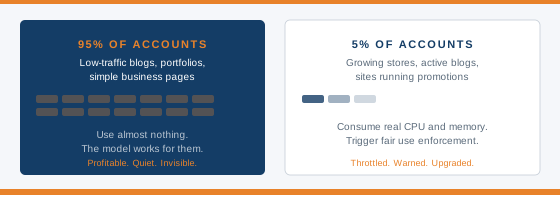
When a host puts 1,000 accounts on a single server, they’re betting that the vast majority of those accounts will use almost nothing. A personal blog with 200 monthly visitors consumes a tiny fraction of server resources. So does a portfolio site. So does a local business page that gets updated twice a year. Most sites fit this description.
The maths work in the host’s favour. A server with 256 GB of RAM and 1,000 accounts on it can’t actually give each account 1 GB of RAM. That would require 1,000 GB. But 95% of accounts are using less than 100 MB at any given moment, so the shortfall never shows up for most customers.
The model breaks when a site grows. Once your WordPress blog starts getting real traffic, once your WooCommerce store runs a sale, once you send a newsletter to your mailing list, you become one of the 5% who are actually consuming meaningful resources. At that point you’re no longer the profitable quiet tenant. You’re the one the host needs to manage.
What Actually Gets Limited
This is where things get specific. “Unlimited” hosting doesn’t limit storage or bandwidth in the way you’d expect. It limits other things instead.

Storage and Inodes
The storage advertised as unlimited is measured in gigabytes. But on Linux servers, your ability to store files isn’t just constrained by gigabytes. It’s also constrained by inodes.
An inode is a counter. Every file and folder on your hosting account uses one inode. A 10 MB image file uses one inode. A 2 KB CSS file uses one inode. A single email in your inbox uses one inode. The size of the file doesn’t matter. The count does.
Most shared hosting plans cap inode usage at between 100,000 and 250,000 per account. That sounds like a lot until you think about what a real site accumulates. A WordPress installation with 40 active plugins can generate 30,000 to 60,000 files before you add any content. Each image you upload creates multiple resized versions, each one a separate file. A WooCommerce store with 5,000 products and several image sizes per product can accumulate inode counts in the hundreds of thousands from product images alone. Add order records, invoice PDFs, nightly backups, and a pile of cached files, and a store that has been running for a year or two can hit the inode ceiling without anyone noticing until something stops working.
When you hit the inode limit, you cannot create new files. No new images can be uploaded. No new emails can be received. None of this has anything to do with how many gigabytes of storage you have left.
CPU
Most shared hosting plans throttle CPU usage at 100% of a single core. This limit is enforced at the kernel level by software called CloudLinux, which creates an isolated container for each hosting account with hard limits on processing power.
Under normal conditions you’ll never notice. But send a newsletter to 10,000 subscribers, run a WordPress cron job while a traffic spike hits, or trigger a WooCommerce sale that hundreds of people try to checkout simultaneously, and the CPU limit kicks in. The result is a “508 Resource Limit Reached” error. Your site doesn’t crash entirely. It just stops responding to new requests until the load drops back under the threshold.
If you’ve ever seen a 508 error on your site, you’ve hit a CPU limit on a plan that advertises unlimited resources.
Entry Processes
Entry processes are the number of simultaneous PHP connections your account can handle. Most shared plans cap this at 20 to 30.
That sounds like plenty for a quiet site. It isn’t for a busy one. Each visitor to a dynamic WordPress page triggers one or more PHP processes. During a traffic spike, all 20 entry process slots can fill up in seconds. New visitors start queuing. The queue has a timeout. Visitors who time out see errors or blank pages.
This is the most common reason a site collapses under a promotion or a viral moment, even on a plan that claims unlimited bandwidth.
Bandwidth
The confusing thing about “unlimited bandwidth” is that bandwidth isn’t actually how most hosts measure load. What they’re really monitoring is CPU usage and memory consumption per visitor. Each person who loads your site consumes a small amount of both.
When a host says unlimited bandwidth, they mean they won’t charge you per gigabyte of data transferred. They will still throttle or suspend your account if the traffic consuming that bandwidth pushes your CPU or memory over their fair use threshold.
File Types
Many hosts restrict what kinds of files you can store, even on plans with unlimited storage. Video files, archives, backup files, and executable files are frequently capped or banned outright in the acceptable use policy. Namecheap’s shared hosting plans, for example, allows up to 10 GB of video or media files, 10 GB of archives, and 10 GB of executables. Everything beyond those limits falls outside the terms regardless of the headline storage figure.
Databases
Unlimited storage doesn’t extend without limits to MySQL databases. DreamHost caps individual databases at 3 GB. Namecheap caps total database storage across a shared account at 10 GB. A growing WooCommerce store with years of order history can push against these limits without the site owner realising databases are a separate consideration from file storage.
Email Send Limits
Unlimited email accounts does not mean you can send unlimited emails. Most hosts impose hourly send limits per account. When you hit the limit, the account is blocked from sending further emails until the hour resets. This is mostly a spam prevention measure, but it catches legitimate users who send newsletters directly through their hosting account rather than through a dedicated email sending service.
What the Fair Use Policy Actually Says
Every unlimited hosting plan has a fair use policy. It’s the document that defines what unlimited means in practice. The problem is that most of them are deliberately vague.
Common phrases you’ll find: “usage consistent with normal website operation,” “we reserve the right to suspend accounts using excessive resources,” and “fair and reasonable use.” None of these phrases contain a number. That’s intentional. Vague language gives the host discretion to act when they need to, without committing to a specific threshold that customers could plan around.
A small number of hosts do publish actual numbers. UltaHost states that usage consistently exceeding 3 to 5 times the average bandwidth of similar plans will trigger a warning. Hetzner’s fair use documentation says they’ll contact you if usage generates a permanently above-average load, and that they’ll work with you to find solutions before taking action. Both of these are more transparent than average.
The practical advice is to search for the words “inode,” “CPU,” “entry process,” and “fair use” in any host’s Terms of Service before signing up. If those words don’t appear with actual numbers, the limits are hidden. If they appear with numbers, you have something concrete to compare.
You can check how much downtime your site would actually experience if suspended using the uptime calculator. Even a few hours of suspension during a promotion or sale can cost more in lost revenue than an upgrade to a better plan would have.
Who This Actually Affects
Here’s the fair version of this: for most small websites, unlimited hosting is fine and the limits in this article will never become relevant to you.
A personal blog with a few hundred monthly visitors, a portfolio site, a small business page that gets updated occasionally, a landing page for a local service. These sites don’t accumulate enough files, traffic, or database records to push against any of the limits described above. For them, unlimited shared hosting is genuinely good value.
The problem shows up for the people who chose unlimited hosting because they expected to grow, and then grew.
The highest-risk use cases are:
- WooCommerce stores that accumulate product images, order records, invoice PDFs, and cache files over time
- Sites that send regular email campaigns directly through their hosting account
- Photography or media portfolios storing large libraries of images or video
- Sites that store their own server backups on the hosting account
- Any site that runs regular cron jobs, resource-intensive scripts, or sees unpredictable traffic spikes
If any of those describe your site, read the fair use policy before you sign up, and pay specific attention to inode limits and CPU thresholds.
What to Look for Instead
If you’re building a site that might grow or is already generating real traffic, here’s what to do differently.
First, before signing up with any host, find their Terms of Service or Acceptable Use Policy. Search for “inode,” “CPU,” “entry process,” and “fair use.” If the document mentions actual numbers, you have a real basis for comparison. If it doesn’t, the limits are whatever the host decides they are on the day you hit them.
Second, consider plans that advertise real resource allocations rather than unlimited ones. VPS hosting gives you a defined number of CPU cores, a guaranteed amount of RAM, and a specific storage allocation. You know exactly what you have. You don’t get suspended for using what you paid for. The cost is higher, but the resources are yours.
Some shared hosting providers are more transparent than others. Scala Hosting, for example, publishes its resource policies and runs significantly fewer accounts per server than most budget hosts. See the Scala Hosting review for a breakdown of how their shared infrastructure compares. That level of transparency is worth looking for regardless of which provider you consider.
The number on the storage allocation matters less than the honesty of the host who is disclosing it.
Frequently Asked Questions
Is unlimited hosting ever actually unlimited?
No. Every server has finite physical resources: storage drives have set capacities, RAM has a fixed amount, and CPU cores can only execute a certain number of instructions per second. “Unlimited” means the host won’t impose a hard numerical cap on your account upfront. The limits exist in their fair use policy and are enforced when your usage exceeds what they consider normal.
What is an inode limit and why does it matter?
An inode is a counter for files and folders on your hosting account. Every file uses one inode regardless of its size. Most shared hosting plans cap inode usage at 100,000 to 250,000 per account. When you hit the limit, you cannot create new files or receive new emails, regardless of how much storage space is technically available. This is the most common way “unlimited storage” stops being unlimited in practice.
What does “508 Resource Limit Reached” mean?
This error means your account has hit the CPU or entry process limit set by your host. It typically appears during traffic spikes, newsletter sends, or WooCommerce sales when too many simultaneous requests hit your site at once. It’s a sign that your current plan’s fair use limits are lower than your site’s actual needs.
When should I upgrade from shared to VPS hosting?
If you’re regularly seeing slow load times during busy periods, experiencing 508 errors, running a WooCommerce store with hundreds of products, or sending regular email campaigns through your hosting account, those are all signals that shared hosting limits are becoming a constraint. VPS hosting gives you guaranteed resources that don’t depend on what other accounts on the same server are doing.
How do I find the real limits in a hosting plan?
Go to the host’s Terms of Service or Acceptable Use Policy page and search for “inode,” “CPU,” “entry process,” and “fair use.” If those terms appear with specific numbers, you have something real to evaluate. If the policy only contains vague language about “normal use” and “fair and reasonable” usage, the actual limits are at the host’s discretion.
The Bottom Line
Unlimited hosting is not dishonest in the sense that most customers will never encounter the limits. For a small personal or business site, it does what it says on the tin.
The issue is what happens when it stops working as advertised. The limits that matter are not bandwidth or storage in gigabytes. They’re inodes, CPU thresholds, entry processes, and fair use policies written in language vague enough to give the host complete discretion.
Read the terms before you sign up. Look for numbers, not promises. And if your site is growing in a direction that will eventually push it past those limits, plan for that transition before the 508 errors do it for you.