99.9% uptime means your website can be offline for up to 8 hours and 45 minutes a year, and your host still isn’t breaking their promise. That’s the number most people don’t see when they read “99.9% uptime guaranteed” on a hosting plan page.
The percentage sounds close to perfect. It isn’t. Knowing what it actually translates to in real downtime, and understanding what the guarantee does and doesn’t cover, will save you from a nasty surprise when something goes wrong.
The number in plain English
Uptime is the percentage of time your website is available and loading for visitors. A host that guarantees 99.9% uptime is promising that your site will be accessible for at least 99.9% of all hours in a year.
The other 0.1% is where the reality check kicks in.
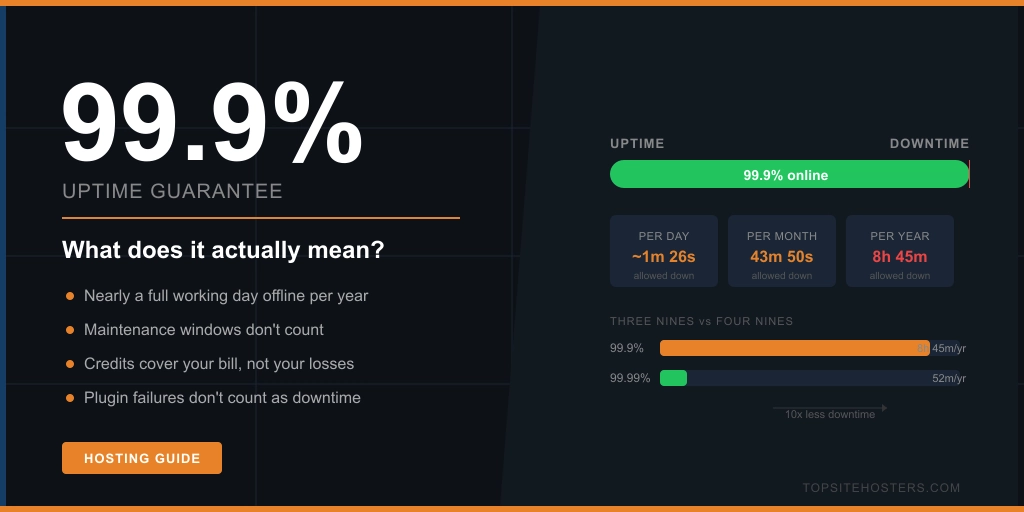
There are 8,760 hours in a year. 0.1% of that is 8.76 hours. That’s nearly a full working day that your site could be offline, and your host would still be meeting their stated guarantee.
On a monthly basis it works out to about 43 minutes of allowed downtime per month. That’s not catastrophic for most small sites. But it’s not nothing either. If your site goes down at a busy time, 43 minutes can mean lost sales, missed enquiries, or a visitor who goes to a competitor and doesn’t come back.
How the nines stack up
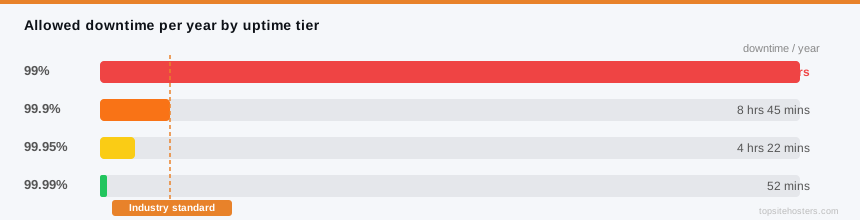
The hosting industry talks about uptime in “nines.” One extra nine changes the picture significantly.
Here’s what each level actually means in downtime:
| Uptime % | Downtime per year | Downtime per month | Common name |
|---|---|---|---|
| 99% | 3 days 15 hours | 7 hours 18 mins | Two nines |
| 99.9% | 8 hours 45 mins | 43 mins 50 secs | Three nines |
| 99.95% | 4 hours 22 mins | 21 mins 54 secs | Three and a half nines |
| 99.99% | 52 mins 35 secs | 4 mins 22 secs | Four nines |
| 99.999% | 5 mins 15 secs | 26 secs | Five nines |
The jump from three nines to four nines looks like a tiny change on paper: 0.09 percentage points. In practice it cuts your allowed downtime by roughly ten times. Going from 44 minutes per month to 4 minutes per month is a meaningful difference if your site does anything business critical.
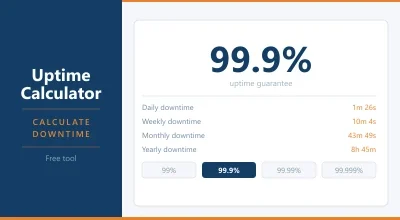
You can use the TSH uptime calculator to work out the exact downtime figures for any uptime percentage your host is quoting.
Most shared hosting providers, including Namecheap and Hetzner, advertise 99.9% or better. Hetzner consistently hits 99.99% in practice. Namecheap sits closer to 99.8% based on independent monitoring. The advertised number and the real world number aren’t always the same, which is why we track uptime ourselves rather than taking the host’s word for it.
What the guarantee actually covers
Now here’s the catch. The uptime percentage tells you how much downtime is allowed. It doesn’t tell you what counts as downtime in the first place. Most hosting SLAs (service level agreements) contain exclusions that narrow the definition significantly.
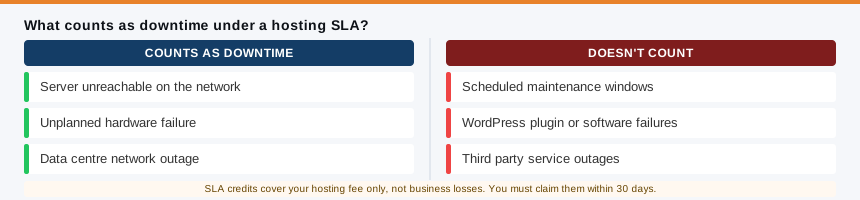
Scheduled maintenance doesn’t count. Hosts can take servers offline for planned maintenance work and it doesn’t get included in the uptime calculation. Some do this during low traffic hours and give advance notice. Others don’t. Either way, your site can be down and the host isn’t technically missing their guarantee.
Network uptime vs server uptime. Many hosts guarantee that their network is up, not specifically that your server is up. Those are different things. A network can be accessible while your particular server is having problems. Read the small print on what exactly is being guaranteed.
Software issues are your problem. If a WordPress plugin update breaks your site, or a bad database query takes it down, that’s not counted as hosting downtime. The server is still running. Your site just isn’t. This is a common point of confusion because from a visitor’s perspective, the site is offline. From the SLA’s perspective, it doesn’t count.
What you get if the host does miss the guarantee. SLA credits compensate your hosting fee, not your actual losses. If your hosting costs $10 per month and the host misses their uptime guarantee, you might receive a 10% credit on your next invoice: a dollar. Meanwhile your site was down for three hours on a busy Friday.
To claim those credits, you usually have to submit a support ticket yourself, within 30 days of the incident, with evidence of the downtime. Most users never do this. Hosts know that.
None of this means uptime guarantees are worthless. They do push providers to maintain reliable infrastructure, and hosts with strong reputations work hard to stay well above their stated minimums. The point is to understand what you’re being promised, not just the headline percentage.
Does uptime percentage matter for a small site?
The honest answer is: it depends on what your site does.
A blog, a portfolio, or a small informational site can function perfectly well on a host with a 99.9% guarantee. If your site goes down for 40 minutes in the middle of the night once a month, most of your visitors will never notice. The impact is minimal.
The calculation changes once your site is generating revenue directly. An e-commerce store, a booking system, a subscription product: for these, downtime has a measurable cost. A site that takes $500 a day offline for an hour loses roughly $20 in direct revenue, plus whatever visitors left and didn’t come back. At that point, paying more for a host with a genuine 99.99% track record starts to make financial sense.
Krystal and Hetzner are good examples of providers that consistently outperform their stated guarantees. Both are worth looking at if reliability matters more to you than getting the lowest entry price.
How to check if your host is actually hitting its guarantee
The only reliable way to know your host’s real uptime is to monitor it yourself, independently. Your host isn’t going to flag their own outages if they can avoid it.
Free tools like UptimeRobot check your site at regular intervals and log every incident. You get a history of outages, their duration, and the cumulative uptime percentage over time. That’s the number that matters, not the one on the marketing page.
At TSH, the uptime figures in our reviews come from independent monitoring rather than provider claims. When a host says 99.99% and our data says 99.80%, that difference shows up in the review. It’s one of the more useful things we track because it cuts through the marketing.
If you’re on a host and having doubts, set up independent monitoring before you complain or switch. You’ll have evidence, and you’ll know whether the issue is consistent or a one-off.
Frequently Asked Questions
What does 99.9% uptime mean in hours per year?
99.9% uptime allows for up to 8 hours and 45 minutes of downtime per year. On a monthly basis that works out to roughly 43 minutes. It sounds like a small number until you consider it’s the maximum allowed, not a target the host is trying to avoid.
Is 99.9% uptime good enough for a small business website?
For most small sites, yes. A blog, portfolio, or informational site can tolerate occasional short outages without significant impact. If your site takes direct payments or bookings, you’ll want a host that consistently hits 99.99% in practice, not just on paper.
What is the difference between 99.9% and 99.99% uptime?
On paper it’s 0.09 percentage points. In practice it’s the difference between 8 hours and 45 minutes of allowed downtime per year versus 52 minutes. Moving from three nines to four nines cuts your potential downtime by about ten times and requires significantly more robust infrastructure from the host.
What counts as downtime under a hosting SLA?
Most SLAs define downtime as the server being unreachable at the network level. Scheduled maintenance is typically excluded. So are software issues, plugin errors, and problems caused by third party services. If your site is down because of a WordPress issue rather than a server failure, it usually won’t count toward the guarantee.
What happens if my host doesn’t meet its uptime guarantee?
You can claim a service credit, usually a percentage of your monthly hosting fee for the affected period. The credit covers your hosting cost, not any business losses from the downtime. Most providers require you to submit a ticket with evidence within 30 days of the incident. If you don’t claim it, you don’t get it.
The bottom line
99.9% uptime is the industry standard and a reasonable baseline for most sites. It’s not a promise that your site will never go down. It’s a promise that it won’t be down for more than eight and three quarter hours in a year, and even that comes with a list of exclusions in the small print. Know what you’re buying, monitor your uptime independently, and choose a host based on their actual track record rather than their marketing headline.